PS3 webMAN MOD v1.43.26 - Latest Update by Aldostools brings new functions and improvements

One of my personal favorite projects for the PS3 has been update. The PS3 plugin for CFW user's webMAN MOD has progressed to v1.43.26 following the recent release by developer aldostools. This update contains new functions and improvements, some of the changes include new http commands, Ps3Lock added to ps3mapi plugin list, Game Grid improvements on html view. See these changes and more in the changelog provided below:​


webMAN_MOD.png

Homebrew
Type
Developer
Platforms
Additional Info.
Plugin
webMAN MOD v1.43.26
Latest - webMAN MOD v1.43.26
  • New http commands: /remap.ps3 and /unmap.ps3
  • Added Remap USB000 to HDD0 and Unmap USB000 to VSH Menu and webMAN.xml
  • Added scanning for .img, .mdf, .bin to /BDISO and /DVDISO folders
  • Now use double quotes instead of single quotes in gamelist.js (slider view)
  • Added /dev_hdd0/plugins/PS3Lock to plugin lists in ps3mapi
  • Updated LANG_ZH.TXT and webMAN_ZH.xml (thanks to @sheaushyong )
  • Added icon resizer to game grid (html) - Double click on the resizer to return the icons to the original size.
  • Added search icon to game grid (html)
  • Fixed duplicate entries (.cue/.bin) for PSX games stored on /net servers

Previous Updates
webMAN MOD v1.43.25

  • Fixed Bug: Show temperature bug (when syscalls disables) link
webMAN MOD v1.43.24
  • 4.78 CFW Support Added
webMAN v1.43.23
  • The issue about games not showing when "Disable grouping of content in "webMAN Games" is selected seems to be a regression present since build 1.43.20, but nobody reported about it until now.
webMAN MOD v1.43.22
  • Added the ability to auto-copy to the internal hdd the PS2 ISO mounted from /dev_usb00x or /net, and PSP ISO mounted from /net
  • PSPISO and PS2ISO are now shown on game list (XMB/HTML) for /dev_usb00x and /net drives
  • Changed the message shown when a game is mounted:
    • Formerly it first showed: "Game xxx" loaded. Then proceeded to mount the game.
    • Now it shows the path being mounted, proceed to mount the game, then show: "Game xxx" loaded.
  • Miscellaneous minor bug fixes
webMAN MOD. 1.43.21
  • added 3 new memory profiles, changed them to a combo box in /setup.ps3 and fixed a bug when a category reach the max number of items.
Download: webMAN MOD v1.43.26 (Installer) (SRC_1.43.26.rar)
Source: PSX-Place.com

 
Last edited:
webMAN MOD issue report

Hello,
Firstly, I would like to thank the developers behind (@deank, [MENTION=89]aldostools[/MENTION], [MENTION=161]Matsumot0[/MENTION], others) the project for great effort in making this great tool.
Secondly, I wasn't able to find a issue tracker of the project – I guess it's disabled in github.
Finally, I would like to report three bugs:
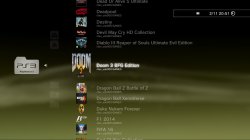
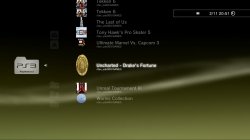
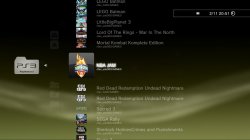
1. PS3 game covers (does not depend if MultiMAN or webMAN covers usage is set in settings) are stretched without keeping the original aspect ratio of the cover (or icon) (I make assumption that covers are stretched because MultiMAN displays same (MultiMAN cover) files properly). Maybe this could be replaced with game disc icon (it is the perfect size for XMB and is always displayed correctly after the game (ISO or folder structure) is mounted)? Screenshots below:
screenshot_2016_02_11_20_51_26.jpg
screenshot_2016_02_11_20_51_56.jpg
screenshot_2016_02_11_20_51_39.jpg
P.S. I've noticed in the changelog that there's some option related to this issue, but I couldn't find anything in the settings and no additional info.
2. PS2 game covers (which are stored in the same directory as PS2 game ISO and has the same filename as ISO) are stretched (I know this because MultiMAN displays those JPG files (which I've downscaled, double-checked and added manually to the corresponding directory) correctly). Screenshot below:
screenshot_2016_02_11_20_51_06.jpg
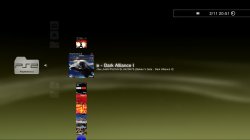
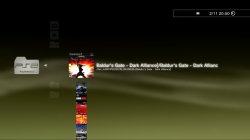
3. I keep my PS2 game ISO's in exactly same folder structure as I do for my PS3 game folder backups – /dev_hdd0/PS2ISO/SXXXYYYYY-[Game Title]/Game Title.iso. During the rebuild of XML something does not go right and half of ISO path is added into result game title (for example /dev_hdd0/PS2ISO/SLUS20675-[Baldur's Gate - Dark Alliance II]/Baldur's Gate - Dark Alliance II.iso gives Baldur's Gate - Dark Alliance II]/Baldur's Gate - Dark Alliance I result (yes – single capital i in the end is missing)). Examples:
screenshot_2016_02_11_20_51_06.jpg
screenshot_2016_02_11_20_50_47.jpg
Thank you once again for your time spent in developing this great application!
Have a nice day.
 
Last edited:
[MENTION=89]aldostools[/MENTION] i think i also found a bug..i'm on new habib starbucks 4.78, cobra 7.30.. i can't toggle external gamedata with gamepad shortcut, in settings shortcut is enabled..also when i go to settings and enable ext gamedata, icons are not changed for games, they are still white, they become normal only after i enter some game, and when toggling off ext game data, icons again don't change..
previous firmware was rogero 4.46 cobra 7 and everything was fine..
 
1. PS3 game covers are stretched without keeping the original aspect ratio of the cover (or icon)
2. PS2 game covers are stretched
3. I keep my PS2 game ISO's in exactly same folder structure as I do for my PS3 game folder backups

Issues 1 & 2 are because the XML uses webbrowser_plugin to mount the games. That module uses squared icons. So the icons are stretched to fit the default size.

The issue is more noticeable when the covers are ICON0 or psp/ps2 covers which use rectangular images. It also happens with multiMAN covers for PS3, but it is less noticeable due they are semi-squared (260x300).

About the issue 3: The folders are not scanned recursively. The isos are scanned only in the following folder structures: /PS2ISO or /PS2ISO/<single-letter-folder> or as /PS2ISO/<iso name>/<iso name>.iso

If you use sub-folders, the folder name must be exactly the same as the file name. e.g. /PS2ISO/SXXXYYYYY-[Game Title]/SXXXYYYYY-[Game Title].iso


i can't toggle external gamedata with gamepad shortcut, in settings shortcut is enabled..

I'm on 4.46 Rogero Cobra 7.2 and external gamedata is working fine on my system... Try reinstalling the full version of webMAN MOD. Maybe you're using a custom build that doesn't have the external gamedata feature.
 
gamedata is working, when i toggle it in webman mod settings..gamepad shortcut is not working..also icons in xmb are not changing when i toggle gamedata, only after i enter some game..i deleted webman mod pkg from system, do i need to keep pkg/homebrew on system for webman mod to work properly? i understand that that pkg/homebrew is used to install everything that is needed for webman mod to work..

EDIT: other gamepad shortcuts that i enabled like show temp is working..
 
Last edited:
gamedata is working, when i toggle it in webman mod settings..gamepad shortcut is not working..also icons in xmb are not changing when i toggle gamedata, only after i enter some game..i deleted webman mod pkg from system, do i need to keep pkg/homebrew on system for webman mod to work properly? i understand that that pkg/homebrew is used to install everything that is needed for webman mod to work..

EDIT: other gamepad shortcuts that i enabled like show temp is working..

The shortcut SELECT+SQUARE is working properly on my system... maybe some setting or another plugin on your system is preventing it to work.
Try deleting the settings on /setup.ps3, restart, go to /setup.ps3 and save your settings again.

Regarding the updater, you can delete it after you have installed webMAN MOD.
 
I enabled all shortcuts in setup and gamedata shortcut is working now..before i have enabled only next game, previous game, unmount game, restart ps3, shut down ps3 and ext gamedata..for white icons that are not changing, i must toggle with square button group content(by album, format, all) abd then icons are changed, very strange, maybe they need to refresh somehow, can you implement something taht gamedata is toggled isons are refreshed?

EDIT: i dont have any other plugin, just webman mod and multiman, reactpsn..
 
Last edited:
I enabled all shortcuts in setup and gamedata shortcut is working now..before i have enabled only next game, previous game, unmount game, restart ps3, shut down ps3 and ext gamedata..for white icons that are not changing, i must toggle with square button group content(by album, format, all) abd then icons are changed, very strange, maybe they need to refresh somehow, can you implement something taht gamedata is toggled isons are refreshed?

EDIT: i dont have any other plugin, just webman mod and multiman, reactpsn..

XMB icons are not refreshed automatically... press SQUARE on the XMB and the icons should be refreshed (changing the group mode)...

When the combo SELECT+SQUARE is pressed, XMB detects that SQUARE is pressed and the icons should be refreshed (if you have selected the Game column).
 
Issues 1 & 2 are because the XML uses webbrowser_plugin to mount the games. That module uses squared icons. So the icons are stretched to fit the default size.

The issue is more noticeable when the covers are ICON0 or psp/ps2 covers which use rectangular images. It also happens with multiMAN covers for PS3, but it is less noticeable due they are semi-squared (260x300).

So I should be able to use following workaround: put square-sized PNG (for transparency) covers into (let's say) /dev_hdd0/tmp/game_repo/main/covers/ folder (yet I am not sure what should filename be – only gameID (like BLES00635), or game folder name (like BLES00635-[Tekken 6])) and then launch get_cover method declared in static bool get_cover(char *icon, char *titleid) method declared in games_html.h (as I can guess – this method is used in games_xml.h) using "Refresh XML" button in webMAN MOD's setup page (and afterwards XMB submenu's should contain the square-sized PNGs from GAMEZ/covers/ folder). Am I right on this one?
P. S. I feel fishy about games_html.h lines 102-103 (my guess is – semicolon is missing after WMTMP constant).

About the issue 3: The folders are not scanned recursively. The isos are scanned only in the following folder structures: /PS2ISO or /PS2ISO/<single-letter-folder> or as /PS2ISO/<iso name>/<iso name>.iso

If you use sub-folders, the folder name must be exactly the same as the file name. e.g. /PS2ISO/SXXXYYYYY-[Game Title]/SXXXYYYYY-[Game Title].iso

If I get it right – you aren't planning to implement /PS2ISO/SXXXYYYYY-[Game Title]/Game Title.iso structure proper support. Am I right?
 
Last edited:
So I should be able to use following workaround: put square-sized PNG (for transparency) covers into (let's say) /dev_hdd0/tmp/game_repo/main/covers/ folder (yet I am not sure what should filename be – only gameID (like BLES00635), or game folder name (like BLES00635-[Tekken 6])) and then launch get_cover method declared in static bool get_cover(char *icon, char *titleid) method declared in games_html.h (as I can guess – this method is used in games_xml.h) using "Refresh XML" button in webMAN MOD's setup page (and afterwards XMB submenu's should contain the square-sized PNGs from GAMEZ/covers/ folder). Am I right on this one?

Yes, using transparent borders in squared icons should fix the issue.

I suggest you that try PScoverBOX by 0_obeWAN ... it already create squared icons for webMAN.
http://www.psx-place.com/forum/ps3-news/pscoverbox-1-0-coverbox-generator-webman-3186.html

or PS3 Cover Tool by Rudi Rastelli... it let you make icons with custom sizes and upload to the PS3.
PS3 Cover Tool v1.0 by Rudi Rastelli - PSX Place

If I get it right – you aren't planning to implement /PS2ISO/SXXXYYYYY-[Game Title]/Game Title.iso structure proper support. Am I right?

You're right... I don't have plans for now to implement new folder structures.

P. S. I feel fishy about games_html.h lines 102-103 (my guess is – semicolon is missing after WMTMP constant).

If you mean this code:
Code:
			for(u8 e = 0; e < 4; e++)
			{
				sprintf(icon, "%s/%s.%s", WMTMP, titleid, ext[e]);
				if(file_exists(icon)) return true;
			}
It is correct that way. It seeks the icon for the title_id in /dev_hdd0/tmp/wmtmp with 4 possible extensions (JPG, PNG, jpg, png) and returns true if the icon is found.
 
Yes, using transparent borders in squared icons should fix the issue.

I suggest you that try PScoverBOX by 0_obeWAN ...

It really did and I'm more than happy with the result – finally XMB looks perfect (to me, and I use game disc icon from taken game folder). Still: I now use MultiMAN's cover directory (MM_ROOT_STD) as far as it's first existing directory which is checked right after COVERS_PATH. I couldn't find where (in the repo) is COVERS_PATH static string initialized with existing (or not empty) filesystem path, so my guess is – as the result method file_exists returns false value and then MM_ROOT_STD is checked. If it isn't initialized with existing filesystem path (if it's still kept as empty string) – would it be possible (would you make the change) to use some real path? For example: "/dev_hdd0/tmp/wmtmp/covers"? It would completely solve any possible interferences between MultiMAN and webMAN MOD files in this (cover) situation. Or... would it be possible (would you make the change) to enable user to enter the COVER_PATH value in webMAN MOD's setup? That (I guess) would be the most reasonable solution.

If you mean this code:
Code:
			for(u8 e = 0; e < 4; e++)
			{
				sprintf(icon, "%s/%s.%s", WMTMP, titleid, ext[e]);
				if(file_exists(icon)) return true;
			}
It is correct that way. It seeks the icon for the title_id in /dev_hdd0/tmp/wmtmp with 4 possible extensions (JPG, PNG, jpg, png) and returns true if the icon is found.

I was talking about these lines:
Code:
sprintf(icon, WMTMP "/%s.JPG", titleid);
sprintf(icon, WMTMP "/%s.PNG", titleid);

My bad. I didn't know that it's possible to concatenate strings in C without using operand of some kind... I'm sorry for the time you've spent checking what's not wrong because of my lack of knowledge (and not testing it myself before posting).

P.S. Is there documentation anywhere on how to build webMAN MOD on Mac OS X/Linux?
 
Last edited:
I couldn't find where (in the repo) is COVERS_PATH static string initialized with existing (or not empty) filesystem path

P.S. Is there documentation anywhere on how to build webMAN MOD on Mac OS X/Linux?

COVERS_PATH is defined in the language files. I know it isn't the best place, but this variable is used only for customization. 99% of the users don't need it.

AFAIK there isn't documentation on how to build webMAN MOD on Mac OS X/Linux. I use Windows to build it and it should be more straightforward on Linux due the SDK is intended for that platform.

Once the Official PS3 SDK v3.40 or 4.00 is configured, just change the working directory to webMAN's project and execute make.
 
... (would you make the change) to use some real path? For example: "/dev_hdd0/tmp/wmtmp/covers"? ... Or... ... (would you make the change) to enable user to enter the COVER_PATH value in webMAN MOD's setup?

To expect, or not to expect – that's the only remaining question, [MENTION=89]aldostools[/MENTION] (even if answer is positive – got no further questions).
 
To expect, or not to expect – that's the only remaining question, [MENTION=89]aldostools[/MENTION] (even if answer is positive – got no further questions).

No -> "this variable is used only for customization. 99% of the users don't need it."

The tool already seeks for covers in 5 locations (including /dev_hdd0/GAMES/covers and /dev_hdd0/GAMEZ/covers).
multiMAN paths have priority over the other paths because almost all the covers packs currently available install the covers in that path.
 
Hello,everyone.I'd like to ask a question:what is the difference between full version(hold L1) and standard version(without holding any botton)?
I really can't find out it. Just find the difference between these two and lite version.
HELP!!!
 
Hello,everyone.I'd like to ask a question:what is the difference between full version(hold L1) and standard version(without holding any botton)?
I really can't find out it. Just find the difference between these two and lite version.
HELP!!!

The difference is the features in each build:

Lite is english only and has the basic features (except support for ps3netsrv) + external gameDATA + REMOVE_SYSCALLS
Standard version (without holding any button) has all lite features + languages + ps3netsrv client + all standard features (FIX_GAME + VIDEO REC + BDVD_REGION + VIRTUAL_PAD + GET_KLICENSEE + SPOOF_CONSOLEID, etc.)
Full has all the standard features + XMB_SCREENSHOT + CUSTOM_COMBO + NET3NET4 + PS3NET_SERVER + SWAP_KERNEL + SYS_BGM.

This is the flag file used to compile the FULL version (a very small description is next to each flag):
Code:
//#define ENGLISH_ONLY	1	// uncomment for english only version

//// EDITIONS ////

#define COBRA_ONLY		1	// comment out for ccapi/non-cobra release
#define REX_ONLY		1	// shortcuts for REBUG REX CFWs / comment out for usual CFW

#define PS3MAPI			1	// ps3 manager API & webGUI by _NzV_
//#define CCAPI			1	// uncomment for ccapi release
//#define LITE_EDITION	1	// no ps3netsrv support, smaller memory footprint

#define DEX_SUPPORT		1	// add support for DEX
#define DECR_SUPPORT	1	// add support for DECR

//// FEATURES ////
#define FIX_GAME		1	// Auto-Fix game
#define EXT_GDATA		1	// /extgd.ps3?status /extgd.ps3?enable /extgd.ps3?disable (external gameDATA)
#define COPY_PS3		1	// /copy.ps3/<path>
#define DEBUG_MEM		1	// /dump.ps3 / peek.lv1 / poke.lv1 / find.lv1 / peek.lv2 / poke.lv2 / find.lv2
#define VIDEO_REC		1	// /videorec.ps3  start/stop video recording (in-game only)
#define LOAD_PRX		1	// /loadprx.ps3?slot=n&prx=path/file.sprx  (load prx)
#define FAKEISO 		1	// support .ntfs[BDFILE] (fake ISO)
#define BDVD_REGION		1	// change BD/DVD region
#define REMOVE_SYSCALLS	1	// remove syscalls on startup and using R2+TRIANGLE
#define SPOOF_CONSOLEID	1	// spoof idps/psid
#define VIRTUAL_PAD		1	// virtual pad
#define WM_REQUEST		1	// accept commands via local file /dev_hdd0/tmp/wm_request  (required by VSH Menu for webMAN)
#define GET_KLICENSEE	1	// /klic.ps3
#define PS3_BROWSER		1	// /browser.ps3 / open browser combos

//// EXTRA FEATURES ////
#define XMB_SCREENSHOT		1	// screenshot XMB using L2 + R2 + SELECT + START
//#define AUTO_EJECT_DISC	1	// eject disc holding SELECT on mount
#define SWAP_KERNEL			1	// load custom lv2_kernel.self patching LV1 and soft rebooting (use /copy.ps3)
//#define WEB_CHAT			1	// /chat.ps3
#define WM_CUSTOM_COMBO	"/dev_hdd0/tmp/wm_combo/wm_custom_"		// advanced custom combos
#define NET3NET4			1	// add support for /net3 and /net4
#define PS3NET_SERVER		1	// ps3 net server

//// TEST FEATURES ////
//#define PS2_DISC		1	// uncomment to support /mount.ps2 (mount ps2 game folder as /dev_ps2disc)
//#define NOSINGSTAR	1	// remove SingStar icon from XMB
#define SYS_BGM			1	// system background music (may freeze the system when enabled)
//#define USE_DEBUG		1	// debug using telnet
//#define RAWISO_PSX_MULTI	// support for multi PSX from Iris Manager (it's incomplete - only rawseciso.h code is complete)
 
The difference is the features in each build:

Lite is english only and has the basic features (except support for ps3netsrv) + external gameDATA + REMOVE_SYSCALLS
Standard version (without holding any button) has all lite features + languages + ps3netsrv client + all standard features (FIX_GAME + VIDEO REC + BDVD_REGION + VIRTUAL_PAD + GET_KLICENSEE + SPOOF_CONSOLEID, etc.)
Full has all the standard features + XMB_SCREENSHOT + CUSTOM_COMBO + NET3NET4 + PS3NET_SERVER + SWAP_KERNEL + SYS_BGM.

This is the flag file used to compile the FULL version (a very small description is next to each flag):
Code:
//#define ENGLISH_ONLY	1	// uncomment for english only version

//// EDITIONS ////

#define COBRA_ONLY		1	// comment out for ccapi/non-cobra release
#define REX_ONLY		1	// shortcuts for REBUG REX CFWs / comment out for usual CFW

#define PS3MAPI			1	// ps3 manager API & webGUI by _NzV_
//#define CCAPI			1	// uncomment for ccapi release
//#define LITE_EDITION	1	// no ps3netsrv support, smaller memory footprint

#define DEX_SUPPORT		1	// add support for DEX
#define DECR_SUPPORT	1	// add support for DECR

//// FEATURES ////
#define FIX_GAME		1	// Auto-Fix game
#define EXT_GDATA		1	// /extgd.ps3?status /extgd.ps3?enable /extgd.ps3?disable (external gameDATA)
#define COPY_PS3		1	// /copy.ps3/<path>
#define DEBUG_MEM		1	// /dump.ps3 / peek.lv1 / poke.lv1 / find.lv1 / peek.lv2 / poke.lv2 / find.lv2
#define VIDEO_REC		1	// /videorec.ps3  start/stop video recording (in-game only)
#define LOAD_PRX		1	// /loadprx.ps3?slot=n&prx=path/file.sprx  (load prx)
#define FAKEISO 		1	// support .ntfs[BDFILE] (fake ISO)
#define BDVD_REGION		1	// change BD/DVD region
#define REMOVE_SYSCALLS	1	// remove syscalls on startup and using R2+TRIANGLE
#define SPOOF_CONSOLEID	1	// spoof idps/psid
#define VIRTUAL_PAD		1	// virtual pad
#define WM_REQUEST		1	// accept commands via local file /dev_hdd0/tmp/wm_request  (required by VSH Menu for webMAN)
#define GET_KLICENSEE	1	// /klic.ps3
#define PS3_BROWSER		1	// /browser.ps3 / open browser combos

//// EXTRA FEATURES ////
#define XMB_SCREENSHOT		1	// screenshot XMB using L2 + R2 + SELECT + START
//#define AUTO_EJECT_DISC	1	// eject disc holding SELECT on mount
#define SWAP_KERNEL			1	// load custom lv2_kernel.self patching LV1 and soft rebooting (use /copy.ps3)
//#define WEB_CHAT			1	// /chat.ps3
#define WM_CUSTOM_COMBO	"/dev_hdd0/tmp/wm_combo/wm_custom_"		// advanced custom combos
#define NET3NET4			1	// add support for /net3 and /net4
#define PS3NET_SERVER		1	// ps3 net server

//// TEST FEATURES ////
//#define PS2_DISC		1	// uncomment to support /mount.ps2 (mount ps2 game folder as /dev_ps2disc)
//#define NOSINGSTAR	1	// remove SingStar icon from XMB
#define SYS_BGM			1	// system background music (may freeze the system when enabled)
//#define USE_DEBUG		1	// debug using telnet
//#define RAWISO_PSX_MULTI	// support for multi PSX from Iris Manager (it's incomplete - only rawseciso.h code is complete)


Dear aldo,many thanks for the answer, and thanks for the great work :)
 
Sorry, seems I'v got another question:
When I want to change my webman mod's version ( for example, from 1.43.26 to 1.43.27 version, or from lite version to standard version), do I just need to use the updater.pkg and install it over the old version?
Or in some cases( for example: from newer version to older version, or full version to standard version, or so on) , I need to uninstall it first?
 
Last edited:
Back
Top