PS3 webMAN MOD v1.45.04 - webMAN MOD Supporting RetroArch Roms, 4.81 DEX & More

This project continues to impress and evolve overtime, a highly requested feature has finally made it's way to the popular PS3 plugin that was originally created by deank with the original version of webMAN, but developer aldostools has been the leading developer behind the webMAN MOD project that has added so many new features and functionality to an already great plugin. Now appearing in version 1.45.04 the dev has added RETRO support for the plugin (sprx), now see an added ROMS category on the XMB & HTML Game list of the plugin. The update does not stop there you can view additional additions in the provided changelog, but its does look like Aldostools is preppping for an upcoming REBUG release with adding support to 4.81 DEX.

Additional details on version 1.45.04 can be viewed in the details provided below.


webMAN MOD.png
.​

  • webMAN MOD 1.45.04 - Changelog
    • Added support for 4.81 DEX
    • Added support for the optional PKG Launcher
      • Added support for mounting /GAMEI games
      • Added support for scanning & mounting /ROMS and subfolders
      • Added ROMS category to game lists XMB & HTML
    • Added support for display of localized title in PARAM.SFO
    • Added check to prevent deletion of XMB icon of external games
    • netclient & rawseciso threads now keep working after unload webman
    • LaunchPad top icons now use localized strings
    • Fixed external game data not auto-enabled with [gd] tag on ntfs
    • Fixed nonCobra edition not using mM's IEXP0_470.BIN on 4.81
    • Fixed default file name used for ISO created by /copy.ps3/net0/***PS3***/ or /***DVD***/
    • Fixed video rec combo required another combo enabled
    • Updated "vanilla" editions with support for 4.81 CEX
    • Merged wm_url_launcher & PKG Launcher projects
    • Updated libntfs_ext.a in prepNTFS (same version as IRISMAN)
    • Updated latest FW version in prepNTFS (used to skip fix games


    • Checkout this thread for additional information about this PS3 plugin.

  • Aldostools shares some additional details about this update in the comments below. Here is the direct link


    http://www.psx-place.com/threads/we...etroarch-roms-4-81-dex-more.11838/#post-63936

Download(s):

 
Last edited:
Hi, when I turn off I leave in stand-by, dynamic control of cooler is still active, is this normal?
When I load a game, randomly it loads alone. Auto-play option disabled in setup
 
Hi, when I turn off I leave in stand-by, dynamic control of cooler is still active, is this normal?
When I load a game, randomly it loads alone. Auto-play option disabled in setup
No it's not normal. Something is very wrong.
1. The fan should not be running when the console is off on standby no matter what the fan mode is, manual, dynamic or syscon.
2. The game should not be starting on its own at random either..
 
Remote play and wake on lan were activated because something weird on my ps3. The other day I went to turn on my ps3, it appeared that screen as if you were calling the first time, returned with factory settings and I'm in DEX, very strange that
 

Attachments

  • ps3.png
    ps3.png
    849.8 KB · Views: 446
is it mandatory to have retroarch installed as well ? cos i dont see any roms folder even after installing the latest webman here full edition :-(
 
is it mandatory to have retroarch installed as well ? cos i dont see any roms folder even after installing the latest webman here full edition :-(
Yes it is the roms won't work without the emulators to make them play. to make the roms folder show in webman make sure the setting is ticked then save and reboot. Sometimes you need to switch your console off fully then back on to make them appear if that still doesn't work try refreshing your games and reboot
 
is it mandatory to have retroarch installed as well ? cos i dont see any roms folder even after installing the latest webman here full edition :-(
You need RetroArch setup of course but have also a look at PKG Launcher. It can be downloaded in the same place wMM & prepNTFS...
 
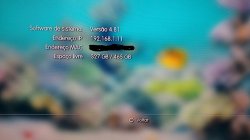
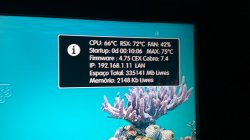
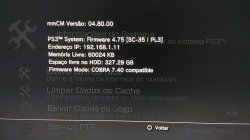
Could someone explain to me why these incompatible INFORMATION ??
And I also CAN NOT access PS3netserv although I installed it as webman versions:
WebMAN MOD 1.45.04
WebMAN MOD 1.45.03
WebMAN MOD 1.45.02
WebMAN MOD 1.45.01
ONLY Games that are in DEV_USB0 and DEV_USB1 and HDD0 in .iso or in masses, but in netserv (PC) it does NOT recognize ...
Windows My: Win 10 64x
My PS3: CECH2501A-Habib v1.01 4,81 COBRA
Can Someone Help ??
 

Attachments

  • XMB.jpg
    XMB.jpg
    143.7 KB · Views: 349
  • webMAN 1.45.04.jpg
    webMAN 1.45.04.jpg
    92.5 KB · Views: 369
  • multiMAN 4.80.jpg
    multiMAN 4.80.jpg
    119.9 KB · Views: 387
Last edited:
Alguém poderia me explicar Por Que essas INFORMAÇÕES incompatíveis ??

E eu tambem nao PODE Acessar PS3netserv apesar de instalado ter eu como versões webMAN:
WebMAN MOD 1.45.04
WebMAN MOD 1.45.03
WebMAN MOD 1.45.02
WebMAN MOD 1.45.01
SOMENTE Games that estao em DEV_USB0 e DEV_USB1 e HDD0 EM .iso OU EM massas, mas em netserv (PC) NÃO reconhece ...
Janelas Minhas: Ganhar 10 64x
Meu PS3: CECH2501A-Habib v1.01 4,81 COBRA
Alguém PODE Ajudar ??

Sorry man.
This is an English speaking forum.

Do your ps3netsrv games get detected by multiman?
Have you checked the checkbox in webMAN-MOD setup page to scan for network content? Have you put the right ip address & port in the wMM setup page?
Which ps3netsrv are you using? The latest Windows version with the GUI?
Have you allowed the ps3netsrv connection via the chosen port (38008?) in your pc firewall?
Can you access any webMAN-MOD page from your Pc browser?
 
Hi :)

If an emulator need a bios, for example to play pc engine cd (Castlevania Chi no Rondo), would as should configure webman Mod to run it?
sorry for my english...
 
Hi :)

If an emulator need a bios, for example to play pc engine cd (Castlevania Chi no Rondo), would as should configure webman Mod to run it?
sorry for my english...
Use RetroArch for most emulators out there. Each "core" added to RetroArch corresponds to one emulator.
For DOS games, there is a dedicated core.
Once RetroArch is installed you will need to place your ROMs in a ROM folder located on the internal hdd or on a fat32 USB device.
WebMAN-MOD 1.45.04 will scan the ROM directory & create shortcuts for the webman games list. A new ROM category will be displayed there too if the option is checked in the wMM setup page.
You need to install the pkg launcher as well.
RetroArch can be downloaded from our Resources section. Look at the list of cores to know exactly what emulators are included in the release you choose to download.
Everything else included the pkg launcher can be downloaded from http://www.github.com/aldostools/webMAN-MOD/releases/tag/1.45.04
 
.
I have had some weird behaviour when playing with the memory usage setting as well on 1.45.02 but I recall no freezes.
Also I had an issue with the memory usage not actually doing what I set it to do but I never investigated...
I have about 100 games atm & I find the standard setting to work great however.

My memory settings on webMAN 1.45.04 are the minimum 320 kbytes and even with that I had freezes like Joonie . Since I have upgraded to Habib 4.81 no freezes so far :)
 
My memory settings on webMAN 1.45.04 are the minimum 320 kbytes and even with that I had freezes like Joonie . Since I have upgraded to Habib 4.81 no freezes so far :)

Create rebug folder inside dev_flash and test again please


Sent from my iPhone using Tapatalk
 
My memory settings on webMAN 1.45.04 are the minimum 320 kbytes and even with that I had freezes like Joonie . Since I have upgraded to Habib 4.81 no freezes so far :)
I never use so little memory.
Not with 100 games..
But if you have this issue with a few games then I think there is a problem...
However there is something else that bothers me, am not sure if it's normal, I hope @aldostools can enlighten me..

If in memory usage I choose to use 12xxkb, after reboot it tells me that it uses 10xxkb.
If I choose 10xxkb, then it says 8xxkb..
What it uses never seems to be what I choose..
Why is that?
I have not looked at the source for an answer... I know.. Sorry... [emoji6]
 
I dont really see the point to have webMAN creating an XML with all the games . If you install PS3 Games Manager you make that creating the list , putting automatically all details in a MySQL databse, downloading the covers and all the details from Metacritic. You can launch games from your pc , mobile phone or tablet in an extremely and intuitive way . I use webMAN just to tell it which game I want to launch on the PS3 and nothing else. I would rather not use webMAN for that. I mean why slowing down and overloading the Playstation 3 when you can do everything externally from a modern machine that does not have just 2 megabytes of ram. I hope you see my point :)

Of course PS2 and RetroArch is not supported yet but it will be I am slowly working on it in my free time.
You can't rely on an external machine to run a console, at least not as standard behaviour.
There is no choice, a game list has to be created by wMM.
All ps3 backup managers do something similar to cache the list otherwise listing the games on the fly takes for ages...
 

Featured content

Trending content

Back
Top