webMAN not showing all games in ISO folders.

Crezazel

Member
I have a CECHA01 "FAT" PS3 running Rebug 4.78.1 REX with multiMAN 04.78.00 and webMAN 1.43.25 and Cobra enabled. I have over 200 PS2 ISOs and over 150 PSone ISOs installed on my internal HDD. My problem is webMAN is showing only 130 PS2 ISOs and only 60 PSone ISOs in their respective folders. All ISOs are showing in multiMAN and launch fine from there, so no problem on that end. How do I get webMAN to show all ISOs? Any info would be appreciated. Thanks.
 
Last edited:
I have a CECHA01 "FAT" PS3 running Rebug 4.78.1 REX with multiMAN 04.78.00 and webMAN 1.43.25 and Cobra enabled. I have over 200 PS2 ISOs and over 150 PSone ISOs installed on my internal HDD. My problem is webMAN is showing only 130 PS2 ISOs and only 60 PSone ISOs in their respective folders. All ISOs are showing in multiMAN and launch fine from there, so no problem on that end. How do I get webMAN to show all ISOs?

Try changing the plugin memory usage to Max (1280KB). Reboot and re-scan your games again.

The default memory usage for PS2 is just 64KB. "Max" assigns 128KB to PS2, allowing to list up to ~250 PS2 games.
It also assigns 256KB for PS1, allowing to list to up ~500 PSX games and about 1000 PS3 games.
 
Try changing the plugin memory usage to Max (1280KB). Reboot and re-scan your games again.

The default memory usage for PS2 is just 64KB. "Max" assigns 128KB to PS2, allowing to list up to ~250 PS2 games.
It also assigns 256KB for PS1, allowing to list to up ~500 PSX games and about 1000 PS3 games.

Thanks for the advice, unfortunately that didn't solve the problem. When inside webMAN setup I click on GAMES at the top of the screen it lists all of my PSone PS2 and PSP ISOs. But all PS2 and PSone ISOs are still not showing in their folders. Thanks.
 
Thanks for the advice, unfortunately that didn't solve the problem. When inside webMAN setup I click on GAMES at the top of the screen it lists all of my PSone PS2 and PSP ISOs. But all PS2 and PSone ISOs are still not showing in their folders. Thanks.

have you updated xml/html on the PS3
 
Thanks for the advice, unfortunately that didn't solve the problem. When inside webMAN setup I click on GAMES at the top of the screen it lists all of my PSone PS2 and PSP ISOs. But all PS2 and PSone ISOs are still not showing in their folders. Thanks.

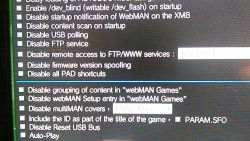
Have you checked whether or not you are using grouping features in wMM setup? If enabled, you should try disabling grouping/sorting & test.

Are the games still listed ok in mCM? You said they were.
Did you check the contents of the xml file in tmp folder to see what it looked like after a refresh?

Sent with Tapatalk
 
Last edited:
Thanks for the advice, unfortunately that didn't solve the problem. When inside webMAN setup I click on GAMES at the top of the screen it lists all of my PSone PS2 and PSP ISOs. But all PS2 and PSone ISOs are still not showing in their folders. Thanks.

http://www.psx-place.com/forum/ps3-...files-max-ps3-max-psx-max-blu-added-3757.html

Here is detailed table with memory profiles, try to use PSX profile etc. And check this solve problem, if yes then maybe someone compile for you version with needed specific memory allocation.
 
Have you checked whether or not you are using grouping features in wMM setup? If enabled, you should try disabling grouping/sorting & test.

Are the games still listed ok in mCM? You said they were.
Did you check the contents of the xml file in tmp folder to see what it looked like after a refresh?

Sent with Tapatalk

I disabled grouping, now all ISOs are showing in webMAN, but they are all (PSone, PS2, PSP) listed together. Which is acceptable, but I prefer them to be in their own folders. Thanks.
 
I disabled grouping, now all ISOs are showing in webMAN, but they are all (PSone, PS2, PSP) listed together. Which is acceptable, but I prefer them to be in their own folders. Thanks.

enable grouping again to see if problem was fixed
 
enable grouping again to see if problem was fixed

I enabled grouping again. It didn't fix the problem. I really appreciate everyones input. I will try some of the other suggestions i.e. webMAN 1.43.21s 3 new memory profiles later, but now I have to go to work. Thanks again everyone.
 
Understandable especially with that many games!
[MENTION=89]aldostools[/MENTION]
the grouped content issue is also memory related isn't it? If using the MAX profile hasn't solved the issue, any suggestions (value change in code?) to get grouped content to work for this number of games?

Sent with Tapatalk
 
the grouped content issue is also memory related isn't it? If using the MAX profile hasn't solved the issue, any suggestions (value change in code?) to get grouped content to work for this number of games?

[MENTION=11583]Crezazel[/MENTION]

Are both game lists (HTML and XML) being refreshed? We are *assuming* that he is accessing the game list on XMB, but it is not clear which game list is not listing all the games.

How many PS2 games are listed in web? And how many PS2 games are listed on XMB?

The grouping only affects the XML. Can you report how many PS2 games are listed with grouping on and off?
Are you saving the settings in /setup.ps3 after changing the profile to Max or any other parameter?

Each time the XML is refreshed (using SELECT+L3 or Refresh XML button), it is required to reboot or enter to a game and return to XMB to refresh the game list.

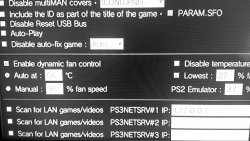
A screenshot (with a smartphone or webcam) of the screens, and the settings in /setup.ps3 would be useful to help to find your issue.
 
[MENTION=11583]Crezazel[/MENTION]

Are both game lists (HTML and XML) being refreshed? We are *assuming* that he is accessing the game list on XMB, but it is not clear which game list is not listing all the games.

How many PS2 games are listed in web? And how many PS2 games are listed on XMB?

The grouping only affects the XML. Can you report how many PS2 games are listed with grouping on and off?
Are you saving the settings in /setup.ps3 after changing the profile to Max or any other parameter?

Each time the XML is refreshed (using SELECT+L3 or Refresh XML button), it is required to reboot or enter to a game and return to XMB to refresh the game list.

A screenshot (with a smartphone or webcam) of the screens, and the settings in /setup.ps3 would be useful to help to find your issue.

I mentioned xml/html refreshing but don't think I ever got an answer
 
[MENTION=11583]Crezazel[/MENTION]

Are both game lists (HTML and XML) being refreshed? We are *assuming* that he is accessing the game list on XMB, but it is not clear which game list is not listing all the games.

How many PS2 games are listed in web? And how many PS2 games are listed on XMB?

The grouping only affects the XML. Can you report how many PS2 games are listed with grouping on and off?
Are you saving the settings in /setup.ps3 after changing the profile to Max or any other parameter?

Each time the XML is refreshed (using SELECT+L3 or Refresh XML button), it is required to reboot or enter to a game and return to XMB to refresh the game list.

A screenshot (with a smartphone or webcam) of the screens, and the settings in /setup.ps3 would be useful to help to find your issue.

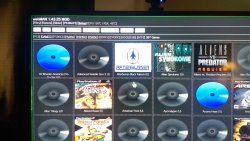
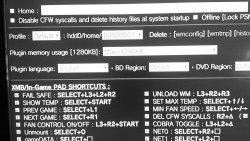
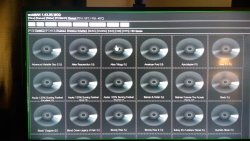
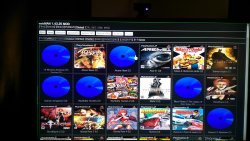
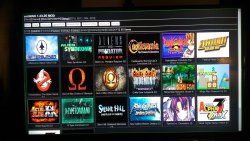
OK. Inside webMAN is showing 397 total ISOs. 217 PS2, 160 PSone and 20 PSP. In XMB 129 PS2, 66 PSone and 20 PSP. I have refreshed both XML/HTML and changed plugin memory usage to MAX (1280KB) and then save and rebooted. I am attaching some pics as requested to try and help give you an idea of what everything looks like. Thank for your help and advice. all games html.jpgplugin mem.jpgps1 html.jpgps2 html.jpgpsp html.jpg
 

Attachments

  • fan.jpg
    fan.jpg
    930.1 KB · Views: 597
  • second.jpg
    second.jpg
    863 KB · Views: 607
Back
Top