
PS3 webMAN URL Launcher TooL by Aldostools

PS3 developer @aldostools drops off a handy tool for CFW user's who enjoy the many benefits from the webMAN MOD plugin. webMAN URL Launcher Tool allows you to map a webMAN web shortcut or even mount various games with the included customize-able template PKG. For those who are familiar with Retro XMB , basically you can create Game Shortcuts (outside of My Games Folder (aka webMAN Games Folder) ) for PS3 /PS2 /PS1 /PSP/ /BD / DVD / ect.. Or you want a quick shortcut on the XMB for various webMAN Web Shortcuts like disable system sycalls, rebuild database, Restart PS3 or the many other shortcuts we have grown to love in webMAN MOD.


webmanmod_blk.png

  • UPDATE:: JUNE 5:
    I have updated the source code and template. It now uses the hdd0/tmp/wm_request file to mount the games.
    The file is polled by webman every few seconds and deleted after it's processed. So multiple apps can use the same interface.
    If "Auto-Play" is enabled on /setup.ps3 or if the [auto] tag is included in the file name, the game will be launched after return to XMB.
    (Some times the timing is bad, and the disc icon will get only the focus. In that case you will only have to press X to start the game)

    NOTE: It only work with webMAN builds compiled with WM_REQUEST flag. e.g. webMAN MOD Lite or vanilla *WILL NOT* work.

    New src + template pkg: http://aldostools.org/temp/test/launcher_src.7z

    Another use could be the creation of a custom AUTOBOOT.ISO with a PS3_EXTRA menu with your favorite games, like LaunchPad

  • This tool can be handy for some users that need to add an icon to XMB that mount a game or execute some custom command via webMAN.

    The EBOOT basically reads a wm_request file stored in USRDIR and sends the command to webMAN which will process it and return to XMB.

    The PKG is a *template* that is intended to be customized before install it. So you'll need to edit the file wm_request, PARAM.SFO (title id & title) and maybe the ICON0.PNG.

    The wm_request file should have the path of the file to be mounted or the webMAN command.

    Examples (use only 1 line):
    • /dev_usb000/GAMES/My JB game
    • /dev_hdd0/PS2ISO/My Game.iso
    • /dev_hdd0/BDISO/My Movie.iso
    • /dev_hdd0/tmp/wmtmp/My Game.ntfs[PS3ISO]
    • /mount_ps3/net0/PS3ISO/My Game.iso
    • /refresh.ps3
    • /rebuild.ps3
    • /restart.ps3
    • /dump.ps3?mem
    • /browser.ps3$disable_syscalls?keep_ccapi
    • /browser.ps3$block_servers
    • /cpursx.ps3?fan=60

  • Additional Web Commands can be viewed in the PSX-Place webMAN MOD forum:

Download: launcher_src.7z (UPDATED: source code + pkg)
(Problems downloading? "Save As" when Downloading)

Source: PSX-Place.com
 
Last edited:
I was just thinking to myself this would be an amazing tool to have and aldos comes through again. Any chance this does covers or could help with where covers are located?
 
Download link is not working for me. Just a bunch of scrabbled up writing when taken to the download page. Here is part of the page:

7z¼¯'�ëw³×*�����$�������ú‹'ñáoà]�D"Äz'ö÷Pˆ³ªÌ.É÷OSk®©§"^u¬Œ
ì76CæzžÖ©õßWpÇõúB©â]Þ¢"ˆÀôŸvÑkpÏy–θµÜfé ö)[—Í"u'«'ÝíÀ¿>u¯}ê~ãËŠQDÃý¬&ø[ÄPÐzFÕM°gv¯Cwú11¢~?ßÓWÞ5Ë7xç+~Ë3
´€tÕJþnCÓu IÑÖÔóH=g"'>zõ(Í`öÁô9ύ#–B—s²`±5uïsÀöØOË☋ØdK´ZÔ�‹"½ðQ}´%5¹üÙ¦}Àz<cnͪTŸ;æÝUG£†KÓGR"£"M½¶ÔT2ìDLê
ä⮐%«¤H5Ç|ÊŸ"FB¸#^©ÀN¼ˆc´hÏwÆS•Y<±b‹|@l«nÿ—Íß5[Ò6€ëè:¾›Ý䶃Ø%N=°× üÉHQQKåŘã겘‰®MAìy-7"¿Ôs¥öè3¢Þ8tŸÁì¿ÄR*ݼÌþV00SMMv;Þcƒx°xãÓQ¤86?"ÅD£ .–@ZôÒ}�Ôöa}g%ü'>%†�¨–/˾Û*&‰+.òç•ÂGaº1•RF2îÏßZë'Ÿ'SØ2~"·äÎÙ0À½.ã4FúSã%)õïgA«õÑ'.áò'25JžÆ&g¨À˜Û.Þȍiº¸ô€ÌUí!.Òé "&'ÚŸ\ö"ùÜúâ3OÆ)¢‹«úÐSF�îÒì‡mm5¼¾Áv½íσºøBoiÊØlwCͯ•²L›•ÇLããs…lG*Çl«ë—á1/]Wd
*õg±ú¾}qc}ç i'À§º'+sXä
W)|H±a-ùÂ.
 
Nice one, love it :D just a doubt what are the icon size it supports if i want to put a game cover and not the usual icon the game brings?
 
Nice one, love it :D just a doubt what are the icon size it supports if i want to put a game cover and not the usual icon the game brings?

ICON0 is normally 320x176 but you can use smaller or larger images and the PS3 will stretch or squash them to fit. The problem is it doesn't keep the correct aspect ratio of the original when it stretches/squashes it, so a normal cover image will not look right (stretched horizontally).

What I do in cases like this is I have a transparent 320x176 png and I paste my covers in on top so the finished image ends up with the cover in the middle and transparent edges on each side, that way the PS3 doesn't need to stretch the image.

Here is the blank ICON0 if you want it:
https://dl.dropboxusercontent.com/s/q28h6tez6bon5vq/Blank 320 by 176 icon0.png
 
Last edited:
Create each different package with a new one titleID eg "LINK00001, LINK00002,...
0_obeWAN

Okay, but I tried this and not the right for me ...
For the center for what I realized is .eboot, being the same it creates a package with the same name and does not allow the different installation (it replaced what has already been installed) at least for me it was so ...
 
0_obeWAN

Okay, but I tried this and not the right for me ...
For the center for what I realized is .eboot, being the same it creates a package with the same name and does not allow the different installation (it replaced what has already been installed) at least for me it was so ...

You will need to make sure the Title ID, Content ID and Folder name match before you repack the package.

EG:
Folder Name "LINK00001"
Title ID "LINK00001"
Content ID "UP0001-LINK00001_00-0000000000000000"

(To change the content ID use param.sfo editor and select "add field" then "CONTENT_ID")
 
DeViL303

Ok man, thanks for the tip, now was smooth ..
As there was no such information in the example, I could not create perfectly, because I am not an advanced usuaria (just curious kkk)
Congratulations for the explanation ... !!!
Thank you also for more Aldostools this spice (as always, good job)
 
DeViL303

Ok man, thanks for the tip, now was smooth ..
As there was no such information in the example, I could not create perfectly, because I am not an advanced usuaria (just curious kkk)
Congratulations for the explanation ... !!!
Thank you also for more Aldostools this spice (as always, good job)


How to customize it was written, maybe you have not read this
The PKG is a *template* that is intended to be customized before install it. So you'll need to edit the file wm_request, PARAM.SFO (title id & title) and maybe the ICON0.PNG.
 
You will need to make sure the Title ID, Content ID and Folder name match before you repack the package.

EG:
Folder Name "LINK00001"
Title ID "LINK00001"
Content ID "UP0001-LINK00001_00-0000000000000000"

(To change the content ID use param.sfo editor and select "add field" then "CONTENT_ID")
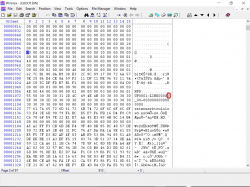
to me it did not work. just being created the folder inside the pkg LINK00000, I just got another way, I used a hex editor and changed a value in eboot marked in red. Re-create the pkg and install on the ps3, then I delete the eboot and put the original, because I modified the initialization error. The image I change the 0 to another number
 

Attachments

  • ex.png
    ex.png
    171.2 KB · Views: 674
to me it did not work. just being created the folder inside the pkg LINK00000, I just got another way, I used a hex editor and changed a value in eboot marked in red. Re-create the pkg and install on the ps3, then I delete the eboot and put the original, because I modified the initialization error. The image I change the 0 to another number

Oh, well then I don't know, that is how I install multiple versions of XMBPD installer and it works for me.
 
to me it did not work. just being created the folder inside the pkg LINK00000, I just got another way, I used a hex editor and changed a value in eboot marked in red. Re-create the pkg and install on the ps3, then I delete the eboot and put the original, because I modified the initialization error. The image I change the 0 to another number
after editind EBOOT with hex if you actually resigned as NPDRM there would be no reason to change EBOOT as it should work, also if you follow @DeViL303 's explanation above about adding the Content ID field to the PARAM there would be no reason to even touch the EBOOT
 

Featured content

Trending content

Back
Top


