PS3 webMAN v1.46n - New XMB Game Mounting Improvements (using wm_proxy/xai_plugin) by deank

Following the recent updates from legendary developer deank that improved NTFS support a great deal in the webMAN plugin, and the recent Cobra Update (stage2.bin) that allows you to play Games & Media from burnt optical disc. The developer has been busy with yet another trick up his sleeves, as we showed yesterday deank has been working on a new test feature for webMAN , now the test feature has been introduced officially in webMAN v1.46n. this new feature utilizes the source code release for the custom xai_plugin (by mysis) and mounting games is much faster and cleaner from the XMB as the web-browser trick is no longer needed as deank adapts the custom xai_plugin in a great way. Checkout all the details and a video demo of the new game loading in the details/changelog provided by deank..


webMAN_deank.jpg


  • webMAN 1.46n
    Changes
    1) Mounting games is now faster
    2) After game/video is mounted the focus will move to the respective XMB column
    3) Reduced memory consumption
    4) Includes NTFS and NETSRV support


    Dean


Download: webMAN_1.46.zip

Source: psx-place.com
 
Last edited by a moderator:
Here i've made a little video with the bug


Enviado desde mi GT-I9190 mediante Tapatalk

Edit: Wow! that was fast i didn't get the time to read your previous post and made the video showing you the bug and you already fixed it [emoji2]
 
Last edited:
@deank
I found a small bug
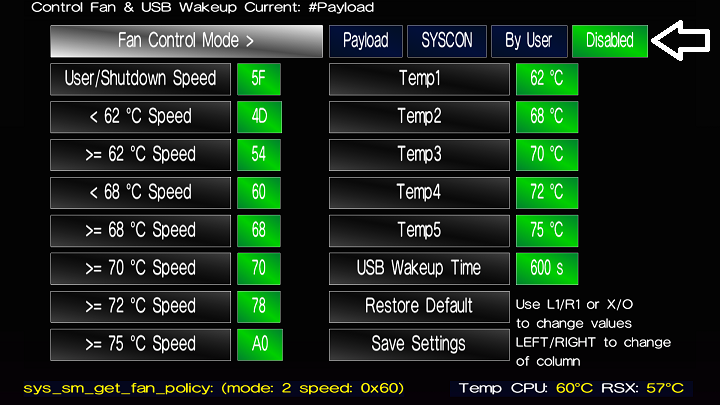
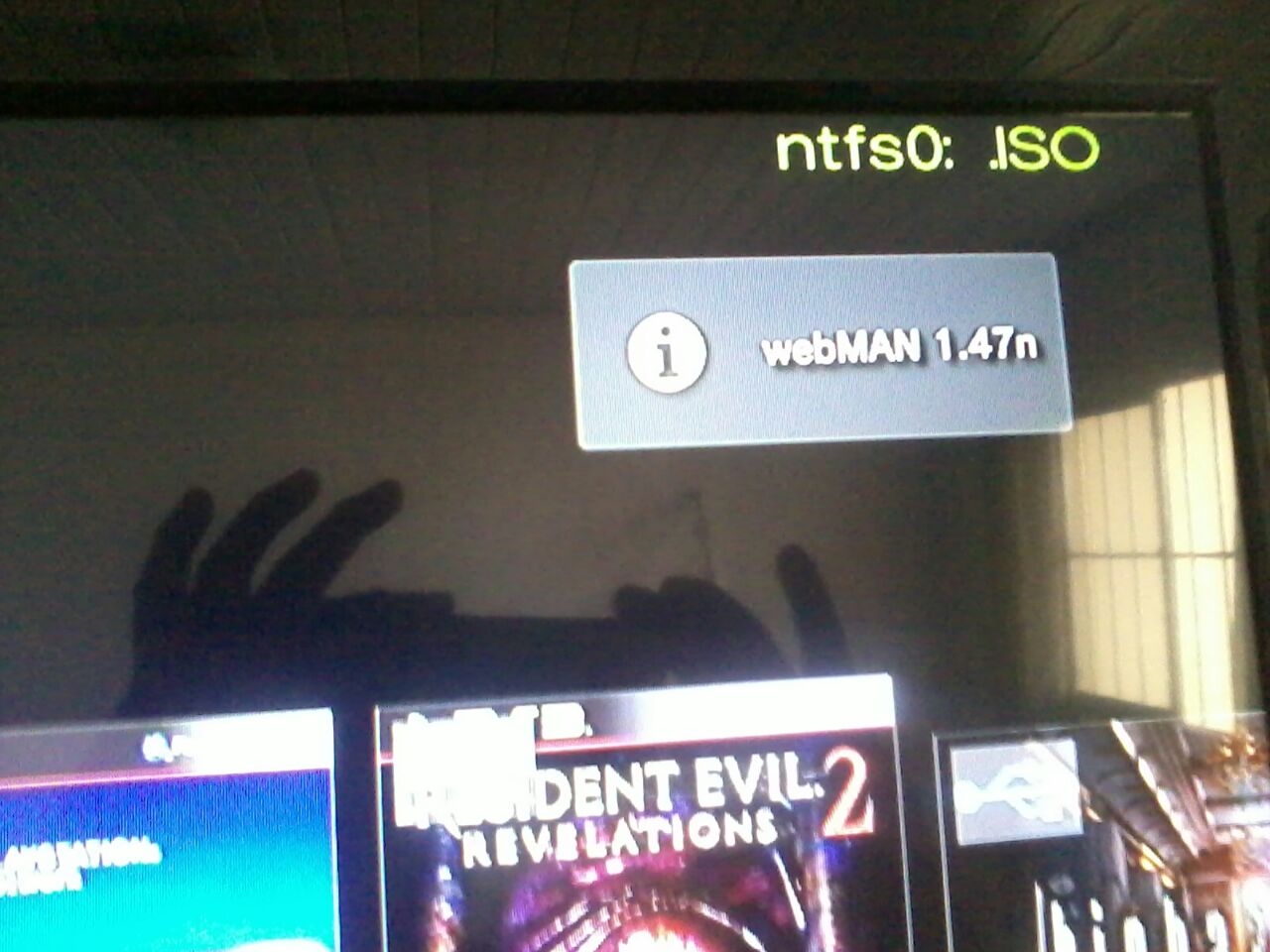
When I enter the irisman the cooler slows down and a message appears on the webman 147n high and then the cooler accelerates.
It only happens when I enter inside the irisman
 
I made some changes to webMAN - it will get the images and param.sfo from ISO games on ntfs drives during boot time. It means that you'll have names/covers/icon0 images for all titles once XMB appears. Copying covers for bdiso/psxiso/dvdiso is also performed if images are found named after the iso on the ntfs drive. This will make things look better for sLaunch.

I didn't like having all the stuff in the root folder of the ntfs drive so webMAN will also check x:\PS3\ folder for PS3ISO/BDISO/etc on ntfs drives.

Also .ntfs[PS3ISO] files are created with the necessary size of few bytes and not 64KB (providing faster access (read/write)).

There was a bug in prepNTFS-implementation in webMAN (for .ntfs[PSXISO] files) which caused PSX BIN+CUE games on NTFS drives with audio tracks to be detected as 1 data and 0 audio tracks. It is fixed now.

edit: Also ICON0.PNG is extracted from ntfs ISOs when no external cover/icon is present.
 
Last edited:
I made some changes to webMAN - it will get the images and param.sfo from ISO games on ntfs drives during boot time. It means that you'll have names/covers/icon0 images for all titles once XMB appears. Copying covers for bdiso/psxiso/dvdiso is also performed if images are found named after the iso on the ntfs drive. This will make things look better for sLaunch.

I didn't like having all the stuff in the root folder of the ntfs drive so webMAN will also check x:\PS3\ folder for PS3ISO/BDISO/etc on ntfs drives.

Also .ntfs[PS3ISO] files are created with the necessary size of few bytes and not 64KB (providing faster access (read/write)).

There was a bug in prepNTFS-implementation in webMAN (for .ntfs[PSXISO] files) which caused PSX BIN+CUE games on NTFS drives with audio tracks to be detected as 1 data and 0 audio tracks. It is fixed now.
@deank is possible for webman to launch video directly from XMB or Slaunch?It should be a beautifull feature :)
 
There was no real need to post this again. Aldo would already have received a notification when I mentioned him!

Btw I am not so sure it's a bug per se but rather due to your own settings.
Don't forget that there are fan control functions in Irisman that will start automatically if not disabled.
On loading Irisman will check for /dev_hdd0/game/IRISMAN00/config/fancontrol.dat where the Irisman fan control settings are saved. Then Irisman will check whether
1. the Irisman Control Fan payload is already in lv2 memory
2. the fan mode is not set to disabled
If the fan control payload is not found in lv2 & the mode is not disabled, Irisman will load the Irisman fan control payload into lv2 memory & apply the configuration found in the dat file.
There are also checks for SM but it's not relevant here.

I am not 100% sure, I just had a quick look at the source & I could easily have missed something but I think what is happening here is that fan control is probably enabled in your Irisman settings. As a result, Irisman must load its Control Fan payload with whatever settings from the dat file then as wMM is still polling, the fan gets set again at the first refresh from wMM.

In theory, if you set the Irisman fan control as disabled the payload should not get loaded at all & you should not have any problems with the fan speed changing when starting Irisman...
I just tested loading Irisman with its fan control disabled in the CPU fan settings section & after restarting the app, I don't get any fan speed changes on loading it.
WMM still handles dynamic control without interference.
Try & let us know if there is still a glitch....

Of course, that still leaves a question mark... Should we be able to load the Irisman fan control payload when wMM is currently managing the fan? And vice versa I suppose...
 
Last edited:
And another quick update to webMAN. Removed over 700 lines of code related to "refresh html" and generating the web page with the games. It now uses directly the slauncher generated file created during boot or when "refresh xml" is used. Improved cover/img lookups and decreased memory usage and prx size. :)
 
Last edited:
There was no real need to post this again. Aldo would already have received a notification when I mentioned him!

Btw I am not so sure it's a bug per se but rather due to your own settings.
Don't forget that there are fan control functions in Irisman that will start automatically if not disabled.
On loading Irisman will check for /dev_hdd0/game/IRISMAN00/config/fancontrol.dat where the Irisman fan control settings are saved. Then Irisman will check whether
1. the Irisman Control Fan payload is already in lv2 memory
2. the fan mode is not set to disabled
If the fan control payload is not found in lv2 & the mode is not disabled, Irisman will load the Irisman fan control payload into lv2 memory & apply the configuration found in the dat file.
There are also checks for SM but it's not relevant here.

I am not 100% sure, I just had a quick look at the source & I could easily have missed something but I think what is happening here is that fan control is probably enabled in your Irisman settings. As a result, Irisman must load its Control Fan payload with whatever settings from the dat file then as wMM is still polling, the fan gets set again at the first refresh from wMM.

In theory, if you set the Irisman fan control as disabled the payload should not get loaded at all & you should not have any problems with the fan speed changing when starting Irisman...
I just tested loading Irisman with its fan control disabled in the CPU fan settings section & after restarting the app, I don't get any fan speed changes on loading it.
WMM still handles dynamic control without interference.
Try & let us know if there is still a glitch....

Of course, that still leaves a question mark... Should we be able to load the Irisman fan control payload when wMM is currently managing the fan? And vice versa I suppose...

McLgP2G9.png


The irisman cooler has always been off
 
McLgP2G9.png


The irisman cooler has always been off
In that case I am sorry but I cannot reproduce your issue at all when using the same settings...
Edit:
You have this issue with webman 1.47n & Irisman 4.81.1?

wMM is in dynamic fan control mode?
And what is the message you get? What does it say? Post screenshots maybe..
 
Last edited:
webMAN: Improved FTP memory usage and performance - it will not constantly allocate/deallocate memory for each file transfer, but do it once per ftp session. This also improves transfer speed along with the increased 256KB buffer. :)

VSH free memory is now 2204KB with one plugin - (webMAN w/ NTFS) and 2068KB with both sLaunch and webMAN. :) This is more than before adding ntfs library to webMAN. :)
 
Last edited:
In that case I am sorry but I cannot reproduce your issue at all...

wMM is in dynamic fan control mode?
And what is the message you get? What does it say? Post screenshots maybe..

1rm6oYzp.jpg


Yes
When I enter the irisman the cooler slows down and a message appears on the webman 147n high and then the cooler accelerates.
It only happens when I enter inside the irisman
 
1rm6oYzp.jpg


Yes
When I enter the irisman the cooler slows down and a message appears on the webman 147n high and then the cooler accelerates.
It only happens when I enter inside the irisman
Sorry I spoke of wMM before... I meant webman 1.47n & Irisman 4.81.1 obviously....
Still, I cannot reproduce your issue...
Not sure what's going on, I would need to look at the webMAN source again to see what could trigger the pop-up to give us a hint...
 
@Zwei
For the webMAN 1.47n pop-up to be displayed, webman must get loaded! There is no other way...
So somehow when you load Irisman,, the webMAN daemon gets loaded again...???
Into another slot I assume because I doubt the first webman instance got unloaded first...
@deank ? How does this make sense? Any idea?
 
Last edited:
Back
Top