What should I do with my broken PS3

Hmmm... So the "new" hdd you purchased. What happens when you attach it your PC? It just doesn't show up in windows or device manager? Sometimes when I attach drives to my PC, I need to refresh the list on "Device Manager" for it to be picked up.

Open "Computer Management" in windows, click the "Disk Management" part of the tree. In the main window , does your drive show up?
The "new" hdd I bought completely crashes my computer when I try to do anything with it I can plug it in and leave it alone and nothing will happen but when I try anything involving it everything crashes
 
This is a hardware problem located in the circuit board of the HDD, probably it have one of the voltage pins connected to a ground pin (so it have a short curcuit), and when you connect it to PC the shortcircuit is detected by the ATX PSU and it cut all voltage outputs for safety reasons
Maybe that hdd "killed" the SATA ports (or the PSU's) of the PS3's ? hmmm

Be careful with that hdd, as you could see the PC ATX PSU's resists this kind of short circuits, but not indefinitivelly
I mean... if you do it 3 or 5 times probably the PSU and motherboard are going to survive... but if you repeat it 30 times there is going to be a point where something is going to be damaged

So if you want to repair that hdd "at home" do it with a very old PC (kind of thing that you dont care it it explodes), or even with a old PSU not connected to any PC, this way you only risk the PSU used in the tests
By now dont connect that hdd to the PS3's ever... just store it somewhere and forget about it for some months, maybe is easy to repair but is a bad timing to try it in my oppinion

--------------
Do you have a multimeter to meassure the voltage in the PS3 SATA connector ?
At this point i think this is the first thing i would try to check... now that you explained the problem of that hdd it makes more sense.. that hdd is a killah
Yea I have a multimeter do you know what pins I should test
 
Kind of annoying.... I've got like 6 2.5 hdds floating around. I'd have given you one if not so far apart (I'm assuming this anyways, I'm am in UK)
 
Yea I have a multimeter do you know what pins I should test
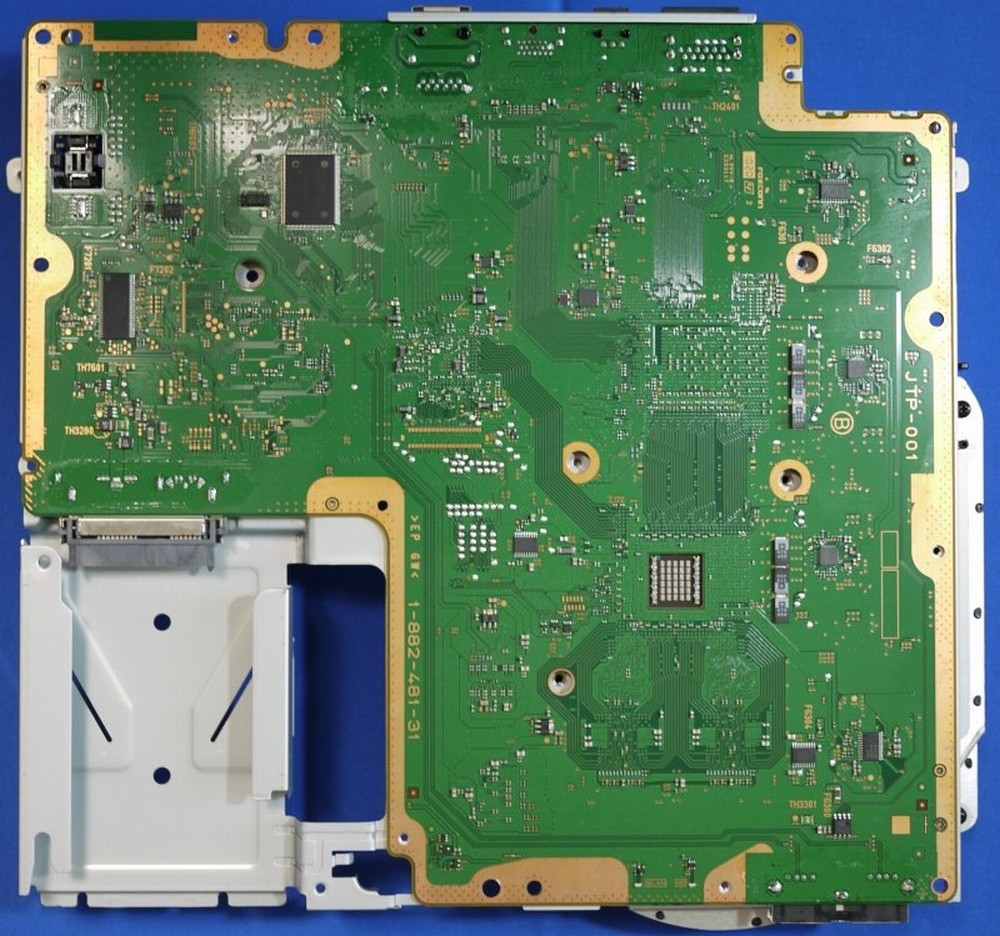
In this link there are photos of the motherboards (and there are some more if you click in the other wiki pages dedicated specifically to every motherboard model)
https://www.psdevwiki.com/ps3/Motherboard_Revisions

As example, in JPT-001 the solder points of the SATA connector are located at bottom side, are that solder "blobs" aligned with the pins
JTP-001_%28bottom_view%29.jpg


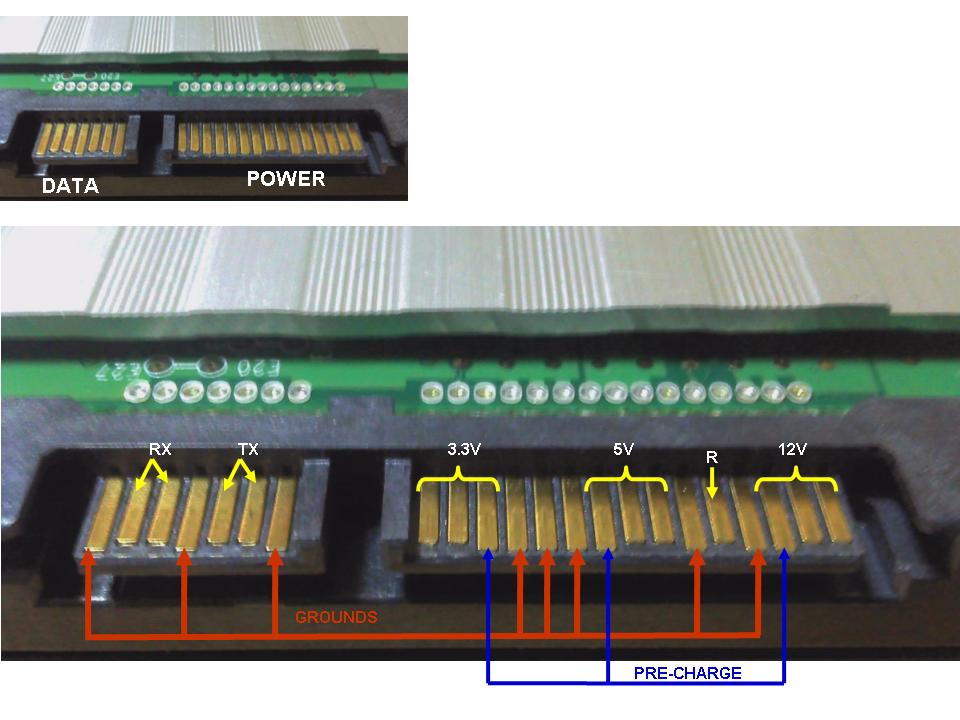
The SATA pinout is standard, i found this link in google where is explained
https://e2e.ti.com/support/processors/f/791/t/552017
TI_2D00_SATA_2D00_FAQ_2D00_DiskConnectorDetails.jpg


---------
But before that i would try to check the pins of the faulty hdd for curiosity sake, is mostly to see if the 5v pins are connected to gnd pins
In your last post you mentioned the PC was able to boot with the hdd connected so maybe is not this kind of shortcircuit, but dunno, just incase, is easy to check

 
In this link there are photos of the motherboards (and there are some more if you click in the other wiki pages dedicated specifically to every motherboard model)
https://www.psdevwiki.com/ps3/Motherboard_Revisions

As example, in JPT-001 the solder points of the SATA connector are located at bottom side, are that solder "blobs" aligned with the pins
JTP-001_%28bottom_view%29.jpg


The SATA pinout is standard, i found this link in google where is explained
https://e2e.ti.com/support/processors/f/791/t/552017
TI_2D00_SATA_2D00_FAQ_2D00_DiskConnectorDetails.jpg


---------
But before that i would try to check the pins of the faulty hdd for curiosity sake, is mostly to see if the 5v pins are connected to gnd pins
In your last post you mentioned the PC was able to boot with the hdd connected so maybe is not this kind of shortcircuit, but dunno, just incase, is easy to check
Thanks I'll give it a look
 

Similar threads

Back
Top