Winhiip bad.partn

Format with uLaunchELF 4.43a 41e4ebe (11-1-2019)
https://mega.nz/folder/50ITQSDI#nZfgmUpJiL8b8cPa8n8BeA

After formatting create +OPL partition with a decent size (something between 512mb and 1024

Then install FreeHdBoot (even if you don't want it, the FSCK utility is useful to warn you if something happens to the HDD) https://github.com/israpps/FreeMcBoot-Installer/releases

After installing FreeHdBoot restart the console without memory cards to see if everything is Ok.

Then you can go to your PC and install games

About removing games from any PC software...
You should avoid that, remove games via uLaunchELF HDDManager


Ok, thanks alot , but it is standard basic information about use fmcb and opl.
Now I need to understand how get back games before format hdd.

Early I said that tried to get backup by Winhiip's copy disk function to copy games to my portable external hdd, but in the end i've get the same hdd with bad.patrn and without same ability add\delete games. ( ok, now i know that delete games i need use uLe hdd manager)
Berion offered to make correct backup with IsoBuster, but i don't get how...
 
In IsoBuster, reveal partition which You want, click to violet "ISO" rectangle and on right window, You will see "Disc Image.iso". Click right button on it and choose "Extract". Rename file to something more informative and do it the same with another game partition.

There is no way in this app to do it automatically for all, so for each game You must do it what I described above, which is tedious but, I'm not sure if You have choice.
 
Stop, stop stop....

- before format in uLe I need get all 102 games back or make backup cause i don't wanna loose it all!
Your installed images are not reliable! A multitude of them seems to be corrupted!

Maybe You have just no free space left at the end and it is not enough space on "hdd0:/__empty" partitions to put in those places game. Partitions must be in chain. In example, if You have reported 2GiB free space but between partitions are __empty by i.e 1GiB in different places, You cannot install there game exceeding 1GiB because there is no place for it. If this is true, Yours HDD logic is not damaged, just full (kind of...). :)
The empty chunks CAN be written to with bigger games as well!!!
 
In IsoBuster, reveal partition which You want, click to violet "ISO" rectangle and on right window, You will see "Disc Image.iso". Click right button on it and choose "Extract". Rename file to something more informative and do it the same with another game partition.
- sorry but i see not "ISO":


And, after extracting i got " PP.HDL.Contra Neo.dsk " - what a format?
 
I see on Your screenshot violet rectangle with "ISO" (right below green rectangle with "APA"), and You saying there is not? ;p

Do not extract whole partition. :P
*.dsk is a raw dump, not usable for You.
 
Scan their MD5 and SHA-1 and compare them with those on redump.org, to make sure that they are valid.
 
Extracted from IB will be not match with ReDump because of APA 128MiB boundary by zeroes. He should check image before writing to HDD.
 
I see on Your screenshot violet rectangle with "ISO" (right below green rectangle with "APA"), and You saying there is not? ;p

Do not extract whole partition. :P
*.dsk is a raw dump, not usable for You

Оооооооооооооооооооооо:eek new: :biggrin: didn't understand at first....
Now, i get it)))

Thanks alot!
 
Then those images are not valid (technically) to begin with.

It also depends on what he uses for injection and extraction AFAIR. They CAN be the same.
 
Extracted from IB will be not match with ReDump because of APA 128MiB boundary by zeroes. He should check image before writing to HDD.

Hmmmmmm... S...t!
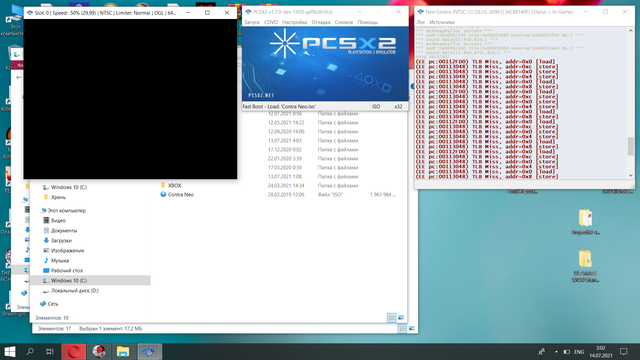
- I dont know how to check it, but it does not start on the emulator anymore - insert ps2 disk. So seems to be the image after isobuster is corrupt.


And maybe I need some another app to extract iso
 
Last edited:
@Newcomer Hmm ok, I'll try to explain it better. On left panel, You have listed storage structure. In case of PS2 HDD, partitions are made from two, let's say, areas: APA (4MiB) and File System Space like i.e PFS, RFS, EXT2, Disc Images anything You want put there (124MiB minimum + maximum up to 1020MiB if I'm correct). Further parts in chains, can be equal to 1GiB, and in summary all up to 128GiB. On right panel, You see contents of selected area (if file system/structure is supported, i.e in case of Disc Images are displaying as whole blob because it is sub fs written as partition, very specific case; but i.e PFS is not shown because IsoBuster doesn't supporting it (yet)). In example of PS2 MC image, You will see only one partition, without partition table and with only one rectangle showing You what fs was detected; and on the right, of course game saves etc. Another examples You can find in screenshots in >>this thread<<.

Valid PS2 DVD games must contains ISO9660+UDFv1.02 in mode1. PS2 can run only from ISO9660 but what about PCSX2, I dunno. Valid PS2 CD games must contains ISO9660 only in mode2 but since mode2 means blocks by 2532 not 2048, HDL and similar tools converting them to mode1 and PS2 still accepting them. I don't know if PCSX2 will do to.

If You are be able to open such extracted disc images in IsoBuster, then it means, from technical point of view, they are not broken. Yet it doesn't means, PCSX2 will run them, for various of reasons. If IsoBuster open them and You see disc contents, You can be sure it is exactly copy of partition fs space and they can be used again to install on HDD.
 
@Newcomer Hmm ok, I'll try to explain it better. On left panel, You have listed storage structure. In case of PS2 HDD, partitions are made from two, let's say, areas: APA (4MiB) and File System Space like i.e PFS, RFS, EXT2, Disc Images anything You want put there (124MiB minimum + maximum up to 1020MiB if I'm correct). Further parts in chains, can be equal to 1GiB, and in summary all up to 128GiB. On right panel, You see contents of selected area (if file system/structure is supported, i.e in case of Disc Images are displaying as whole blob because it is sub fs written as partition, very specific case; but i.e PFS is not shown because IsoBuster doesn't supporting it (yet)). In example of PS2 MC image, You will see only one partition, without partition table and with only one rectangle showing You what fs was detected; and on the right, of course game saves etc. Another examples You can find in screenshots in >>this thread<<.

- anyway too hard......:sfun toiletmonster:


You can be sure it is exactly copy of partition fs space and they can be used again to install on HDD.

Are you SURE? - After all, 300 GB....:confusion:
 
Pretty sure. IB ignoring a lot of stuff which other apps will not, because it is recovery tool and recovering data as is.

You can make a test. Extract game by this method, send it to someone (if You don't have another HDD) and check if game booting. ;) Or also You can boot it from pendrive, it is also a valid test (if this title is also USB compatible; compatibility between HDD/SMB/USB/FW/MX4SIO are different).


PS: Please, attaching screens on forum (larger screenshots convert to JPG to keep them small). I do not unblock javascript from Your hosting service, and without it, screen is blurred to force by that end user to unblock js for this site. ;)
 
Last edited:
You can make a test. Extract game by this method, send it to someone (if You don't have another HDD) and check if game booting. ;) Or also You can boot it from pendrive, it is also a valid test (if this title is also USB compatible; compatibility between HDD/SMB/USB/FW/MX4SIO are different).

- ofcourse!
I took my little 40hb hdd and install 5 random isos after isobuster's extraction.
But unfortunately nope!

only 2 small games (smaller 1 gb) were able to start. Others - no((( exactly like on pcsx2)
So, method with isobaster's extraction is failed, I've suppose
 
  1. Have opened such extracted image by IsoBuster again to see if it recognize it as disc image?
  2. If yes, then are You in main view of disc, You see red cross on track01?
  3. Have You extracted flagged image as broken in WinHIIP?
It looks like for me that partition chains (in partition index are broken, so parts are taken not from proper disk areas). But, please try to answer to above questions anyway.

Does this IsoBuster is cracked or just free/home/pro version? Maybe there are mechanics which makes pirates life harder, but I dunno. Just blind shot. I see such security mechanism in CDRWin back then.
 
Last edited:
Have opened such extracted image by IsoBuster again to see if it recognize it as disc image?
Yes

If yes, then are You in main few of disc, You see red cross on track01?
upload_2021-7-14_7-37-48.png


Have You extracted flagged image as broken in WinHIIP?

- No.
I took some images with "bad.ptrn" and with "ok" status in winhiip.
And results was pretty funny - neo contra was "ok" in winhiip, but don't run at pcsx2( it's said insert ps2 disk) and ps2 hardware ( just black screen). Vf2 - was "bad.ptrn", but run correctly

Does this IsoBuster is cracked or just free/home/pro version? Maybe there are mechanics which makes pirates life harder, but I dunno. Just blind shot. I see such security mechanism in CDRWin back then.
- Free from offical site....
 
Well guys, still no ideas?


Ok, maybe I should return back to the attempt adding game to my main problematic hdd....
So, I've been able to add random iso to it by HDLBInst. And it worked on ps2.

But the one specifically game that i needed to add finally not able to be add by HDLBInst\HDL Batch (Error... V.iso: not a Playstation CD-ROM/DVD-ROM). Yes, it's hacked-modded game, but it work ( i've install it by winhiip on another hdd without problem)
And i couldn't run it from pendrive too

So, maybe someone could recommend another app to pc, that could just add this game on my crazy hdd (same as winhiip)?
 
Last edited:
Ad1. It is possible. ;) I don't know what partitions names creating HDL but HDL Dumb and HDLGI using "PP." which can be removed from uLE just like any other user partitions. By standard uLE, only system partitions cannot be (those which starts from "__") but this can be dealt with uLE kHn and probably uLE ISR HDD.

You can delete also system partitions (I think you have to rename them first), aside the mbr obviously.

I seems to remember Ule couldn't actually delete game's partitions, but it's been a long time, apparently I remember wrong.

Maybe it was something with my HDD, since ule hddmanager has a partition number limit (sp193 increased it a little about one year ago) that's quite easy to surpass with a 2TB HDD.

EDIT: It seems I can delete games from Ule hddmanager. The remove option isn't greyed out, but I didn't tried it, I'm not sure it is 100% safe for the above mentioned reason.
For example Ule is no longer able to load the game's information (it worked when I had less game's partitions).
 
Last edited:
Back
Top