(WIP - Contributions Welcomed] - PS3 starter Guide (2019 Edition for HEN User's)

good morning.
i have a 4000 series superslim
i installed hen easily but i have a few problems
-when launch multiman, sometimes my system turns off with standby light off (no red and need the button to be pushed twice to startup again )
or sometimes system hangs in black screen and need power off

-webman 1.47.17 does not control fan speed. and this is the main reason i nstalled it. when install 1.49 hen fix webman i have the control of fans but my hen payload failed after a few restarts and no working at all anymore.

could you help me with this?
There is a new version of HEN V2.0 try it, it fixes many things!
 
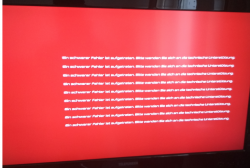
This is ps3 from my friend he installed hen and after rif installer pkg from han he got error and this screen on launch psn game
 

Attachments

  • rsod.png
    rsod.png
    461.5 KB · Views: 491
I'm Trying To Play Call Of Duty 3 But Every Time I Get Into The Game By Multiman Or Managunz It Hangs On The Screen Loading Someone Can Help Me
 
This is ps3 from my friend he installed hen and after rif installer pkg from han he got error and this screen on launch psn game
A red screen of death ? From a PSN game ? Also, why is his RSOD in a single language ? And that font of his looks weird.

I'm pretty sure he fucked up with his system at some point, tell him to reinstall HFW from recovery mode
 
im using Irisman with HEN 2.0 and works perfect, what i have saw different is that with HEN 1.0 Irisman mounted the game in /app_game/ps3_game and there wasnt a disk icon on xmb, now with HEN 2.0 Irisman mounts the game as a disk icon and theres nothing mounted in /app_game/ps3_game, why this happens? i really dunno but the freezings, hard lockups and scary visits to recovery mode have ended at least for me. i have to say that i dont have webman installed, maybe is the culprit in your case.

amazing job with HEN 2.0 devs, your great!!

For PS3 JB games there are several "mount modes" availables, most popular was BDemu and BDmirror
But all that was used before cobra, ISO support, and "discless" modes
If i remember right... in irisman... by choosing BDemu/BDmirror you are disabling the "discless" feature

Try to insert a original PS3 BD disc game in the drive and you will see how the icon of app_home changes
 
For PS3 JB games there are several "mount modes" availables, most popular was BDemu and BDmirror
But all that was used before cobra, ISO support, and "discless" modes
If i remember right... in irisman... by choosing BDemu/BDmirror you are disabling the "discless" feature

Try to insert a original PS3 BD disc game in the drive and you will see how the icon of app_home changes

I tried it but doesnt works, definitively seems that BDMIRROR mode and /app_home/ps3_game mounting modes just doesnt work on Irisman now but if we can launch games from disc icon its a minor issue unless some games really need BDMIRROR mounting mode.
 
I'm Trying To Play Call Of Duty 3 But Every Time I Get Into The Game By Multiman Or Managunz It Hangs On The Screen Loading Someone Can Help Me
Resign your multiman and then install it.This might help.Copy your disc to internal hdd and then try to launch it.And why you need to load a disc from multiman if it can be done from XMB.
 
How do I remove app_home / PS3_GAME? I want to have the installer of hen in the xmb but without app_home

I don't think it is possible because it's part of exploit.
It actually can be removed if someone wants it gone.

Delete this from the top section of your category_game.xml
Code:
<Query
class="type:x-xmb/folder-pixmap"
key="seg_gamedebug"
src="#seg_gamedebug"
/>
 
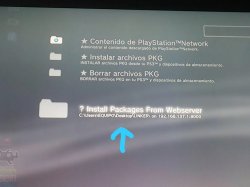
how can I add this folder to the install package files? in the HEN_v2.1.0_Installer_HDD_signed.pkg I do not get that option, in install han I get folder

Excuse my bad english I'm with a translator .....
 

Attachments

  • d7eff3db-f724-41ca-87e5-4f89bd3491d8.jpg
    d7eff3db-f724-41ca-87e5-4f89bd3491d8.jpg
    65 KB · Views: 217
how can I add this folder to the install package files? in the HEN_v2.1.0_Installer_HDD_signed.pkg I do not get that option, in install han I get folder

Excuse my bad english I'm with a translator .....
In your category_game.xml you will see a bit like this at line 728
upload_2019-5-18_15-50-59.png

Code:
<View id="seg_package_fixed">
<Items>
<Query class="type:x-xmb/folder-pixmap" key="host_psn" attr="host_psn" src="#seg_install_files_psn"/>
<Query class="type:x-xmb/folder-pixmap" key="hdd0_install" attr="hdd0_install" src="#seg_package_files_install"/>
<Query class="type:x-xmb/folder-pixmap" key="hdd0_delete" attr="hdd0_delete" src="#seg_package_files_delete"/>
</Items>
</View>


Change it so its like this:
upload_2019-5-18_15-52-4.png

Code:
<View id="seg_package_fixed">
<Items>
<Query class="type:x-xmb/folder-pixmap" key="host_psn" attr="host_psn" src="#seg_install_files_psn"/>
<Query class="type:x-xmb/folder-pixmap" key="hdd0_install" attr="hdd0_install" src="#seg_package_files_install"/>
<Query class="type:x-xmb/folder-pixmap" key="hdd0_delete" attr="hdd0_delete" src="#seg_package_files_delete"/>
<Query class="type:x-xmb/folder-pixmap" key="pkg_link0" src="xmb://localhost/dev_usb000/package_link.xml#package_link"/>
<Query class="type:x-xmb/folder-pixmap" key="pkg_link1" src="xmb://localhost/dev_usb001/package_link.xml#package_link"/>
<Query class="type:x-xmb/folder-pixmap" key="pkg_link2" src="xmb://localhost/dev_hdd0/game/PKGLINKER/USRDIR/package_link.xml#package_link_game"/>
</Items>
</View>
 
Here I loaded the category_game.xml for DeViL303 with its codes, it is without PS3_Game in the xmb and with the folder of PKG_linker
http://www.mediafire.com/file/r4jrkd1rxfa2tn5/category_game.xml/file
Give a touch of more premium ....
Thanks to the developers for hen. :)
it's like having clean xmb xD
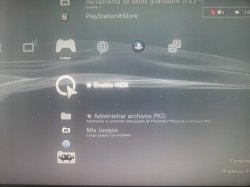
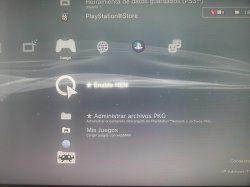
but I think it would be nice if you compile an optional package with the xml for HEN_v2_Installer_HDD_signed.pkg, it looks beautiful
 

Attachments

  • 2.jpg
    2.jpg
    80.5 KB · Views: 203
  • 2.jpg
    2.jpg
    80.5 KB · Views: 160
Last edited:
Itroublve Hacker
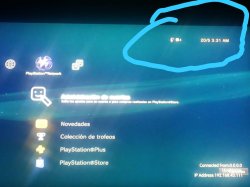
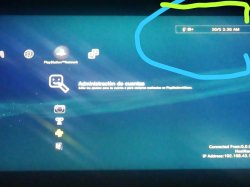
how can I put the transparent background on the watch?
in the pkg of Blue_OLD_Stock_theme.pkg it appears transparent to me, I know it's a detail but I changed the xmb_plugin_normal.rco from Blue_OLD_Stock_theme.pkg to Black_theme.pkg and it changed the icons to the old one
 

Attachments

  • theme 2.jpg
    theme 2.jpg
    71.6 KB · Views: 197
  • theme 1.jpg
    theme 1.jpg
    70.2 KB · Views: 204
Back
Top