PS2 wLaunchELF Release Thread

Never launch uLE/wLE by uLE/wLE. It starts to behaviours strange and some weird bugs appearing. I.e, for me uLE launched as third in a row (You know, we have a lot of forks and one can do something which other can't) it freezing.
 
A question about Wle HDDmanager:

Is the expand function able to use the adjacent free space?? For example:

- Delete a game installed just after the +OPL partition
- Expand the +OPL partition (within the space the deleted game freed)

Will the +OPL partition fill this space, or will it be divided (the expanded part after all installed games, as it does when using the create function)?
 
A question about Wle HDDmanager:

Is the expand function able to use the adjacent free space?? For example:

- Delete a game installed just after the +OPL partition
- Expand the +OPL partition (within the space the deleted game freed)

Will the +OPL partition fill this space, or will it be divided (the expanded part after all installed games, as it does when using the create function)?
Do not use the expand function, has far as i know it has a bug that can cause corruption to the partition.

Best regards.
 
Do not use the expand function, has far as i know it has a bug that can cause corruption to the partition.

Best regards.

Yes, I forgot about that... Now it is about an hour stuck with the "Expanding current partition" popup. The HDD light is always lit. I'll wait another while then if nothing happens I'll force power off the Ps2 (hoping that the file system won't get damaged).

I tried the other way but Wlaunchelf cannot see unused space. It installs everything sequentially, after the last installed thing.

I done so firstly:

- deleted the first installed game (Alter Echo, that's about 4470MB. I have MBR, HDLoader Settings and +OPL partition before it).
- deleted the 128MB +OPL partition and re-created it 4096MB.

This way the +OPL partition was created after all the 422 installed games (since as @sp193 once said to me, Wle doesn't know when space is freed, so it will be used only after the HDD will be filled up).

This is a Ulaunchelf related problem. For example, winhiip and HDL dump don't do it (indeed when i reinstalled Alter Echo with HDL dump, it has been installed exaclty where it was, before all other games).

Unfortunately i didn't noticed it (I thought Alter Echo was re-installed after all the games) and thus, thinking I had +4GB of space at the HDD beginning I did the ingenious:

- renamed HDLoader Settings partition to +OPL and expanded it to 4GB.

After pressing the button I noticed Alter Echo was just after HDL partition. Maybe if there were those +4GB of free space, the expanding process would have been successful??

If only I had seen the game, I'd have delete it and done a more sensible test.
 
Last edited:
Patience has paid off. After almost 2 hours Wle HDD manager managed to expand the +OPL partition to 4GB.

Now, I'd really like to know how exactly the expand function works, since there were only 256MB of free space between that partition and the next. The possibilities that comes to my mind are two:

1. HDDmanager moved all the 422 games up by 4GB of space, freeing the 4GB for correctly expand the +OPL partition (considering how long it took I wouldn't exclude this possibility).

2. +OPL partition is fragmented, having the first 256MB at the HDD beginning and the other 3840MB after all the installed games.

- I can say for sure that at least the first part of the partition is on the HDD beginning (since it takes 3 secs. to load the cached game list. It took 21 secs. when the partition was after the games).

- Also it doesn't overwrited the adjacent game (Alter Echo), since it works perfectly.


I'll see if I can find some specific documentation about the expand function. If the partition is as I supposed in option 2 (+OPL fragmented), I think I'll get delay from things that will be "on the other side" of the HDD (like cover arts). Being sure that's the case, I could do so:

- expand +OPL to 128MB
- delete Alter Echo
- expand +OPL back to 4GB
- re-install Alter Echo

This way +OPL should be all in one piece at the HDD beginning (and Alter Echo will be at the end). But before to do this I have to be sure.
 
Last edited:
I think it would be good if wLE always created the +OPL partition at startup regardless of the games
they have installed, if this is possible.

Best regards.
the default partition structure is created on libhdd side (HDD.IRX iirc)
so adding +OPL to the mix must be done on SDK side

It could be added inside wLE code, but it takes away the chance of choosing partition size


Patience has paid off. After almost 2 hours Wle HDD manager managed to expand the +OPL partition to 4GB.

Now, I'd really like to know how exactly the expand function works, since there were only 256MB of free space between that partition and the next. The possibilities that comes to my mind are two:

1. HDDmanager moved all the 422 games up by 4GB of space, freeing the 4GB for correctly expand the +OPL partition (considering how long it took I wouldn't exclude this possibility).

2. +OPL partition is fragmented, having the first 256MB at the HDD beginning and the other 3840MB after all the installed games.

- I can say for sure that at least the first part of the partition is on the HDD beginning (since it takes 3 secs. to load the cached game list. It took 21 secs. when the partition was after the games).

- Also it doesn't overwrited the adjacent game (Alter Echo), since it works perfectly.


I'll see if I can find some specific documentation about the expand function. If the partition is as I supposed in option 2 (+OPL fragmented), I think I'll get delay from things that will be "on the other side" of the HDD (like cover arts). Being sure that's the case, I could do so:

- expand +OPL to 128MB
- delete Alter Echo
- expand +OPL back to 4GB
- re-install Alter Echo

This way +OPL should be all in one piace at the HDD beginning (and Alter Echo will be at the end). But before to do this I have to be sure.
Expand is crap

also, +OPL larger than 3gb causes issues on the long run...
 
Expand is crap

also, +OPL larger than 3gb causes issues on the long run...

I cannot find any documentation/topic on how the expand function works.


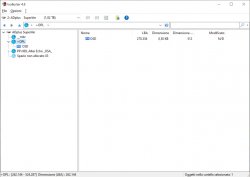
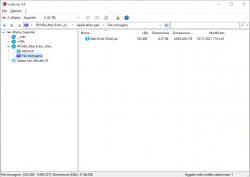
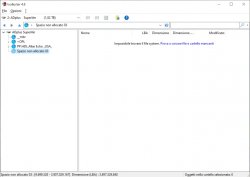
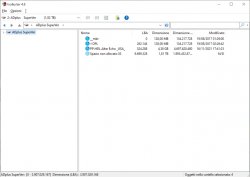
I checked the HDD with @IsoBuster and got this:

Immagine1.jpg Immagine2.jpg Immagine3.jpg

As you can see on the bottom left on the windows, the +OPL partition seems to be in one piece (start at LBA 262144 and finish at LBA 524287, then the first game Alter Echo starts just after).

However it is impossible that a 4GB +OPL partition is physically there (since there are 256MB of free space in that position). Unless all the 422 games have been moved up by 4GB.
It is possible that even if +OPL is physically at the end of the HDD, it is readed/scanned first as it was on the HDD beginning?


Also i don't know if IsoBuster is optimized for 2TB HDD, since it can only see Alter Echo (connecting another HDD, 320GB, IsoBuster can see all the 109 games). This can be either a isoBuster limit*** or a issue due to some filesystem damaging. I don't know since i never checked this HDD with isobuster before.

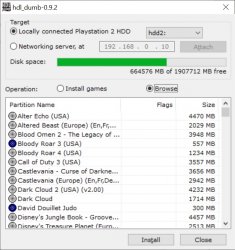
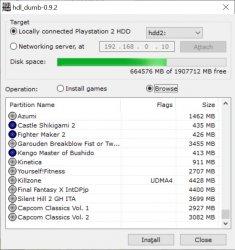
Btw I can correctly see all the games with Wle and also from PC with HDL dump:

Immagine4.jpg Immagine5.jpg

@sp193
you firstly made the 2TB support. Did you perhaps checked also the expand function when you were working at it??

*** I seems to remember I had problems with IsoBuster using this USB 3.0 case also for Xbox HDDs. I see if I can find another SATA to USB adaptor.

 

Attachments

  • Immagine0.jpg
    Immagine0.jpg
    127.8 KB · Views: 101
I cannot find any documentation/topic on how the expand function works.


I checked the HDD with @IsoBuster and got this:

View attachment 35265 View attachment 35266 View attachment 35267

As you can see on the bottom left on the windows, the +OPL partition seems to be in one piece (start at LBA 262144 and finish at LBA 524287, then the first game Alter Echo starts just after).

However it is impossible that a 4GB +OPL partition is physically there (since there are 256MB of free space in that position). Unless all the 422 games have been moved up by 4GB.
It is possible that even if +OPL is physically at the end of the HDD, it is readed/scanned first as it was on the HDD beginning?


Also i don't know if IsoBuster is optimized for 2TB HDD, since it can only see Alter Echo (connecting another HDD, 320GB, IsoBuster can see all the 109 games). This can be either a isoBuster limit*** or a issue due to some filesystem damaging. I don't know since i never checked this HDD with isobuster before.

Btw I can correctly see all the games with Wle and also from PC with HDL dump:

View attachment 35268 View attachment 35269

@sp193
you firstly made the 2TB support. Did you perhaps checked also the expand function when you were working at it??

*** I seems to remember I had problems with IsoBuster using this USB 3.0 case also for Xbox HDDs. I see if I can find another SATA to USB adaptor.
The usage of expand is totally discouraged.

delete partition, re-create and run HDDChecker on the PS2 to fix it
 
The usage of expand is totally discouraged.

delete partition, re-create and run HDDChecker on the PS2 to fix it

I readed about many problems with the expand function. However (in the cases I know at least) it always started from the user not waiting the process to finish. I guess that if I forced power off the Ps2 I'd have got corruption (then trying to expand again the Ps2 would have remained stuck/freezed forever).

Before to do anything else I'll check the HDD with HDDChecker and let you know the result. Apparently there's nothing broken.
 
I created another thread for continue this discussion.

I think there's no need for moving the messages writed so far, since this is a Wlaunchelf related problem. However the solution for this issue requires tests and programs not strictly related to Wlaunchelf, so better to not clog this thread.

Thus for who's interested in following/join this specific discussion about the expand function of Wlaunchelf HDDmanager, here it is: PS2 - Wlaunchelf HDDmanager partition expanding test | PSX-Place
 
Once upon in time "Expand" should be debugged and fixed, but heck... There is SOOOO much stuff still possible and to-do on the PS2 and there are only 2 dozen devs currently active (at max).
There are HUNDREDS of Homebrew-devs which did stuff on the PS2!


I am going to tag @Berion, because he is probably one of the best people to help out with Debugging and/or testing! Maybe @jolek and some others as well...
 
Last edited:
Once upon in time "Expand" should be debugged and fixed, but heck... There is SOOOO much stuff still possible and to-do on the PS2 and there are only 2 dozen devs currently active (at max).
There are HUNDREDS of Homebrew-devs which did stuff on the PS2!

It'd need just one of those developers to have the tools for debugging games for OPL.

Like sp193 was doing last year (or maybe was 2 years ago). We tested the games and so he perfectly knew where to look for debugging and could do the patches very quickly. Continuing like this, in one or two more weeks OPL would have reached 100% compatibility.

I guess no one of the current developers has such equipment.
 
Hello all,

so far my ulaunch 4.11 has worked great.
I now had to get a HDMI converter because my new TV no longer has a comp. port.
For this I had to change in the PS2 to "Y Cb/Pb Cr/Pr".
Since then I have unfortunately only a black picture instead of the ulaunch.
But it still works because the HotKeys still react and also load the stored programs - which I then see again.
Is there a trick how I can see the ulaunch again?

Greetings
etofi
 
Hello all,

so far my ulaunch 4.11 has worked great.
I now had to get a HDMI converter because my new TV no longer has a comp. port.
For this I had to change in the PS2 to "Y Cb/Pb Cr/Pr".
Since then I have unfortunately only a black picture instead of the ulaunch.
But it still works because the HotKeys still react and also load the stored programs - which I then see again.
Is there a trick how I can see the ulaunch again?

Greetings
etofi

4.11??
That's old as F%$#

wLaunchELF 4.43x_isr https://github.com/israpps/wLaunchELF_ISR/releases/download/latest/BOOT.ELF
 
My English is not good, so I can only use translation software to leave messages. May I ask you to provide a system that can support 4tb hard disk wLaunchELF
 

Similar threads

Back
Top