PS3 XMB Lock: Prevent System Settings Changes & XMB System Updates

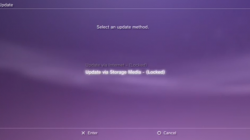
Here is a handy new utility for PS3 4.70 CFW user's as you can now lock down your CFW with this new hack by ErMaK86 & Echo6vi, this new homebrew utility called XMB Lock will allow you to lock your XMB System Settings, Network Settings and of course the System Update from being used/changed. This utility provides you a layer of protection from your Roommates, Friends, Kids, Spouse ect.[break]xx[/break] As these XMB settings can't be accessed or used. With the "System Update" disabled this will prevent a firmware update from the XMB. "System Settings" from the XMB is locked down so no one can change your settings. Then also the" Network Settings" can not be changed if this XMB Lock is in affect also. At this time XMB Lock is only for 4.70 CFW user's, You can view all the details below in the info provided:


update - small note:

bitsbubba said:
Just a note: it says reboot requires Cobra CFW but it also requires webMAN (not all Cobra CFW users use webMAN


ICON0.PNG


ABOUT - XMB LOCK
This tool for CFW 4.70 will protect your console's settings locking the System settings, Network settings and System update.

The tool also allows to install a System Reboot option on XMB for any CFW 4.70 Cobra.

ScreenShots
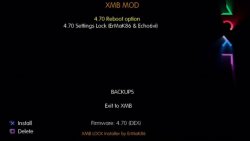
XMB Mod screen1.JPG
Installer (modified XMBM+ Installer)
Xmb lock 1.PNG
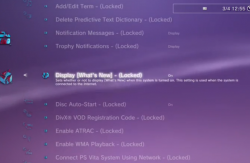
LOCKED SYSTEM SETTINGS
Xmb lock 2.PNG<--<--<--<--<-- LOCKED SYSTEM SETTINGS
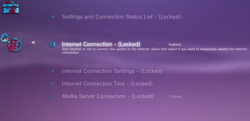
Xmb lock 3.PNG
LOCKED NETWORK SETTINGS


Installation

Installation: Once you have made your choice of settings, please install the XMBLOCK REBOOT.pkg enter the homebrew and select the activate lock.An want to make changes to settings then deactivate.

[video=youtube;e28WWfl0i4U]https://www.youtube.com/watch?v=e28WWfl0i4U[/video]
Download: XMB LOCK
Mirror:Brewology

Source: psjailbreak.gr / Brewology.com

 
ermak86


Im sorry i may come accross a little dumb ; do i just click on either 'Activate Lock.zip' or 'Deactivate Lock.zip' once the archive is extracted. Or do i have to replace per file wilst dev_flash enabled in filemanager?

thanks

the files inside each archive r installable zip files. mmos will mount dev_blind automatically and install the file(s) to the correct directories of the flash. btw, ermak (long time no see btw), but u can create a dev_blind base zip (i.e. PS3~dev_blind.zip) and put each of the files being replaced in their download directories. that way, u'll only have to install one zip file.
 
the files inside each archive r installable zip files. mmos will mount dev_blind automatically and install the file(s) to the correct directories of the flash. btw, ermak (long time no see btw), but u can create a dev_blind base zip (i.e. PS3~dev_blind.zip) and put each of the files being replaced in their download directories. that way, u'll only have to install one zip file.
to enable lock it replaces files on dev_flash, to disable it returns original files is the reason for 2 zip installs
 
they are multiMAN install packages, in multiMAN file manager (mmOS) double click on the zip file and it will install where it needs to go. Activate to install lock, Deactivate to uninstall lock

Do I need dev_flash enabled in order for these badboys to unpack ?

Is this possible from within WebMAN MOD rather than MmOS or even ftp commands?
 
Do I need dev_flash enabled in order for these badboys to unpack ?

Is this possible from within WebMAN MOD rather than MmOS or even ftp commands?

the one I posted above only requires 1 zip install per activate/deactivate, nothing but mmOS

Edit: no need to enable dev_blind as multiMAN will do it for you
 
I tried the app and was really happy with it , until I tried to re-enable my internet connection , it would not let me access anything in system settings column / network settings

I was hoping this was a bug , I only installed the XMBLOCK , I did not install the 'rebooter options' I am on 4.70 COBRA CFW 7.10 V1.01

Had to restore , which works fantastically btw.

Will there be updates from this app?

Am I doing something wrong or does network settings work for others once lock is 'activated' ?

thanks regardless.
 
it would be cool if u could use a button combination to enable or disable the lock. the 360's base firmware actually has something like that in which u have to push a button combination in order to change certain settings such as blocking xbl. and, if u update say a jtag/rgh, the settings still exist afterwards, so the security settings won't be removed unless u remove them urself.
 
Am I doing something wrong or does network settings work for others once lock is 'activated' ?

thanks regardless.
this disables all options within system settings, updates and network settings, I myself wish it was security settings and not network
 
I can edit xml & rco's manually , I might pull em apart if I get time , surely if I just copy & paste make new Xml , Rco but find network setting and any others and keep them references untouched it should be cool. Or maybe just look into locking out 'system update & Automatic game updates only' and overwrite files in dev_flash manually.

If I get chance & time I will have a go.
 
I can edit xml & rco's manually , I might pull em apart if I get time , surely if I just copy & paste make new Xml , Rco but find network setting and any others and keep them references untouched it should be cool. Or maybe just look into locking out 'system update & Automatic game updates only' and overwrite files in dev_flash manually.

If I get chance & time I will have a go.

If you can make this work without webman and cobra that would be a great addition to the community!
 
If you can make this work without webman and cobra that would be a great addition to the community!
Lock already works without webMAN, as for reboot (which did) I posted a pkg which require yo to install an additional pkg but then the reboot calls that EBOOT and not webMAN for restart function

EDIT: I'll be posting another build sometime this weekend using haxxxen's pkg for reboot
 
Last edited:
Lock already works without webMAN, as for reboot (which did) I posted a pkg which require yo to install an additional pkg but then the reboot calls that EBOOT and not webMAN for restart function

EDIT: I'll be posting another build sometime this weekend using haxxxen's pkg for reboot

Looking forward for new developments! :)
 
I can edit xml & rco's manually , I might pull em apart if I get time , surely if I just copy & paste make new Xml , Rco but find network setting and any others and keep them references untouched it should be cool. Or maybe just look into locking out 'system update & Automatic game updates only' and overwrite files in dev_flash manually.

If I get chance & time I will have a go.
xml & rco is just to change the way it shows on XMB the real locking procedure is done within the sprx
 
xml & rco is just to change the way it shows on XMB the real locking procedure is done within the sprx

then I doubt i'll be pulling part , I was happy with the visual side of things , just locking out of network , its a bit vague no real accuracy just widespan functionality removed

If I could mod the sprx , I would have it lockup FIRWARE UPDATE , Automatic gameupdates and nothing more really. And if I could still flash cfw from recovery menu whilst lock is activated then great but otherwise I couldn't be arsed unlock to flash to re-lock becoming a tedious task , as for reboot option I for one personally cant see how we can benefit from reboot button on xmb

I often wondered if these reboot's actually could cause harm to HDD's internal ones I mean?
 
Hi
very nice tool. xmb lock is the best tool since webMAN.
is there a chance for a 4.46 version in next time? or is there a TUT on how to modify sprx files?

thanks
 
Back
Top