PS3 XMB Lock: Prevent System Settings Changes & XMB System Updates

Here is a handy new utility for PS3 4.70 CFW user's as you can now lock down your CFW with this new hack by ErMaK86 & Echo6vi, this new homebrew utility called XMB Lock will allow you to lock your XMB System Settings, Network Settings and of course the System Update from being used/changed. This utility provides you a layer of protection from your Roommates, Friends, Kids, Spouse ect.[break]xx[/break] As these XMB settings can't be accessed or used. With the "System Update" disabled this will prevent a firmware update from the XMB. "System Settings" from the XMB is locked down so no one can change your settings. Then also the" Network Settings" can not be changed if this XMB Lock is in affect also. At this time XMB Lock is only for 4.70 CFW user's, You can view all the details below in the info provided:


update - small note:

bitsbubba said:
Just a note: it says reboot requires Cobra CFW but it also requires webMAN (not all Cobra CFW users use webMAN


ICON0.PNG


ABOUT - XMB LOCK
This tool for CFW 4.70 will protect your console's settings locking the System settings, Network settings and System update.

The tool also allows to install a System Reboot option on XMB for any CFW 4.70 Cobra.

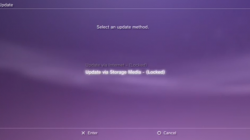
ScreenShots
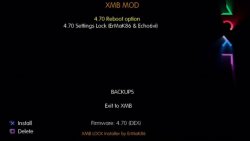
XMB Mod screen1.JPG
Installer (modified XMBM+ Installer)
Xmb lock 1.PNG
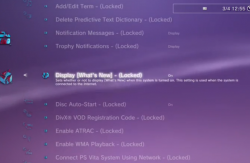
LOCKED SYSTEM SETTINGS
Xmb lock 2.PNG<--<--<--<--<-- LOCKED SYSTEM SETTINGS
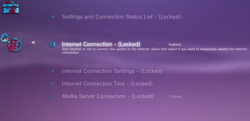
Xmb lock 3.PNG
LOCKED NETWORK SETTINGS


Installation

Installation: Once you have made your choice of settings, please install the XMBLOCK REBOOT.pkg enter the homebrew and select the activate lock.An want to make changes to settings then deactivate.

[video=youtube;e28WWfl0i4U]https://www.youtube.com/watch?v=e28WWfl0i4U[/video]
Download: XMB LOCK
Mirror:Brewology

Source: psjailbreak.gr / Brewology.com

 
ermak could u support me?
i used ur tool version 2.0.1 on cfw 4.70 with no cobra and now it gaves me a black screen, how could i fix this??
 
ermak could u support me?
i used ur tool version 2.0.1 on cfw 4.70 with no cobra and now it gaves me a black screen, how could i fix this??

delete xmb lock v2.01 and install it again in clear install.after install accept to remove backups(old files from xmblock):D
if you have problem send me...
 
i can't go to xmb anymore and when i reboot my ps3 it gaves me a black screen, i cant do anything.
even safe mode options dont work. i used ur tool and did full lock. so if u know anything what i could do to fix this, please help me.
it hurts me a lot to lose my ps3.

i hope to hear from u soon.
 
What is your PS3 model (cech-XXxx)? And what do you mean that safe mode options not work? You can go to safe mode but if you select update firmware (disconnect internet!) then what?
 
Last edited:
CECH-C04 AND IF U SELECT 1OPTION in safe mode, they do nothing, it just reboots ps3 and then it gives a black screen again
 
CECH-C04 AND IF U SELECT 1OPTION in safe mode, they do nothing, it just reboots ps3 and then it gives a black screen again

i don't thing so if this problem its from xmblock.
anyway do some steps and tell as if boot normal
1.go to recovery and make rebuild database
2.go to recovery ad make restore file system
3.go to recovery and reinstall same firmware
4.just test the video settings by reseting.
5.check if hdd is healthy and test other hdd
your :x:PS3:[]: is still alive...
 
Last edited:
i don't thing so if this problem its from xmblock.
anyway do some steps and tell as if boot normal
1.go to recovery and make rebuild database
2.go to recovery ad make restore file system
3.go to recovery and reinstall same firmware
4.just test the video settings by reseting.
5.check if hdd is healthy and test other hdd
your :x:PS3:[]: is still alive...

I think he only needs to re-install CFW through Safe/Recovery Mode then all should be fine
 
CECH-C04 AND IF U SELECT 1OPTION in safe mode, they do nothing, it just reboots ps3 and then it gives a black screen again

Because first option is actually just reboot. Your PS3 is based on NAND memory so best thing will be probably flash one more time CFW using 6th option. On nor based ps3 changing hdd can help but in your case this do nothing.

Before that you can try option 3 then 4. If not help flash cfw.
 
What does it mean XMB Reboot System(pkg dependant) and XMB Reboot System(webMAN dependant)? :hmmm:
 
What does it mean XMB Reboot System(pkg dependant) and XMB Reboot System(webMAN dependant)? :hmmm:
pkg dependant means you need to install an additional pkg (app) for it to show up and work

webMAN dependant means it needs webMAN running because it uses restart function within webMAN
 
pkg dependant means you need to install an additional pkg (app) for it to show up and work

webMAN dependant means it needs webMAN running because it uses restart function within webMAN

Thanks for the explanation, but I still have doubts about the XMB Reboot System(pkg dependant).
Where can I download this pkg additional and this option would be for a CFW not COBRA?
 
Thanks for the explanation, but I still have doubts about the XMB Reboot System(pkg dependant).
Where can I download this pkg additional and this option would be for a CFW not COBRA?


The pkg is included and should show up as a bubble install
 

Featured content

Trending content

Back
Top