alexboanta3107
Member
Error: Not enough memory to run 3D Pinball.
Press X to exit.
Can you fix this issue?
Press X to exit.
Can you fix this issue?



you're not giving me much to work with here...Error: Not enough memory to run 3D Pinball.
Press X to exit.
Can you fix this issue?

there is no field rendering involvedDoes it use field or frame rendering for either?

alright, i've looked into gsKit's source code and found that ZBuffering is enabled by default which eats up some more VRAM, i've turned this off and also restored the splash screen
test build with forced NTSC mode
 +
+  , +
, +  , +
, +  ., , .
i'll take a look and see if it's an USB driver issue going on in thereBut there is something I forgot to add...
I mean I have an issue with devices compatibility.
Some of them just don't work:
Although them work fine with other homebrew (OPL, SMS, FCEU, etc)
i could do that, but then you can't control the paddles and launch the ball with the DPad if someone wanted to use that layoutAs for controls.
Is there a chance to change how the table can be shaken?
Instead of
Use only D-PAD (without triangle):
i could do that, but then you can't control the paddles and launch the ball with the DPad if someone wanted to use that layout
 or
or  for that.
 ,
,  ,
,  ,
,  and... , . is unused., .
v0.1 and v0.2 are now stuck at black screen!
v0.3 is now stuck at converting certain sound files!
In the latest test build the blue text is blinking!


Any word on relative path instead of mass:/APPS/3DPINBALL/ being hardset?I like 1052's list above and would add relative folder-paths, so that the app can be placed anywhere.
@Headshotnoby added this and other changes a long time ago, but a new release with these changes is still not released.Any word on relative path instead of mass:/APPS/3DPINBALL/ being hardset?
I didn't git checkout with that specific commit. I just compiled the latest. I don't know what issues you all are encountering, but see if this fixes anything:@Headshotnoby added this and other changes a long time ago, but a new release with these changes is still not released.
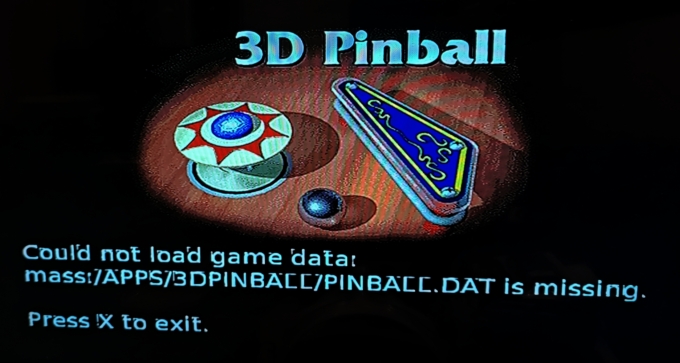
Afaik, you don't need the assets to build it. I didn't have them. However, you need the assets to run the game. I've compiled this game for several systems, and some require the assets be baked in; others do not. I don't think this one does.pinball.dat is not found
I changed it back to mass:/APPS/3DPINBALL for the assets. it's in winmain.cpp, where it gets this info. here's the new version. try putting the data there and see what happens. I'm unable to test: https://www.mediafire.com/file/lgddbkxpmp6ryzh/3dpinball-ps2.zip/file

