UPDATE (May, 2022) 4.89 HFW Released see here.
.
Original Article (4.84 HFW - March 2019): Huge News as the PS3 exploit ladder has taken a step up into 4.84 rung, with a new approach to bring back PS3Xploit functionality on 4.84. With a Hybrid Firmware (NOT A CFW) that can be installed on ANY MODEL PS3 over any Official Firmware (OFW) version. .The only thing this modified firmware essentially does is bring back the patched webkit from OFW 4.82 that was an entry point for PS3Xploit, if you recall when 4.84 was released developers @bguerville and @esc0rtd3w stated the exploit was not actually patched but rather only the webkit entry used was removed in 4.83+ which rendered the actual exploit unreachable (not patched and could be restored). Now the webkit is back for 4.84 OFW thanks to this new clever magic that has allowed OFW user's to use and install this slightly modified Firmware.

So, what does all this mean? Now it will be just like it was back in 4.82 before PS3Xploit was "patched"(some ps3xploit tools need updated still) you will be able to install a CFW (on a CFW compatible model) and for those unfortunate user's that does not have a CFW Compatible model (i.e. SuperSlim/late slims) you have will have access to the HAN exploit . So for new user's or ones that updated, here is your second chances thanks to the efforts of the members of PS3Xploit Team and to @Joonie (waved magic wand on files) and prepared this magically release, @habib (for valuable input on this project) and @esc0rtd3w (work in porting ps3xploit tools to 4.84)

It has been an exciting month here at psx-place with so much progress on all fronts of the PS3 . the fuel of this project actually comes from a user simply igniting a spark with an idea as @Doge_Rules did with this thread truly making it a community effort. Updated - to version 4.84.2 (see details below)

-STLcardsWS

HFW_Joonie_ps3Xploit.jpg


  • Joonie is back again with 4.91 HFW


  • Joonie is back with an update to 4.90 with 4.90 HFW.

  • 4.89 HFW

  • 4.88 HFW:

  • UPDATE 4.87.1 RELEASED:
    via @Joonie:
    It's been a while, saw a new FW dropped today. So here's yet another one for everyone.

    https://mega.nz/file/fAJFwSqL#PeQfhVjbGAi69S4Jr369Tly4trG4Y9ALqdlUIBzW8qk

    Since there's no change in the kernel, you may see a PS3HEN update anytime soon.

    Have fun and stay safe at home.


  • Release Post via Joonie
    .
    4.86.1 (HFW) Hybrid Firmware
    It's been a while, saw a new FW dropped today. So here's yet another one for everyone.

    https://mega.nz/#!zIpFnDjB!PwJVSc15POf0jzFDQuUllxJahdzpnb48TW74hJOgjyc

    Since there's no change in the kernel, you should see a PS3HEN update anytime soon.

    Have fun and stay safe at home.​


  • Release Post via Joonie
    .Here's a little gift for everyone who has working PS3 (excluding RSOD or broken BD/BT units)

    Here's what we have found.
    Code:
    1. no changes in Kernel
    2. no changes in VSH
    3. no changes in isolated loaders
    4. Stability improved

    Enjoy your latest HFW 4.85.1 and stay tuned for more updates coming from various developers.

    Download link : https://mega.nz/#!SAYhnYYB!6CmxOz0H_pSuVRb4YZ7-lYvY66hP0LlohgVMWfFut4Q

    FYI @STLcardsWS @esc0rtd3w @habib @Zar @aldostools

    To devs - PS3HEN can literally be ported in 5 mins. or you could just use PS3HEN 2.3.1 and it should work right out of the box.

    To everyone else - Don't rush your update until all the tools get fully ported & released.

  • 4.84.2 HFW (Hybrid Firmware)
    Restores PS3Xploit Flasher/Tools & PS3Xploit HAN for 4.84 OFW user's

    Today, we proudly present the very first modified OFW that can be installed on all PS3 models. (NOTE: THIS IS NOT A FULL BLOWN CFW, HOWEVER IT Allows you to run the patched webkit exploit that's ported to 4.84)

    Yes, you didn't hear wrong, it can be installed over

    • ALL OFW versions on ALL PS3 models
      • ex) OFW 4.83, 4.84 , CECH-3XXX, CECH-4XXX and etc..

    We wanted this to be called "HHHFW" since it was Hybrid, Hack-able, HAN ready also inspired by @habib but let's call it HFW since this is Hybrid FW (Well you can call this MFW).

    The idea was reminded by some guy who didn't want to be annoying but actually ended up being helpful: @ psx-place.com

    Habib had this idea long time ago but the previous attempt was not successful due to lack of interest and preparation.

    As you all know, I recently started messing with my PS3 again and this idea was brought back.

    So then I went ahead and tried his magical idea.... after a few hours later... Boom!!, now we have HFW that works on all PS3 models (including 3K and 4K) that allows the previously patched exploit by using old webkit from 4.50 that's been used until 4.83. This method is rather hacky than technical, so I would like to leave this method under the radar for now until it gets patched out (this can easily be patched).

    What can you do with this HFW 4.84.1/2?
    1. You can use PSN since the FW is the latest.
    2. You can downgrade/Install CFW on your PS3 if your model is downgrade-able/hack-able (excluding CECH-3K and 4K)
    (The same capability as what you had for 4.82 OFW)
    3. You can use HAN and all the tools that worked up to 4.82 with this FW.
    4. You can always go back to the real OFW 4.84 if you wish.​

    To all scener's and developers
    • Please update the HAN toolbox or any xml that can support 4.84 if anyone's available.



    .UPDATE 3-22-2019 - 4.84.2 Released
    .​
    HFW 4.84.2_PS3UPDAT.PUP
    • Bugfix : Fixed the installation issue with regions that use following languages
      English (UK), Turkish (Turkey), and Portugal (Brazil) , Thanks to @citra mulia to report the bug :)
    • upload_2019-3-22_0-1-23.png
    4.84_icon.jpg

    ,​
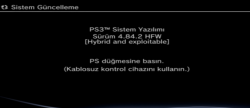
    System Update displaying 4.84.1 HFW
    c3LQ54O.png


    PS3Xploit Tools running on 4.84 HFW
    upload_2019-3-21_9-15-20.png

    upload_2019-3-20_22-7-55.png


  • DO NOT UPDATE WHEN A NEW OFW FIRMWARE UPDATE IS RELEASED!!!

    -STLcardsWS
    Here is a video tutorial by @MrMario2011


Release Thread & Download: HFW 4.87.1

.
Update May 2022 https://www.psx-place.com/threads/p...-the-ps3-exploit-for-noncfw-ps3-models.37273/


UPDATE JAN. 2023
Mirror's HFW Downlaod's :

LINK

 
Last edited by a moderator:
Not quite sure what to do and I'm freaking out. Did the normal dump for backup. Flashed the flash_484.hex file successfully. Dumped again. check fails. ERROR: unable to determine flash type! It doesn't seem to be a valid dump. I've tried multiple flash drives. The dump completes successfully. I'm running out of ideas. I think I have one more flash drive to try before I give up. Any ideas if it fails again?
 
Thanks for your help I got it to work and is there anything else you recommend I should install

multiMAN v04.82.00:
https://www.psx-place.com/resources/multiman.530/.
webMAN MOD:
https://github.com/aldostools/webMAN-MOD/releases,
https://store.brewology.com/ahomebrew.php?brewid=310,
https://www.psx-place.com/threads/webman-mod-general-information-thread.9643/.
Movian:
https://store.brewology.com/ahomebrew.php?brewid=196,
https://www.psx-place.com/resources/movian-official.152/.

Eventually:
ManaGunZ:
https://www.psx-place.com/resources/managunz.497/.
RetroArch:
https://www.retroarch.com/?page=platforms.

I'm having an issue with the second NOR dump. I flashed the 484 hex file, dumped it, ran it through the pyps3checker. Says Unable to determine flash type! Seems to be an invalid dump. I've ran the dump 3 times. The exploit runs fine, the dump works fine. Size of the file seems fine. What am I doing wrong here?

Try to post your problem here:
https://www.psx-place.com/forums/ps3xploit-cfw-installer-ps3-25xx-models-lower.223/.
 
I got it working. Took 4 different flash drives to find one that actually recorded the dump properly. I swear I was about to freak out like an chimp on crack.....
 
Hi, I have a ps3 with error 8002f1f9, it is the bt / wifi module. I was seeing that there is firmware for cfw no bt that supposedly fix the update loop.
Could the same be done with 4.84 hfw? Or yes or if I need to change the module?
Comunidad
Comunidad
 
Hello guys
I'm new here
Just tried downloading the 4.83HFW updates 1 and 2 but can't even extract it on my pc
When extracting, only getting checksum error
Tried all sort of archive repairer without success
Also when trying to downlad it via mega link it only stucks at about 25% then return to 22% all over again.
Can someone please me from this hell?
Thanks
 
There is no 4.83 HFW, currently you should be downloading 4.84.2 HFW (HFW_4.84.2_PS3UPDAT_03_22_2019 .7z).

I don't understand what "checksum error" means?
Different checksum?
 
There is no 4.83 HFW, currently you should be downloading 4.84.2 HFW (HFW_4.84.2_PS3UPDAT_03_22_2019 .7z).

I don't understand what "checksum error" means?
Different checksum?
Yes sorry for the mistake
It id actually 4.84hfw update
When trying to extract downloaded files with winrar or any other archiver i simply got the message : Checksum error like on the pic
 

Attachments

  • 156417112847858787758.jpg
    156417112847858787758.jpg
    2.8 MB · Views: 281
I don't know from were you've downloaded HFW 4.84.1?
Because official link for this version was deleted (file is no longer available).
Currently only link to HFW 4.84.2 should work.
 
Just to know, is it in 7z archive format too? Because i'm always facing checksum error when trying to decompress 7z archives format
I still don't figure a fix for it yet
 
Are you using WinRAR 5.71?
If not, try this version.

On the other hand.
I've unpacked this archive with 7-Zip.
 
Hey bro I'm having the same problem, i have installed the pup file my hard drive is FAT32 and it is in PS3/UPDATE everything should be fine but it still says no applicable data found if you know anything that could help me it would be much appreciated
 
Hey bro I'm having the same problem, i have installed the pup file my hard drive is FAT32 and it is in PS3/UPDATE everything should be fine but it still says no applicable data found if you know anything that could help me it would be much appreciated
Make sure your USB drive in FAT32 is formatted with MBR and not GPT. If it can be detected by the PS3 on the XMB under the Photo, Music and Video categories then it's properly formatted.
If it's detected but the PS3 still says no update data found, then make sure you renamed the file so the folder structure looks like the following. X: is whichever drive letter your USB drive is.

X:\PS3\UPDATE\PS3UPDAT.PUP

If the problem persists, try checking the MD5 (there are free applications available for this such as WinMD5Free) of the file you downloaded. It should be: 4247362b54fadd2e4d7c09007f720803

If it doesn't match, re-download the 4.84 HFW .PUP and follow the same process as outlined above. Hope this helps solve your problem. :)
 
I just wanted to make absolutely sure I can install a hfw then a cfw. I have CECH-3001A I seen it said 3xxx or 3k somewhere for hfw but I was wanting to go to cfw if I could.
 
Make sure your USB drive in FAT32 is formatted with MBR and not GPT. If it can be detected by the PS3 on the XMB under the Photo, Music and Video categories then it's properly formatted.
If it's detected but the PS3 still says no update data found, then make sure you renamed the file so the folder structure looks like the following. X: is whichever drive letter your USB drive is.

X:\PS3\UPDATE\PS3UPDAT.PUP

If the problem persists, try checking the MD5 (there are free applications available for this such as WinMD5Free) of the file you downloaded. It should be: 4247362b54fadd2e4d7c09007f720803

If it doesn't match, re-download the 4.84 HFW .PUP and follow the same process as outlined above. Hope this helps solve your problem. :)
Make sure your USB drive in FAT32 is formatted with MBR and not GPT. If it can be detected by the PS3 on the XMB under the Photo, Music and Video categories then it's properly formatted.
If it's detected but the PS3 still says no update data found, then make sure you renamed the file so the folder structure looks like the following. X: is whichever drive letter your USB drive is.

X:\PS3\UPDATE\PS3UPDAT.PUP

If the problem persists, try checking the MD5 (there are free applications available for this such as WinMD5Free) of the file you downloaded. It should be: 4247362b54fadd2e4d7c09007f720803

If it doesn't match, re-download the 4.84 HFW .PUP and follow the same process as outlined above. Hope this helps solve your problem. :)
Hey man thanks for the suggestion I tried the MD5 application and they matched up so im not sure what is going wrong but when i see other people doing the version check the file has a readme symbol but mine is notepad idk if that means anything but i just can figure out why it keeps saying no applicable data found
 
I just wanted to make absolutely sure I can install a hfw then a cfw. I have CECH-3001A I seen it said 3xxx or 3k somewhere for hfw but I was wanting to go to cfw if I could.
Systems above 2500 with datacode 1A, CFW cannot be installed, doing so you will 99.9% brick your system, and there is no Hardware Flasher to save you.

For a minimal CFW requirement is to have a PlayStation3 with Factory Firmware 3.56 or lower, its a reference that MetLdr2 its not implemented in thoes models, thus making CFW instalation possible, systems above 2500 have MetLdr2 implemented, so as Factory Firmwares starting with 3.60, thus CFW cannot be installed on them, resulting in a permanent brick.


Sent from my G8141 using Tapatalk
 
Systems above 2500 with datacode 1A, CFW cannot be installed, doing so you will 99.9% brick your system, and there is no Hardware Flasher to save you.

For a minimal CFW requirement is to have a PlayStation3 with Factory Firmware 3.56 or lower, its a reference that MetLdr2 its not implemented in thoes models, thus making CFW instalation possible, systems above 2500 have MetLdr2 implemented, so as Factory Firmwares starting with 3.60, thus CFW cannot be installed on them, resulting in a permanent brick.


Sent from my G8141 using Tapatalk
Why you say there is no Hardware Flasher to save you ??? all Flasher can recover that to get it back to work Teensy,Progskeet or E3 Flasher
  • just dissamble PS3, bridge solder GND&Tristate
  • put NOR Clip on NOR Chip in motherboard
  • Get Dump with Flasher
  • open it in PS3DumpChecker in PC and flash it with coreOS from OFW 4.84 or with PyPS3Patcher and do the need command
  • Flash your PS3 with Fixed dump and you are good to power on your console again and put HFW pup in USB and update and XMB will be there again
 
I figured as much. I seen the firmware was above 3.56 for it's minimum firmware. But it seems like the hfw with han enabled is close enough.
 

Featured content

Trending content

Back
Top