PS3 Berion's HDD Decryption Helper Scripts on Linux: permission denied on some /dev_hdd0/game files

pingponghs

Forum Noob
Hey, everyone! First post here.

I followed the guide for Berion's scripts on my Linux PC to recover some files of my dead PS3's HDD. I could mostly copy everything, but for some reason there are files in /dev_hdd0/game that I can't read because I don't have the necessary permissions. As someone on Reddit has already suggested it, yes, I'm running the files as root.

For example, if I go over to LittleBigPlanet's folder and try to copy one of the profile files to my home folder:

Code:
$ sudo cp bigfart100 ~
cp: cannot open 'bigfart100' for reading: Permission denied

So what am I missing here?
 
Hello.

Permissions issues can occurring on damaged UFS2 filesystem. You can try different approach: make that partition dump from the mapper. It will be in decrypted form, so you can use standard NetBSD 6.0 (PPC64) for data retrieving (or tools dedicated to work with UFS2 on Windows, BSD etc.).

Code:
sudo dd if=/dev/mapper/ps3hdd2 of=${HOME}/ufs2hell.img status=progress

ps3hddX number depend of model type, NAND vs NOR; it is the biggest partition.

If disk have bad sectors use ddrescue to make image (syntax is different than above for dd).
 
Permissions issues can occurring on damaged UFS2 filesystem. You can try different approach: make that partition dump from the mapper. It will be in decrypted form, so you can use standard NetBSD 6.0 (PPC64) for data retrieving (or tools dedicated to work with UFS2 on Windows, BSD etc.).

Hello Berion, thanks for your reply.

I want to understand this, what you mean is that I should use NetBSD 6.0 specifically because it supports PPC64 (which I can gather from your comment and some googling was used by the PS3 fs and is now deprecated in many OSs and I guess NetBSD 7.0+)?

If I were to use, say, latest version FreeBSD on a VM, and try to mount the image with mount, would that not work/break anything?
 
It must be NetBSD 6.0 for PPC64. Nothing else can handle UFS2 made by PS3 (detected in it as FFS) relatively properly.

All changes in fs, especially damaged are invasive and can lead you to further damages. It is never safe so never work on the only copy you have. Just as last resort, worth to try use that.

In short, make image from decrypted user partition mapper, attach it to loop dev and expose it as device for qemu OR expose that mapper as device for qemu (qemu must be ppc64 variant or else will be unable to emulate PPC 64bit operating systems). Then on qemu run mentioned by me OS and mount that disk (from his perspective will be a disk). Then do fsck with fixing flags and after that try copy files which failed earlier.
 
In short, make image from decrypted user partition mapper, attach it to loop dev and expose it as device for qemu OR expose that mapper as device for qemu (qemu must be ppc64 variant or else will be unable to emulate PPC 64bit operating systems). Then on qemu run mentioned by me OS and mount that disk (from his perspective will be a disk). Then do fsck with fixing flags and after that try copy files which failed earlier.

Sorry for the noobiness, I tried to do this on my own but my computer literacy has a limit... I've never ran a VM on any arch that's not x86. I need some help setting it up.

I got to the 6.0.1 repo: https://archive.netbsd.org/pub/NetBSD-archive/NetBSD-6.0.1/iso/
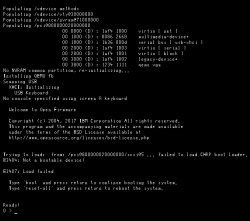
I'm confused as to which of the ppc options I should pick, and if any of them even are actually ppc64. I tried the Open Firmware image (ofppc) and the generic test boards image (evbppc).

Then I installed packages qemu-system-ppc (trying to install qemu-system-ppc64 falls back to this package) and virt-manager. I used the following relevant configs on the setup:

OS: Generic
Arch: ppc64
Machine type: p-series (the default option)

When I try to boot it up I get the messages shown in the attached file.

I tried to make an x86 NetBSD 9.3 VM to check if I was missing something but it installs fine. So I'm doing something wrong here.
 

Attachments

  • Screenshot from 2025-12-12 17-19-23.png
    Screenshot from 2025-12-12 17-19-23.png
    15.2 KB · Views: 21
Sorry. I look at scripts and inside Expander, you have everything you need to setup NetBSD or FreeBSD (i.e at the end in commented sections) including links to images and vm setup. Of course purpose of "PS3 HDD Expander.sh" is different, so don't follow it, just use it as reference material. Let me know if you need some assistance, also @andshrew could help.

In short, you need decrypt disk or mount decrypted user partition on Linux. On the same Linux, setup vm and inside of it which runs bsd, do the magic.
 
inside Expander, you have everything you need to setup NetBSD or FreeBSD (i.e at the end in commented sections) including links to images and vm setup

I found the comments. I guess they will be helpful once I get the proper netbsd image, as I understand that they describe commands I would use while using the VM; but my main doubt still is what netbsd image I have to get, and where.

Also, I see the freebsd image downloaded is in .qcow2 format. That gives me more questions, do I have to get a qcow2 formatted netbsd image?
 
Forget about NetBSD. I was wrong, remembered bad. ;) What you need is that disk image with FreeBSD, link in Expander script.
 
Haha, well that's better! I managed to successfully run FreeBSD by running the command that's inside Expander
:D

Code:
sudo qemu-system-ppc64 -smp 1 -m 1g \
                                                                          -drive file=${HOME}/ps3/storage/vm/freebsd.qcow2,format=qcow2,if=virtio \
                                                                          -net nic,model=virtio \
                                                                          -machine pseries,cap-cfpc=broken,cap-sbbc=broken,cap-ibs=broken \
                                                                          -vga none -nographic

But, you'll notice I deleted the line in which I mount the ps3 partition. That's because I'm still confused as to how that should be done.

Calling back to your first reply, you told me to make a copy of the biggest partition

Code:
sudo dd if=/dev/mapper/ps3hdd2 of=${HOME}/ufs2hell.img status=progress

I ended up with a 157,6 GB image, ufs2hell.img (just noticed your name pick while writing this. lol). As I understand from what you said, this image is a decrypted version of the main partition. Now, how do I exactly go about mounting it...? I clearly can't mount it to Linux first because UFS2 is not supported.

If I try to show the image to the system as a loop device and not mount it, and then when using qemu add the line

Code:
-drive file=/dev/loop0,format=raw,if=virtio

qemu complains

Code:
qemu-system-ppc64: -drive file=/dev/loop0,format=raw,if=virtio: The device is not writable: Permission denied

https://www.qemu.org/2021/08/22/fuse-blkexport/ What I get from this is that I have to somehow get a raw file from the image i have, and then convert it to qcow2. And I also get that qemu complained because the img is not in raw format as i told it with the parameter format=raw.

So, this is what I should do? Export as raw, then export as qcow2? If so, is there any additional parameter I should add for it to work?\

Forget about NetBSD. I was wrong, remembered bad. ;) What you need is that disk image with FreeBSD, link in Expander script.
Forget my last comment, I figured out that I had to expose the image file to QEMU instead of the loop device.

So yeah, now I can mount that image and see the files from inside FreeBSD. Great! :D Now... how do I take them out???

All the guides I find explain ways to do this via the virt-manager GUI, but I'm using the QEMU client. Could you tell me the most straight-forward way to export these files to the host?
 
Last edited by a moderator:
Hello, you can use another virtual disk but with some human kind filesystem (i.e EXT3 (do not try 4 due to default journaling) or exFAT), mounted in the same way. Or via virtual FTP/SMB. Then in terminal inside FreeBSD, just mount it and copy from one mount point (PS3 contraption) to that another disk/network share. I'm not much familiar with BSD family but most tools and syntax are even the same (except of course dev/mnt nomenclature different in both).

Forget my last comment, I figured out that I had to expose the image file to QEMU instead of the loop device.
You can use loop but then syntax be different. ;)
 
Hello, you can use another virtual disk but with some human kind filesystem (i.e EXT3 (do not try 4 due to default journaling) or exFAT), mounted in the same way. Or via virtual FTP/SMB. Then in terminal inside FreeBSD, just mount it and copy from one mount point (PS3 contraption) to that another disk/network share.

Hey. I made a disk image with dd, then mkfs.ext2 (wanted to be completely sure of compatibility...), then added it to my qemu script
Code:
-drive file=/tmp/extass.img,format=raw,media=disk \
Now I seem to be able to mount it as
Code:
# mkdir ps3recovery
# mount -t ext2fs /dev/da0 ps3recovery
But when I try to mkdir, it doesn't actually create a directory, it does nothing and doesn't give any errors. And when I try to copy files into it, it gives me "no such file or directory" errors... somehow I fucked something up and now it's readonly, that's what I guess.

About the network options, that's what I tried at first with ssh, but I honestly have no clue about the QEMU or FreeBSD parameters I should use to expose the system to the host or even the internet.

Network parameters I have in QEMU are
Code:
-net nic,model=virtio \
-net user \
ifconfig in FreeBSD shows
Code:
lo0: flags=1008049<UP,LOOPBACK,RUNNING,MULTICAST,LOWER_UP> metric 0 mtu 16384
    options=680003<RXCSUM,TXCSUM,LINKSTATE,RXCSUM_IPV6,TXCSUM_IPV6>
    inet 127.0.0.1 netmask 0xff000000
    inet6 ::1 prefixlen 128
    inet6 fe80::1%lo0 prefixlen 64 scopeid 0x2
    groups: lo
    nd6 options=21<PERFORMNUD,AUTO_LINKLOCAL>
vtnet0: flags=1008802<BROADCAST,SIMPLEX,MULTICAST,LOWER_UP> metric 0 mtu 1500
    options=880028<VLAN_MTU,JUMBO_MTU,LINKSTATE,HWSTATS>
    ether 52:54:00:12:34:56
    media: Ethernet autoselect (10Gbase-T <full-duplex>)
    status: active
    nd6 options=29<PERFORMNUD,IFDISABLED,AUTO_LINKLOCAL>
And pinging anything shows "No route to host".

I would try the image again with exFAT but from the freebsd wiki I understand that I have to install a package... And I can't without an internet connection
 
Maybe that's permissions issue which FreeBSD driver not communicating you as we expecting on Linux (BSD world is also for me terra incognita :D).

So let's try mount that image on Linux side and change ownership etc. In example:
Code:
sudo losetup /dev/loop0 ext2.img
mkdir /tmp/magic
sudo mount /dev/loop0 /tmp/magic
sudo chown -R $(id -nu):$(id -ng) /tmp/magic
sudo find /tmp/magic -type d -exec sudo chmod 755 {} \;
sudo find /tmp/magic -type f -exec sudo chmod 644 {} \;
sync
sudo umount -l /tmp/magic
sudo losetup -d /dev/loop0
After that, try again with FreeBSD stuff. Or there is need on BSD to do that as root? Like on Linux be
Code:
sudo cp -r <source>/. <target>

ChatGPT told me that you can switch to root by
Code:
su -
Or do (but needs installed sudo already):
Code:
sudo cp -a /path/to/source/. /path/to/target/
 
Last edited:
Or there is need on BSD to do that as root?
I've run FreeBSD as root from the beginning, so I don't think that's the issue.
Code:
sudo losetup /dev/loop0 ext2.img
mkdir /tmp/magic
sudo mount /dev/loop0 /tmp/magic
sudo chown -R $(id -nu):$(id -ng) /tmp/magic
sudo find /tmp/magic -type d -exec sudo chmod 755 {} \;
sudo find /tmp/magic -type f -exec sudo chmod 644 {} \;
sync
sudo umount -l /tmp/magic
sudo losetup -d /dev/loop0
Hmmmm. tried this, same result. Though I found there seems to be a weird issue where I can create files inside of the image, but not remove them! This is both for directories and files. For example:
Code:
root@:~/ps3recovery # touch letmegetmylbpsavefiles
root@:~/ps3recovery # ls
BCUS98148_USER8         letmegetmylbpsavefiles  pap
BCUS98148_USER8         lost+found
#the other files/dirs are failed attempts or experiments
root@:~/ps3recovery # rm letmegetmylbpsavefiles
rm: letmegetmylbpsavefiles: No such file or directory
I don't know what that could be. I'd have to try formatting the image and trying to write files inside linux... maybe it's an ext2 thing and I should actually try with ext3 as you had told me to do...? I'll update on this.

It's already Christmas in Europe, right? Merry Christmas then :very drunk:

Update: now I tried ext3. Results are pretty much the same, but I noticed something different: making a file doesn't corrupt anything, but making a directory does!
Code:
root@:~ # mount -t ext2fs /dev/da0 ps3recovery/
root@:~ # ls ps3recovery/
lost+found
root@:~ # cd ps3recovery/
root@:~/ps3recovery # touch blegh
root@:~/ps3recovery # ls
blegh           lost+found
root@:~/ps3recovery # rm blegh
root@:~/ps3recovery # ls
lost+found
root@:~/ps3recovery # mkdir blegh
root@:~/ps3recovery # ls
blegh           lost+found
root@:~/ps3recovery # rmdir blegh
rmdir: blegh: No such file or directory
root@:~/ps3recovery # ls
blegh           lost+found
root@:~/ps3recovery # cd blegh
cd: blegh: No such file or directory
root@:~/ps3recovery # touch blegh
root@:~/ps3recovery # ls
blegh           blegh           lost+found
root@:~/ps3recovery # rm blegh
rm: blegh: No such file or directory
As you can see here, at first I can create and remove a file normally. BUT when I create a directory, I can only see it exists but not remove it or cd into it. UGH!

Maybe you can get some conclusions from this? Until then I'll see if I can get some help from the FreeBSD community.

Update: SOLVED! :pineapple: Thanks so much to Berion for the kind help. I was finally able to recover the save profiles of LittleBigPlanet 1 and 2! That's right, this whole mess was only for those two goddamn games!
Also guess what, I tried changing from ext to vfat and it just worked, no hiccups. That was it lmao.

Now, a Summary of How I Did It.

WARNING for anyone who comes here with the same issue in the future: All the following is over-explained and overdone and I'm no expert on PS3 storage (that's what Berion is here for) nor a QEMU expert. This was all trial and error. So don't take this as a no-brainer copy-and-paste-commands guide so much as a summary of the whole thread.

According to Berion, permission issues on some files probably relate to a damaged UFS2 system. Linux isn't great at dealing with UFS. So it's best to backup the decrypted HDD to an image and mount it into a FreeBSD ppc64 virtual machine, and that will be able to correctly read and copy the files.

There might be several ways to then take the files out from the vm to Linux; I was able to do it by creating a vfat disk image, mounting it to the vm, copying the desired HDD files into it, shutting down the vm and then mounting the image to Linux and copying the files over to it.

My setup (yours may differ and still work, but I'll just tell you what worked for me)
Full Breakdown
  1. Mounted the HDD using the scripts
  2. With the HDD already mounted, made an image "ufs2hell.img" from the main partition
    Code:
    sudo dd if=/dev/mapper/ps3hdd2 of=${HOME}/ufs2hell.img status=progress
  3. Made a blank disk image, let's call it "ps3aid.img"
    Code:
    dd if=/dev/zero of=ps3aid.img bs=3 count=1g status=progress
    and formatted it to vfat
    Code:
    mkfs.vfat ps3aid.img
  4. Might not be necessary, but mounted the image to add all necessary permissions and unmounted
    Code:
    sudo losetup /dev/loop0 ps3aid.img
    mkdir /tmp/magic
    sudo mount /dev/loop0 /tmp/magic
    sudo chown -R $(id -nu):$(id -ng) /tmp/magic
    sudo find /tmp/magic -type d -exec sudo chmod 755 {} \;
    sudo find /tmp/magic -type f -exec sudo chmod 644 {} \;
    sync
    sudo umount -l /tmp/magic
    sudo losetup -d /dev/loop0
  5. Made a text file "run-freebsd.sh", made it executable ("chmod +x run-freebsd.sh" or via file properties in GUI) and inserted the script to run the virtual machine
    Code:
    sudo qemu-system-ppc64 -smp 1 -m 1g \
        -drive file=/path/to/img/ufs2hell.img,format=raw,if=virtio \
        -drive file=/path/to/img/freebsd.qcow2,format=qcow2,if=virtio,id=disk1 \
        -drive file=/path/to/img/ps3aid.img,format=raw,media=disk \
        -net nic,model=virtio \
        -net user \
        -machine pseries,cap-cfpc=broken,cap-sbbc=broken,cap-ibs=broken \
        -vga none -nographic
    Some notes on this shitty script: -net parameters are for network and theoretically shouldn't be necessary, so if you find this works without them just remove them. If you use this change paths in the script accordingly. I personally put all images in a system folder like /etc/ to make sure they were accessible by root, but that might not be necessary. You could try and change -smp and -m for more processing power and memory; with this setting it was quite slow for me as qemu was emulating another architecture (ppc64).
  6. With setup being over, ran the script
    Code:
    ./run-freebsd
  7. With FreeBSD already running, logged in as "root" (blank password).
  8. Listed drives
    Code:
    geom disk list
    Guessing by disk sizes, "vtbd1" (147G) was my HDD backup and "da0" (3G) was my rescue image.
  9. Created directories "dev_hdd0" and "ps3recovery"
    Code:
    mkdir dev_hdd0 ps3recovery
  10. Mounted the backup and rescue drives respectively
    Code:
    mount /dev/vtbd1 dev_hdd0 && mount /dev/da0 ps3recovery
    then verified both were mounted with "df -h" and "ls"
  11. Copied the things I wanted to recover into the rescue image, in this example it's the folder where LBP 2 save files were located
    Code:
    cp -r dev_hdd0/game/BCUS98245_USER8/ ps3recovery/
  12. Shut down FreeBSD
    Code:
    shutdown -p now
  13. Mounted the rescue image back to Linux
  14. Enjoyed the taste of victory

I don't know if this will be helpful to anyone, maybe dead PS3 + backed up ERK + faulty filesystem is a one in a million case? I hope it is tho. And if anyone can add to all the things I said, you're welcome to do so.

For now I'll just leave my computer and go touch grass as a celebration. Thanks to Berion once again ;)
 
Last edited by a moderator:
Hello and sorry sorry for late answer. You know, we have holidays period and I trying to be away from computers. ^^"

Great that my random insights helped, :] yet I have few three cents:

Ad2. "/dev/mapper/ps3hdd2" is for NOR model. NANDs don't have VFLASH partition, so in such case ps2hdd1 will the user data partition.

Ad3. FAT32 have limit of max file size 3.99GiB. Worth to mention that it cannot be used for everything. So, it seems that EXT drivers are broken in FreeBSD or we doing something wrong.

Ad5. I'm pretty sure, user can use directly the decryption mapper. Making image in your case was intended only to have plain UFS2 image to usage by any tools on any OS, which means getting rid of encryption layer and useless, for the specific task, data.
Code:
-drive file=/dev/mapper/ps3hdd2,format=raw,if=virtio

Ad8. That's strange, why both drives aren't: "/dev/da0" and "/dev/da1"?
 
Ad3. FAT32 have limit of max file size 3.99GiB. Worth to mention that it cannot be used for everything. So, it seems that EXT drivers are broken in FreeBSD or we doing something wrong.
I should report a bug to the FreeBSD guys. For now I can only hypothesize that it's truly just an EXT issue and exFAT or NTFS should be able to work just as fine.
Ad8. That's strange, why both drives aren't: "/dev/da0" and "/dev/da1"?
That's because they're mounted as different drive types. Notice that on my QEMU script I added the argument media=disk to the recovery image. I had to add it because It wouldn't work otherwise ;)
 

Similar threads

Back
Top