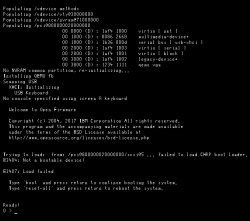
Or there is need on BSD to do that as root?
I've run FreeBSD as root from the beginning, so I don't think that's the issue.
Code:
sudo losetup /dev/loop0 ext2.img
mkdir /tmp/magic
sudo mount /dev/loop0 /tmp/magic
sudo chown -R $(id -nu):$(id -ng) /tmp/magic
sudo find /tmp/magic -type d -exec sudo chmod 755 {} \;
sudo find /tmp/magic -type f -exec sudo chmod 644 {} \;
sync
sudo umount -l /tmp/magic
sudo losetup -d /dev/loop0
Hmmmm. tried this, same result. Though I found there seems to be a weird issue where I can create files inside of the image, but not remove them! This is both for directories and files. For example:
Code:
root@:~/ps3recovery # touch letmegetmylbpsavefiles
root@:~/ps3recovery # ls
BCUS98148_USER8 letmegetmylbpsavefiles pap
BCUS98148_USER8 lost+found
#the other files/dirs are failed attempts or experiments
root@:~/ps3recovery # rm letmegetmylbpsavefiles
rm: letmegetmylbpsavefiles: No such file or directory
I don't know what that could be. I'd have to try formatting the image and trying to write files inside linux... maybe it's an ext2 thing and I should actually try with ext3 as you had told me to do...? I'll update on this.
It's already Christmas in Europe, right? Merry Christmas then

Update: now I tried ext3. Results are pretty much the same, but I noticed something different: making a file doesn't corrupt anything, but making a directory does!
Code:
root@:~ # mount -t ext2fs /dev/da0 ps3recovery/
root@:~ # ls ps3recovery/
lost+found
root@:~ # cd ps3recovery/
root@:~/ps3recovery # touch blegh
root@:~/ps3recovery # ls
blegh lost+found
root@:~/ps3recovery # rm blegh
root@:~/ps3recovery # ls
lost+found
root@:~/ps3recovery # mkdir blegh
root@:~/ps3recovery # ls
blegh lost+found
root@:~/ps3recovery # rmdir blegh
rmdir: blegh: No such file or directory
root@:~/ps3recovery # ls
blegh lost+found
root@:~/ps3recovery # cd blegh
cd: blegh: No such file or directory
root@:~/ps3recovery # touch blegh
root@:~/ps3recovery # ls
blegh blegh lost+found
root@:~/ps3recovery # rm blegh
rm: blegh: No such file or directory
As you can see here, at first I can create and remove a file normally. BUT when I create a directory, I can only see it exists but not remove it or cd into it. UGH!
Maybe you can get some conclusions from this? Until then I'll see if I can get some help from the FreeBSD community.
Update:
SOLVED! 
Thanks so much to Berion for the kind help. I was finally able to recover the save profiles of LittleBigPlanet 1 and 2! That's right, this whole mess was only for those two goddamn games!
Also guess what, I tried changing from ext to vfat and it just worked, no hiccups. That was it lmao.
Now, a Summary of How I Did It.
WARNING for anyone who comes here with the same issue in the future: All the following is over-explained and overdone and I'm no expert on PS3 storage (that's what Berion is here for) nor a QEMU expert. This was all trial and error. So don't take this as a no-brainer copy-and-paste-commands guide so much as a summary of the whole thread.
According to Berion, permission issues on some files probably relate to a damaged UFS2 system. Linux isn't great at dealing with UFS. So it's best to backup the decrypted HDD to an image and mount it into a FreeBSD ppc64 virtual machine, and that will be able to correctly read and copy the files.
There might be several ways to then take the files out from the vm to Linux; I was able to do it by creating a vfat disk image, mounting it to the vm, copying the desired HDD files into it, shutting down the vm and then mounting the image to Linux and copying the files over to it.
My setup (yours may differ and still work, but I'll just tell you what worked for me)
Full Breakdown
- Mounted the HDD using the scripts
- With the HDD already mounted, made an image "ufs2hell.img" from the main partition
Code:
sudo dd if=/dev/mapper/ps3hdd2 of=${HOME}/ufs2hell.img status=progress
- Made a blank disk image, let's call it "ps3aid.img"
Code:
dd if=/dev/zero of=ps3aid.img bs=3 count=1g status=progress
and formatted it to vfat
- Might not be necessary, but mounted the image to add all necessary permissions and unmounted
Code:
sudo losetup /dev/loop0 ps3aid.img
mkdir /tmp/magic
sudo mount /dev/loop0 /tmp/magic
sudo chown -R $(id -nu):$(id -ng) /tmp/magic
sudo find /tmp/magic -type d -exec sudo chmod 755 {} \;
sudo find /tmp/magic -type f -exec sudo chmod 644 {} \;
sync
sudo umount -l /tmp/magic
sudo losetup -d /dev/loop0
- Made a text file "run-freebsd.sh", made it executable ("chmod +x run-freebsd.sh" or via file properties in GUI) and inserted the script to run the virtual machine
Code:
sudo qemu-system-ppc64 -smp 1 -m 1g \
-drive file=/path/to/img/ufs2hell.img,format=raw,if=virtio \
-drive file=/path/to/img/freebsd.qcow2,format=qcow2,if=virtio,id=disk1 \
-drive file=/path/to/img/ps3aid.img,format=raw,media=disk \
-net nic,model=virtio \
-net user \
-machine pseries,cap-cfpc=broken,cap-sbbc=broken,cap-ibs=broken \
-vga none -nographic
Some notes on this shitty script: -net parameters are for network and theoretically shouldn't be necessary, so if you find this works without them just remove them. If you use this change paths in the script accordingly. I personally put all images in a system folder like /etc/ to make sure they were accessible by root, but that might not be necessary. You could try and change -smp and -m for more processing power and memory; with this setting it was quite slow for me as qemu was emulating another architecture (ppc64).
- With setup being over, ran the script
- With FreeBSD already running, logged in as "root" (blank password).
- Listed drives
Guessing by disk sizes, "vtbd1" (147G) was my HDD backup and "da0" (3G) was my rescue image.
- Created directories "dev_hdd0" and "ps3recovery"
Code:
mkdir dev_hdd0 ps3recovery
- Mounted the backup and rescue drives respectively
Code:
mount /dev/vtbd1 dev_hdd0 && mount /dev/da0 ps3recovery
then verified both were mounted with "df -h" and "ls"
- Copied the things I wanted to recover into the rescue image, in this example it's the folder where LBP 2 save files were located
Code:
cp -r dev_hdd0/game/BCUS98245_USER8/ ps3recovery/
- Shut down FreeBSD
- Mounted the rescue image back to Linux
- Enjoyed the taste of victory
I don't know if this will be helpful to anyone, maybe dead PS3 + backed up ERK + faulty filesystem is a one in a million case? I hope it is tho. And if anyone can add to all the things I said, you're welcome to do so.
For now I'll just leave my computer and go touch grass as a celebration. Thanks to Berion once again