
I recently came across a probably known issue with the PS3's browser giving you the "Your browser is no longer supported" message but the problem was, it was on OFW, thanks to @aldostools i could fix it so i figured i'd post it here in case anyone comes across the same issue as me.
NOTE - THIS FIX IS MAINLY FOR ORIGINAL FIRMWARE, BUT IT CAN BE USED ON CFW/HFW
This fix requires you to use a proxy (man in the middle attack) and change the HTTP header of your PS3's browser.
I used mitmproxy which you can get on mitmproxy.org
MITMPROXY setup:
On your PC:
Once you hit enter, you get hit with the error message again but that doesn't matter for now, because on your PC's browser in the mitmproxy window, you should see that we sucessfully sniffed out the request as shown
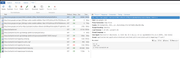
NOTE - YOU WILL ONLY SEE ONE REQUEST, DON'T GET SCARED THAT YOU ARE MISSING SOMETHING, YOU ARE NOT
Once you see something pop up, you are ready to use a script to replace the HTTP header:
After you go through this process and jailbreak your console, if you get the error again, it's easily fixable, you can find a bunch of tutorials online.
Again thanks to @aldostools and i hope this helps someone someday.
NOTE - THIS FIX IS MAINLY FOR ORIGINAL FIRMWARE, BUT IT CAN BE USED ON CFW/HFW
This fix requires you to use a proxy (man in the middle attack) and change the HTTP header of your PS3's browser.
I used mitmproxy which you can get on mitmproxy.org
MITMPROXY setup:
On your PC:
- open cmd, type "ipconfig" and find your PC's ip address - this will be necesarry for later
- download mitmproxy
- in your file explorer, navigate to the mitmproxy folder (default is C:/Program Files/mitmproxy/bin)
- launch mitmweb.exe
- navigate through the XMB: Settings>Network Settings>Internet Connection settings
- in the setup: setting method - custom, connection - depends on you (if on ethernet, choose wired if not, choose wireless), scan for your network, wlan security - depends if you have a protected network, ip address setting . automatic, dhcp hostname - optional, dns setting - manual - primary dns 8.8.8.8, secondary 8.8.8.4, mtu - automatic, proxy server - use, address is your PC's IP address, port is 8080, upnp - enabled
Once you hit enter, you get hit with the error message again but that doesn't matter for now, because on your PC's browser in the mitmproxy window, you should see that we sucessfully sniffed out the request as shown
NOTE - YOU WILL ONLY SEE ONE REQUEST, DON'T GET SCARED THAT YOU ARE MISSING SOMETHING, YOU ARE NOT
Once you see something pop up, you are ready to use a script to replace the HTTP header:
- download the pyhton script i attached, name it as you like, but
- close the mitmproxy window running in your PC's browser
- open cmd and type in this command: mitmdump -p 8080 -s path to the python script (ex. Desktop\useragent.py)
- in the cmd window you should see something like this

- on your PS3, launch your browser and again delete the cache, cookies, etc.
- search for the exploit's site you want to use, it should be working now
After you go through this process and jailbreak your console, if you get the error again, it's easily fixable, you can find a bunch of tutorials online.
Again thanks to @aldostools and i hope this helps someone someday.


