PS2 Cannot format 1TB SATA HDD using WinHiip

For formatting HDD on PC, use PFS Shell.

pfsshell_initialize.png
 
i have tried many different ways to get HDD work nothing worked so HDD only shows up on PS2Fat but not recognizing on My Computer. it's already formatted from ULaunchelf and it shows on PS2 fat its has been formatted.. how can i add games to HDD? thanks
 
So I don't understand Your problem. If disk is already formatted on PS2 and PS2 recognize it, the only thing which left for You is writing games from discs on the console itself or on PC via WinHIIP or HDL Dump/Dumb.
 
i have tried many different ways to get HDD work nothing worked so HDD only shows up on PS2Fat but not recognizing on My Computer. it's already formatted from ULaunchelf and it shows on PS2 fat its has been formatted.. how can i add games to HDD? thanks

If you launch HDL dump (always as administrator) and select Ps2 local HDD it doesn't see anything?? In this case it could be a issue of your adaptor or PC port.

If you're using a IDE/SATA to USB adaptor, try connecting it to another PC-usb port. If still doesn't work you should try another adaptor.
 
i'm using western digital blue 1tb wd10ezex using on PS2Fat its working with PS2 and FreeMcBoot i have tried 3 different laptops none of the laptops Recognizing the HDD Sata adapter seems to work fine.. do i have to use desktop for this HDD or this should also work with Laptop? i also Tested HDloader its works fine when copying games from CD to HDD.. how can i make this HDD work ?
 
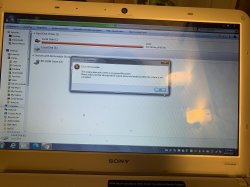
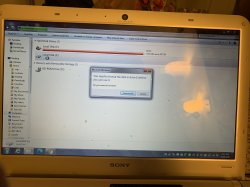
So I finally got the new USB Sata Adapter for HDD and it works so the issue I have is it's asking me to format the drive as you can see on the pic? I already Formatted the HDD with ULainchelf it won't let me enter to the HDD another I issue I have with is HDL Dump Helper as you can see on the pic please let me know how can I fix both of the issue ? Thanks
 

Attachments

  • 6EB3E439-1FED-486A-B657-5018B2C8874A.jpeg
    6EB3E439-1FED-486A-B657-5018B2C8874A.jpeg
    3.8 MB · Views: 120
  • F11F279A-470D-48C4-8643-A6641408362E.jpeg
    F11F279A-470D-48C4-8643-A6641408362E.jpeg
    4.4 MB · Views: 95
  • 50A661A5-8846-467F-A7A0-158517185F49.jpeg
    50A661A5-8846-467F-A7A0-158517185F49.jpeg
    3.8 MB · Views: 95
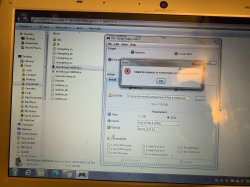
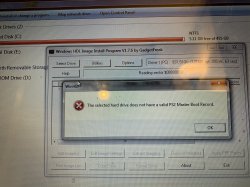
Issue with HDL Dump Helper ? Please let me know on this one as well how to fix it? Maybe im not using it rite way please help thanks !
 

Attachments

  • 97FA98F9-0089-4AB2-855E-89B2C1F9540A.jpeg
    97FA98F9-0089-4AB2-855E-89B2C1F9540A.jpeg
    5.7 MB · Views: 62
If you will format your HDD in u\wLaunchELF, your HDD will have PlayStation File System (PFS).
Windows Explorer will not recognize this file system and will attempt to format it.

By default (Windows XP or higher) will recognize FAT32 (probably also FAT12, FAT16) and NTFS file system.
exFAT is supported in Vista (SP1) or higher, XP need additional update.

Some apps will allow you to enter HDD with PFS.
E.g. WinHIIP, HDL Dump/Dumb, PFS Shell.

BTW: To take screenshot press PrtScn or Alt + PrtScn.
Start "Paint", Paste (Ctrl + V), Save:
https://www.take-a-screenshot.org/windows.html.

Issue with HDL Dump Helper ? Please let me know on this one as well how to fix it? Maybe im not using it rite way please help thanks !
I also bought a 3rd party adapter...
3rd party Network Adaptors like GameStar do not have working LAN port,
so you cannot connect PS2 to PC through that port.

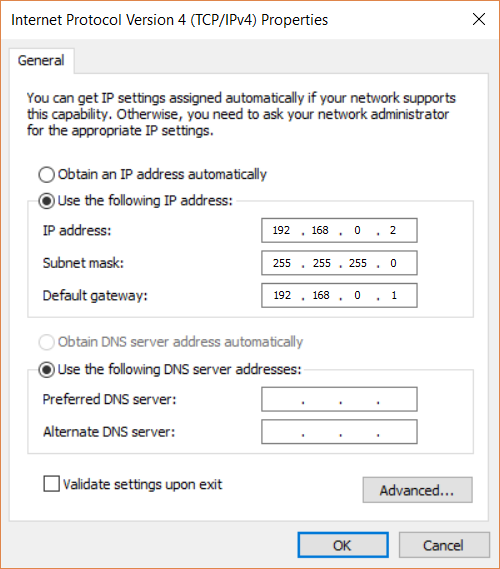
What is your IPv4 configuration (on PC)?
IPv4.png

You have static or dynamic IP?
Are you connecting PS2 to PC directly or through router?
On what operating system you are on (7, 10...)?

What are your network settings in OPL?
Did you "Start HDL Server" in OPL:
https://web.archive.org/web/2019061...r-0.9.3-documentation-project/wiki/hdl-server.
 
Last edited:
So I finally got the new USB Sata Adapter for HDD and it works so the issue I have is it's asking me to format the drive as you can see on the pic? I already Formatted the HDD with ULainchelf it won't let me enter to the HDD another I issue I have with is HDL Dump Helper as you can see on the pic please let me know how can I fix both of the issue ? Thanks

I already told You that You will not see APA scheme disk in Windows until someone write drivers for it (which probably never happen). I don't understand why You get drive letter in the first place BTW.

Look how different it is ("nagłówek" means "header", "np." means "i.e", "system plików" means "file system", "tablica partycji" means "partition table"):
apa_schemat.png


This doesn't mean that disk is not seen. It is, as disk, not his logic structure which is fine.
 
Maybe because You didn't choose proper drive or WinHIIP doesn't works with USB controllers (in assumption that the same drive is visible and partitioned on PS2).

Use HDL Dump or Dumb to putting games on PS2 HDD.
 
Issue with HDL Dump Helper ? Please let me know on this one as well how to fix it? Maybe im not using it rite way please help thanks !

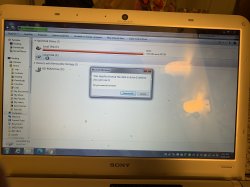
A storm in a teacup :)

This isn't a error, simply select Local HDD, then you'll be able to select the Ps2 HDD that you connected with the adaptor. In the drop-down menu it'll appear Ps2 HDD.
 
Back
Top