After being a PS2 owner for over 15 years I finally decided to upgrade to component from just standard AV composite. However I just can't get it to work. I've already changed the component video option in the system settings without any disk or memory card but still nothing. I can get audio to work but not video. The best I can do is just the whole screen being pink. It's not even that I can see the menu but with a pink tint, it's just this noisy pink screen that doesn't move at all or anything. Anyone know how I can fix this? It's a Slim model if that matters.

You are using an out of date browser. It may not display this or other websites correctly.
You should upgrade or use an alternative browser.
You should upgrade or use an alternative browser.
PS2 Can't Get Component Video to Work
- Thread starter avrona
- Start date

atreyu187
Loathsome Dung Eater
Well I had the same issue using cheap knock off cables. Mine was just a rainbowed orangish red color. Best thing I can suggest is try it on the different TV if it does the same thing on a different TV the cables are definitely at fault. Most aren't properly shielded to keep cost down but directly effects the display. I had two sets of bad cables from them. So I got a PS2 HDMI adapter and it's been great since and literally more then $100 cheaper then an official set of PS2/PS3 component cables.
So I tried it on another TV, a 4k LG model, and I did get a video signal, it was just full of that particular kind of dot crawl-like artefacting you got a lot with AV back in the day. It's so bad it's almost unplayable.Well I had the same issue using cheap knock off cables. Mine was just a rainbowed orangish red color. Best thing I can suggest is try it on the different TV if it does the same thing on a different TV the cables are definitely at fault. Most aren't properly shielded to keep cost down but directly effects the display. I had two sets of bad cables from them. So I got a PS2 HDMI adapter and it's been great since and literally more then $100 cheaper then an official set of PS2/PS3 component cables.
Haven't made any modifications to the console though.It also can be faulty modchip causing these "inconveniences".
So I went and bought another component cable, got the exact same issue.So if your console has not been opened ever since new, in your TV you have 5 (not only 3) inputs (or adaptor) for component,
then it is probably a faulty cable as atreyu187 mentioned.
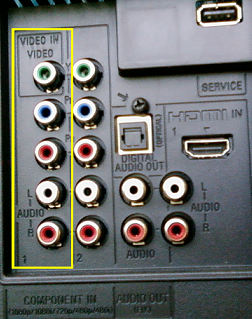

Yes it does.Does the console have a warranty sticker?

jolek
Senior Member
So to sum up.
- You are the 1st owner of this console.
- The console has a warranty seal, so it has not been opened.
- In your PS2 Settings you have changed an option from RGB to Y Cb/Pb Cr/Pr.
- A TV has 5 RCA input for a component cable.
Does this new cable have any brand?
It can be a hardware issue, can you try this cable with another console?
If you are from Europe you can try to buy RGB cable:
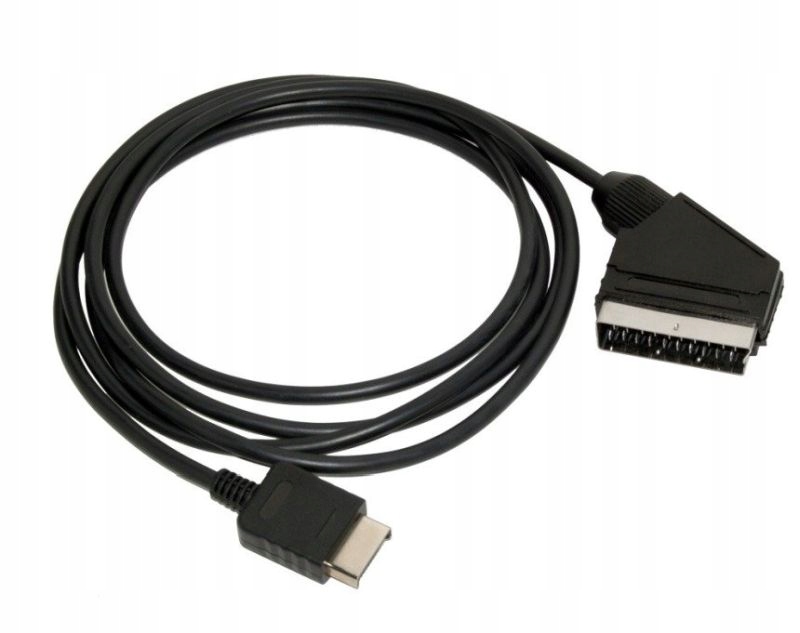
These cables should also give a high quality picture (definitely better than composite or S-Video).
- You are the 1st owner of this console.
- The console has a warranty seal, so it has not been opened.
- In your PS2 Settings you have changed an option from RGB to Y Cb/Pb Cr/Pr.
- A TV has 5 RCA input for a component cable.
Does this new cable have any brand?
It can be a hardware issue, can you try this cable with another console?
If you are from Europe you can try to buy RGB cable:
These cables should also give a high quality picture (definitely better than composite or S-Video).
I tried on another console however both had the exact same issue. Last thing it could be is the 3.5mm adapter, as both TVs just use 2 3.5mm instead of just 5 individual inputs for component. I ordered a new adapter so we'll see tomorrow. Apart from that I have no idea what else it could be.
atreyu187
Loathsome Dung Eater
Stop buying shitty third party cables man. Or take them apart shield the cables as this causes your issues. The interference causes banding, color distortion and bad audio feedback. There is a reason those cables are cheap and the official ones go for $75+ nowadays. RetroVision makes some descent cables but far from perfect. Aside from Monster Cables only official PS2/PS3 component cables are best. Pound makes a pretty good HDMI cable but I have been very happy with my PS2HDMI adapter.

These are known quality cables for about $30 USD

These are not to bad and fairly cheap. My brother has these and for the cost they are great.

This is what I have used for 3-4 years. Pretty descent quality, cheap and easy to find.

But all three of these are leaps and bounds beyond these turds.
But if you can find official PS2 or PS3 component cables these are PERFECT!! Add a upscaler and you are in the game. And Monster cables are even better but tend to only be video and must pull audio from the fiber optical port.
These are known quality cables for about $30 USD
These are not to bad and fairly cheap. My brother has these and for the cost they are great.
This is what I have used for 3-4 years. Pretty descent quality, cheap and easy to find.
But all three of these are leaps and bounds beyond these turds.
But if you can find official PS2 or PS3 component cables these are PERFECT!! Add a upscaler and you are in the game. And Monster cables are even better but tend to only be video and must pull audio from the fiber optical port.
Last edited:
So my new adapter arrived today. While it did fix the grain issue on the other TV, on the main TV which I wanted to use for this I still get the same pink screen like before. Two different cables, two different video adapters, two different consoles, but still the same issue.
What is the TV set you are plugging in? Exact model. Do not buy anything more, you have spent too much money on that already.
The TV I'm still having issues with is a Samsung UE40C5800QK.What is the TV set you are plugging in? Exact model. Do not buy anything more, you have spent too much money on that already.
So you are connecting the PS2 component outputs to the two 3x RCA -> Jack 3,5mm adapters. The two audio plugs from the PS2 (should be tied each other) have to be connected to the white and red inputs of AV adapter respectively (yellow has to be left unconnected). This jack has to be plugged in the L-R Audio connector (left one) of the COMPONENT IN inputs. The red (untied one), green and blue connectors plugs have to be connected to the respective inputs of component adapter and its jack connected to the right one connector of the COMPONENT IN input (Y/Pb/Pr). Then you have to switch the TV signal source to the Component (not AV).
Yeah everything is plugged in correctly. Both TVs use adapters for both component video and audio, with the component audio sharing the same port as AV composite. Everything is plugged in correctly and the adapters do 100% work.So you are connecting the PS2 component outputs to the two 3x RCA -> Jack 3,5mm adapters. The two audio plugs from the PS2 (should be tied each other) have to be connected to the white and red inputs of AV adapter respectively (yellow has to be left unconnected). This jack has to be plugged in the L-R Audio connector (left one) of the COMPONENT IN inputs. The red (untied one), green and blue connectors plugs have to be connected to the respective inputs of component adapter and its jack connected to the right one connector of the COMPONENT IN input (Y/Pb/Pr). Then you have to switch the TV signal source to the Component (not AV).
