CECHA01 PS2 Black Screen

Wow, thank you for your reply, glad you've got the issue resolved.
Could you also point me out to the faulty fuses and capacitors on the cok 001 board? Can you mark which ones were faulty in your case so I can check them on my board too?

The reason why I ask is that I have the exact same issue on my board, so maybe it could help me too.
The only difference in my unit is that PS2 games sorta works if CELL temperature is above 75c, sometimes PS2 games would have visual artefacts and then instantly freezes.
Anything below 75c will result in a black screen mostly, or instant freezes on Playstation 2 logo.
Much appreciated in advance.

Oh boy, I'll have to take a look inside again next time I open it. It's about due for a cleaning soon anyways, so I'll try and ID the exact components I replaced for you if I can. It's been a while now since I did it all, but, I think I may be able to identify them when I have the board out on my desk again. Memories should come back.

Will let you know when I open it again if I can rediscover the precise components, and hopefully it may help out yours.

Sounds like it may be a capacitance problem in your case with artifacts pending on temperature. Maybe try checking capacitors in the general area between and around the EE/GS, see if you may find anything. That's where I would start at least.
 
Yep, definitely will do as I'm not yet quite ready to replace the whole ee+ gs chip from donor board.

Will see if there's anything I can find, after all I would much prefer to fix that without buying a second console.

Broken capacitor has different color than the rest of them, I wonder how I can identify it exactly?
 
I have this problem too, but my doesn't look up, just don't boot the game.
I can open the menu with the PS button and return to the XMB, still need to check the board to find some faulty component.
 
Just wanted to update the thread.

I've tried to replace the EE/GS chip via help of repair service locally in Moscow, and the board was warped in the process, making the whole board and the console is pretty much dead. (cecha00)

Since then I've bought cecha01 from USA and it didn't had the same issue, so I guess it's something regarding capacitors in the board, but I don't know which ones to be exact.
 
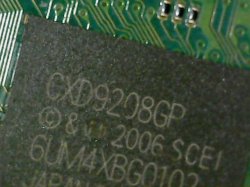
If you have issue where its black screen with access to setting with ps button, its either caps/fuse thats connect to gs/ee or CDX9028GX needs to be reflowed/reballed/replaced. I reflowed after seeing @vyktormvmpay25 post on chip replacement.
4vxWVFh
aXsh9hr

took me two days to research and find this information thx to Frankenstein ps3 forum! hopefully you guys get chance to fix this issue too!
 
Hi there

I'm having this exact problem in the original post. I tried looking for the CDX9028GX chip on the schematic or searches and I cannot find that.
 
its underneath ee/gs you should be able to locate medium size chip with cdx9028gx written on it
I think you mean this? Its on the top side There are no chips on the bottom side remotely that large....just some caps/fuses and mosfet looking chips....
 

Attachments

  • WIN_20220823_19_30_21_Pro.jpg
    WIN_20220823_19_30_21_Pro.jpg
    88.9 KB · Views: 137
thats it! reflow that chip on high temp with flux and that should solve ps2 game black screen issue.

Ok So I not only reflowed it but I took a donor chip and reballed it. Same results. SO I now took the Entire EE/GS chip from the donor and reballed that and going to try to replace the old one this weekend.
 
Ok So I not only reflowed it but I took a donor chip and reballed it. Same results. SO I now took the Entire EE/GS chip from the donor and reballed that and going to try to replace the old one this weekend.
I fixed my console installing a PAL converter and played with the Resolution in the XMB parameter a lots of time (without knowing what i was doing) and BINGO , now its fixed !
 
It's important to understand that there is no one cure for all. As evidenced here, the ps2 black screen issue can happen for variety of different reasons; some will have a problem with EE/GS, others will have an issue with the bridge chip, somebody will have a broken fuse, etc etc. It's also a little difficult to even arrive at a point of reference when people who repair it just ambiguously say " I replaced something" but didn't say where exactly. The only way is to use the schematic and try to attempt a diagnostic on your particular board.

Btw it is possible to look at the uart log from EE/GS. https://www.ps2-home.com/forum/viewtopic.php?t=4828

Here CB used it to see if there was any errors

I fixed my console installing a PAL converter and played with the Resolution in the XMB parameter a lots of time (without knowing what i was doing) and BINGO , now its fixed !

This is quite... Unusual. Please explain a little more.
 
It's important to understand that there is no one cure for all. As evidenced here, the ps2 black screen issue can happen for variety of different reasons; some will have a problem with EE/GS, others will have an issue with the bridge chip, somebody will have a broken fuse, etc etc. It's also a little difficult to even arrive at a point of reference when people who repair it just ambiguously say " I replaced something" but didn't say where exactly. The only way is to use the schematic and try to attempt a diagnostic on your particular board.

Btw it is possible to look at the uart log from EE/GS. https://www.ps2-home.com/forum/viewtopic.php?t=4828

Here CB used it to see if there was any errors


This is quite... Unusual. Please explain a little more.
I just remember , when you play PS2 ISO the screen go black and stay there UNTIL you push the controller PS button (center) that will re-marry the PS3 controller with the use of PS2 ISO.

Tell me if it work for you
 
photo_5041942193190841196_y.jpg

for anyone still looking. ive found these capacitors were blown. eveything else is fine and everything on the otherside is also fine. going to replace them and check back
 

Similar threads

Back
Top