CECHC-04 overheating even after delidding

Hello, I have a Cechc04 model phat ps3. I upgraded the software to 4.85 rebug cfw and installed webman. The webman was operating the fan at 60% to hold the cell processor at 70 degrees. and the fan was making too loud. So I decided to open and delidding ps3. (I changed the thermal paste of rsx and cell before and cleaned ps3). I opened ps3 and removed the ihs of cell and rsx. I cleaned the cpu's ihs silicones and rsx's thermal glue and applied the thermal grease and closed the ps3. But temperatures ( in the Red dead redemption cell 83 rsx 66 degrees in 5 minute) and fan speed don't change. Also room temperature 32 degrees and thermal paste hy510. I know my thermal paste is not very good but I think it should work. because the old paste was in a dreadful state. What could be the problem of my ps3. Thanks in advance.
 
Last edited:
The IHS on CELL has not been properly secured. After installation of new thermal paste under IHS, you need to properly secure IHS over CELL chip. After removing Silicon sealant of CELL, the IHS becomes loose and installing new thermal paste won't be beneficial if CELL chip & IHS are not firmly in contact.


Also you should check how much thermal paste you are applying. You don't need too much thermal paste under IHS.
 
My specialized subject:

The Thermal paste you have used has a rating of:

Thermal Conductivity: >1.93 W/mK - high temp machines like PS3 need a better transfer rating. Unfortunatley this paste is near to useless for you!

A good paste would have at least 5 W/mk to achieve a good thermal transfer - So this is your first problem!

Spend a bit of money and buy a stick of the MX-4 thermal paste - 8.5 W/(mK)

A good test is, put your hand behind the ps3 at the grill and feel how hot it is - if it doesnt feel very warm after 8 minutes then the transfer of heat is not working.

Second problem is your fan settings - the default SYSCON fan table is absymal - you can use the webman to use dynamic mode once the good paste has been applied.

These old models on average will achieve on both CELL and RSX a temp of 69C to 73C on idle with a tweaked syscon fan table fan speed at 30%.

One last point to take away, make sure the amount of paste is an A4 page of thickness anymore is actually counter productive!

Hope this helps?

Hello, I have a Cechc04 model phat ps3. I upgraded the software to 4.85 rebug cfw and installed webman. The webman was operating the fan at 60% to hold the cell processor at 70 degrees. and the fan was making too loud. So I decided to open and delidding ps3. (I changed the thermal paste of rsx and cell before and cleaned ps3). I opened ps3 and removed the ihs of cell and rsx. I cleaned the cpu's ihs silicones and rsx's thermal glue and applied the thermal grease and closed the ps3. But temperatures ( in the Red dead redemption cell 83 rsx 66 degrees in 5 minute) and fan speed don't change. Also room temperature 32 degrees and thermal paste hy510. I know my thermal paste is not very good but I think it should work. because the old paste was in a dreadful state. What could be the problem of my ps3. Thanks in advance.
 
Hello again. I did a little test today. The temperature of the cell is 54 and the temperature of rsx is 38 degrees when I open ps3 for the first time while Webman is on automatically. (fan speed 24% and room temperature 28) After 5 minutes, the cell 75 and rsx remain stable at 56 degrees (fan speed 32%) when I enter any game, the fan speed is around 50% - 60%. this is very loud. I feel the warmth when I put my hand behind the ps3. The main thing I want to ask is why is the temperature difference between cell and rsx so high? Could there be a problem with the processor or motherboard?
 
So the CECHC04 has a COK-002 board

https://www.psdevwiki.com/ps3/SKU_Models

CELL is 90nm and RSX is 90nm - on average with a high grade thermal paste you would expect a heat maximum of 72C when running at idle for both CELL and RSX.

A common mistake when delidding and putting back together is A. not using thermal glue to bind the heatsinks back properly and B. Not putting pressure as soon as you have applied thermal paste and glue to keep the bind together.

Another issue that causes the CELL and RSX to overheat is the IC buck controller chips go in over voltage/current mode causing the nominal 1.0V to go to 1.2V - you can measure this with a multimeter on the postive pins next to the cell NEC tokins.

But in your case your thermal paste is not good, so thermal pass through is very poor causing a build up of heat.

The only other possible is your CELL core is about to give up.

Share a photo if you can


Hello again. I did a little test today. The temperature of the cell is 54 and the temperature of rsx is 38 degrees when I open ps3 for the first time while Webman is on automatically. (fan speed 24% and room temperature 28) After 5 minutes, the cell 75 and rsx remain stable at 56 degrees (fan speed 32%) when I enter any game, the fan speed is around 50% - 60%. this is very loud. I feel the warmth when I put my hand behind the ps3. The main thing I want to ask is why is the temperature difference between cell and rsx so high? Could there be a problem with the processor or motherboard?
 
But in your case your thermal paste is not good, so thermal pass through is very poor causing a build up of heat.

I would recommend a better thermal paste but if thermal paste was a problem his RSX Temperature should also be high. IHS of RSX & CELL both removed but CELL is causing the problem with much higher Temperature.

I would recommend this. After successful delidding. Clean up IHS of CELL & remove all silicon. No need to remove all silicon around CELL chip. Just remove and Silicon around CELL chip at the four corners. Reapply new silicon of tiny pea size on four clean corners. Make sure that this sealant is easily removable if need arises. Apply new thermal paste on CELL die & reinstall clean IHS on top of it. Hold it for half hour at least for sealant to dry up. I recommend putting a light weight on CELL for 1 hour (like one of the heatsinks). Then re-assemble PS3 & check the temps.

Also since you are taking hassle of delidding, you should buy a better quality thermal paste.
 
You didn't do this:


After a delid, you need to put the pressure on CELL and RSX that was before the delid. So put slim carboard in the opposite site of the mobo like in the video. Also, just stick the heatspreaders to the heatsinks, so the next time you need to open the console, you won't have to clean everything, just the dies. Once again, watch that in the video.

Even with birdie poo poo that C shouldn't be overheating like that.
 
I would recommend a better thermal paste but if thermal paste was a problem his RSX Temperature should also be high. IHS of RSX & CELL both removed but CELL is causing the problem with much higher Temperature.

I would recommend this. After successful delidding. Clean up IHS of CELL & remove all silicon. No need to remove all silicon around CELL chip. Just remove and Silicon around CELL chip at the four corners. Reapply new silicon of tiny pea size on four clean corners. Make sure that this sealant is easily removable if need arises. Apply new thermal paste on CELL die & reinstall clean IHS on top of it. Hold it for half hour at least for sealant to dry up. I recommend putting a light weight on CELL for 1 hour (like one of the heatsinks). Then re-assemble PS3 & check the temps.

Also since you are taking hassle of delidding, you should buy a better quality thermal paste.

Thank you for the answers you have given to all of you. I thought like you, because the thermal paste, albeit bad, should have had a good change in temperatures. I put the heat spreaders to adhere to the cooler, I cleaned the old silicone on the cell beautifully, but I did not apply any new adhesive silicone. Can the problem be caused by that?
 
Silicon Sealant is there to keep IHS, firmly in contact with CELL die. You do not need Silicon if you can keep IHS firmly in contact with CELL die and heatsinks (see the video above). Silicon sealant itself doesn't dissipate any heat.

Otherwise you can apply a small pea sized sealant again on 4 corners of CELL if you want to securely place IHS on CELL chip. Make sure you apply a constant light pressure on IHS after reapplying sealant for some time to allow sealant to dry & harden.

You don't need to apply silicon sealant again if you are doing it the way as shown in video.
 
Didn't the coolant come in full contact with the processor due to the height formed after cleaning the silicone? If I put cardboard in the mounting part of the cooler as in the video, I think the problem will be solved. So is there any danger of the processor breaking due to increased pressure?
 
Hello, I took into account the recommendations you said and worked a bit on ps3 today. I firmly adhered the heat spreaders to the cooler using thermal paste. I applied thin thermal paste on the cell and RSX. I put a small piece of cardboard on the back of the motherboard.

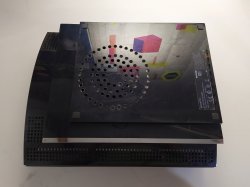
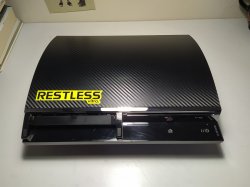
I removed the fan and lubricated the bearing. I opened ventilation holes for the fan to breathe more easily. And I covered the top cap with carbon fiber coating. I liked the way it looks like this. and you ? I played Red Dead Redemption for an hour and the temperatures were as follows: Cell: 74 RSX: 64 Fan speed: 34% (I set the Cell to be maximum 75 degrees using Webman.)

This way the fan sound did not bother. I think these temperatures are normal for 60 Gb CECHC-04. In the future, I will replace the thermal paste with MX-4. For now, thank you for all your help.
 

Attachments

  • IMG_20200710_193556.jpg
    IMG_20200710_193556.jpg
    2.3 MB · Views: 155
  • IMG_20200710_193511.jpg
    IMG_20200710_193511.jpg
    3.5 MB · Views: 144
Last edited by a moderator:
Well done!

These old models are hard to keep cool, especially the first models.

The thermal paste change to a better grade will improve it even further.

You might be interested in this thread - https://www.psx-place.com/posts/250516/


Hello, I took into account the recommendations you said and worked a bit on ps3 today. I firmly adhered the heat spreaders to the cooler using thermal paste. I applied thin thermal paste on the cell and RSX. I put a small piece of cardboard on the back of the motherboard.

I removed the fan and lubricated the bearing. I opened ventilation holes for the fan to breathe more easily. And I covered the top cap with carbon fiber coating. I liked the way it looks like this. and you ? I played Red Dead Redemption for an hour and the temperatures were as follows: Cell: 74 RSX: 64 Fan speed: 34% (I set the Cell to be maximum 75 degrees using Webman.)

This way the fan sound did not bother. I think these temperatures are normal for 60 Gb CECHC-04. In the future, I will replace the thermal paste with MX-4. For now, thank you for all your help.
 
Back
Top