PS3HEN Change "★ Enable HEN" text to other text

Yurand

Forum Noob
TL;DR
Guide in linked thread says to change a path to file that does not exist. Need help.


Hi everyone,

I am trying to change the name of the '★ Enable HEN' text to something else. I concluded, that the file that I need is 'hen_enable.xml' located in dev_hdd0/hen/xml/; but just like @oppala in this thread:
https://www.psx-place.com/threads/change-enable-hen-text-to-other.42031/
I have the same issues - the file cannot be retrieved via ftp, and file managers also don't seem to work with it.

The author of the thread managed to find themselves a solution, which is:

""
the provisory solution that I found is to edit the category_game.xml to use the hen_enable.xml located on flash:

<!-- HEN Enabler Default HDD -->
<Query
class="type:x-xmb/folder-pixmap"
key="hen_xmb"
attr="hen_xmb"
src="xmb://localhost/dev_flash/vsh/resource/explore/xmb/hen_enable.xml#hen_xmb"
/>

then, editing the file there make the text change take effect
""


but it is very confusing to me, as in my console (4.92 hfw, 3.4.0 hen), the file 'hen_enable.xml' does not exist in my console's
/dev_flash/vsh/resource/explore/xmb/. There are lots of xml files there, 'category_game.xml' included, but 'hen_enable.xml' is not one of them.

There IS however a folder with 'hen_enable.xml' file, located in my /dev_flash/hen/xml/ ; I thought of redirecting the 'category_game.xml' path to that file (/dev_flash/hen/xml//hen_enable.xml), but its contents only seem to be from Hen Installer, not Hen Enabler; there is no mention of '★ Enable HEN' inside the file which on my console starts with:

<!-- THIS COPY SHOULD BE STORED ON FLASH IN THE EVENT THE HDD IS FORMATTED OR HDD FILES ARE MISSING -->
<XMBML version="1.0">
<!-- 4.92 CEX -->
<View id="hen_flash">
<Attributes>
<Table key="hen_enable">
<Pair key="icon"><String>/dev_flash/vsh/resource/explore/icon/hen_repair.png</String></Pair>
<Pair key="title"><String>★ Install HEN</String></Pair>
}
...

What should I do now? I'm out of ideas.
Please help me navigate here as i am lost, lol. Would gladly appreciate it, thanks.
 
I think it's one of these two files (or both) :

Code:
dev_hdd0/hen/xml/hen_enable.xml
dev_rewrite/hen/xml/hen_enable.xml

I can't extract the PKG for whatever reason so I can't be 100% sure.
 
I think it's one of these two files (or both) :

Code:
dev_hdd0/hen/xml/hen_enable.xml
dev_rewrite/hen/xml/hen_enable.xml

I can't extract the PKG for whatever reason so I can't be 100% sure.

I think you need this for certain pkgs, including hen: https://www.mediafire.com/file/8qdw68dpski5ifq/pkg_custom.exe/file

it's cmdline iirc. it will extract a pkg that's based on a theme pkg, which hen is, I believe, since it modifies multiple files all over the system (not just in the game folder).
 
It's a hybrid package now, you need to extract it via custom_pkg or extracting the second ... folder

there seems to be a problem. I could only find the latest Hen pkg in a thread by Coro, and when I tried to extract it (i.e. custom_pkg --extract Hen.pkg), it says unsupported pkg, signed or something to that effect. it won't even list the pkg content either with the -l command (same error). I'm not really sure what's wrong, but I think it's doing the same thing to @ShaolinAssassin . I was pretty sure custom_pkg could extract it, but for some reason it's not working.
 
It's a hybrid package now, you need to extract it via custom_pkg or extracting the second ... folder

Thanks, that worked with PkgView.

I concluded, that the file that I need is 'hen_enable.xml' located in dev_hdd0/hen/xml/; but just like @oppala in this thread

And now I realised that OP already determined which file to modify... :oops::oops::oops: Stupid me, I should read more carefully. @Yurand : the solution should be to extract HEN PKG, modify the dev_hdd0/hen/xml/hen_enable.xml file, then repack the PKG with pkg_custom and install it.
 
Thanks, that worked with PkgView.


And now I realised that OP already determined which file to modify... :oops::oops::oops: Stupid me, I should read more carefully. @Yurand : the solution should be to extract HEN PKG, modify the dev_hdd0/hen/xml/hen_enable.xml file, then repack the PKG with pkg_custom and install it.

yeah, that's not working for me. it shows that it's extracting the dev_rewrite folder, but all that's in the Hen folder afterwards is a Hen.log that shows the files extracted, but where?

nm, I figured it out. it went up two or three directories, since dev_rewrite does. I don't see a star enable hen in the file:

upload_2025-11-26_12-45-29.png
 
Last edited by a moderator:
Thanks, that worked with PkgView.


And now I realised that OP already determined which file to modify... :oops::oops::oops: Stupid me, I should read more carefully. @Yurand : the solution should be to extract HEN PKG, modify the dev_hdd0/hen/xml/hen_enable.xml file, then repack the PKG with pkg_custom and install it.

Thanks for the input, everyone.

My every trial of extracting the pkg (except the USRDIR folder) results in program error and nothing gets extracted.
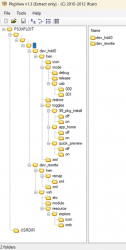
After a little while of trying to understand all this, I have managed to extract the pkg 'contents' by using PkgView, but it worked only for this 3rd row of 'dots' - not on 2nd row like @LuanTeles suggested.
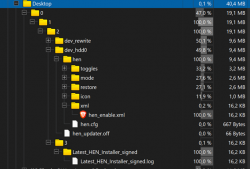
After trial and error & due to weird exctracted folder structure, i finally extracted the selected (on screenshot) 'dots' to my Desktop\0\1\2\3 folder, the result is dev_hdd0 and dev_rewrite folders are inside the '2' folder (like on the 2nd screenshot with treeview).

I deleted the folder '3' as it contains only one folder with log leftover from extraction.

I Created a pkg using folder '2': pkg_custom.exe Desktop\0\1\2\
and also using folder '1': pkg_custom.exe Desktop\0\1\

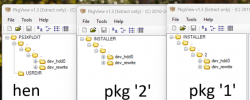
unfortunately, the created pkg files are (to my eye) wrong - not simillar to the original HEN pkg (third screenshot).
Pkg made from folder '2' is the cleanest, but it lacks one dots '..' row (like in the original HEN pkg).
Pkg made from folder '1' seems to have the most similar structure to original HEN - but with '2' instead of third row of dots '..' - i could not get Windows to rename folder '2' to two dots - results in error.

Could any of my created files be correct? If not, what should I change? Pardon my ignorance but I'm kind of new to this, to me this is a big hassle and I would not like to brick my console due to installing some self-made crap :)
 

Attachments

  • hen-oriPKG.png
    hen-oriPKG.png
    90.6 KB · Views: 24
  • treeview-extraction.png
    treeview-extraction.png
    105.7 KB · Views: 16
  • pkgs.png
    pkgs.png
    108.1 KB · Views: 17
Thanks for the input, everyone.

My every trial of extracting the pkg (except the USRDIR folder) results in program error and nothing gets extracted.
After a little while of trying to understand all this, I have managed to extract the pkg 'contents' by using PkgView, but it worked only for this 3rd row of 'dots' - not on 2nd row like @LuanTeles suggested.
After trial and error & due to weird exctracted folder structure, i finally extracted the selected (on screenshot) 'dots' to my Desktop\0\1\2\3 folder, the result is dev_hdd0 and dev_rewrite folders are inside the '2' folder (like on the 2nd screenshot with treeview).

I deleted the folder '3' as it contains only one folder with log leftover from extraction.

I Created a pkg using folder '2': pkg_custom.exe Desktop\0\1\2\
and also using folder '1': pkg_custom.exe Desktop\0\1\

unfortunately, the created pkg files are (to my eye) wrong - not simillar to the original HEN pkg (third screenshot).
Pkg made from folder '2' is the cleanest, but it lacks one dots '..' row (like in the original HEN pkg).
Pkg made from folder '1' seems to have the most similar structure to original HEN - but with '2' instead of third row of dots '..' - i could not get Windows to rename folder '2' to two dots - results in error.

Could any of my created files be correct? If not, what should I change? Pardon my ignorance but I'm kind of new to this, to me this is a big hassle and I would not like to brick my console due to installing some self-made crap :)

two dots isn't a folder name. it tells the app to go up a directory in both windows and linux. that's how packages work as well. these custom packages are based off of theme packages, which allow installation anywhere without a PARAM.SFO.
 
Back
Top