
PS3 Coolest running Slim Model?

Hello friends,

I'm currently investigating which of all PS3 Slimline models are running the lowest possible temperatures, because some people claim those models have different temps, which I could say might be true for the 2000 series and the 3000 due to resized cell/rsx size, but unsure about on 2100 and 2500 series.

Therefore I wanted to ask out if some of you could share their experiences in regards of temperatures and/or reliability of your cech-whatever consoles, prefered but not limited on 2100 and 2500's.

I'm currently awaiting a 2104 and a 2504 console myself and will also share my temperatures when done testing after reapplying thermal paste for anecdotal and maybe helpful Information to the scenery.

Thank you for your time, best wishes!
 
I would go for a 25xx cfw compatible one because you dont need nobd cfw unlike 20xx and 21xx you need to remarry the disc drive. I personally have two 25xx cfw with 68/71 CPU, 75/78 RSX on Syscon while gaming.
My 30xx runs the coolest at max Syscon 58 CPU, 68 RSX while gaming.
And 48 at max on 40% fan speed.
But it can be different with yours it has to do with how its been used.
 
I would go for a 25xx cfw compatible one because you dont need nobd cfw unlike 20xx and 21xx you need to remarry the disc drive.
I also agree with this. i have a 25xx and a 20xx retail, get around 65c on both of them with webman being in control of the fan. I've been told by numerous people that that is a decent temp for slims. My Testkit also gets the same average temps, it also being a 25xx system.
 
I would go for a 25xx cfw compatible one because you dont need nobd cfw unlike 20xx and 21xx you need to remarry the disc drive. I personally have two 25xx cfw with 68/71 CPU, 75/78 RSX on Syscon while gaming.
My 30xx runs the coolest at max Syscon 58 CPU, 68 RSX while gaming.
And 48 at max on 40% fan speed.
But it can be different with yours it has to do with how its been used.
Thank you very much for your input, kinda interesting that your 3000 series runs the coolest as it has a reduced heatsink and fan size when compared to 2xxx models

I also agree with this. i have a 25xx and a 20xx retail, get around 65c on both of them with webman being in control of the fan. I've been told by numerous people that that is a decent temp for slims. My Testkit also gets the same average temps, it also being a 25xx system.
Good one, can't wait to test my two consoles to determine a winner although I'm pretty sure both of them will be fine, it's just that I've heard a few folks ranting about more cutting costs on 25xx models when compared to 21xx as sony likes to make things cheaper in nearly each revision.
 
Last edited by a moderator:
I've heard a few folks ranting about more cutting costs on 25xx models when compared to 21xx as sony likes to make things cheaper in nearly each revision.

A bit of thread necromancy but this is a topic that SHOULD be covered in a lot more detail on this scene. As a PC guy and IT technician\engineer I find it quite incredible the current lack of information \ understanding (or naivete?) that surrounds this topic. For the record I have a 2503A system that I haven't jailbroke yet where I'm waiting on a new laser and deck for it but even on the XMB it is noticeably quieter than my old 2003A and that was with both of them with fresh TIM.

You aren't wrong about Sony making things cheaper with each PS3 revision and TBH if you want a long term fully CFW compatible system you'll want a 20XX, 21XX, or 25XX model. Improvements and drawbacks with each are swings and roundabouts. 20XX models have a better heatsink but that's because they have to using a 65nm lithography RSX and have (IMO) more robust (better build quality - the lasers themselves are questionable) bluray drives.

Aside from that the 20XX models use Samsung memory on the board as well as the RSX which should on paper lead to better latency (advantage for developers maybe?) compared to later models (25XX > ) which use Samsung on the RSX and Elpida on the system board. This has drawbacks too though, the Samsung on the system board of 20XX (and 21XX? Don't have one of those to check) is lower density so a couple modules are on the reverse of the board while later models with Elpida only have the modules one side being higher density which means on the reverse side of the PCB you can place a few thermal pads to pull heat away to cool the Elpida much more effectively and in the process put that bottom aluminium plate to some actual use other than acting mostly just like a X clamp for the RSX and Cell.

However the 20XX models (and maybe 21XX? Again, I don't have this model to check) compared to 25XX use the NEC\TOKIN capacitors which are a pain in the arse to remove and replace if they fail also meaning the models are not ideal, or I would flat out say not suitable, for attempting to OC on because you're just going to burn them up with the extra current the RSX will draw. In terms of general maintenance though the 20XX models (and maybe 21XX) are easier as bluray ribbon cables are all easy to connect unlike on the 25XX model(s) due to the daughterboard being integrated on the main system board. An issue that didn't need to be an issue if Sony just made the sodding ribbon cable longer and for whatever absolutely arse backwards reason Sony removed the hole that allows you to replace the CR2032 battery without having to tear the system right apart so you might actually want to cut a hole on the internal chassis for 25XX models to be able to do this easily.

One final advantage for the 20XX models is with the PSU, it is capable of drawing almost 230w (required due to the model drawing a bit more power) while the 25XX models use a PSU drawing just under 200w but both PSUs are interchangeable regardless of if you have a 20XX, 21XX, or 25XX model so putting that slightly beefier PSU in 21XX or 25XX models should see them running a bit cooler because the PSU isn't pushed as hard while also making the newer units more stable because they have a bit more power to play around with when pushed hard which could also eliminate game crashes some people experience in very demanding titles.

I have a lot more to say on this but I think this answers whats being asked here.
 
Hello friends,

I'm currently investigating which of all PS3 Slimline models are running the lowest possible temperatures, because some people claim those models have different temps, which I could say might be true for the 2000 series and the 3000 due to resized cell/rsx size, but unsure about on 2100 and 2500 series.

Therefore I wanted to ask out if some of you could share their experiences in regards of temperatures and/or reliability of your cech-whatever consoles, prefered but not limited on 2100 and 2500's.

I'm currently awaiting a 2104 and a 2504 console myself and will also share my temperatures when done testing after reapplying thermal paste for anecdotal and maybe helpful Information to the scenery.

Thank you for your time, best wishes!


English is not my native language, sorry about that.
Due to the tolerance in the production of CELL/BE and RSX of all consoles, they may run hotter or colder than another CELL/BE. Even game consoles with the same coded motherboard do not have equal temperature values. For this reason, the test you perform will not give you a completely accurate result. (For example, while CELL/BE number 1 needs 50W power to operate at 100 Mhz, CELL/BE number 2 needs to consume 55W energy to operate at 100 Mhz. Thus, CELL/BE number 2 will run hotter. In short, even CELL/BE with the same model number may operate at different temperatures due to tolerances in production.
Additionally, the 20xx models feature 65 nm RSX and NEC/TOKİN capacitors. That's why they have a better cooler. Why should I buy the 65 NM RSX model when there is a newer and better one?

Since models with model code 21xx were produced for short periods of time,
it is difficult to find parts. If the Bluray motherboard fails, it requires re-marriage.

In 25xx series Third PS3 slim model. The Blu-ray drive's components were revised (including laser), as well as having the daughterboard controller integrated into the main motherboard. The networking components (LAN and WiFi/Bluetooth modules) were also updated.Starting with some of the later manufactured date code 1A models, factory firmware that came with metldr2 superseded the exploitable metldr which previously allowed the installation of CFW (Custom Firmware)

If you ask my opinion, the coolest model is the PS3-SLIM-25XX with the latest BT and WiFi features and a hackable production date of 0C or 0D or 1A.

I have 19 PS3s in total. My 2 25XX series PS3s run at an average of 51°C CPU (CELL/BE), 48°C RSX and 40% fan speed. (Without Delid)
 
Last edited:
There's a footnote to add to that, 20XX models largely have components that you can interchange with 21XX models and vice versa. The blueray drives are the same design, as are the PSUs and AFAIK the inner and outer chassis as well. The biggest difference between 20XX and 21XX models is that the 21XX models dropped the NEC\TOKIN capacitors completely and the RSX moved to 45nm lithography. If you're a developer you might prefer the system and graphics memory matching as you should have better latency making the 20XX models preferable but otherwise 21XX models are probably what you want due to a larger pool of parts being available compared to the 25XX models.
 
There's a footnote to add to that, 20XX models largely have components that you can interchange with 21XX models and vice versa. The blueray drives are the same design, as are the PSUs and AFAIK the inner and outer chassis as well. The biggest difference between 20XX and 21XX models is that the 21XX models dropped the NEC\TOKIN capacitors completely and the RSX moved to 45nm lithography. If you're a developer you might prefer the system and graphics memory matching as you should have better latency making the 20XX models preferable but otherwise 21XX models are probably what you want due to a larger pool of parts being available compared to the 25XX models.


Thanks for your contributions. You are right in what you say. 20xx's are available as spare parts for 21xx.
 
Thanks for your contributions. You are right in what you say. 20xx's are available as spare parts for 21xx.

Yep, in the UK 20XX models are floating around all over the place on ebay. I have a box of spare parts from 20XX models and just managed to snag a 2103A with three controllers (2x official, getting quite hard to find now) in mint condition and it even comes with 6x games, one of which I actually wanted and sells for £10-15 by itself so I've really lucked out there :D

As it's something else that isn't really talked about or covered I will also add to this thread that in terms of thermal paste the ONLY compound you should use is Arctic Ceramique, this is because it is designed for ultra high endurance uses such as in aircraft, it'll perform every bit as well as the day it was first applied even after a decade. Thermal pads are also important, replacement pads should be the EXACT size of the component they are cooling not big enough just for the center, the center is the hottest part but the rest of the chip is still getting hot too. I'd recommend 1.5mm pads that squash down nicely (so you get better thermal contact and thus heat transfer) with a rating of at least 6w/mk. You can also add some thermal pads to components like the system memory and it will only help improve the lifespan of the console as by default the system memory isn't really cooled at all relying on just what minimal airflow reaches them from the fan, placing pads on their underside as well as on top will help cool them a fair bit, potentially as much as 20c or more, I don't have data for how hot the system memory gets under load situations but I can easily see it getting to 70c+ there's no reason that's necessary at all with the bottom plate doing nothing but acting as a giant X clamp for the CPU and GPU - put it to use on the memory. The internal top half of the metal chassis you might not want to heatsink the memory to as it's already in part dealing with heat from the VRMs, CPU, and GPU but with 20XX models you won't have a choice due to the Samsung memory used on those being lower density so they won't get cooled by just using thermal pads on the underside.
 
Yep, in the UK 20XX models are floating around all over the place on ebay. I have a box of spare parts from 20XX models and just managed to snag a 2103A with three controllers (2x official, getting quite hard to find now) in mint condition and it even comes with 6x games, one of which I actually wanted and sells for £10-15 by itself so I've really lucked out there :D

As it's something else that isn't really talked about or covered I will also add to this thread that in terms of thermal paste the ONLY compound you should use is Arctic Ceramique, this is because it is designed for ultra high endurance uses such as in aircraft, it'll perform every bit as well as the day it was first applied even after a decade. Thermal pads are also important, replacement pads should be the EXACT size of the component they are cooling not big enough just for the center, the center is the hottest part but the rest of the chip is still getting hot too. I'd recommend 1.5mm pads that squash down nicely (so you get better thermal contact and thus heat transfer) with a rating of at least 6w/mk. You can also add some thermal pads to components like the system memory and it will only help improve the lifespan of the console as by default the system memory isn't really cooled at all relying on just what minimal airflow reaches them from the fan, placing pads on their underside as well as on top will help cool them a fair bit, potentially as much as 20c or more, I don't have data for how hot the system memory gets under load situations but I can easily see it getting to 70c+ there's no reason that's necessary at all with the bottom plate doing nothing but acting as a giant X clamp for the CPU and GPU - put it to use on the memory. The internal top half of the metal chassis you might not want to heatsink the memory to as it's already in part dealing with heat from the VRMs, CPU, and GPU but with 20XX models you won't have a choice due to the Samsung memory used on those being lower density so they won't get cooled by just using thermal pads on the underside.


Your shopping is really nice. In my country, I can buy a Playstation for £50 as your currency. I have 19 Playstation 3's in total. I have not used the thermal paste you suggested before. I use Arctic MX4 thermal paste at 8.5 W/mK on all my consoles. As you said, I also change all the thermal pads of my game consoles. Adding extra thermal pads can put stress on an already fragile motherboard or components. So I'm worried about adding extra thermal pads. I also never allow the core temperature of all my Playstation 3s to exceed 55C°. Therefore I ignore the possibility of RAM heating up. I don't have as much technical knowledge as you about PS3. I only play games on my Playstation 3s once a weekend, based on serial numbers. ;) I'm happy to use MX4 thermal paste on all of them. I wrote down the consoles I have along with their quantities. Also, in my country, no one knows about backward compatibility, so prices are low.
5X CECHA/1X CECHB
3X CECHC/1X CECHE/
1X CECHJ/2X CECHK/
1X CECHL/2X 2504/
2X 4004/1X 4304/
 
Your shopping is really nice. In my country, I can buy a Playstation for £50 as your currency. I have 19 Playstation 3's in total. I have not used the thermal paste you suggested before. I use Arctic MX4 thermal paste at 8.5 W/mK on all my consoles. As you said, I also change all the thermal pads of my game consoles. Adding extra thermal pads can put stress on an already fragile motherboard or components. So I'm worried about adding extra thermal pads. I also never allow the core temperature of all my Playstation 3s to exceed 55C°. Therefore I ignore the possibility of RAM heating up. I don't have as much technical knowledge as you about PS3. I only play games on my Playstation 3s once a weekend, based on serial numbers. ;) I'm happy to use MX4 thermal paste on all of them. I wrote down the consoles I have along with their quantities. Also, in my country, no one knows about backward compatibility, so prices are low.
5X CECHA/1X CECHB
3X CECHC/1X CECHE/
1X CECHJ/2X CECHK/
1X CECHL/2X 2504/
2X 4004/1X 4304/

Heating of components isn't universal, each component outputs its own heat, some more than others, so the larger the surface area you give them for cooling the cooler those components will stay and thus the longer they will live. You don't need to worry about "stress" on the mainboard thermal pads don't add any stress at all they just bridge a gap because air is a very poor thermal conductor, as I said the larger the surface area the cooler important components will stay and thus live longer. MX4 is alright as far as thermal paste goes but I'd only consider it low grade because the use life of it is very low, regularly in the PC enthusiast community people talk about having to replace it every 1-3 years to maintain peak performance which is why you don't want to use it in any PS3. Arctic Ceramique once applied will maintain it's performance and characteristics over at least a 7-10 year period and you can even leave it as long as 12 years between applications because that's what its designed for; good performance and extreme endurance. :D

As a general rule for slim models here is what you want to heatsink;

VRMs (the little black square components near the Cell\RSX)
Storage controller (not essential, it doesn't actually output a lot of heat anyway, maybe 40c or so)
System memory (You'll know it when you see it, it'll have written on it either Samsung, Elpida, or Hynix, maybe Micron in some models too)

In the case of the slims from models 21XX onward placing the thermal pads on the reverse side of the motherboard underneath the system memory will work well - you're putting the bottom plate to use that otherwise is basically just a giant EMI shield and X bracket for the CPU\RSX. A huge surface area like that just for the system memory (which I still find bizarre Sony never had the memory configuration as a combined memory pool for developers) will easily handle the heat load from the memory. In the models that will allow for it you want to avoid using the top internal chassis as it's already dealing with the heat from the CPU, RSX, storage controller, and VRMs which is likely why the engineers didn't also add thermal pads for the system memory instead letting just airflow cool them which isn't a bad thing when done right (but still far from ideal or optimal) but the Sony engineers completely ballsed this principle up because the system memory on the mainboard is placed right in the fans dead zone meaning it gets little to zero in the way of cooling from the fan airflow.

Fat models are a more complex proposition and really I'd need to make a video showing what to do and where to place thermal pads but the principles are the same so most people should be able to work it out. Out of curiosity how much do CECHCxx and CECHBxx models sell for in your country? I'd like to have one but I really don't want to play the silly prices they are in the UK (£200-300 minimum).
 
Last edited:
Heating of components isn't universal, each component outputs its own heat, some more than others, so the larger the surface area you give them for cooling the cooler those components will stay and thus the longer they will live. You don't need to worry about "stress" on the mainboard thermal pads don't add any stress at all they just bridge a gap because air is a very poor thermal conductor, as I said the larger the surface area the cooler important components will stay and thus live longer. MX4 is alright as far as thermal paste goes but I'd only consider it low grade because the use life of it is very low, regularly in the PC enthusiast community people talk about having to replace it every 1-3 years to maintain peak performance which is why you don't want to use it in any PS3. Arctic Ceramique once applied will maintain it's performance and characteristics over at least a 7-10 year period and you can even leave it as long as 12 years between applications because that's what its designed for; good performance and extreme endurance. :D

As a general rule for slim models here is what you want to heatsink;

VRMs (the little black square components near the Cell\RSX)
Storage controller (not essential, it doesn't actually output a lot of heat anyway, maybe 40c or so)
System memory (You'll know it when you see it, it'll have written on it either Samsung, Elpida, or Hynix, maybe Micron in some models too)

In the case of the slims from models 21XX onward placing the thermal pads on the reverse side of the motherboard underneath the system memory will work well - you're putting the bottom plate to use that otherwise is basically just a giant EMI shield and X bracket for the CPU\RSX. A huge surface area like that just for the system memory (which I still find bizarre Sony never had the memory configuration as a combined memory pool for developers) will easily handle the heat load from the memory. In the models that will allow for it you want to avoid using the top internal chassis as it's already dealing with the heat from the CPU, RSX, storage controller, and VRMs which is likely why the engineers didn't also add thermal pads for the system memory instead letting just airflow cool them which isn't a bad thing when done right (but still far from ideal or optimal) but the Sony engineers completely ballsed this principle up because the system memory on the mainboard is placed right in the fans dead zone meaning it gets little to zero in the way of cooling from the fan airflow.

Fat models are a more complex proposition and really I'd need to make a video showing what to do and where to place thermal pads but the principles are the same so most people should be able to work it out. Out of curiosity how much do CECHCxx and CECHBxx models sell for in your country? I'd like to have one but I really don't want to play the silly prices they are in the UK (£200-300 minimum).
In my country, no thermal paste called Arctic Ceramique is sold. But thank you anyway for your suggestion. I will place thermal pads on the system memories. It felt like a right change to me. Your opinions about the designs made by Sony engineers are correct, they are complete nonsense. Even the Syscon fan curve is completely inadequate.
CECHA series PS3s are priced at 4,000 TL=£100.
 
In my country, no thermal paste called Arctic Ceramique is sold.
CECHA series PS3s are priced at 4,000 TL=£100.

Halnziye HY-A9 should be a good alternative to Ceramique, might not last as long but probably around 6 years. Damn £100 for a back compatible PS3 is crazy cheap. I managed to track down a couple good PS3 slim models so they will do.
 
For Slim models, 21xx has the best temperature because its heat sink is stronger than 25xx, but 25xx integrates the optical drive logic board on the motherboard. 21-25 are stable models, but later 25xx may not be compatible with cfw.
 
Heating of components isn't universal, each component outputs its own heat, some more than others, so the larger the surface area you give them for cooling the cooler those components will stay and thus the longer they will live. You don't need to worry about "stress" on the mainboard thermal pads don't add any stress at all they just bridge a gap because air is a very poor thermal conductor, as I said the larger the surface area the cooler important components will stay and thus live longer. MX4 is alright as far as thermal paste goes but I'd only consider it low grade because the use life of it is very low, regularly in the PC enthusiast community people talk about having to replace it every 1-3 years to maintain peak performance which is why you don't want to use it in any PS3. Arctic Ceramique once applied will maintain it's performance and characteristics over at least a 7-10 year period and you can even leave it as long as 12 years between applications because that's what its designed for; good performance and extreme endurance. :D

As a general rule for slim models here is what you want to heatsink;

VRMs (the little black square components near the Cell\RSX)
Storage controller (not essential, it doesn't actually output a lot of heat anyway, maybe 40c or so)
System memory (You'll know it when you see it, it'll have written on it either Samsung, Elpida, or Hynix, maybe Micron in some models too)

In the case of the slims from models 21XX onward placing the thermal pads on the reverse side of the motherboard underneath the system memory will work well - you're putting the bottom plate to use that otherwise is basically just a giant EMI shield and X bracket for the CPU\RSX. A huge surface area like that just for the system memory (which I still find bizarre Sony never had the memory configuration as a combined memory pool for developers) will easily handle the heat load from the memory. In the models that will allow for it you want to avoid using the top internal chassis as it's already dealing with the heat from the CPU, RSX, storage controller, and VRMs which is likely why the engineers didn't also add thermal pads for the system memory instead letting just airflow cool them which isn't a bad thing when done right (but still far from ideal or optimal) but the Sony engineers completely ballsed this principle up because the system memory on the mainboard is placed right in the fans dead zone meaning it gets little to zero in the way of cooling from the fan airflow.

Fat models are a more complex proposition and really I'd need to make a video showing what to do and where to place thermal pads but the principles are the same so most people should be able to work it out. Out of curiosity how much do CECHCxx and CECHBxx models sell for in your country? I'd like to have one but I really don't want to play the silly prices they are in the UK (£200-300 minimum).


Can you make a video showing the correct places to put thermal pads on the PS3 25xx?
If not, if you have any pictures of the correct place on this model.
I opened my PS3 SLIM 2501B and there were no thermal pads on it!!
 
Can you make a video showing the correct places to put thermal pads on the PS3 25xx?
If not, if you have any pictures of the correct place on this model.
I opened my PS3 SLIM 2501B and there were no thermal pads on it!!
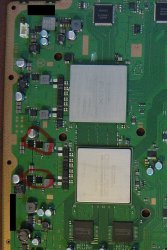
On the 25xx, there are only two small thermal pads on the cell's VRM. You can check the RF shield for two raised contact points. As for the thickness, I don't know. Felix reported that it was 1mm on COK001.
 

Attachments

  • IMG_5607.jpeg
    IMG_5607.jpeg
    363.4 KB · Views: 129
Back
Top