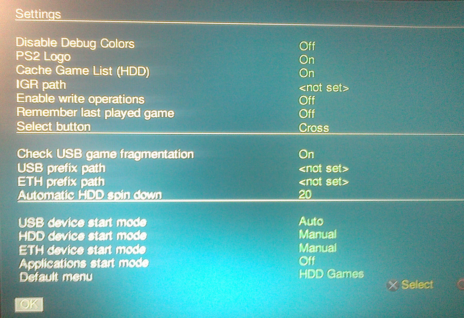
Could not launch OPL Loader

Balaji

Forum Noob
Hi,

I am having ps2 FAT model with installed infinity matrix 1.93. Also i do have opl loader installed in memory card. Except this i dont have any other softwares.

I can play games using ps2 cds, i dont have any issues. But i could not play games via USB. I cannot launch opl loader from boot, in the matrix infinity configiration i select boot mode is Auto.

Please advise do i need any other software to play via usb ? Even i cant able to launch opl from my memory card. I press R1 while booting, but no response.
 
From what I understand you enabled USB device start mode\BDM start mode:
manual.png


What more can you tell about your USB device?
Is it formatted to FAT32 (MBR)?

Did you try other USB devices?

Which version of OPL did you try?

Did you copy games' ISOs to CD\DVD folder?
 
From what I understand you enabled USB device start mode\BDM start mode:
manual.png


What more can you tell about your USB device?
Is it formatted to FAT32 (MBR)?

Did you try other USB devices?

Which version of OPL did you try?

Did you copy games' ISOs to CD\DVD folder?
 
Hi Thanks for your reply, please see the following details and please advise...

Is it formatted to FAT32 (MBR)? - Yes sure

Did you try other USB devices? - Not yet, at the moment don't have any other USB Stick

Which version of OPL did you try? - OPNPS2LD-v.1.2.0 Beta version latest one

Did you copy games' ISOs to CD\DVD folder?[/QUOTE] - Yes i copied ISO file to DVD folder.

The OPL Settings, i could see only option as BDM Start Mode - Auto Block Devices

https://i.postimg.cc/zvvhcxZ0/20211108-103318-mfnr.jpg

https://i.postimg.cc/xjXygdfY/20211108-103429-mfnr.jpg

https://i.postimg.cc/tTYPrrHD/20211108-103501-mfnr.jpg

Kindly please check the above photos and advise......


From what I understand you enabled USB device start mode\BDM start mode:
manual.png


What more can you tell about your USB device?
Is it formatted to FAT32 (MBR)?

Did you try other USB devices?

Which version of OPL did you try?

Did you copy games' ISOs to CD\DVD folder?
 
Hi, I did with OPL 1.0.0 also, still opl cannot detect my games in the USB Drive.

Mainly in OPL settings, i seen BDM instead of USB which i seen in many youtube videos. So i am not sure whether the problem is in USB drive or in the OPL settings.

Please advise
 
Hi, I am gone through very bad with these PS2, but cannot leave that. I had installed matrix chip and also soft mod with FMCB. But the problem here is, my usb stick is not detected in the OPL.

Structure i have in my USB drive - USB Root/DVD/Game.ISO

Also i tried with USB Util - USB Root/DVD/UL format files.

Above both not detect my USB drive.

Details:

PS2 Console FAT - SCPH-39004
OPL Loader - Beta Version latest one and also i tried with Version 1.0.0
USB - Kingston 16GB

Anyone please check the below setting is correct or what i did mistake and where i missed ?

What is this BDM ? I know its Block device manager, but when i seen lot of youtube videos, i could see only USB. Is there any compatible issue with my console. Please advise any experts...

20211109_212628_mfnr.jpg

20211109_212645_mfnr.jpg
20211109_212718_mfnr.jpg
 
You can correctly see your pendrive content from Wlaunchelf??

I'm asking since also my 39004 has some problems with the 16GB KINGSTON pendrive (I have 2 of them), sometimes it cannot read the content (The 75004 instead never fails to see this pendrive).

I'm not using newer OPL versions actually, so I'm not much expert about the BDM start mode. I think that setting USB ON in Block devices you're blocking the USB reading. Have you tried setting it to Off?

Also games in UL format must be installed on device's root (not CD or DVD folder) togheter with the ul.cfg. However you have to use USBUtil only for games bigger than 4GB.
 
Hi, Thank you so much for giving that hint KIngston is not working in some consoles. Yes that's right, i just bought new sandisk it works like a charm. I didn't do anything. Just plug in the new USB Stick. The OPL detects automatically.

Thank you so much....
 

Similar threads

Back
Top