
PS3 Error 8002F2F0 after updating to cfw 4.83

Louay

Senior Member
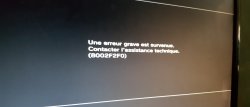
the ps3 is fat model CECHP04 with 160GB it was work up until today and always up to date it was on cfw 4.82 then i update it to 4.83cfw after updating ps3 restart then show the coldboot then It say serious error 8002F2F0 is there a solution for this problem can i fix it with hardware flasher or repatch the dump with new 4.83cfw coreOS ???
 

Attachments

  • 20181203_002550.jpg
    20181203_002550.jpg
    2.8 MB · Views: 860
which firmware did you update to? I'm on ferrox 4.83 myself, and I've had no issues with it. I guess your hdd might be dying. I replaced the 50GB hdd my system came with with a 1TB hdd, and there were no errors with either. I've opened up the hdd bay and removed the hdd multiple times. again, no errors...which is what makes me think that.
 
I update to ferrox 4.83 and i format the hdd same thing happen and when i acess recovery menu all menu works but the last one which is system update when i click on it same error appear
 
You have well and truly corrupted the flash to get this error. And to be honest I am surprised this hasn't totally bricked your PS3. Did you by any chance have one of your own MFW's you created installed before you updated to 4.83 CFW?

Factory restore your PS3 from the recovery menu. This should wipe the flash clean and then ask you to install your firmware, So it will reset the PS3 to as if you just got it out of the box.
 
No i just install 4.83 cfw ferrox cobra 7.55 downloaded from here and me too when.i search they told its a bad nor so i will try to dump and see the flash and rewrite it again
 
You should try to format the hdd in PC (not in PS3) to remove all the sony data
After that insert the hdd back to the PS3 and allow the PS3 to format it
 
the only bug I've found with ferrox 4.83 (unless it's normal) is that when I rebuilt the database, it removed psn patch, so I had to reinstall it. I'm also not sure about whether ferrox should have install all packages, since it doesn't appear to have that feature for me @Alexander . beyond those two things, everything works for me.
 
Dunno, im insisting in the hdd because sometimes is the cause of some "misterious" problems when installing the firmware
But the error code is pointing to the PUP file
http://www.psdevwiki.com/ps3/Error_Codes

Error with installing Firmware update. The PUP is not recognised as valid update.
Initially you should check the USB flash drive, format it, etc...
Also be sure is a flash drive that you used before in a PS3 to install firmware, this way you know for sure that flash drive is compatible with PS3

Also, use an app to check the MD5 of the PS3UPDAT.PUP file AFTER you copy it in the flash drive, just incase is becoming corrupted when you copyed it to the flash drive
 
the only bug I've found with ferrox 4.83 (unless it's normal) is that when I rebuilt the database, it removed psn patch, so I had to reinstall it. I'm also not sure about whether ferrox should have install all packages, since it doesn't appear to have that feature for me @Alexander . beyond those two things, everything works for me.
I've never had this bug. Over the weekend I'll see if I can replicate it.
 
I'm assuming it was due to rebuilding the database what happened is that I had an internet hiccup, so I was trying to solve it on the ps3. I did several things, that being one of them, in order to fix it. it's corrected now. I think the issue was brought on by the instability of ftp on the system.
 
Back
Top