PS2 ESR does not boot games

Then it is not a problem with a memory card or with ESR.
Your PS2 has a problem with reading these discs.

Probably via wLe your PS2 has more attempts to read these disc.

If somehow after more than a while these discs will be read,
your laser will not work too long trying to read them.

Did you use a desktop or a laptop DVD\BD writer?
Try a desktop writer.

What brand of DVD discs did you use?
Did you used DVD-R or DVD+R?
Try Verbatim DVD-R, Sony DVD-R (Made in Taiwan), TraxData DVD-R (RITEKF16).

What speed of writing did you use?
For me 4X does the job, for anyone else it could be 8X or even 12X.
The lowest Jitter the better results you will get.
LaunchElf always says at the top "Stop disc==ESR DVD(off)" if that helps.
I used a laptop DVD writer, I wish I had a desktop. I use verbatim DVD+R, but one disc I'm trying to get work is a Maxwell DVD-R.
Videos say try to burn at the lowest speed(1X), and my DVD drive only supports as low as 2X-Max, so I used 2.4x. Made it seem like anything higher damages the drive or something.
 
Last edited:
Start reading posts about DVD+-R from here:
https://www.psx-place.com/threads/d...r-your-backups-on-fat-ps2s.24450/#post-183622.

Your (and many if not all) DVD writer(s) has\have writing speed in its\their firmware.
That is why you cannot* write in a lower\higher speed then it is supported (e.g. 1X, 16X).

Additionally also discs have their writing tag speed.
Currently most of discs you can buy have max 16X tag.

* - very, very old discs can have 2.4X or even 1X max speed tag.
A DVD writer should detect it and not allow to write data above that speed.
 
Start reading posts about DVD+-R from here:
https://www.psx-place.com/threads/d...r-your-backups-on-fat-ps2s.24450/#post-183622.

Your (and many if not all) DVD writer(s) has\have writing speed in its\their firmware.
That is why you cannot* write in a lower\higher speed then it is supported (e.g. 1X, 16X).

Additionally also discs have their writing tag speed.
Currently most of discs you can buy have max 16X tag.

* - very, very old discs can have 2.4X or even 1X max speed tag.
A DVD writer should detect it and not allow to write data above that speed.
Just ordered the Verbatim DVD-R discs.
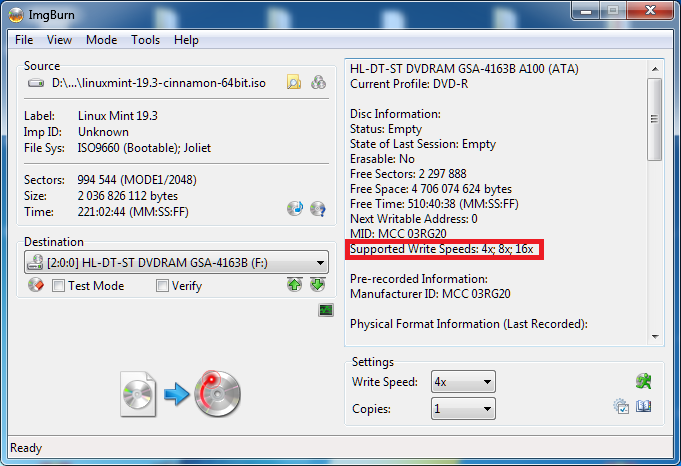
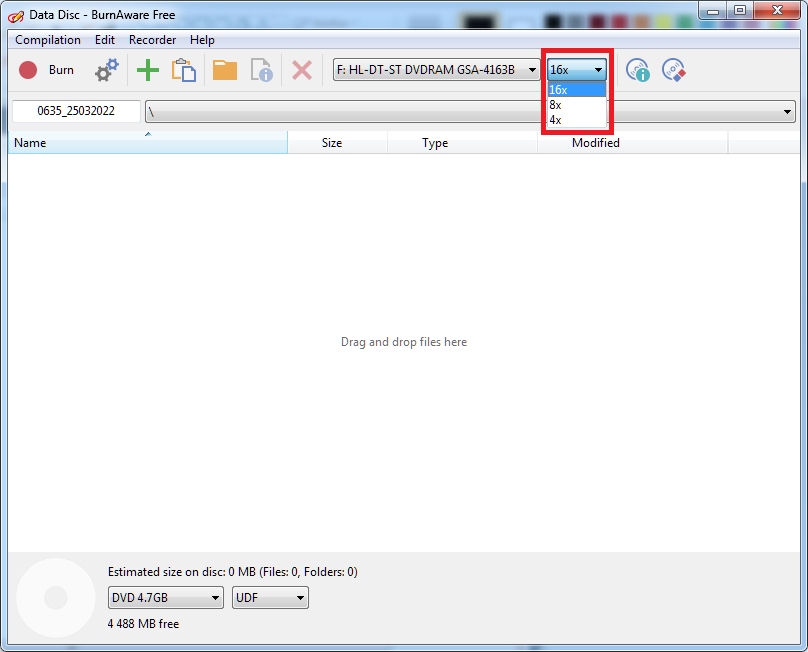
How do I check the write speed for my DVD drive?
 
Once you insert a disc, your drive should detect its parameters.
E.g. you can check it in almost any app that writes data to a disc:
  • ImgBurn:
    sup-write.png
  • BurnAware:
    sup-write2.png

Changing the disc manufacture it's only a halfway.
Also changing the DVD drive (from a laptop to a desktop) that writes data may be needed...
 
Once you insert a disc, your drive should detect its parameters.
E.g. you can check it in almost any app that writes data to a disc:
  • ImgBurn:
    sup-write.png
  • BurnAware:
    sup-write2.png

Changing the disc manufacture it's only a halfway.
Also changing the DVD drive (from a laptop to a desktop) that writes data may be needed...
Oh so image burn does that then. It says that my write speeds are 2x and 8x.
 
Last edited:
Okay, nothing is working.
I tried the other ESR disc patcher (FDVDBOOT)
Even used the correct payload for my PS2
Used the max writing speed
I still get "DVD player is not set up"
I'm at a damn loss here..
 
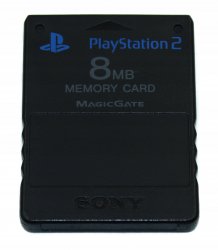
An official memory card for PS2 has 8 MB and looks like this:
Karta-Pamieci-8-MB-PS2-PlayStation-2-SCPH-10020.jpeg

Other capacity cards are 3rd party.
 
Follow the instructions on how to run it from USB, it is very easy. Then if it will solve the problem, you can install it on MC.

Sorry I said a nonsense, this won't work 'cause when you install on USB you'll need to launch it (to manually select the ELF), the update won't start automatically when you insert a ESR/FDVDB disc. Only if installed on MC the update will work automatically.

Anyway it is quicker than it seems. If you don't undesrtand something just ask in the thread.
Also Berion writed a guide: PS2 - Updating DVD-Player | PSX-Place
 
Sorry I said a nonsense, this won't work 'cause when you install on USB you'll need to launch it (to manually select the ELF), the update won't start automatically when you insert a ESR/FDVDB disc. Only if installed on MC the update will work automatically.

Anyway it is quicker than it seems. If you don't undesrtand something just ask in the thread.
Also Berion writed a guide: PS2 - Updating DVD-Player | PSX-Place
Thank you both for the help. My official memory card came in and I'll test it out before I attempt this method.
 
So, my PS2 now says "disk read error" when trying to boot into ULE and install FMCB on the other memory card...

EDIT: Nevermind, found an old disc that worked. I guess the PS2 exploit doesn't work with verbatim discs, but it will with Maxell....?
 
Last edited:

Similar threads

Back
Top