PS2 Ethernet link light but no IP address, DHCP or Static

jakenmenheer

Forum Noob
I have a SCPH-39001 with an original Sony Ethernet adapter. I recently got a FMCB card with the intent of playing games over Samba, as I already have an active NAS.

I am attempting to get the Ethernet and Samba connections running, but am not having success is what seems to be getting the PS2 an IP address. If I boot the console, open OPL, and select Eth Games>Start Device, I get a link light on the port on the switch I have the PS2 connected to, but after some time also get the following error: "301: No Network Connection." Additionally, I can not see the device via an IP scan or ping from my PC on the same LAN after the link light goes active. This is the case if I choose Static or DHCP in the configuration via OPL.

Additionally, I get the same results when configuring network settings and trying to connect to host:/ in LaunchELF. I inspected the IPCONFIG.DAT generated, and it seemed inline with what I have seen online from others.

I know that the IP address I am attempting to use statically is open and outside of my DHCP range.

Any insight on why I might not be able to get an IP?

I know I may have some hoops to jump through to get the SMB portion working, as I have read needing to possibly use SMB V1 and such, but I need to get basic LAN connection running first.

For basic info:

Console:

SCPH-39001
Browser 1.20
CD Player 1.20
PlayStation Driver 1.10
DVD Player 2.12U

w/uLaunchELF v4.43a
Free MCBoot v 1.966
OPL 1585-DB-TA-cea1d2a
 
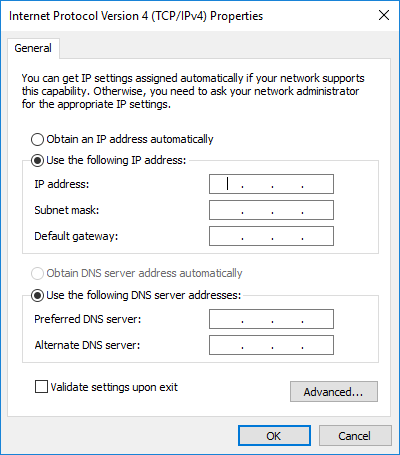
Make a screenshot of your IPv4 settings:
ipv4-properties.png


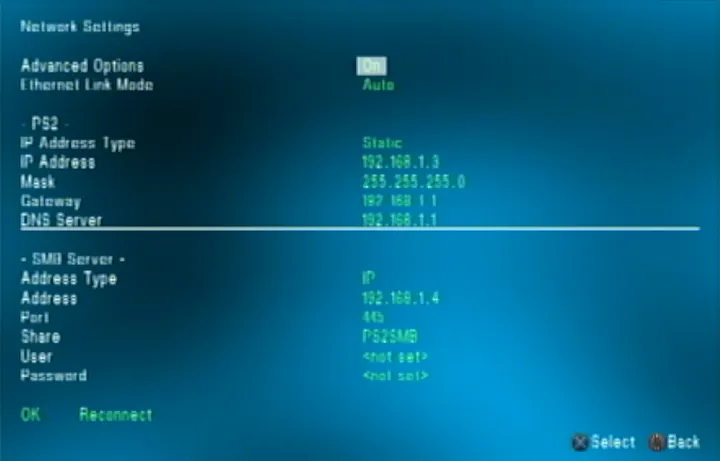
Make a photo or screenshot of your OPL network settings:
1*-wsLpgd1jxiEkpDvlOtYkQ.png


The latest OPL-v1.2.0-Beta-2152 can be downloaded from here:
https://github.com/ps2homebrew/Open-PS2-Loader/releases.
 
Make a screenshot of your IPv4 settings:
ipv4-properties.png


Make a photo or screenshot of your OPL network settings:
1*-wsLpgd1jxiEkpDvlOtYkQ.png

The IPv4 settings would be those of my NAS, which is running Open Media Vault.


On the PS2 I have tried static and DHCP. When using static I have the same/proper .1 gateway and DNS server, and a static IP in the same subnet, that I know is not in use by anything else on my LAN.
 
Not sure why my images got stripped from my reply. But I have both my NAS (running Open Media Vault) hosting the SMB share and the PS2 on the same 192.168.1.x subnet. I have gateway and DNS pointing to my router at .1.
 
The PS2 needs the SMBv1 protocol or you will never be able to communicate with it, it is as if you were speaking to it in "Chinese" when it speaks "French".
 
Here is the OPL IP settings when using Static. I have the same result when set to DHCP.

b0a34JQ.jpeg


And for the NAS hosting the Samba share:

ktrCjiU.png


Yes I am sure I have the Samba share info correct, as I have connected plenty of other devices to the share.

As for it having to be a SMBv1 share, while that may be true, I don't believe it would stop the device from obtaining an IP address or being pingable.

None the less, I have tried enabling SMBv1 via OMV's Samba settings, as discussed here:

https://forum.openmediavault.org/index.php?thread/41498-omv6-can-smb1-be-enabled/

I am not sure how accurate that is, but I did try it and still got the same Error 301: No Network Connection.
 
Last edited by a moderator:
I installed OPL Server on my Windows machine and tried to connect to that machine/share, but still got the same "No Network Connection" error.
 
I installed OPL Server on my Windows machine and tried to connect to that machine/share, but still got the same "No Network Connection" error.

Two questions
1.-Have you installed OPL versions previously on your console?
2.-Are you connecting your PC directly to your PS2 or are you using a router?
 
Two questions
1.-Have you installed OPL versions previously on your console?
2.-Are you connecting your PC directly to your PS2 or are you using a router?

1. I just got my FMCB recently and this is the only version of OPL I have tried.

2. As I mentioned in my comments I am connecting my my NAS over my LAN and have tried DHCP (so all connected to my router) and static. The Windows machine OPLServer was also tested over LAN, not directly connected.

I will try this evening going direct connection from the Windows machine to the PS2, and just set static addresses on both. See if removing the rest of my LAN helps at all.
 
1. I just got my FMCB recently and this is the only version of OPL I have tried.

2. As I mentioned in my comments I am connecting my my NAS over my LAN and have tried DHCP (so all connected to my router) and static. The Windows machine OPLServer was also tested over LAN, not directly connected.

I will try this evening going direct connection from the Windows machine to the PS2, and just set static addresses on both. See if removing the rest of my LAN helps at all.

Thank you.
another question:
Are you using direct cable?
 
Thank you.
another question:
Are you using direct cable?
Not sure what you mean by that. I just explained that everything I have done so far is wired connections through switches/my wired LAN, but that I intend to test via direct device to device connection with a single cable this evening.
 
Not sure what you mean by that. I just explained that everything I have done so far is wired connections through switches/my wired LAN, but that I intend to test via direct device to device connection with a single cable this evening.

When using a router, a direct cable is what you use.
but if you are connecting your pc to the ps2 directly then you should use a crossover cable.
 

Similar threads

Back
Top