PS3 (Fault Finding) Wifi/Bluetooth failure leading to dead console PS3 Super Slim

If you exchange Wi-Fi in some cases won't work because of eprom tied with board, solution is to exchange 8 pin eprom from old module to new board which is inside module.
Or read data from old and write data inside new eprom on new board.

Wow, I hope not... I would have no idea how to dump or reprogram an eprom... I know there are videos out about dumping/reprogramming eproms for the optical drive, but I can't find any on this topic... I'm actually having trouble sourcing the wifi module here in Australia, the only ones I can find are on Ali Express, which take ages to get here...

Btw... in your last posts you were talking about a coil... I've got to be honest, I'm only an amateur/hobbyist guy, but I don't know what you are referring to when you are talking about the coil...
 
Wow, I hope not... I would have no idea how to dump or reprogram an eprom... I know there are videos out about dumping/reprogramming eproms for the optical drive, but I can't find any on this topic... I'm actually having trouble sourcing the wifi module here in Australia, the only ones I can find are on Ali Express, which take ages to get here...

Btw... in your last posts you were talking about a coil... I've got to be honest, I'm only an amateur/hobbyist guy, but I don't know what you are referring to when you are talking about the coil...
No worries you don't have to program anything, it is just a way I get some situations with some boards. A simple swap of 8 pin ic will be enough. Do this swap only if you see all power supply with 1.8v and 3v3 to WiFi module and you still get loop update.
Edit
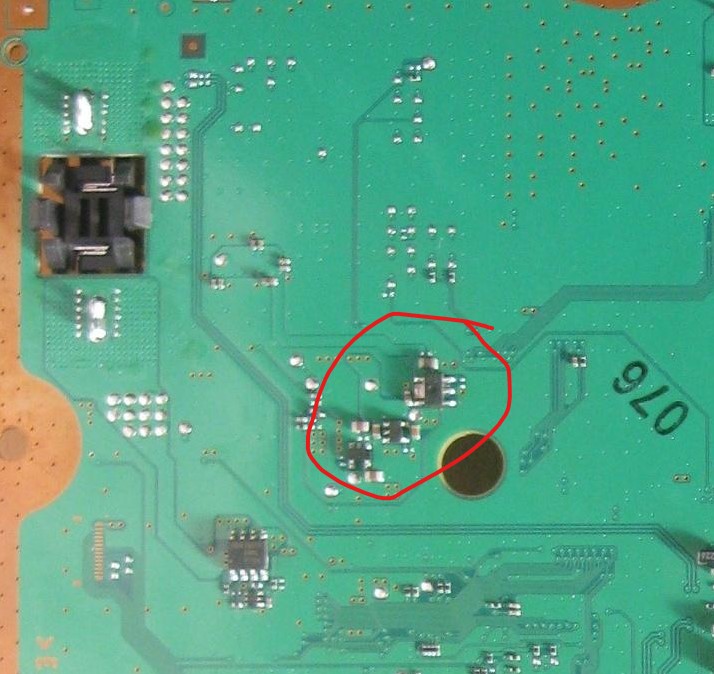
@Jarod A I've forgot to show where coil(inductor) is placed
http://s.go.ro/uqa1ntvx
For more thing related ps3 can look as well http://s.go.ro/ax49drsu
 
Last edited:
Hey Guys,

Just wanted to provide my side as I was able to get my Update error fixed by using the hard drive pull trick. Here's exactly what I did.
  • PS3 is a CECH-2100A
  • Firmware used was HFW 4.85.1 (Link)
  • Bluetooth / WiFi Module broken
  1. Find a new 2.5" drive that you can use (you can also use your ps3 drive, but the data will be completely unrecoverable which wasn't a concern for me)
  2. Connect the drive to a windows machine
  3. Wipe the drive as MBR and create a 30GB FAT32 partition
  4. Insert back into the PS3
  5. Run through the setup process which will format the drive
From here I was receiving the errors (as expected) but at 34% with the Firmware above. I then documented the Hard drive read times to see if I could find out what was going on. From what I determined, the Hard Drive was reading at 21% and consistently reading until 30%.
  • 33% pull - Error (error @ 35)
  • 32% pull - Error (error @ 35)
  • 30% pull - Error (error @ 35)
  • 28% pull - Error (error @ 47)
  • 20% pull - Jumps to 38% and completed!
With the 20% pull, I pulled the Hard disk for 3 (quick?) seconds and re-inserted. The hard drive was pulled BEFORE the 21% read listed above. The disk light was then solid yellow for around 3-5 minutes while the system paused and then shot up to 38% where I saw the disk light resume activity. From there it completed normally with no other action needed from me.

I had tried a number of official Sony Firmware versions to no avail, but also didn't document them near as much as I did this version. What I suspect (at least on the 4.85.1 firmware listed above) is that the second read between 21% and 30% is entirely on the Bluetooth / Wifi module. But, that's just a wild guess.

I hope this helps someone!
 
Hey guys!
Thank you for your efforts. We're you able to fix this error lately since last year?
I have a somewhat same PS3 SS, and the WiFi board is dead and keeps trying to update. Is this error called boot update error? Thanks
 
Hi,

I had a PS3 Slim which the controller wouldnt power the console on unless either connected via USB or the controller powered on after the console had fully booted, then at random stages the console would completely freeze.~

Assuming a scamming prick had sold me a faulty PS3 knowingly (as they tried to play dumb then ignored all messages). I then recently purchased another PS3 console (this time avoiding Facebook gaming groups and got one from CEX).

Just checking the console and magic its base firmware is 2.70, so I can downgrade/update the firmware, most of all it should be compatible to just install 4.90 CFW onto the console (and not the Hybrid Firmware).

So I have just downloaded a complete EvilNat 4.90 CFW bundle and reading the readme I see now (last time I did any JailBreaking was back when 3.50 was released and on my launch FAT, which died years ago, so I just replaced it with one already modded).

Would I be correct in assuming CFW noBT (For PS3 without or damaged Bluetooth) would mean if your console has a damaged BT that it would solve the issue of the console crashing/hanging by ignoring the BT completely.

If this is the case could someone confirm please as I could save myself £120 by returning my other PS3 I just purchased from CEX and simply update my other PS3 with CFW noBT (For PS3 without or damaged Bluetooth).

That would also be great because I upgraded that HDD to a 2TB HDD with loads of games downloaded to it and also my pain staking Metal Gear Solid 4 game save on 2.0 with nearly all emblems unlocked and most of all BIG BOSS rank.

Thanks
 
Hi,

I had a PS3 Slim which the controller wouldnt power the console on unless either connected via USB or the controller powered on after the console had fully booted, then at random stages the console would completely freeze.~
Thanks

I have a super slim with almost the same symptoms.
However mine also has LAN connection problems. WiFi is also hit and miss. Sometimes it works and sees networks, but mostly not. Controller usually can connect and works, but sometimes it has difficulty connecting.
The console usually freezes if I try to fiddle with network related settings/menus.
I cannot find any pattern.
I took it apart, voltages on wireless module are fine, no shorts.
Can you please do some tests with wired LAN connection? See if that works for you? (always)
Might be southbridge issue? This console has some marks on its side, probably was thrown or felt real hard.
 
I have a PS3 Slim with a DYN-001 board with a suspiciously similar issue. When I get home from work in a week I'm going to try and get it running so I can salvage my savegames, that's all I really care about. I am hoping for some assistance with finding the most efficient route to resolution here, keeping in mind I'll be replacing the console, I won't be trying to repair it.

So, looking at this picture of a DYN-001 board, could someone please point out to me which component I should to remove to get the console booting, in the event that this is the fault I am experiencing? I know it will be in one of the clusters in the top left corner, probably here:

dyn.jpg
 
Back
Top