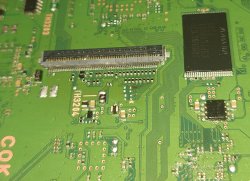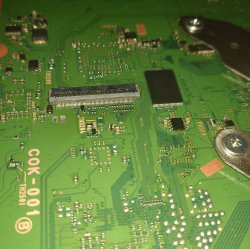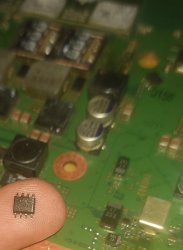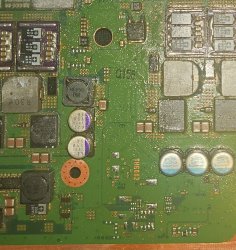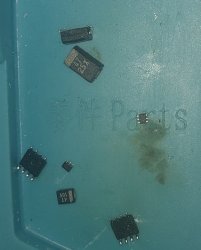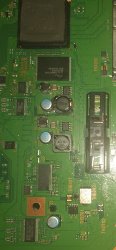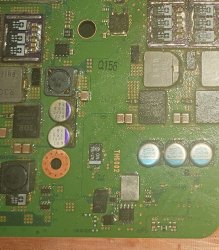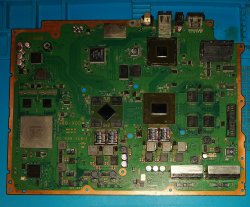
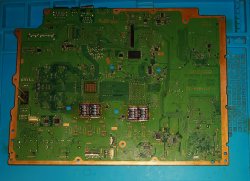
PS3 Error 8002f14e. My Blu Ray drive isn't functioning, no power to the BD Drive.

mNqdPpi.jpeg

c2sCUHc.jpeg

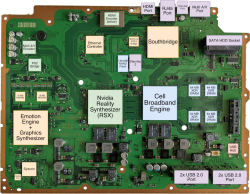
PS3 Specs
1tb SSD
Tantelizers
Has new quality Replacement Caps for the Motherboard, PSU and the BD Drive
Delided

I'm very familiar with tech repair and soldering and repair a bunch of other systems in my spare time. No broken traces, no cold solder.
20250819_215738.JPG

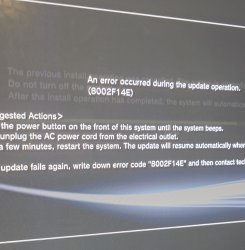
Evil Nat CFW and now it's stuck on the latest update for Evil Nat that I attempted to install to see if that would fix the BD Drive, but instead I get error 8002fe14e every time it gets to 75% of the installation.

Hi thought I make this post about my A01 PS3 that no longer has a functional Blu Ray Drive, and I've tried everything to try and fix this fault going down the rabbit hole of trying various repair attempts and scrolling through old forum posts. But nothing seems to fix this fault, it looks like this fault is more complicated than I thought. And it looks like it's pointing towards the motherboard. I'm now stuck on the update installation for the latest Evil Nat CFW giving me an 8002fe14e error at 75%. And now my BD Drive has a disc stuck inside, and it looks like it's not getting any power, no blue light, no eject.

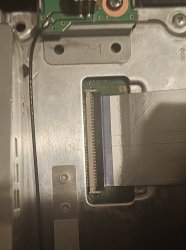
Before it used to take in discs, but it would not read any discs, but now it doesn't function at all. I made a mistake of tearing down my PS3 a bunch of times causing more wear to the BD FPC Connector and the ribbon cable that plugs into it. I got into PS3 too early, trying various different fixes first it was the Delid, then the Tantalum Caps, then new Thermal Pads, then the Tantelizers. In comparison to my A01. My B01 that I recently aquired has also been Recapped with CFW, Tantelisers, Delid and that unit works perfectly. The BD Drive is fully functional and that's because I didn't take it apart as many times and was extra careful with it, the FPC Cables and the connector is in great shape. But my A01 is another story.

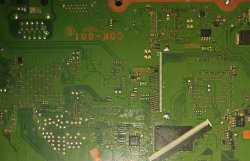
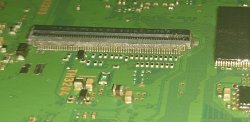
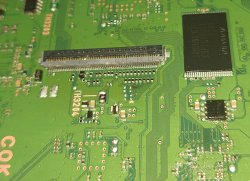
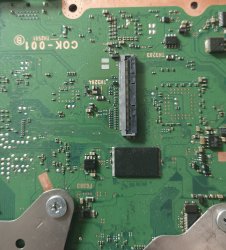
My PS3 was originally bought boxed fully working from Japan, I was able to Delid it, install CFW and with a 1tb SSD. It used to work perfectly, but then when I took it apart for NEC Tokins replacements along with thermal pad replacements. And with the amount of times i took apart my PS3 sometimes having to reapply the thermal paste for better temps. The 60 pin Blu Ray Drive Connector on the motherboard would start to wear out every time. I opened up my unit to the point where the latch completely broke off.

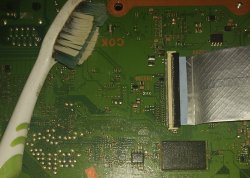
Where I would reinsert it, and the 60 Pin Blue FPC cable would also start to wear out more, with the blue tabs eventually breaking off. It got to the point where the BD Drive stopped functioning, where a game would crash at a certain point, and then all of a sudden my BD Drive would not detect discs, no PS2 discs, PS1 games, PS3, DVD, BD, CD's nothing. At first I thought my BD Drive failed. So I took a known working one from 80gb unit, along with replacement FPC Cable and remarried the replacement, that didn't fix it. I then I kind of gave up and used Webman for playing my games off an SSD.

Then I wanted to take another shot at repairing the BD Drive since a non working disc drive just bothers me. I bought a new laser for the replacement BD Drive and that didn't fix it. I replaced the BD Drive board and that didn't fixed it. I then took it out and remarried the BD Drive to my working B01 unit and the BD Drive along with its board worked perfectly. This then pointed towards it either being a software fault or a motherboard issue. So i tried going the software route by remarrying the drive again, and messing around with the CFW settings which didn't work to eventually reinstalling the firmware where I now have this 8002fe14e fault.

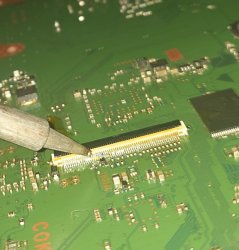
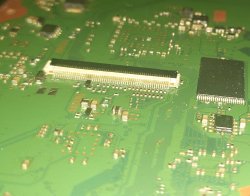
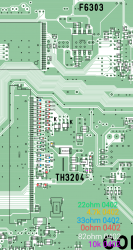
And replacing the FPC connector with a quality replacement 60 FPC Connector and that didn't fix it and I tried replacing the FPC connector with different 60 pin FPC Connectors, 3 times checking over my solder work and nothing. I even went as far as replacing the 0402 resistors near the BD Connectors using the schematics to identify them and that didn't fix it. I also blew some fuses near by TH3204, TH2501 and TH3203 likely caused by me plugging in damaged Ribbon cables into the connectors over and over which most likely may have caused those fuses to blow. So I took the fuses out of a 80gb non backwards compatible PS3, that I plan getting it's 65nm RSX extracted from via a BGA repair service to repair another E01 PS3. But that's besides the point. I got the fuses off of my parts unit, along with another 60 pin FPC Cable, and it's back to the same 8002fe14e error code always getting stuck at 75%.

Going through all of this mess. I came to the realisation that circuitry, most likely an IC Chip that communicates with the BD Drive on the Motherboard maybe fried, and I don't know much about where such an IC chip could be on the motherboard. Unless I killed my BD Board which I highly doubt since it's a remarried replacement. My PS3 definitely needs to be investigated and probed out, perhaps with an Oscilloscope since I can't figure out why this fault is occuring despite me replacing the BD Drive, Board, 60 pin FPC Connector on the motherboard along with the FPC Ribbon Cable and the nearby resistors on the motherboard. Nothing seems to work.

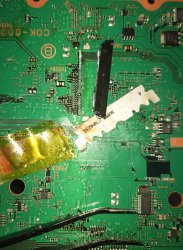
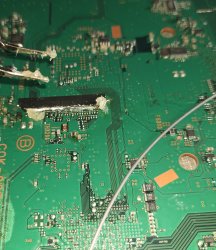
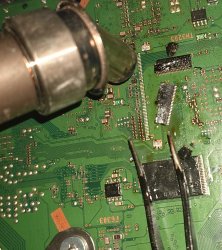
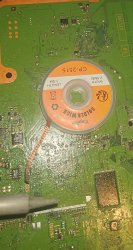
This is how I replaced the FPC Connectors and the Resistors. Most of this was just a waste of time.If anyone understands how the original PS3's motherboard communicates with the Blu Ray drive, I would love to know and see what the specific fault is on my PS3. It most likely that my PS3 just isn't communicating with the BD Drive.

I also tried swapping the network/bluetooth board since I heard that can also cause this error but swapping the network board doesn't fix this error for me and my BD Drive continues to not function. Everything 100% is pointing towards a fault on the motherboard. Now I could try formatting the SSD or rebuilding it's database, but my main focus of this thread is to get the BD Drive working and figure out where the exact fault is for the BD Drive not communicating with the motherboard.
20250613_204913~2.JPG
20250806_212212.JPG

20250613_205534~2.JPG
20250613_210723~2.JPG
20250613_212517~2.JPG
20250613_213204~2.JPG
20250816_022523.JPG
20250818_005514.JPG
Screenshot_20250809-115318~16.png
Screenshot_20250807-195047~2.png
Screenshot_20250807-151806~2.png
Screenshot_20250807-185001.png
20250807_001546.JPG

playstation-3-cech-a01-cok-001-nightmare-help-v0-v2h4uteffzaa1.png

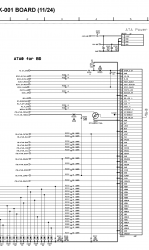
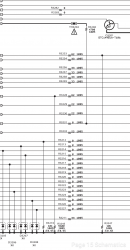
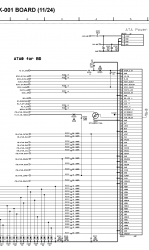
I thought I insert this schematic for a reference, i can't seem to find a Blu Ray IC on the motherboard.

Is the fault with one of these chips below.

Source: https://www.psdevwiki.com/ps3/Bluray_Drive

"The Blu-ray drive is controlled by a Sony Digital Signal Processor chip (CXD6350GG-1, CXD5063AGG-1, CXD5065GB-1, CXD5065-1 depending the SKU) and a Sony CXA2720R Front End Processor chip. Motors/coils are driven by Rohm BA5888FP (Laser Driver - Tracking/Focus Coils driver) and Rohm BD7956FS (Motor Driver - EXP-Motor coils/sled/slot motor driver), of which the Laser Driver uses an OPAMP NJM13403V for Tracking/Focus CTRL."
 

Attachments
  • 20250613_215352~2.JPG
    20250613_215352~2.JPG
    436.2 KB · Views: 70
  • 20250807_005345.JPG
    20250807_005345.JPG
    213.6 KB · Views: 72
  • 20250816_022523.JPG
    20250816_022523.JPG
    569.7 KB · Views: 70
  • Screenshot_20250807-195047~2.png
    Screenshot_20250807-195047~2.png
    289.2 KB · Views: 66
Last edited by a moderator:
Hi there @iVirtualZero

Great re-work you did on the board.


I thought I insert this schematic for a reference, i can't seem to find a Blu Ray IC on the motherboard.

Is the fault with one of these chips below.

Source: https://www.psdevwiki.com/ps3/Bluray_Drive

Those components on the link are are in the Bluray drive board (I believe people refer that as a "daughter board"), for instance , see on the wiki for one of the boards: https://www.psdevwiki.com/ps3/images/6/6c/BMD-002_1-874-277-33_A.jpg


If I understood (is a long post :-) ) during your tests, you re-maried the drive with another console - if you allow me speculating, assuming you fixed all the hardware issues with connectors, capacitors etc, would that not stop the updating process? (I mean, the drive is no longer maried with the board you are trying to perform the update)
Cheers,

M
 
Hi thanks for the reply, yes I have a lot of soldering a rework experience and I see so then the fault is elsewhere on the motherboard perhaps with MOSFETs, Capacitors or something, to sum it up, the drive is married to this board. I remarried it to my B01 to test it and the BD Drive worked. I then remarried it back to my A01 and it wouldn't work. Which points towards a motherboard fault. Replacing the resistors and 60 pin connector didn't fix this fault, then when I tried updating to the latest Evil Nat firmware I ended up with this update loop. Also this console had Internet issues prior to this where the WiFi nor the ethernet doesn't work along with a slow Bluetooth connection where the controller pairs up very slowly. This fault popped up later out of nowhere. It's now at a point where my BD doesn't get any power at all, along with being stuck on an update loop. Most likely something on the motherboard is gone, but I don't know what to test or to check for with my Multimeter all of the fuses check out fine. May need to send this over to someone that can really test this for any faults.

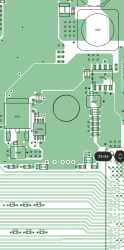
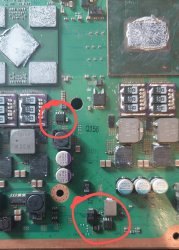
Could the fault be around here:

20250820_143024~2.JPG
 
Last edited:
Ahh ok, thanks for clarifying that the drive is indeed married back with the current board.

In that case, indeed a more in dept troubleshooting is needed - some of other members with huge experience repairing these boards can deffinetively suggest somethings to check prior you send it to someone else.

On an unrelated note (just because you mentioned the issue with WiFi/Bluetooth), I have a CECH-2503B (waiting for parts) that is stuck as well on the update loop with 8002F1F9 - this is a common fault for some SLIM models indicates the power rail for the Bluetooth/WiFi module or the module itself.

Cheers,

M
 
Ahh ok, thanks for clarifying that the drive is indeed married back with the current board.

In that case, indeed a more in dept troubleshooting is needed - some of other members with huge experience repairing these boards can deffinetively suggest somethings to check prior you send it to someone else.

On an unrelated note (just because you mentioned the issue with WiFi/Bluetooth), I have a CECH-2503B (waiting for parts) that is stuck as well on the update loop with 8002F1F9 - this is a common fault for some SLIM models indicates the power rail for the Bluetooth/WiFi module or the module itself.

Cheers,

M

Yes even with that fault I replaced the WiFi/Bluetooth module and that also didn't fix the internet connection fault. I also just plugged my A01 BD Drive into my B01 and successfully ejected the disc out of the BD Drive. But when I put it back into my A01, the BD drive was completely dead, no blue led flash, doesn't take in discs. There is indeed most likely a bunch of faults with this motherboard. I suspect there could be fried MOSFETs on my board. But I'm not good with diagnostic level repair. I will try getting a hold of a dead YLOD motherboard and will try swapping around the two Mosfets that are known to fail.
 
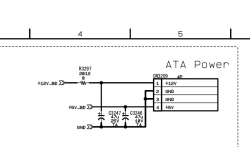
I had a quick look on the full diagram and assuming there is no power at all on the drive, the initial checks would be the power rails for sure; from the diagram, the connector that provides power to the Blu-ray is CN3209.

It supplies 12V and 5V:

Screenshot 2025-08-20 at 23.59.36.png


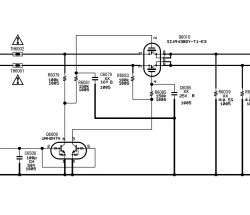
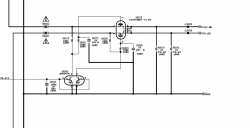
Those direct voltages come from Q6010:

Screenshot 2025-08-21 at 00.01.45.png

Q6010 and surounding components can be damaged - the quick check that you can do would be:
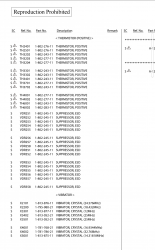
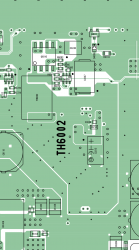
- TH6001 and TH6002 - they are "thermo fuses" (i.e. Thermistors) - if they are "opened" , it could be just them or potentially them + Q6010
- check for shorts on all the surounding capacitors
- check for the resistence on all the surounding resistors

I assume all the other parts on the console are working hence the main 12V and 5V power rails should be ok (they are connected to Q6010 via the thermistors).

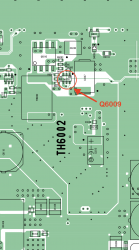
Q6009 seens to be the "enabler" of Q6010 - another one that can be at fault - worthy checking the surounding components.

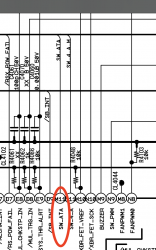
Q6009 is triggered via a signal that comes from the SYSCON chip via the line SW_ATA - I guess checking the continuity from pin 2 of Q6009 and M11 from the SYSCON chip (IC4002) would be another quick check, however it is a BGA chip and not an easy task finding the track or tap into it:

Screenshot 2025-08-21 at 00.47.06.png

Said that, I believe the better option would be measuring the voltages/signals on all the relevant points around those components - not an easy task I guess (i.e. console on, need to find measurement points on the other side of the board because the component are on the side of the heatsink, etc).

I am not sure if any of the above helps.

Cheers,

M
 
Last edited:
I had a quick look on the full diagram and assuming there is no power at all on the drive, the initial checks would be the power rails for sure; from the diagram, the connector that provides power to the Blu-ray is CN3209.

It supplies 12V and 5V:

View attachment 46415


Those direct voltages come from Q6010:

View attachment 46416

Q6010 and surounding components can be damaged - the quick check that you can do would be:
- TH6001 and TH6002 - they are "thermo fuses" (i.e. Thermistors) - if they are "opened" , it could be just them or potentially them + Q6010
- check for shorts on all the surounding capacitors
- check for the resistence on all the surounding resistors

I assume all the other parts on the console are working hence the main 12V and 5V power rails should be ok (they are connected to Q6010 via the thermistors).

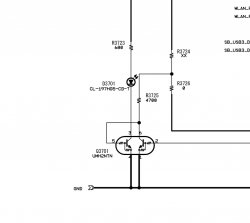
Q6009 seens to be the "enabler" of Q6010 - another one that can be at fault - worthy checking the surounding components.

Q6009 is triggered via a signal that comes from the SYSCON chip via the line SW_ATA - I guess checking the continuity from pin 2 of Q6009 and M11 from the SYSCON chip (IC4002) would be another quick check, however it is a BGA chip and not an easy task finding the track or tap into it:

View attachment 46417

Said that, I believe the better option would be measuring the voltages/signals on all the relevant points around those components - not an easy task I guess (i.e. console on, need to find measurement points on the other side of the board because the component are on the side of the heatsink, etc).

I am not sure if any of the above helps.

Cheers,

M

Thanks for the information, you mean the two IC Q6010 and Q60200 chips I circled in my previous reply. I've already replaced those two IC chips from a YLOD Board and it made no difference. I will need to check the other nearby components perhaps near the power connector. Will have to find and test Q6009.

This post: https://www.psx-place.com/threads/blu-ray-drive-does-not-pull-in-disc-cecha01.32858/

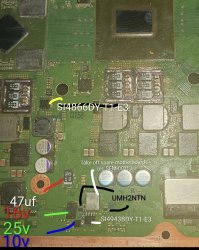
Mentions a nearby 47uf 25v tantalum cap being at fault. Will need replace that. But it looks like i will need to order it from Mouser or Digikey.

May consider ordering new ic's just in case: https://www.mouser.co.uk/ProductDetail/?qs=jcx%2B0HVgj2YtP03RabH5VQ==

20250820_201236.JPG

chrome-native://pdf/link?url=content%3A%2F%2Fmedia%2Fexternal%2Fdownloads%2F1000112684

Screenshot_20250821-112107.png

Screenshot_20250821-112138.png
 
Last edited:
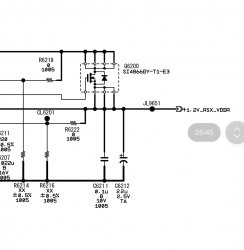
I don't believe Q6200 would be responsible to power on the BD drive (it is for the 1.2V VDDR).

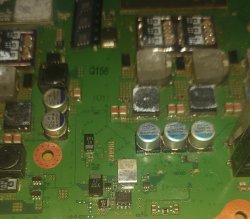
Q6009 is just another "FET like" transistor (edited: they are not FET, they are two NPN transistors) in a chip (IC) package - it is located very close to Q6010:

Screenshot_20250821-112107.png

I think you are well clued up :encouragement:, it is better I stop making "silly" suggestions now :smile:

Cheers,

M
 
Last edited:
I don't believe Q6200 would be responsible to power on the BD drive (it is for the 1.2V VDDR).

Q6009 is just another "FET like" transistor in a chip (IC) package - it is located very close to Q6010:

View attachment 46424

I think you are well clued up :encouragement:, it is better I stop making "silly" suggestions now :smile:
Cheers,

M

Yes looking through the other posts including your replies, I will try all of these suggested fixes. I will replace those two ic's just in case with brand new chips along with replacing the 47uf 25v Tantalum cap with a new 47uf 35v Tantalum cap. But I would like to order that Q6009 component. What is that component labeled as?

I have a feeling it might be that bad cap since this fault that popped up at first and would sometimes boot into a disc, but then it would crash and not load any discs, and then I would turn it off for some time and then turn it back on and right on boot, it would detect a disc. It would boot into the discs and it would crash earlier than before, not even getting to the game menu, and then after that it just stopped detecting discs altogether even with me powering the system on and off.

I would hear the internal disc mechanism struggling to read the disc, or perhaps struggling to mount the disc, despite the BD Drive fully working in another PS3. The fault got progressively worse until now where it just doesn't power on the BD Drive at all. Which likely explains this error code where the BD Board is likely not getting any power, along with WiFi/Bluetooth issues popping up out of the blue, prior to this Update Loop.
 
Last edited:
Q6009 (on the schematics) is a UMH2NTN from Rohm.
From the datasheet, it is a NPN+NPN Dual Digital Transistor (Bias Resistor Built-in Transistor).

I am not sure about the packaging size ( 3 sizes available - SOT-563 , SOT-363 and SOT-457 - I believe you can check on the board the exact things written on the chip to determined the package or look into the datasheet and try matching it up)

The datasheet is here :

https://fscdn.rohm.com/en/products/databook/datasheet/discrete/transistor/digital/imh2at110-e.pdf

if on the board you have the exact
UMH2NTN, the package will be SOT-363, better checking though

Cheers,

M
 
I replaced both of the 4943B MOSFETs, the two Q609 and Q610 transistors, along with the 47uf tantalum capacitors, a replacement TH6002 component from an 80gb Phat PS3, and now I have an entirely different fault. My PS3 now only gives me a solid Red Light and nothing else. Eject and power isn't working despite me replacing the power button board and ribbon, I tried inserting a disc and reseating the SSD and nothing, I also tried hooking up the controller wired and nothing. I suspect it's the MOSFETs, perhaps it needs to be a specific one.

Also found this forum post about another person have a similar issue where there disc, wasn't spinning likely a similar fault to what I may have had: https://m.mobile01.com/topicdetail.php?f=281&t=1096879&p=45

20250910_225356.JPG
20250910_234827.JPG
20250911_021948.JPG
20250911_012436.JPG
20250911_012312.JPG

Update: Q6200 is an entirely different chip, it looks like I need put the original back in.


Screenshot_20250911-135514~2.jpg
Screenshot_20250911-135054~2.jpg
Screenshot_20250911-134757.jpg

Another update, I put the original Q6200 Chip back in and now it powers up. But the Disc Drive is still completely dead. I don't know where to go from here. Is this even repairable?
 
Last edited:
@iVirtualZero unless a component that is no longer avaible is damaged, I guess everything is repairable :chuncky: (wellllllll damaged layers in a multilayer motherboard is a diferent discusstion though :bipolar:).

But on all seriousness, making some basic messurements when the board is powered on would be paramount here (I guess I suggested that before).

"chainging componentes withouth testing", yes it can work, however I once again would suggest for you to check some basic Voltages, "following the power line path", etc - that will very likely give you the information you need, I mean "the issue is in this area/possible this components".

You seems to be very skilled soldering SMD components, I am quite sure some basic mesurements with a multimeter would not be extremely difficult for you to do :encouragement::encouragement:

PS: I am not very sure why you were working on Q6200 if (for my understanding) it is not even related to the Bluray drive, it is for the it is for the 1.2V VDDR for the RSX

Cheers

M
 
@iVirtualZero unless a component that is no longer avaible is damaged, I guess everything is repairable :chuncky: (wellllllll damaged layers in a multilayer motherboard is a diferent discusstion though :bipolar:).

But on all seriousness, making some basic messurements when the board is powered on would be paramount here (I guess I suggested that before).

"chainging componentes withouth testing", yes it can work, however I once again would suggest for you to check some basic Voltages, "following the power line path", etc - that will very likely give you the information you need, I mean "the issue is in this area/possible this components".

You seems to be very skilled soldering SMD components, I am quite sure some basic mesurements with a multimeter would not be extremely difficult for you to do :encouragement::encouragement:

PS: I am not very sure why you were working on Q6200 if (for my understanding) it is not even related to the Bluray drive, it is for the it is for the 1.2V VDDR for the RSX

Cheers

M

Yes I thought it was the same 4943BDY chip but it's a totally different chip (4866DY). Does that IC not provide any type of power to the BD Drive? I'm not even getting a blue light from the board. And replacing the 4943BY Mosfet along with the 3 47uf Tantalum capacitors 10v, 35v and a 16v, 2 UMH2NTN transistors, and the TH6002 fuse like component hasn't made any difference to getting it working. Perhaps there is a blown fuse somewhere, or another failed component somewhere.

@iVirtualZero unless a component that is no longer avaible is damaged, I guess everything is repairable :chuncky: (wellllllll damaged layers in a multilayer motherboard is a diferent discusstion though :bipolar:).

But on all seriousness, making some basic messurements when the board is powered on would be paramount here (I guess I suggested that before).

"chainging componentes withouth testing", yes it can work, however I once again would suggest for you to check some basic Voltages, "following the power line path", etc - that will very likely give you the information you need, I mean "the issue is in this area/possible this components".

You seems to be very skilled soldering SMD components, I am quite sure some basic mesurements with a multimeter would not be extremely difficult for you to do :encouragement::encouragement:

PS: I am not very sure why you were working on Q6200 if (for my understanding) it is not even related to the Bluray drive, it is for the it is for the 1.2V VDDR for the RSX

Cheers

M

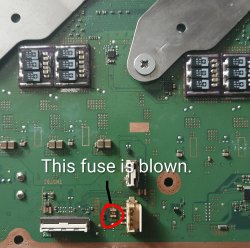
It looks like I found a blown Fuse. I'm going to see if I can take this fuse off my PS3 SEM revision motherboard, since that will be a donor unit for my 65nm RSX swap.

Another update I'm still stuck on the update loop even with another daughter board. I need to find a way to bypass this error code or to cancel this update installation.

20250912_131431~2.JPG
20250912_131435.JPG
Screenshot_20250915-015259~2.jpg

Yes! my BD Drive is getting power and it's taking in discs. Not sure if i may be able bypass that error code, since I haven't remarried the Daughter board, but I have a spare one that is remarried. So I might have to swap it out.

Update no luck, the BD Drive is now working and taking in discs, but I suspect my PS3 also may have a Bluetooth/WiFi, fault or this might be bricked into an update loop.

20250912_144925.JPG 20250912_144940.JPG

I was able to get out of that error code by formatting my SSD, booting into Safe mode and updating it with the No BD/BT firmware. I then discovered that my PS3 has error 80010201. I cannot connect to the internet, nor detect a WiFi signal even after a Bluetooth/WiFi Board swap, I could not test the BD Drive nor the Bluetooth. Since I have no BD/No BT firmware installed. I then proceeded to install the normal latest Evil Nat firmware and encountered the same error code again. At 75% it gives me the error 8002F1F9, and from what I read from 60% to 70%, it does the BD drive check, but mine goes beyond that check at 75%, and my BD Drive seems to be working fine. I may try holding down the ribbon clip just to be extra sure, or perhaps another 60 pin FPC connector replacement.

It takes in the disc and ejects, and I can hear it spin the discs like a fully functional BD Drive, but i can't test it on the XMB due to no BD firmware. So the fault with my console is likely pointing towards the Bluetooth/WiFi/Ethernet circuitry on the motherboard. I ordered a spare E01 motherboard off eBay, the Cell chip is damaged on that, after a failed Delid attempt, and that will be used for parts. I need to go back to the drawing board, and look into the schematics of Bluetooth/WiFi circuitry. The Marvell Chip on the PS3 is the Ethernet controller, perhaps that could be at fault. Or i could just order another A01 and start over, but I would prefer to figure out a way to repair this rare fault. Especially for documentation purposes. So to sum it up, I now need to find a way to repair the 80010201 error. I will need to install no BD firmware and get error logs off this thing. Update tried no BD Firmware and I get error 8002f1f9 which is related to BT/WiFi. It looks like no BD/ no BT firmware is my only choice.

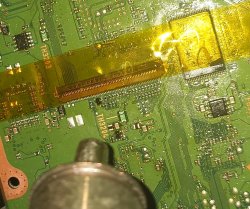
Looks like the 60 connector was damaged after all, I have discovered shorts on that connector, it's melted internally, and here is my failed attempt trying to desolder a donor one from a motherboard I ordered from eBay with a damaged Cell. I also slightly melted the donor one whilst Desoldering it off with Low melt solder. Looks like i need to order new 0.5 60 Pin FPC Connectors, turn down the temp and be super careful with soldering these on using light drag soldering techniques. Actually I might have to just use my rework station.

Will be ordering a bunch of replacements: https://uk.farnell.com/c/connectors?st=60+pin+connector+FPC+0.5

20250918_151412.JPG
20250918_143147.JPG
 
Last edited by a moderator:
I might also need to order some 60-pin connectors. Exactly which model are you ordering? I'm a bit unsure
You will have to solder wick the lead free solder off, once you hot air the original connector off. And then add some flux and 63/37 Lead solder, Kester is a great brand or Chipquik to add new solder to the pads. And then you can either lightly solder on the connector without melting it, or the easier method, you can add a bit of Kapton tape to the connector and hot air it on.

https://youtube.com/shorts/Qc2Yo-PuACk?si=aHnWRR8R8wsq1Fu_

https://youtube.com/shorts/CBB-RfKie48?si=3v-cNValEiWdRHU7

I recommend ordering a couple a different ones to make up for the postage cost;

https://uk.farnell.com/molex/505110-6091/connector-ffc-fpc-60pos-1row-0/dp/2500029

https://uk.farnell.com/amphenol-icc/f32d-1a7y1-21060/conn-r-a-ffc-fpc-60pos-1row-0/dp/3526743

https://uk.farnell.com/te-connectivity/2041215-1/connector-fpc-60pos-1row-0-5mm/dp/3261433

https://uk.farnell.com/molex/51296-6094/conn-ffc-fpc-r-a-60pos-1row-0/dp/3500453

https://uk.farnell.com/hirose-hrs/fh28e-60s-0-5sh-05/socket-zif-0-5mm-60way/dp/1518745
 
Last edited:
Back
Top