PS3 Fault finding YLOD with the SYSCON - First steps and Error reporting

Check 1v8 line for WiFi in standby, also 3v3 should be present, Idk would syscon say on but you get WiFi error. Check power line around WiFi and lan ic. If you find any cap in short just remove that ic and test for short again.
1.8 and 3.3V are OK
I checked maybe all the capacitors, even the small ones.
I have the same working board and everything looks the same.
Maybe I should measure in the on state?
But it will be difficult because of the radiators.
 

Attachments

  • IMG_20220719_004008_onFire(Abhi).jpg
    IMG_20220719_004008_onFire(Abhi).jpg
    1.2 MB · Views: 77
Yes, the PS3 needs to run a JIG firmware, be connected to the factory server and syscon needs to be remarried. You can bypass the factory server part but not the JIG firmware/Syscon Remarry. The normal firmware doesn't have the rtc set functions and syscon will only accept them during the remarrying process.
Cytology syscon firmwares do have a "rtc set" uart command though.
Hmmm, after using the "rtc set" command in cytology i guess syscon stores new data related with this date/time settings in the rewritable areas of syscon EEPROM

So im wondering if we can update that info inside syscon EEPROM manually by UART, do you know the offset where is stored ?, i want to take a look at it to try to see if is a single setting storing a simple timestamp (that would be easy to update)
 
1.8 and 3.3V are OK
I checked maybe all the capacitors, even the small ones.
I have the same working board and everything looks the same.
Maybe I should measure in the on state?
But it will be difficult because of the radiators.
Have you tried to install fw without bdrom installed? Try this and see what is going, if is working fine then one of bdrom switches could not be on right point (on/off)
If this is not hdd /wifi/bdrom I'm out of ideas.
I don't find this error in kte001, usually I see 2f1f9 on this model.
 
Last edited:
Yes, I tried without a BD drive, I tried with another working BD drive. Again the update stops at 20-22%.
Can the firmware be installed without the wifi board?
 
Hmmm, after using the "rtc set" command in cytology i guess syscon stores new data related with this date/time settings in the rewritable areas of syscon EEPROM

So im wondering if we can update that info inside syscon EEPROM manually by UART, do you know the offset where is stored ?, i want to take a look at it to try to see if is a single setting storing a simple timestamp (that would be easy to update)
The data is stored within the RTC controller, Syscon sends it via I2C. Also thats only the rtc, not the secure rtc, which means it's good for the error codes but you can't set the actual PS3 time back without doing the remarry procedure.
 
The data is stored within the RTC controller, Syscon sends it via I2C. Also thats only the rtc, not the secure rtc, which means it's good for the error codes but you can't set the actual PS3 time back without doing the remarry procedure.
Thats a bit new for me, how is named the RTC controller in COK-001 ?, im asking to get an overal idea of the phisical connections
 
I see in several places on youtube that this error (8002f147) is related to the BD drive.
After trying another BD drive, what else could be the problem?

Is there a way to install firmware and then see where the problem is?

If I take the nand and put it on a working board, install firmware and then put it back on the non working one, will it boot? Are there other components that are related?

Or with a hardware flasher, but I don't have one?
 
Last edited:
Hey there. Came with an update. So far i managed to solder everything as it was needed and i got this
COK-002
===================================
ERR 00: 00000000 A0801701 FFFFFFFF
ERR 01: 00000000 A0801701 FFFFFFFF
ERR 02: 00000000 A0801701 FFFFFFFF
ERR 03: 00000000 A0801701 FFFFFFFF
ERR 04: 00000000 A0801701 FFFFFFFF
ERR 05: 00000000 A0801701 FFFFFFFF
ERR 06: 00000000 A0801701 FFFFFFFF
ERR 07: 00000000 A0801001 0BB5C5AE
ERR 08: 00000000 A0801701 FFFFFFFF
ERR 09: 00000000 A0801701 FFFFFFFF
ERR 10: 00000000 A0801701 FFFFFFFF
ERR 11: 00000000 A0801701 FFFFFFFF
ERR 12: 00000000 A0801701 0B5B19C5
ERR 13: 00000000 A0801701 FFFFFFFF
ERR 14: 00000000 A0801001 0B5B1971
ERR 15: 00000000 A0801701 0B5B192C
ERR 16: 00000000 A0801701 0B5B1923
ERR 17: 00000000 A0801701 FFFFFFFF
ERR 18: 00000000 A0801001 0B5312D5
ERR 19: 00000000 A0801701 0B52ED1D
===================================

Seems that problem is with HDD, but even without it wont boot up normaly.
 
Me and the user @marciolsf started a few days ago to study the SYSCON errors, we both have PS3 with the error ending in 3034.

We have already checked the sectors for some errors ending:
3001 - Without 12v from the source.
3003 - VRM for CELL with problem. It can be NEC Tokins or PWM or any other component of this sector
3004 - VRM for RSX with problem. It can be NEC Tokins or PWM or any other component in this sector.

Hello, I recently used syscon to find errlogs of a ps3 e01. At first it was giving me 3034 and 4422 related to RSX failure. I did a proper reflow and now I am getting A0202120 and A0213013. Is there an in-depth explanation towards these error codes and exactly what am I supposed to do?
 
Yes, the PS3 needs to run a JIG firmware, be connected to the factory server and syscon needs to be remarried. You can bypass the factory server part but not the JIG firmware/Syscon Remarry. The normal firmware doesn't have the rtc set functions and syscon will only accept them during the remarrying process.
Cytology syscon firmwares do have a "rtc set" uart command though.
The data is stored within the RTC controller, Syscon sends it via I2C. Also thats only the rtc, not the secure rtc, which means it's good for the error codes but you can't set the actual PS3 time back without doing the remarry procedure.
Im reading the 78KOR_KG3 datasheet again (100 pins syscons for PS3 superslim) but i still dont get it
When you mentioned I2C protocol you made me think the rtc controller is a component different than syscon... most specifically the "clock generator" (codenamed "MK") that is connected to syscon by I2C and is responsible to generate many other clock signals for many other components, and probably the responsible to generate many syscon error codes too

But... in the 78KOR_KG3 datasheet there are many pages dedicated to the internal clock generator (a sub-circuit inside syscon) that uses his own "registers" and a couple of them are "counters". I wonder if you was talking about this registers and im wondering also if all this clock registers are stored at a very deep level of syscon eeprom (something in between the bootloader --->here ---> and the syscon firmware) so we cant access them directly ?

I wrote some info about how the error code timestamps works here, but without this info about how to "restore" the real timer is incomplete
https://www.psdevwiki.com/ps3/Syscon_Error_Codes#Error_log_format
I even added a sample that i found interesting ripped from RIP-Felix here, but after your explanations i guess the descriptions of what was happening in that tests is not completly correct
https://www.psdevwiki.com/ps3/Talk:Syscon_Error_Codes
 
Im reading the 78KOR_KG3 datasheet again (100 pins syscons for PS3 superslim) but i still dont get it
When you mentioned I2C protocol you made me think the rtc controller is a component different than syscon... most specifically the "clock generator" (codenamed "MK") that is connected to syscon by I2C and is responsible to generate many other clock signals for many other components, and probably the responsible to generate many syscon error codes too
You asked about the the one on the COK-001:
Thats a bit new for me, how is named the RTC controller in COK-001 ?, im asking to get an overal idea of the phisical connections
The CXR series Syscons just have an extra die in the package which holds the EEPROM and the RTC (so just two chips in one case, that's why the EEPROM traces are connected externally). The CXR flash variants do even have an extra die for the flash memory.
But... in the 78KOR_KG3 datasheet there are many pages dedicated to the internal clock generator (a sub-circuit inside syscon) that uses his own "registers" and a couple of them are "counters". I wonder if you was talking about this registers and im wondering also if all this clock registers are stored at a very deep level of syscon eeprom (something in between the bootloader --->here ---> and the syscon firmware) so we cant access them directly ?
Yes, the Sherwood Syscons have the RTC built-in, but I haven't reversed how Sony uses/configures it.
 
No. I had a loose cap between the tokins and cell, but I think that error can mean anything regarding power to the cell.

https://www.psx-place.com/threads/fixed-cecha01-ylod-hit-me-outta-nowhere.37676/page-2#post-339550

I also thought it was the hdd, but it started fine without it when I fixed the cap. But you say you had a failed firmware install?


I see. My system will boot normaly without BluRay Drive connected to the motherboard, what about yours?
I tried to replace BD motherboard but still get same YLOD over and over again. The only hope now is NEC/TOKIN replacement near CELL area. I hope that will fix it.
 
Hey man, thanks for replying. So, C4004 and C4001 are exactly the same specs according to the service manual. But while C4004 gives me around 1.1 ohm, C4001 is giving me over 6k ohm. Fuses are good. Dead C4001 then?

hey man, im checking the resistance for c4001 and it gives me a high value in 6s and 7s. Did you end up removing it? What happened? C4004 gives me relatively low value near 0.
 
So your first few errors are RSX related - 2 0 3 1Thermal Sensor Error (IC2101), the previous error is related to this error (A0201B02).

So this is an interesting issue, because its two possible issues, the thermal sensor near the RSX is either faulty or not getting power or thermal signals? - I dont have the schematics for that board, but with a multimeter you could check the pins on the sensor and see if there are any 3.3v readings. Otherwise you can check the capacitors or resistors around that area for shorts -

pro tip: shorts will show low ohm readings (0.2 ohms) on both sides of the capacitors.

Your second errors for the COK-002 are power issues for both CELL and RSX - could be interlinked. Look at my github repo for the COK-002 test points, and check every point and see if the voltage readings are wrong, that gives you an indication of where the issue lies.

Do this a few times and you will get experience, and will become second nature, it also gives you a good mental picture of how this all fits together when things go wrong.

Draw some diagrams and block charts will help in the future.

Hey man, thanks for the effort and time to make those diagrams, just checked out your github. I have an error in my cok-002 following with a0202120 10x and once a0213013 so I believe the issue is mostly the power to the RSX. Im going to follow your diagram to check the test points. I am a little confused, isn't a low reading of ohm (near 0) indicating a short and is a GOOD thing? I checked the fuse F6302 and it has low resistance and the capacitors (C6320) on the other side start low and increase to about 5.4. Not sure if im understanding the values im getting. Also, the diagram is very blurry and I can't really make out what point is what. Every thing I check the voltage is always giving me about 5.04 V, this includes test points, power supply, resistors, capacitors, everything has the same voltage

Edit: The only areas where I get a voltage of 1.3 - 1.75 v is the syscon area near and on the Rx, Tx test points.

 
Last edited:
Hey man, thanks for the effort and time to make those diagrams, just checked out your github. I have an error in my cok-002 following with a0202120 10x and once a0213013 so I believe the issue is mostly the power to the RSX. Im going to follow your diagram to check the test points. I am a little confused, isn't a low reading of ohm (near 0) indicating a short and is a GOOD thing? I checked the fuse F6302 and it has low resistance and the capacitors (C6320) on the other side start low and increase to about 5.4. Not sure if im understanding the values im getting. Also, the diagram is very blurry and I can't really make out what point is what. Every thing I check the voltage is always giving me about 5.04 V, this includes test points, power supply, resistors, capacitors, everything has the same voltage

Edit: The only areas where I get a voltage of 1.3 - 1.75 v is the syscon area near and on the Rx, Tx test points.

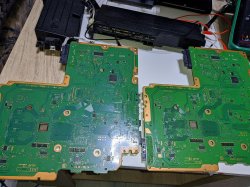
It could be other components around there also. Like I had a resistor knocked off here https://www.psx-place.com/threads/f...cecha-with-40nm-rsx.28069/page-84#post-325808

I also had a case where broken F6301 caused these errors.
 
Update on the warranty returned 65nm swap. Does not appear to be RSX related. It has new tantalums, but both signals appear unusually dirty. It is back to the original errors and freezing, with random 1001/1601/1701.

I am unable to find anything obviously off, and the dirty signals give me the feeling I'd be chasing a ghost or spending more time on it than it would be worth versus just starting the next one, so it's going to end up on a shelf and then recycled when I finally realize I'm never going to circle back around to it even when I'm not swamped with personal stuff. Unless someone wants it to do a deep dive on what's happening... Any takers? @RIP-Felix ?

I was mistaken about the sheet when I mentioned it in the Frankenstein thread a few weeks ago, it's #4 on page 135.

No charge, just let me know and I'll send it out.
 

Similar threads

Back
Top