PS3 Fault finding YLOD with the SYSCON - First steps and Error reporting

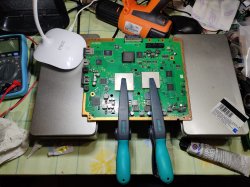
@RIP-Felix So I have ordered Permatex Ultra Grey but got instead Permatex Supra Grey. Since it is also in the rigid category I kept it.

cpu,gpu_reglueing.jpg

You said the following here:

Before putting on paste and glues be sure you're ready for a 2 hour burn in process. If you need to install SYSCON wires to monitor temperatures, do that now. Have all the parts and screws ready for full assembly. We want to minimize the time the paste and glues are open to the air. And the burn in should take place

Is it a problem if I let the silicon dry in normal air environment? I wanted it to be perfectly centered and with your method I didn't know how to do it centered. Now I have let it dry 18h on my desk like on the photo. I think the burn in isn't necessary anymore right?

EDIT: I also cut a little bit from the Supra Grey after 18h open air drying and I had the feeling that it was even more rigid then the OG Sony one.
 
That's an old post I shiuld edit. I used to reccomend assembling, assuming the pressure from the leaf springs and HS would celf center the IHS flat against the die. But unfortuantatly it's possable for the HS to cause the IHS to tilt to one side and then the glue will set. If that happens the IHS wont be sitting flat against the die, instead it'll have a gap on one side that completly ruins the performance.

So now I reccomend rigging up a method to clamp the IHS to the MB such that the pressure it directly over the center of the IHS and die. That way the IHS can't tilt while the adhesives set. I very much like those clamps you have there! Can you toss up a link?
 
please help

i have a CECHA01 have yold wen i heat it up for 5 min and let it cool will work for a week i did that 3 times


Code:
Statistics: Boot Count 3125 - Shutdown Count 1223 - Runtime 79d 17h 17mn 4s

Errors (32)

Error 0: 0xA0403034 Time: Mon, 10 Jul 2006 12:38:27 GMT

Error 1: 0xA0404412 Time: Mon, 10 Jul 2006 12:38:27 GMT

Error 2: 0xA0403034 Time: Mon, 10 Jul 2006 11:55:39 GMT

Error 3: 0xA0404412 Time: Mon, 10 Jul 2006 11:55:39 GMT

Error 4: 0xA0902203 Time: Mon, 10 Jul 2006 11:54:38 GMT

Error 5: 0xA0902203 Time: Mon, 10 Jul 2006 11:54:38 GMT

Error 6: 0xA0902203 Time: Mon, 10 Jul 2006 11:54:38 GMT

Error 7: 0xA0902203 Time: Mon, 10 Jul 2006 11:54:38 GMT

Error 8: 0xA0801802 Time: Mon, 10 Jul 2006 11:54:38 GMT

Error 9: 0xA0802022 Time: Thu, 29 Jun 2006 22:16:31 GMT

Error 10: 0xA0802022 Time: Thu, 29 Jun 2006 22:15:47 GMT

Error 11: 0xA0403034 Time: Tue, 27 Jun 2006 23:51:29 GMT

Error 12: 0xA0404412 Time: Tue, 27 Jun 2006 23:51:29 GMT

Error 13: 0xA0403034 Time: Tue, 27 Jun 2006 23:46:56 GMT

Error 14: 0xA0404412 Time: Tue, 27 Jun 2006 23:46:56 GMT

Error 15: 0xA0403034 Time: Tue, 27 Jun 2006 23:44:23 GMT

Error 16: 0xA0404412 Time: Tue, 27 Jun 2006 23:44:23 GMT

Error 17: 0xA0403034 Time: Tue, 27 Jun 2006 23:43:51 GMT

Error 18: 0xA0404412 Time: Tue, 27 Jun 2006 23:43:51 GMT

Error 19: 0xA0801601 Time: Tue, 27 Jun 2006 23:41:26 GMT

Error 20: 0xA0801701 Time: Tue, 27 Jun 2006 23:41:26 GMT

Error 21: 0xA0403034 Time: Sun, 25 Jun 2006 17:27:19 GMT

Error 22: 0xA0404412 Time: Sun, 25 Jun 2006 17:27:19 GMT

Error 23: 0xA0403034 Time: Sun, 25 Jun 2006 17:27:15 GMT

Error 24: OxA0404412 Time: Sun, 25 Jun 2006 17:27:15 GMT

Error 25: OxA0403034 Time: Sun, 25 Jun 2006 17:27:10 GMT

Error 26: OxA0404412 Time: Sun, 25 Jun 2006 17:27:10 GMT

Error 27: 0xA0401001 Time: Sun, 25 Jun 2006 17:27:06 GMT

Error 28: 0xA0403034 Time: Sun, 25 Jun 2006 17:27:01 GMT

Error 29: OxA0404412 Time: Sun, 25 Jun 2006 17:27:01 GMT

Error 30: 0xA0403034 Time: Sat, 24 Jun 2006 19:34:58 GMT

Error 31: 0xFFFFFFFF Time: Thu, 01 Jan 1970 00:00:00 GMT

any help would be apreciated
İf its working when you heated it then %90 Bga Solder balls causing this, Reflow with a real heatgun can make this work for a long time. İm almost sure because i had the same error codes with one of my ps3 and it was working like yours when i heated it and i just tried to give it pressure and it was working like that too. Just reflow without melting the chips. Or add some thermal pad to top of the ihs, this may give enough pressure to make it work.
 
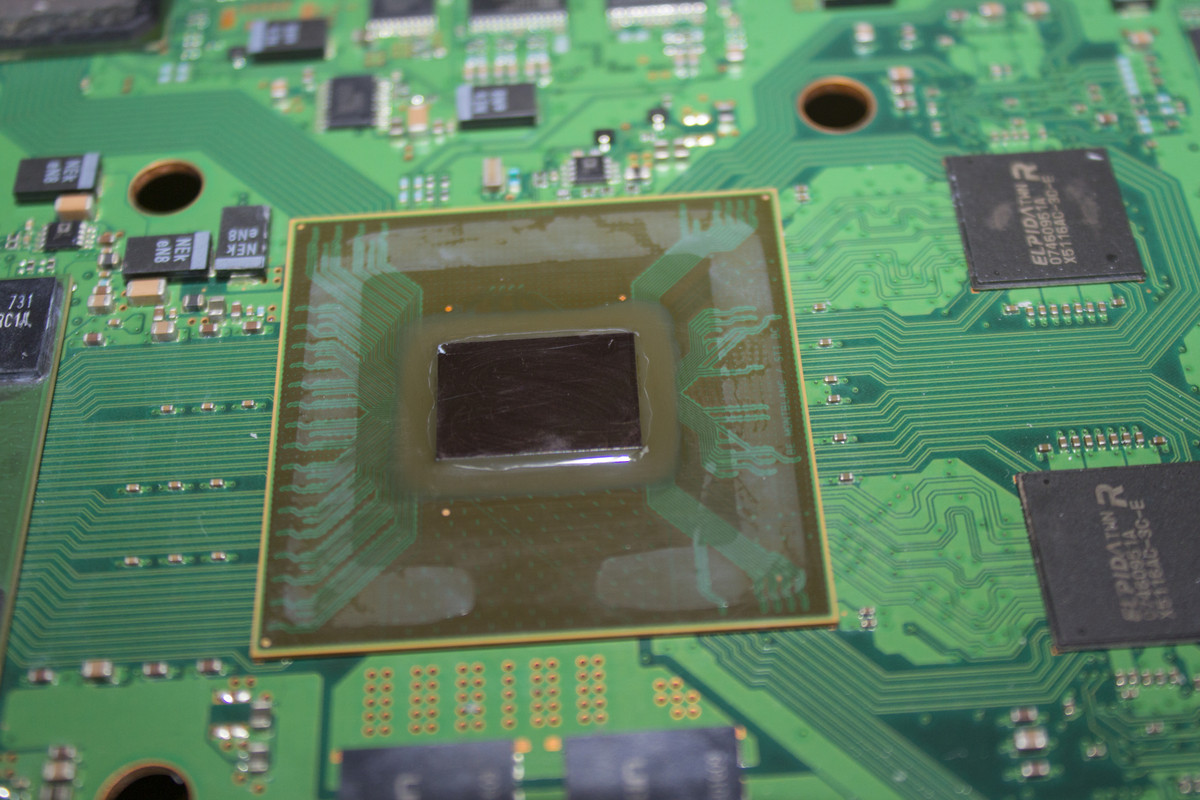
Yes, the unit was de-lidded. I checked the CELL die and surrond area. I could spot 2 possible damages:

1) Lower right corner in between the middle of where the 4 traces join, there seems to be a small patch of exposed copper. Inder the magnifying glass it looks to me like no trace is damaged, just the conformal coating stripped away. Easy to test with a drop of coating added.

2) This is what worries me the most: The upper left corner of the die look has a chip, with a hairline crack extending from that location to about 2/3 of the die length. I am not sure if in this flip chip design this is a conductive metal plate or the chip itself. It might be the root cause.

All other SMDs look good.

Is it gone for good or somehow recoverable?

IMG-5612.jpg
Similar thing happened to my cechg04 but it worked after the delid for 5 minutes i dissassembled and looked at the cell and i saw the little chipped part on the cpu die, İ dont know how is that even worked for 5 minute with chipped cpu or the cpu chipped after the assembly but after that it never booted and always showed 3032 error. Now im waiting for a heatgun and gonna reflow i will reply if its work. İ think if the crack wont touch anything that sit inside the cpu die youre fine.
 
Inspect the CPU for cracks or trace damage. Has it been delided? Check the area around the CPU for any damaged or missing SMDs.

Check for the presence of voltages.
The nick is near the XDR memory traces and wouldnt cause that error IMO. The Die being cracked is more likely the cause. It's been reported from cracked dies before.

If that's the cause (probably) it's done. You can't replace the CPU without also replacing the Flash and SYSCON as well (they're married). You can replace them, but need a donor set from a board that isn't more easily fixable itself, which is rare.

Thanks a lot for all the insight. I drew the exact same conclusion, the root cause is liked to the die nick/crack. I would be curious to understand the section of the die to see if there is any attempt possible at getting it to somehow boot. Besides data in the HDD there is nothing I seek to recovery in this unit, I would make it functional again by replacing the full motherboard. Data is the only thing of value.
 
İf its working when you heated it then %90 Bga Solder balls causing this, Reflow with a real heatgun can make this work for a long time. İm almost sure because i had the same error codes with one of my ps3 and it was working like yours when i heated it and i just tried to give it pressure and it was working like that too. Just reflow without melting the chips. Or add some thermal pad to top of the ihs, this may give enough pressure to make it work.
No.

Heat test does not diagnose BGA defects and a reflow is not repair. A pressure test can be used as a qualitative test to indicate (but not prove) BGA defects. And if pressing on the IC makes it boot, shows artifacts, etc, then a reball is a repair you could consider. However, if you have to remove the 90nm GPU anyway it's better to replace it with a reliable model now that we can.

In most cases, any model containing a 90nm GPU (RSX) that experiances a YLOD with a A0403034 it's the GPU. And IME few 3034s responded to the pressure test (presumably not the BGA).
 
The pinout is the same for 90, 65, and 40nm GPU (RSX). Your 30xx model has a 40nm. Just look at where the voltages pin on the RSX are, then look at the power planes on the Mb entering the RSX. The layout may be different, but they have to be similar.

There are no schematics available for models after SEM-001 (Gxx models). So you will have to find it in the dark, using compartive deduction from the models we do have shcematics for.
 
Hello, I have a CECHL which will shutdown after being on for a while. The problem started a few years ago and it slowly got worse up to the point that games are now unplayable (the system will shut down as soon as a 3D scene is displayed, but sometimes it shuts off even on the XMB), and sometimes the PS3 won't turn on at all.
It has 184 days of uptime, a boot count of 3480, a shutdown count of 3405 and the syscon reports A0801002 errors followed by one or two A0802124 errors.
 
Hello, I have a CECHL which will shutdown after being on for a while. The problem started a few years ago and it slowly got worse up to the point that games are now unplayable (the system will shut down as soon as a 3D scene is displayed, but sometimes it shuts off even on the XMB), and sometimes the PS3 won't turn on at all.
It has 184 days of uptime, a boot count of 3480, a shutdown count of 3405 and the syscon reports A0801002 errors followed by one or two A0802124 errors.
Bad RSX tokins. 184 days is a pretty short amount of time for them to die tho. Is the console dusty? Kept in a place where it gets warm?
 
Bad RSX tokins. 184 days is a pretty short amount of time for them to die tho. Is the console dusty? Kept in a place where it gets warm?
That's what I was thinking.
No the console is clean. The console wasn't in a super ventilated space, but it's always been pretty quiet so I don't think it ever got very hot. It also has a problem where the disc drive won't eject the disc most of the times (unless I force-eject it by pressing the eject button for 5~10 seconds), but that should be unrelated.
Is there a guide to replace the caps? I don't want to damage anything.
 
Hey Everyone.

I'm getting the following error on a CECHL01 VER-001 board. Per the error log its code 2024/2124, which is HDMI/AV encoder. I have two other parts boards that have the AV CXM4024R chip, I don't have any HDMI MN864709 chip would have to order from AliExpress. Just want to make sure I'm reading the log correct before I proceed. Also, any one know if I need to replace both chip or just one in specific?

Code:
>$ bringup
00000000
# [SSM] Bringup Start.
# [SSM] Msg 2663 : being delayed.

Press Ctrl+C to exit
>$ shutdown
FFFFFFFF Answer length
Press Ctrl+C to exit
>$ shutdown
00000000
# [SSM] PS0 ok.
# [SSM] Cond/Fatal received, msg=2663.
# [SSM] Fataldown Start.
# [SSM] Fataldown ok.
# (PowerOff State) (Fatal)
NG E00000E0
# [SSM] Clearfatal Start.
# [SSM] Clearfatal ok.
# (PowerOff State)

Press Ctrl+C to exit
>$ powersw
00000000
# [SSM] Bringup Start.
OK 00000000
# [SSM] Msg 2663 : being delayed.

Press Ctrl+C to exit
>$ errlog
00000000
# [SSM] PS0 ok.
# [SSM] Cond/Fatal received, msg=2663.
# [SSM] Fataldown Start.
# [SSM] Fataldown ok.
# (PowerOff State) (Fatal)
# CODE     CLOCK
# A0112024 2CFC839E
# A0112124 2CFC839E
# A0112024 2CFC839D
# A0112024 2CFC839D
# A0112024 2CFC839C
# A0112024 2CFC839C
# A0112124 2CFC839B
# A0112024 2CFC839B
# A0112124 2CFC839A
# A0112124 2CFC8399
# A0112124 2CFC8399
# A0112124 2CFC8398
# A0112124 2CFC8398
# A0112024 2CFC8397
# A0112124 2CFC8397
# A0112124 2CFC8396
# A0112124 2CFC8396
# A0112124 2CFC8395
# A0112124 2CFC8395
# A0112124 2CFC8394
# A0112124 2CFC8394
# A0112124 2CFC8393
# A0112124 2CFC8393
# A0112124 2CFC8392
# A0112124 2CFC8392
# A0112124 2CFC8391
# A0112124 2CFC8391
# A0112124 2CFC8390
# A0112124 2CFC8390
# A0112124 2CFC838F
# A0112124 2CFC838F
 
most likely just the HDMI transmitter. But it could be the chokes and any resistor on the HDMI line. Start by checking them in diode mode against a good board. replace as necessary. It may not be the transmitter itself. if it's not the transmitter or SMDs try the DVE and as a last resort the RSX itself...but that's unlikly unless you noted drop damage, delidding, any signs of the RSX having been jolted or tampered with (which could have caused a BGA defect). Otherwise the 65nm is a reliable chip and unlikly to cause that sort of error (multiple 2024/2124's. As opposed to a singular HDMI error code associated with other codes, like 1701/1601, 3034, or 1001 which is commonly associated with other causes).
 
Good morning.
I have a question, with a PS3 COK-002 with a yellow light problem, I was able to obtain the following error codes using the SysconReader, then I was able to enter the external mode through the CMD without problems, enter the internal mode with the red light flashing, The problem I have is that the cable was disconnected from the power supply and when trying to enter internal mode with "auth" it shows me the following message:

C:\Users\User\Downloads\ps3syscon-master\ps3syscon-master\Linux>ps3_syscon_uart_script.py COM3 CXRF
Press Ctrl+C to exit
>$auth
scopen response invalid
Press Ctrl+C to exit
>$
I also tried to enter external mode but it is no longer possible.
Very grateful to those who can guide me how to restart access to internal and external mode.
Greetings.
 
Good morning.
I have a question, with a PS3 COK-002 with a yellow light problem, I was able to obtain the following error codes using the SysconReader, then I was able to enter the external mode through the CMD without problems, enter the internal mode with the red light flashing, The problem I have is that the cable was disconnected from the power supply and when trying to enter internal mode with "auth" it shows me the following message:

C:\Users\User\Downloads\ps3syscon-master\ps3syscon-master\Linux>ps3_syscon_uart_script.py COM3 CXRF
Press Ctrl+C to exit
>$auth
scopen response invalid
Press Ctrl+C to exit
>$
I also tried to enter external mode but it is no longer possible.
Very grateful to those who can guide me how to restart access to internal and external mode.
Greetings.
Follow the tutorial closely.

Most likely you need to gnd DIAG and your USB adapter to the PS3 so that the PC and PS3 share the same ground refrence. If that's good, then switch RX/TX. Note, you have to GND Diag to enter CXRF and cannot have it grounded if entering CXR
 
Simple question for @RIP-Felix;
Are you freely sharing the .STL file for the 3D printed Cell plug? If so, is there a place to download the file? If not, I fully understand.
Thank you for your time.
 

Similar threads

Back
Top