That has really helped thank you, I'll try it later, thanks for the picturesNope. Could work as well, but what I did was connect one wire on diag, one wire on the motherboard's ground plane (The bronze colored surface that runs around the edge of the motherboard) and then bridged the ends of the wires together and connect that bundle to GND on the USB.
You don't have to solder the wire onto the ground plane, if you have alligator clamps you can just use those to clip the wire to the board. If you do decide to solder it direction to the ground plane, it'll take quite a bit of heat, also be sure to use flux.
Don't bother doing this unless you've already tried entering the CORRECT command like I mentioned and it didn't work.
Gimme 5 minutes and I'll post pics
Edit: Pics
.View attachment 42799
View attachment 42800

You are using an out of date browser. It may not display this or other websites correctly.
You should upgrade or use an alternative browser.
You should upgrade or use an alternative browser.
PS3 Fault finding YLOD with the SYSCON - First steps and Error reporting

YLoDIsEvil
Forum Noob
Hi, I'm working on trying to bring back an old fat model CECHA01 PS3 that briefly boots but quickly shuts off to a YLoD (it died while playing Dark Souls of all games... I think right when I got hit in the game, the PS3 froze and blacked out; amazing timing). This happened about a month ago. It outputs via AV for about 5, maybe 10 seconds, before the screen goes black and it beeps three times. When it is outputting, it's normal for the first few seconds, before becoming very laggy and chippy, to the point of freezing, blacking out, and throwing the error. Trying to boot it again results in a shorter output time, and subsequent attempts result in no observable output. After waiting a little bit, the time it outputs before throwing a YLoD increases back to normal.
I did some searching online for the error codes, and found that error 1601 possibly points to an issue with RAM, while 1701 may point to an issue with the HDD. I was hearing clicking in the HDD, so I replaced it with an SSD. I also found a post that correlates the errors with issues with the NEC caps. Though, I haven't been able to find anything definitive on the errors.
The SysCon output below is after a repaste and HDD replacement.
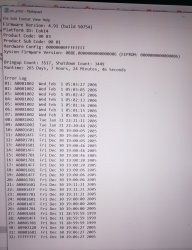
Here's the output of the SysCon:
I'm not sure how to proceed. Any suggestions? Thank you!
I did some searching online for the error codes, and found that error 1601 possibly points to an issue with RAM, while 1701 may point to an issue with the HDD. I was hearing clicking in the HDD, so I replaced it with an SSD. I also found a post that correlates the errors with issues with the NEC caps. Though, I haven't been able to find anything definitive on the errors.
The SysCon output below is after a repaste and HDD replacement.
Here's the output of the SysCon:
Code:
becount
Bringup : 2313 times
Shutdown: 2229 times
Power-on: 124day 08hour 09min 20sec
errlog
ofst[ 64]:err_code:0xffffffff, clock:0x0b5abb9c  2006/01/13 19:27:24
ofst[ 68]:err_code:0xa0801802, clock:0x0b6688f8  2006/01/22 18:18:32
ofst[ 72]:err_code:0xa0801701, clock:0x0b668920  2006/01/22 18:19:12
ofst[ 76]:err_code:0xa0801601, clock:0x0b668920  2006/01/22 18:19:12
ofst[ 80]:err_code:0xa0801802, clock:0x0b66896f  2006/01/22 18:20:31
ofst[ 84]:err_code:0xa0801701, clock:0x0b6689aa  2006/01/22 18:21:30
ofst[ 88]:err_code:0xa0801601, clock:0x0b6689aa  2006/01/22 18:21:30
ofst[ 92]:err_code:0xa0801802, clock:0x0b6689c6  2006/01/22 18:21:58
ofst[ 96]:err_code:0xa08014ff, clock:0x0b668a02  2006/01/22 18:22:58
ofst[100]:err_code:0xa0801701, clock:0x0b668a02  2006/01/22 18:22:58
ofst[104]:err_code:0xa0801802, clock:0x0b668a0a  2006/01/22 18:23:06
ofst[108]:err_code:0xa0801802, clock:0x0b668a30  2006/01/22 18:23:44
ofst[112]:err_code:0xa0801802, clock:0x0b668b10  2006/01/22 18:27:28
ofst[116]:err_code:0xa0801701, clock:0x0b668b33  2006/01/22 18:28:03
ofst[120]:err_code:0xa0801601, clock:0x0b668b33  2006/01/22 18:28:03
ofst[124]:err_code:0xa0801701, clock:0x0b668b70  2006/01/22 18:29:04
ofst[  0]:err_code:0xa0801601, clock:0x0b668b70  2006/01/22 18:29:04
ofst[  4]:err_code:0xa0801701, clock:0x0b668f0b  2006/01/22 18:44:27
ofst[  8]:err_code:0xa0801601, clock:0x0b668f0b  2006/01/22 18:44:27
ofst[ 12]:err_code:0xa0801701, clock:0x0b67628e  2006/01/23 09:46:54
ofst[ 16]:err_code:0xa0801601, clock:0x0b67628e  2006/01/23 09:46:54
ofst[ 20]:err_code:0xa0801701, clock:0x0b6762b2  2006/01/23 09:47:30
ofst[ 24]:err_code:0xa0801601, clock:0x0b6762b2  2006/01/23 09:47:30
ofst[ 28]:err_code:0xa0801701, clock:0x0b6762d3  2006/01/23 09:48:03
ofst[ 32]:err_code:0xa0801601, clock:0x0b6762d3  2006/01/23 09:48:03
ofst[ 36]:err_code:0xa0801701, clock:0x0b676306  2006/01/23 09:48:54
ofst[ 40]:err_code:0xa0801601, clock:0x0b676306  2006/01/23 09:48:54
ofst[ 44]:err_code:0xa0801802, clock:0x0b676392  2006/01/23 09:51:14
ofst[ 48]:err_code:0xa0801701, clock:0x0b6b8893  2006/01/26 13:18:11
ofst[ 52]:err_code:0xa0801601, clock:0x0b6b8893  2006/01/26 13:18:11
ofst[ 56]:err_code:0xa0801701, clock:0x0b6b88b4  2006/01/26 13:18:44
ofst[ 60]:err_code:0xa0801601, clock:0x0b6b88b4  2006/01/26 13:18:44
I'm not sure how to proceed. Any suggestions? Thank you!

Rissy
Member
Interesting times afoot, as I've now got another four PS3s in the house as of last night. I ran the PS3Toolset on all of them last night to see what I'd bought, and I have to say, I'm quite happy. This is the results from these machines:
CECH2103A (OFW 4.91)
Statistics: Boot Count 688 - Shutdown Count 633 - Runtime 58d 22h 16mn 20s
3 instances of 0xA0802022 in 2014 (All in Dec at the exact same time)
CECH2503A Date Code 0C (OFW 4.91)
Statistics: Boot Count 2013 - Shutdown Count 1999 - Runtime 124d 8h 25mn 3s
2 instances of 0xA0802130 in 2011 (Jan and Feb)
CECH2503A Date Code 0D (OFW 4.82)
Statistics: Boot Count 1385 - Shutdown Count 1197 - Runtime 112d 17h 42mn 13s
NO ERRORS
CECH4303A (OFW 4.75)
Statistics: Boot Count 18 - Shutdown Count 16 - Runtime 0d 5h 17mn 35s (OMG)
NO ERRORS
For the following displayed error codes, can someone please explain to me what these are indications of?
0xA0802130
I believe now from RIP-Felix that 0xA0802022 is typically from video outputting errors relating to a missing TV or ill-plugged HDMI lead etc, and can normally be ignored.
In addition to this, I have a friend who's crazy on PS3s, especially Phat ones. He's not very tech savvy, and was unaware of the PS3Toolset until I told him about it last week. He's now gone through that exercise, and is asking me if I can find out from you guys what his error codes mean. He has a pretty much dead 60GB Backwards compatible machine in his collection, as well as still working ones. This is one of the error codes from more than one of his machines (Which I've no knowledge of and haven't seen before). Can someone advise what this is an indication of too please?
0xA0801004
If you want more knowledge of each of my friends PS3s, you need only ask, and I'll get this information from him, and match up the error codes to model numbers etc. Right now I don't have all that, just error codes.
Thanks in advance.
No one able to help me with these two codes?
BadaBoomBadaBing
Forum Noob
Sorry wish I could help but my knowledge on this shit is very limited. https://www.psdevwiki.com/ps3/Syscon_Error_Codes#1601_(CELL_Livelock_Detection)No one able to help me with these two codes?
Possible causes for 1004 are a failing power supply or a GPU issue. 2130 is a thermal sensor issue on the CPU. The link I shared can provide a bit more information. Best of luck.
Rissy
Member
Sorry wish I could help but my knowledge on this shit is very limited. https://www.psdevwiki.com/ps3/Syscon_Error_Codes#1601_(CELL_Livelock_Detection)
Possible causes for 1004 are a failing power supply or a GPU issue. 2130 is a thermal sensor issue on the CPU. The link I shared can provide a bit more information. Best of luck.
That's ok, thank you for your reply. I seem to somehow struggle to get assistance with my questions sometimes, I'm not sure why. In this case, if I'd known there was a table of faults, then I wouldn't have pestered people (I don't wish to annoy or upset anyone, I'm just doing what everyone else does, learn, do, and come across issues, or areas related to doing where a greater, more experienced mind needs to be tapped into along the way to help out.)
I'd tried searching for my codes "0xA0802130" etc, but nothing came up, so at this point, I had to ask.
Now I'm aware of this table, that will help me out enormously, thank you again!
BadaBoomBadaBing
Forum Noob
Could just be silence because people aren't too sure how to help with your particular issue.That's ok, thank you for your reply. I seem to somehow struggle to get assistance with my questions sometimes, I'm not sure why. In this case, if I'd known there was a table of faults, then I wouldn't have pestered people (I don't wish to annoy or upset anyone, I'm just doing what everyone else does, learn, do, and come across issues, or areas related to doing where a greater, more experienced mind needs to be tapped into along the way to help out.)
I'd tried searching for my codes "0xA0802130" etc, but nothing came up, so at this point, I had to ask.
Now I'm aware of this table, that will help me out enormously, thank you again!
The pros seem to be on break from this thread which is totally understandable considering how much free time they sacrifice to help out.
Don't feel like you're pestering anyone, this lovely community is here for a reason.
One note about that 1004 error: Please don't attempt to disassemble the power supply if it comes down to it, unless you absolutely 100% know what you're doing. The capacitors can store enough power to cause some serious damage for a long time! It's best to just replace the unit instead.
Best of luck!
Rissy
Member
Could just be silence because people aren't too sure how to help with your particular issue.
The pros seem to be on break from this thread which is totally understandable considering how much free time they sacrifice to help out.
Don't feel like you're pestering anyone, this lovely community is here for a reason.
One note about that 1004 error: Please don't attempt to disassemble the power supply if it comes down to it, unless you absolutely 100% know what you're doing. The capacitors can store enough power to cause some serious damage for a long time! It's best to just replace the unit instead.
Best of luck!
The 1004 error is on a friends PS3. So it's not my console. However, the 2130 error code has appeared on one of my own, but not since 2011, so I'm not sure whether this is evidence of the console being stuck in a confined space and used there, resulting in it getting too hot. I didn't own the console until last week, so i don't know the history of it.
My own original PHAT console has been exhibiting a 1001 and a 1002 errors in the past couple of months, so I'm afraid to understand that it looks like the TOKINS may be on their way out on that one. It's got just over 6500 running hours put on it since 2008, so that falls in line with RIP-Felix findings during all his amazing research.
Currently, I'm preparing a console to be my PHAT replacement. I'll be doing a data transfer from my PHAT one over to a Slim replacement. I'll have my fingers crossed that the PHAT one stays alive long enough for me to get all my data ported over from it on to the Slim. If that bit goes successfully, then I'll be following RIP-Felix advice to try stressing out the PHAT one to see if I can trigger these errors on purpose. I'm starting also to do my research on TOKIN replacement. I'm starting to think i may give it a go.... eek!
luvbuckets
Member
Hi, I'm working on trying to bring back an old fat model CECHA01 PS3 that briefly boots but quickly shuts off to a YLoD (it died while playing Dark Souls of all games... I think right when I got hit in the game, the PS3 froze and blacked out; amazing timing). This happened about a month ago. It outputs via AV for about 5, maybe 10 seconds, before the screen goes black and it beeps three times. When it is outputting, it's normal for the first few seconds, before becoming very laggy and chippy, to the point of freezing, blacking out, and throwing the error. Trying to boot it again results in a shorter output time, and subsequent attempts result in no observable output. After waiting a little bit, the time it outputs before throwing a YLoD increases back to normal.
I did some searching online for the error codes, and found that error 1601 possibly points to an issue with RAM, while 1701 may point to an issue with the HDD. I was hearing clicking in the HDD, so I replaced it with an SSD. I also found a post that correlates the errors with issues with the NEC caps. Though, I haven't been able to find anything definitive on the errors.
The SysCon output below is after a repaste and HDD replacement.
Here's the output of the SysCon:
Code:becount Bringup : 2313 times Shutdown: 2229 times Power-on: 124day 08hour 09min 20sec errlog ofst[ 64]:err_code:0xffffffff, clock:0x0b5abb9c 2006/01/13 19:27:24 ofst[ 68]:err_code:0xa0801802, clock:0x0b6688f8 2006/01/22 18:18:32 ofst[ 72]:err_code:0xa0801701, clock:0x0b668920 2006/01/22 18:19:12 ofst[ 76]:err_code:0xa0801601, clock:0x0b668920 2006/01/22 18:19:12 ofst[ 80]:err_code:0xa0801802, clock:0x0b66896f 2006/01/22 18:20:31 ofst[ 84]:err_code:0xa0801701, clock:0x0b6689aa 2006/01/22 18:21:30 ofst[ 88]:err_code:0xa0801601, clock:0x0b6689aa 2006/01/22 18:21:30 ofst[ 92]:err_code:0xa0801802, clock:0x0b6689c6 2006/01/22 18:21:58 ofst[ 96]:err_code:0xa08014ff, clock:0x0b668a02 2006/01/22 18:22:58 ofst[100]:err_code:0xa0801701, clock:0x0b668a02 2006/01/22 18:22:58 ofst[104]:err_code:0xa0801802, clock:0x0b668a0a 2006/01/22 18:23:06 ofst[108]:err_code:0xa0801802, clock:0x0b668a30 2006/01/22 18:23:44 ofst[112]:err_code:0xa0801802, clock:0x0b668b10 2006/01/22 18:27:28 ofst[116]:err_code:0xa0801701, clock:0x0b668b33 2006/01/22 18:28:03 ofst[120]:err_code:0xa0801601, clock:0x0b668b33 2006/01/22 18:28:03 ofst[124]:err_code:0xa0801701, clock:0x0b668b70 2006/01/22 18:29:04 ofst[ 0]:err_code:0xa0801601, clock:0x0b668b70 2006/01/22 18:29:04 ofst[ 4]:err_code:0xa0801701, clock:0x0b668f0b 2006/01/22 18:44:27 ofst[ 8]:err_code:0xa0801601, clock:0x0b668f0b 2006/01/22 18:44:27 ofst[ 12]:err_code:0xa0801701, clock:0x0b67628e 2006/01/23 09:46:54 ofst[ 16]:err_code:0xa0801601, clock:0x0b67628e 2006/01/23 09:46:54 ofst[ 20]:err_code:0xa0801701, clock:0x0b6762b2 2006/01/23 09:47:30 ofst[ 24]:err_code:0xa0801601, clock:0x0b6762b2 2006/01/23 09:47:30 ofst[ 28]:err_code:0xa0801701, clock:0x0b6762d3 2006/01/23 09:48:03 ofst[ 32]:err_code:0xa0801601, clock:0x0b6762d3 2006/01/23 09:48:03 ofst[ 36]:err_code:0xa0801701, clock:0x0b676306 2006/01/23 09:48:54 ofst[ 40]:err_code:0xa0801601, clock:0x0b676306 2006/01/23 09:48:54 ofst[ 44]:err_code:0xa0801802, clock:0x0b676392 2006/01/23 09:51:14 ofst[ 48]:err_code:0xa0801701, clock:0x0b6b8893 2006/01/26 13:18:11 ofst[ 52]:err_code:0xa0801601, clock:0x0b6b8893 2006/01/26 13:18:11 ofst[ 56]:err_code:0xa0801701, clock:0x0b6b88b4 2006/01/26 13:18:44 ofst[ 60]:err_code:0xa0801601, clock:0x0b6b88b4 2006/01/26 13:18:44
I'm not sure how to proceed. Any suggestions? Thank you!
1802 is rsx interrupt, similar to 1701 for cell. It's not looking good. I've seen 1601/1701/14ff combos usually as a precursor to 3034. It's looking more like an rsx issue unfortunately. Replacing tokens might be something you can handle on your own. you could give that a shot? on the plus side, this looks like a good candidate for the Frankenstein treatment.
I have a question...on my A00 (that was Frankied with a 65nm RSX) the console worked great with great temps. When I had the frankie done I did not have the NEC Tokins changed. The person who did the job had tested the tokins with an oscillator and they checked out fine spec wise.
As of this week when I turn the console on from a cold boot it YLOD a second after I press the power on. When I turn off the switch and back on to try again (sometimes it take 2 or 3 times before it stays on) it comes on and stays on running just fine.
I did the Syscon dump through the PS3 advanced tools and saved it on the USB stick. According to what I read about the error codes it indicates a possible issue with the caps on the RSX side revealing code 1002.
I have a soldering station and may order the tantalizing caps to replace the tokins.
But, after the issue is resolved is there any way to clear the syscon error log in the CFW without having to use the UART device through Windows, or is that the only way?
As of this week when I turn the console on from a cold boot it YLOD a second after I press the power on. When I turn off the switch and back on to try again (sometimes it take 2 or 3 times before it stays on) it comes on and stays on running just fine.
I did the Syscon dump through the PS3 advanced tools and saved it on the USB stick. According to what I read about the error codes it indicates a possible issue with the caps on the RSX side revealing code 1002.
I have a soldering station and may order the tantalizing caps to replace the tokins.
But, after the issue is resolved is there any way to clear the syscon error log in the CFW without having to use the UART device through Windows, or is that the only way?
Attachments
BadaBoomBadaBing
Forum Noob
I looked for a way myself and wasn't able to find a solution even with the UART device. I'm not sure it's possible. If you find a way let me know, I'll do the same. Good luck.I have a question...on my A00 (that was Frankied with a 65nm RSX) the console worked great with great temps. When I had the frankie done I did not have the NEC Tokins changed. The person who did the job had tested the tokins with an oscillator and they checked out fine spec wise.
As of this week when I turn the console on from a cold boot it YLOD a second after I press the power on. When I turn off the switch and back on to try again (sometimes it take 2 or 3 times before it stays on) it comes on and stays on running just fine.
I did the Syscon dump through the PS3 advanced tools and saved it on the USB stick. According to what I read about the error codes it indicates a possible issue with the caps on the RSX side revealing code 1002.
I have a soldering station and may order the tantalizing caps to replace the tokins.
But, after the issue is resolved is there any way to clear the syscon error log in the CFW without having to use the UART device through Windows, or is that the only way?
luvbuckets
Member
This is why I always change the tokens no matter if they're good or not. They're a common point of failure and If I'm doing a Franky, I should do the tokens while it's on my bench. Now you have to send it back to get them replaced. Hopefully the seller has some kind of warranty? Don't work on this yourself. Don't even open it up. If the seller has some kind of warranty, you may void it by doing that.
YLoDIsEvil
Forum Noob
Hey, thanks for the response! I kind of suspected an rsx issue1802 is rsx interrupt, similar to 1701 for cell. It's not looking good. I've seen 1601/1701/14ff combos usually as a precursor to 3034. It's looking more like an rsx issue unfortunately. Replacing tokens might be something you can handle on your own. you could give that a shot? on the plus side, this looks like a good candidate for the Frankenstein treatment.
 . I'll order the replacements for the tokens tonight, I'll let you know if replacing them makes any difference.
hello i am brand new to this following felix's windows guide on youtube. i have gotten as far as changing 3961 and then attempting to get into internal mode. i am having a similar problem to chiefhunnablunts on page 13/14 where i get 'scopen response invalid' when attempting to auth after putting in cxrf. i tried the thing of turning off/on again, gnd is definitely connected to diag, what am i doing wrong thanks
it's a COK-002 from a cechc03
it's a COK-002 from a cechc03
Last edited:
Rissy
Member
@RIP-Felix can I ask you. Sorry for my ignorance, but I'd like to understand the difference between both of your Tantalizer variants please.
https://oshpark.com/profiles/RIP-Felix
What is the difference between the 0.9b and the 0.3b with regards to use case when attempting to replace the NEC TOKINS?
I can see they're slightly different sizes, but why is this pertinent, and in what cases?
I have a CECHK model Phat PS3, which I'm considering attempting this fix on. I've not opened it up yet, so I'm unsure of the TOKIN model numbers my DIA-002 board has (OE 108 or OE 128). Any guidance please?
https://oshpark.com/profiles/RIP-Felix
What is the difference between the 0.9b and the 0.3b with regards to use case when attempting to replace the NEC TOKINS?
I can see they're slightly different sizes, but why is this pertinent, and in what cases?
I have a CECHK model Phat PS3, which I'm considering attempting this fix on. I've not opened it up yet, so I'm unsure of the TOKIN model numbers my DIA-002 board has (OE 108 or OE 128). Any guidance please?

RIP-Felix
Senior Member
Could you post the motherboard revisions or at least the platform ID (from which I can derive the MB rev)? There are 2 different MB revisions for 25xx and 43xx models. I track reports by MB rev.CECH2503A Date Code 0C (OFW 4.91)
Statistics: Boot Count 2013 - Shutdown Count 1999 - Runtime 124d 8h 25mn 3s
2 instances of 0xA0802130 in 2011 (Jan and Feb)
CECH2503A Date Code 0D (OFW 4.82)
Statistics: Boot Count 1385 - Shutdown Count 1197 - Runtime 112d 17h 42mn 13s
NO ERRORS
Rule out overheating due to poor thermal contact. 2130 is the CPU Thermal Monitor (IC1101) external sense line. Check C1002, R1003/4 & replace IC1002 before reballing CPU. If all else fails the CPU's thermal diode is dead.For the following displayed error codes, can someone please explain to me what these are indications of?
0xA0802130
YesI believe now from RIP-Felix that 0xA0802022 is typically from video outputting errors relating to a missing TV or ill-plugged HDMI lead etc, and can normally be ignored.
ACDC Power Failure. Can be generated when the console is powered off suddenly, like during a power outtage, flipping the rocker off at the back, or when the PSU is failing. A0801001 is more commonly triggered from such unexpected shutdowns, but maybe 1 out of 4 attempts can trigger 1004. An errorlog consisting of 1001 and 1004s could be expected from a GLOD console, since the only way to turn it off is to flip the power rocker. Each time generating one of the above codes.what this is an indication of too please?
0xA0801004
If it's a PSU, then it'll occur right after attempting to power on. And you should only get the 1004. TBH that's so rare that I'm not exactly sure how it behaves. I've never seen it.
Last edited:
RIP-Felix
Senior Member
0.3b Should have been stopped sharing. Problem has been corrected. There is no functional difference. 09b has edge cuts going around the outside of the slot instead of through the center, which was causing manufacturing issues. I originally wanted to do V-scoring so they could break apart along that score and then you could just snap them off, but nobody supports that and all the board houses complained about edge plating. 0.9b is me bending to their will so that you can just order them without them fussing. But you will need to trim the edges, snipping them off.@RIP-Felix can I ask you. Sorry for my ignorance, but I'd like to understand the difference between both of your Tantalizer variants please.
https://oshpark.com/profiles/RIP-Felix
What is the difference between the 0.9b and the 0.3b with regards to use case when attempting to replace the NEC TOKINS?
I can see they're slightly different sizes, but why is this pertinent, and in what cases?
I have a CECHK model Phat PS3, which I'm considering attempting this fix on. I've not opened it up yet, so I'm unsure of the TOKIN model numbers my DIA-002 board has (OE 108 or OE 128). Any guidance please?
RIP-Felix
Senior Member
That's not short, that's normal. The CPU and GPU core voltages (VDDC) are low impedance, meaning they normally read somewhere between 2 and 5 ohms when healthy.Banging my head against the wall at this point. The CPU issue is worked out, but this 3004 is driving me nuts. For whatever reason the resistance on the RSX caps will not go above 02.0ohms no matter how many caps I use... Surely all these caps aren't dead/bad and I magically picked the perfect ones for the CPU right? Is there another component on the board that could be causing this? I can't see any obvious short.
Measuring without the bridge shows 43ish ohms, then it tanks to 02.0 when the bridge is connected. Will post pics of the pads when I get the console disassembled.
RIP-Felix
Senior Member
What MB revisions were those?Thought I would add something useful.
err_code:0xa0022110 can be caused by missing C6024 near IC6003. It can also be caused by an open PS6001 which happened on my previous board repair.
Managed to bring a board from my scrap pile back to life..
RIP-Felix
Senior Member
Freezing and locking up can occur with 1701 errors in case of a failing HDD. If it were tokins you would see 1001/1701 errors and you would need to witness it happening in game or XMB and generating a 1001 from that event, but that wouldn't cause 1802. The presence of 1601/1701 combo combined with 1802 is confirmation of a GPU issue and in an A01, that meand it needs replaced. The only exception I would allow is if there were drop damage or it was delided. In those situations stress could have broken a BGA solder ball and a reflow/reball could repair it to the state it was previously. But the 90nm RSX is defective and if you have to go to that much trouble, it should be replaced with a newer model that isn't.Hi, I'm working on trying to bring back an old fat model CECHA01 PS3 that briefly boots but quickly shuts off to a YLoD (it died while playing Dark Souls of all games... I think right when I got hit in the game, the PS3 froze and blacked out; amazing timing). This happened about a month ago. It outputs via AV for about 5, maybe 10 seconds, before the screen goes black and it beeps three times. When it is outputting, it's normal for the first few seconds, before becoming very laggy and chippy, to the point of freezing, blacking out, and throwing the error. Trying to boot it again results in a shorter output time, and subsequent attempts result in no observable output. After waiting a little bit, the time it outputs before throwing a YLoD increases back to normal.
I did some searching online for the error codes, and found that error 1601 possibly points to an issue with RAM, while 1701 may point to an issue with the HDD. I was hearing clicking in the HDD, so I replaced it with an SSD. I also found a post that correlates the errors with issues with the NEC caps. Though, I haven't been able to find anything definitive on the errors.
The SysCon output below is after a repaste and HDD replacement.
Here's the output of the SysCon:
Code:becount Bringup : 2313 times Shutdown: 2229 times Power-on: 124day 08hour 09min 20sec errlog ofst[ 64]:err_code:0xffffffff, clock:0x0b5abb9c 2006/01/13 19:27:24 ofst[ 68]:err_code:0xa0801802, clock:0x0b6688f8 2006/01/22 18:18:32 ofst[ 72]:err_code:0xa0801701, clock:0x0b668920 2006/01/22 18:19:12 ofst[ 76]:err_code:0xa0801601, clock:0x0b668920 2006/01/22 18:19:12 ofst[ 80]:err_code:0xa0801802, clock:0x0b66896f 2006/01/22 18:20:31 ofst[ 84]:err_code:0xa0801701, clock:0x0b6689aa 2006/01/22 18:21:30 ofst[ 88]:err_code:0xa0801601, clock:0x0b6689aa 2006/01/22 18:21:30 ofst[ 92]:err_code:0xa0801802, clock:0x0b6689c6 2006/01/22 18:21:58 ofst[ 96]:err_code:0xa08014ff, clock:0x0b668a02 2006/01/22 18:22:58 ofst[100]:err_code:0xa0801701, clock:0x0b668a02 2006/01/22 18:22:58 ofst[104]:err_code:0xa0801802, clock:0x0b668a0a 2006/01/22 18:23:06 ofst[108]:err_code:0xa0801802, clock:0x0b668a30 2006/01/22 18:23:44 ofst[112]:err_code:0xa0801802, clock:0x0b668b10 2006/01/22 18:27:28 ofst[116]:err_code:0xa0801701, clock:0x0b668b33 2006/01/22 18:28:03 ofst[120]:err_code:0xa0801601, clock:0x0b668b33 2006/01/22 18:28:03 ofst[124]:err_code:0xa0801701, clock:0x0b668b70 2006/01/22 18:29:04 ofst[ 0]:err_code:0xa0801601, clock:0x0b668b70 2006/01/22 18:29:04 ofst[ 4]:err_code:0xa0801701, clock:0x0b668f0b 2006/01/22 18:44:27 ofst[ 8]:err_code:0xa0801601, clock:0x0b668f0b 2006/01/22 18:44:27 ofst[ 12]:err_code:0xa0801701, clock:0x0b67628e 2006/01/23 09:46:54 ofst[ 16]:err_code:0xa0801601, clock:0x0b67628e 2006/01/23 09:46:54 ofst[ 20]:err_code:0xa0801701, clock:0x0b6762b2 2006/01/23 09:47:30 ofst[ 24]:err_code:0xa0801601, clock:0x0b6762b2 2006/01/23 09:47:30 ofst[ 28]:err_code:0xa0801701, clock:0x0b6762d3 2006/01/23 09:48:03 ofst[ 32]:err_code:0xa0801601, clock:0x0b6762d3 2006/01/23 09:48:03 ofst[ 36]:err_code:0xa0801701, clock:0x0b676306 2006/01/23 09:48:54 ofst[ 40]:err_code:0xa0801601, clock:0x0b676306 2006/01/23 09:48:54 ofst[ 44]:err_code:0xa0801802, clock:0x0b676392 2006/01/23 09:51:14 ofst[ 48]:err_code:0xa0801701, clock:0x0b6b8893 2006/01/26 13:18:11 ofst[ 52]:err_code:0xa0801601, clock:0x0b6b8893 2006/01/26 13:18:11 ofst[ 56]:err_code:0xa0801701, clock:0x0b6b88b4 2006/01/26 13:18:44 ofst[ 60]:err_code:0xa0801601, clock:0x0b6b88b4 2006/01/26 13:18:44
I'm not sure how to proceed. Any suggestions? Thank you!
This is usually a death sentence. A repair service will cost $400-600.
Similar threads
-
 PS3 Kohada - A repair & tuning toolkit for the PS3 syscon
- Started by sagemono
- Replies: 2
-
 PS3 [Tutorial] How to use an ESP32 as a SYSCON UART Bridge
- Started by GrGeorge
- Replies: 0
-
-
