PS3 Frankenstein CECHB00 PS2 Backwards Compatibility

Adam0717

Member
Hello people, I recently picked up a CECHB00 Frankenstein console, with a 40nm RSX installed. It was fairly cheap, because of an issue that can't seem to get resolved by me.
Basically, it's the PS2 backwards compatibility, that doesn't work as it should. Most of the time, if I put in a PlayStation 2 disc, I get welcomed by a black screen, with the XMB menu still available. If I copy over a PlayStation 2 game with Multiman to PS2ISO, they work, I assume, it's because that method uses emulation, which I also activated in WebMAN, so when I start a PS2 .iso, it says on the top right "ps2_netemu.self activated".

I already tried the following:
- disabling WebMAN temperature control, setting it to "SYSCON"
- with the temp. control disabled, trying to press "Reset game" on the PS2 menu
- I made a deep clean of the mainboard, and all parts in the PS3, including repasting the chips under and over the IHS with Arctic MX-4 paste.
- I replaced the CMOS battery, as it was dead
- I cleaned the laser in the disc drive

I assume the disc drive works just fine, as it can successfully copy over a PS2 game as .iso.

- PS3 games work excellent, with low temperatures that I have never seen before in a fat PS3. RSX max. temp was 55C in a long session in the game The Last of Us.
- PS1 games work fine, I guess because it also uses emulation with the help of CELL/BE and RSX.

About the PS3:
- The mainboard seems clean, can't see any burn marks, or damage in the traces.
- All of the NEC tokins were replaced with tantalizers.
- Thermal pads are fresh, not dried out.
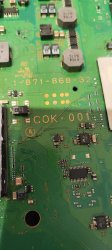
- It's the original COK-001 mainboard, as you can see on the following pictures

I got GTA Vice City once to load with EE+GS, until the intro, where the console just hard locked itself and had to get shut down on the back with the main power switch. Apart from that, it's always a black screen.

So I think, it's the EE+GS chip, that's dead. Did anyone else experience this error with a frankie ever? Are there any hints, suggestions? I thought it would be an idea to reflow the EE+GS chip with my heat gun, but I never heard of anyone doing that before. I will also send some pictures of the console and mainboard, any help or hint is appreciated.

79zw5ld.jpg


Previous owner sent me this:

P9FjAjb.jpg


71d4pwW.jpg


This case really gave me headaches, as I was planning to somehow resolve this issue, but can't seem to be able to. If there is nothing, I will just accept it, because it was really really cheap for a 40nm RSX fat PS3. Thank you
 
This seems to be the noPS2, there is no solution for it, some say it is EEGS, others say it is RSX or internal PCB routing, which is why you can get it cheap.
 
Yes, the EEGS replacement fixed it in my case, I know of at least 2 other people who fixed it the same way. But the PCB must be inspected for damages as well.

From the frankenstein thread somebody also noticed broken traces damage example and remedied it by running a wire to recover the connection. But inspite of that, only EEGS replacement resolved nops2 in his case. However it's also a good example of what else can be responsible for the games not working.

eegs remedy1.jpg
 
Last edited:
Yes, the EEGS replacement fixed it in my case, I know of at least 2 other people who fixed it the same way. But the PCB must be inspected for damages as well.

From the frankenstein thread somebody also noticed broken traces damage example and remedied it by running a wire to recover the connection. But inspite of that, only EEGS replacement resolved nops2 in his case. However it's also a good example of what else can be responsible for the games not working.

View attachment 45279

The replacement of EE+GS is that simple? I am surprised, I thought there was some sort of marrying the chip to the motherboard, just like CELL and also the RSX (but today can be easily re-married).
 
EEGS is not married, so yes. It is "simple", but it needs more heat to take off because of the thick IHS.
 
Hmm, very interesting. Do you know if this has to be the same model of EE+GS, currently sitting on the COK-001 motherboard? Or maybe it could be also one taken of PS2 (ofc with matching pinout)? Or maybe each of EE+GS models has different BGA
 
Hmm, very interesting. Do you know if this has to be the same model of EE+GS, currently sitting on the COK-001 motherboard? Or maybe it could be also one taken of PS2 (ofc with matching pinout)? Or maybe each of EE+GS models has different BGA

The guy in frankie thread used the one from PS2 and it worked. So I think they are all the same.
 
Would I cause just more damage, or would it be worth it blasting the chip with a heat gun? Or maybe it got destroyed by heat when replacing RSX in the first place?
 
Heat gun for replacing chip is a very bad idea. You are not controlling the temperature when heating up a chip, you are exposing it on too high temperature and with heat gun you are not heating up a chip uniformly.
 
Progress Update on the "No PS2" Issue: Q6600 and C662 Findings

Over the past few months I've been investigating the long-standing "No PS2 playback" issue on early backwards-compatible PlayStation 3 consoles (CECHA / CECHB, COK-001). Historically this fault has been attributed mainly to BGA fatigue under the EE/GS, often leading to risky chip removal or reballing with very mixed results. Up untill recently, I was sure it was BGA fatigue but now my opinion has changed.
Through repeated testing across multiple boards, I've now identified EE/GS local power delivery as an additional and independent failure mechanism that can produce identical symptoms.
Specifically, components Q6600 (MOSFET) and C6620 (tantalum capacitor, a subscriber pointed me to these components) sit directly adjacent to the EE/GS and form part of its local power conditioning network. On boards exhibiting the classic behaviour — PS3 mode working normally, PS2 mode black-screening, but temporarily booting when heat is applied behind the EE/GS — replacing Q6600 and C6620 has repeatedly restored reliable PS2 playback from cold.
This strongly indicates that in many cases the original fault is power-rail instability caused by solder fatigue or marginal joints,or a failed mosfet and capasitor, not a dead EE/GS or failed BGA. Applying heat whilst the console was running, behind the EE/GS was effectively masking the issue by temporarily stabilising these nearby power components, which explains why the fault has historically been misdiagnosed as a BGA problem.
In several earlier experiments, ultrasonic cleaning and controlled low-temperature baking also restored PS2 playback for extended periods (months to nearly a year), further supporting the idea that the silicon itself was intact and that interconnect integrity was the limiting factor.
Importantly, this does not rule out EE/GS BGA fatigue — that failure mode absolutely exists — but it does explain why EE/GS replacement and reballing have such a high permanent failure rate when power integrity is not addressed first. In at least one case, unnecessary EE/GS removal introduced board-side damage that resulted in partial video output (red-tinted black screen), even though the original No PS2 fault was power-related and repairable.
Based on these findings, the repair order that makes the most technical sense is:
  1. Stabilise EE/GS power delivery (Q6600, C6620, solder integrity)
  2. Address mechanical stress and board flatness
  3. Treat EE/GS BGA intervention strictly as a last resort
This approach has already proven more consistent, lower-risk, and more informative than immediately lifting the EE/GS. I'm continuing to document results across additional boards, but so far Q6600 and C6620 have emerged as critical and previously overlooked contributors to the No PS2 issue.

Replacing these components when PS2 goes to black screen or needs to be at a high temperature to run and the menu is avaliable, has resolved this issue in 4.out of 4 consoles so far

Oh, and i.almost forgot, I got it all.on video.....

 
Good findings, it can be added to the list of potential causes.

EE/GS replacement and reballing have such a high permanent failure rate

But where are you getting these statistics ? There have been people for whom it has worked well.
 
Good findings, it can be added to the list of potential causes.


But where are you getting these statistics ? There have been people for whom it has worked well.
Good findings, it can be added to the list of potential causes.


But where are you getting these statistics ? There have been people for whom it has worked well.

Which statistics are you referring to? Currently i have 4 consoles in my possession thst i have resolved this issue by swapping out the Q6600 and C6620. All of these consoles would go to black screen and refuse to boot PS2 games. Whilst the console was running I would move the Blu-ray drive and apply heat behind the EEGS chip. On all four occasions the console would boot PS2 games when this area was heated.i original thought that it was BGA fatigue behind the EEGS chip as this was the area that heat was being applied to. However Q660 and. 6620 are right next to the EEGS chip and would have been heated also. Having swapped.out these components using spares from boards I was practising RSX lifts on, all four consoles have recovered. So basically if you heat the back of the EEGS whilst trying to boot a PS2 game, and it boots, it seems likey to be these components.

I have been told by two other users this has also worked for them, one had 2 NoPS2 consoles that this work on, the other had one.

Its also.worth considering this.....
Effect of EE/GS Rework Heat on Q6600 and C6620 in "No PS2" Failures

During investigation of the long-standing No PS2 playback fault on early backwards-compatible PlayStation 3 consoles (CECHA / CECHB, COK-001), it has become evident that the thermal exposure associated with EE/GS removal or installation can temporarily mask faults unrelated to the EE/GS BGA itself.
The components Q6600 (MOSFET) and C6620 (tantalum capacitor) are located immediately adjacent to the EE/GS and form part of its local power conditioning and transient response network. During EE/GS rework, the motherboard is subjected to extended preheat and soak phases, placing these components well within the same thermal and mechanical stress region.
If the failure mode affecting Q6600 or C6620 is interconnect degradation—such as solder fatigue, marginal wetting, or increased contact resistance—rather than intrinsic component failure, the elevated temperatures associated with EE/GS rework can temporarily restore electrical continuity. This occurs through stress relief at micro-fractured solder interfaces and a transient reduction in joint resistance, thereby stabilising the EE/GS supply rail sufficiently to allow PS2 mode initialisation.
This effect can misleadingly suggest that EE/GS rework has resolved the fault, even when the underlying issue lies in the EE/GS local power delivery rather than the BGA itself. Because this thermal exposure does not constitute a controlled reflow of Q6600 or C6620 solder joints, the improvement is typically non-permanent. Normal thermal cycling during operation can cause the same marginal joints to degrade again, leading to recurrence of the No PS2 condition.
This mechanism explains cases where PS2 functionality briefly returns following EE/GS heating or replacement but degrades over time, resulting in repeated and unnecessary EE/GS interventions.
Direct replacement of Q6600 and C6620 has, in six instances that i know of, restored reliable cold-boot PS2 playback on boards previously exhibiting heat-responsive black-screen behaviour. This strongly indicates that local EE/GS power-rail instability can independently cause the No PS2 fault.
These findings do not exclude genuine EE/GS BGA fatigue as a failure mechanism; rather, they demonstrate that thermal diagnostics alone are insufficient to distinguish between BGA interconnect failure and local power-rail solder degradation. From a risk-management and repair-order perspective, stabilising EE/GS power delivery prior to any EE/GS BGA intervention appears technically justified and significantly reduces the likelihood of irreversible board damage.
 
Last edited by a moderator:
Seems like this is way more difficult than what I am able to do here. :congratulatory:
I am watching your videos right now, gave them a thumbs up. Btw this CECHB00 console still works. PS2 playback doesn't work lately. Some GTA games can get to the intro, and that was it, the console still gets hard locked. Maybe the time will come when this issue will be fully uncovered by people like you, and somebody is able to repair this for me reliably. Keep up the good work
 
Seems like this is way more difficult than what I am able to do here. :congratulatory:
I am watching your videos right now, gave them a thumbs up. Btw this CECHB00 console still works. PS2 playback doesn't work lately. Some GTA games can get to the intro, and that was it, the console still gets hard locked. Maybe the time will come when this issue will be fully uncovered by people like you, and somebody is able to repair this for me reliably. Keep up the good work

If the console.runs better the warmer it gets, its definitely a possibility its the Mosfet and cap change i have mentioned (Q6600 and C6620)
 
It would have never occurred to me to heat the back of the EE/GS and see if the game boots. I mean it's good if you found out that way, but to make it more scientific we need some measurements and proof of the voltage "instability". If it is letting too much ripple through or not giving enough voltage for example. I am quite sure Rip-Felix will be all over this haha.
 
It would have never occurred to me to heat the back of the EE/GS and see if the game boots. I mean it's good if you found out that way, but to make it more scientific we need some measurements and proof of the voltage "instability". If it is letting too much ripple through or not giving enough voltage for example. I am quite sure Rip-Felix will be all over this haha.

I originally heated the back of the EEGS because I believed it was BGA fatigue, not a power rail issue. I was then pointed in this direction by a frankie specialist that was able to resolve a recent NoPS2 issue by replacing these components. When I looked on the schematics and located them, I then realised what was actually happening. So thats when I decided to swap out these components on a console that would boot when heat was added. This confirmed that under these circumstances, this component change seems to work. And by the way, this is the most common form of NoPS2 thats out there. In the early stages the console will only boot when it reaches a certain temperature. As the degradation gets worse, the console needs to be hotter for the console to boot untill the heat required is to hot for the console to produce. So when I then apply additional heat, it boots meaning its from this common category of NoPS2 and so far this solution works for these consoles with these symptoms.
 
Makes sense, I have never encountered a nops2 console that booted games after warming up, but I havent worked on enough of them anyways. For me it was always either black screen no matter what or it booted games with artifacts.

@RIP-Felix where are you
 
So i want to be clear, Rambonz2, told me about this component change, so its not my discovery. When I changed the components on camera, it worked and fell in line with my diagnosis (heating the area behind the EEGS to get a PS2 disc to boot). Because of his advice falling in line with how i diagnose the console, it made me realise that my method to resolve this issue could be causing a false positive. So I put the video on private whilst I investigate the issue further. Unfortunately he thought I deleted all his comments which wasnt the case. Although there are lots of ways to resolve NoPS2 as there are many reasons it can happen, slow degradation due to heat is the most common NoPS2 issue out there at the moment, and Rambonz's findings could have just unlocked a usefully method to resolve this
 
Today I took this CECHB00 from the shelf, connected it to my TV with a suspected half-broken HDMI cable and set the Max. Temp. of CELL to 74C in WebMan. I started up the game Last of Us to bring up the temperatures so I see if it behaves differently with PS2 games. But the PS3 didn't want this test at all, and YLOD'd a lot of times. It never behaved like this before. After changing the suspected HDMI cable, no errors or YLOD occured, and I successfully brought up the temp of CELL to 74C degrees and RSX to around 50-55. 40nm RSX is really hard to get hot, but I tried my best. The NoPS2 issue didn't change, it still behaved in the same way.

I dumped the syscon errors to my USB flash drive.
Firmware Version: 4.91 (build 50754)
Platform ID: Cok14
Product Code: 00 82
Product Sub Code: 00 02
Hardware Config: 0000FFFF0003FFFF
Syscon Fimware Version: 0B8E.0001000000000006 (EEPROM: 0001000000000006)

Bringup Count: 1332, Shutdown Count: 1171
Runtime: 49 Days, 9 Hours, 9 Minutes, 26 Seconds

Error Log
01: A0A02031 Fri Dec 31 23:59:59 1999 Thermal Sensor, RSX
02: A0801601 Sat Dec 31 00:20:59 2005 CELL Livelock Detection
03: A08014FF Sat Dec 31 00:20:59 2005 Check Stop
04: A0801701 Sat Dec 31 00:20:59 2005 CELL BE ATTENTION
05: A0801601 Sat Dec 31 00:04:54 2005 CELL Livelock Detection
06: A08014FF Sat Dec 31 00:04:54 2005 Check Stop
07: A0801701 Sat Dec 31 00:04:54 2005 CELL BE ATTENTION
08: A0A02031 Fri Dec 31 23:59:59 1999
09: A0A02031 Fri Dec 31 23:59:59 1999
10: A0A02031 Fri Dec 31 23:59:59 1999
11: A0A02031 Fri Dec 31 23:59:59 1999
12: A0A02031 Fri Dec 31 23:59:59 1999
13: A0A02031 Fri Dec 31 23:59:59 1999
14: A0A02031 Fri Dec 31 23:59:59 1999
15: A0A02031 Fri Dec 31 23:59:59 1999
16: A0A02031 Fri Dec 31 23:59:59 1999
17: A0A02031 Fri Dec 31 23:59:59 1999
18: A0A02031 Fri Dec 31 23:59:59 1999
19: A0A02031 Fri Dec 31 23:59:59 1999
20: A0A02031 Fri Dec 31 23:59:59 1999 Thermal Sensor, RSX
21: A0902203 Fri Dec 31 23:59:59 1999 South Bridge
22: A0801001 Fri Dec 31 23:59:59 1999 CELL Power
23: A0A02031 Fri Dec 31 23:59:59 1999 Thermal Sensor, RSX
24: A0801004 Fri Dec 31 23:59:59 1999 POWER AC/DC
25: A0902203 Fri Dec 31 23:59:59 1999 South Bridge
26: A0801004 Fri Dec 31 23:59:59 1999 POWER AC/DC
27: A0801004 Fri Dec 31 23:59:59 1999 POWER AC/DC
28: A0902203 Fri Dec 31 23:59:59 1999 South Bridge
29: A0801004 Fri Dec 31 23:59:59 1999
30: A0801004 Fri Dec 31 23:59:59 1999
31: A0801004 Fri Dec 31 23:59:59 1999 POWER AC/DC
32: FFFFFFFF Fri Dec 31 23:59:59 1999

Either this Playstation 3 has suffered major CELL damage while it got the 40nm RSX, or it was really the HDMI cable causing trouble, as it looks right now. What I can understand is, HEAT does NOT affect the way this PS3 behaves with PS2 games. Maybe some time I try blasting the same area as you do, behind the EE+GS with a heatgun and see, if there are any changes. At least you brought hope to the people, who have this issue.

P.s. With ps2_netemu.self enabled, the HDD-installed PS2 games work flawlessly. PS1 games also work from HDD as well as from physical CD-R.
 
Last edited:
Back
Top