
You are using an out of date browser. It may not display this or other websites correctly.
You should upgrade or use an alternative browser.
You should upgrade or use an alternative browser.

vyktormvmpay25
Senior Member
Well you can't lower than that, I couldn't find something that would automatically adjust in a range of 065v up to 1.5v. I've tried something but didn't work for me. It's a fixed voltage there. You can develop something and came up with a solution.
Hey guys I bought a 60gb A01 last night 8t has 15 hrs of runtime on it!! I put new pads and thermal paste and battery. Just wondering if it might be a frankie since the rsx runs cooler than cpu. I have dumped lvl 1 but cannot figure out how to read it. I'm looking for the string that mentions what rsx it is. Thank you for any information
vyktormvmpay25
Senior Member
I could try just dm.
I woukd love to but I think I may not have that option unlocked lol I can't find that option can you send me a messege to respondI could try just dm.
I think I am locked for messeges, probably noob stuff... I really want to know if this thing is frankie.
Last edited by a moderator:
vyktormvmpay25
Senior Member
From cfw there are options to dump syscon parts and build a partial dump of syscon, then we can conclude rsx id installed on 3242 and 3254, isn't full data but enough to understand, if it's cechaxx, cechbxx, cechcxx is definitely Frankie.
Sent part dumps of your syscon here or on faulty findings ylod thread instead of opening another thread, quate some people like u often see them posting along this thread.
You have to do like 10 posts on forum before any link for download you post may be easy posted or post it and wait for approval of admins.
Sent part dumps of your syscon here or on faulty findings ylod thread instead of opening another thread, quate some people like u often see them posting along this thread.
You have to do like 10 posts on forum before any link for download you post may be easy posted or post it and wait for approval of admins.

Raidmax
Member
I might be wrong, but isn't the RSX type find-able in a LV1 dump as well? I kind of remember finding the rsx type in a few LV1 dumps I had from a CECHB and a few slims. (the latter were the first I dumped to check the core/VRAM speeds if they were changed, and the former was subsequently dumped after I figured I could find out the RSX type in the same section)From cfw there are options to dump syscon parts and build a partial dump of syscon, then we can conclude rsx id installed on 3242 and 3254, isn't full data but enough to understand, if it's cechaxx, cechbxx, cechcxx is definitely Frankie.
Sent part dumps of your syscon here or on faulty findings ylod thread instead of opening another thread, quate some people like u often see them posting along this thread.
You have to do like 10 posts on forum before any link for download you post may be easy posted or post it and wait for approval of admins.
vyktormvmpay25
Senior Member
I have not went to deep into those but yes it could be there, Idk, more things around overclock thread probably. Didn't test that neither.

leonemax81
Member
Hi guys I recovered this RSX from a perfectly working PS3 SLIM, the RSX is the CXD5300A1GB model, taking the measurements I noticed that the resistance of the FBVDD RAM is very high compared to the other 40Nm RSX which usually measures around 380Ohm, why is this value so high?
Attachments
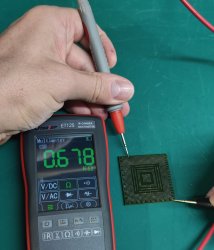
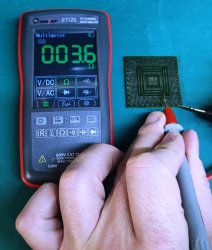
Raidmax
Member
Kinda late but yeah, it's in that region.I have not went to deep into those but yes it could be there, Idk, more things around overclock thread probably. Didn't test that neither.
To find it easily - search the PS3's stock speeds with a hex editor. The first result will land you exactly the RSX type string and the speeds it's clocked at.
Helpful for Frankie OC experimenting. I personally couldn't manage to get one (neither Sony nor unofficial) but, if you're still doing them, I'll keep you in mind for when I need a GPU swap. I think I still have a (useless to me due to not being CFW-able) 3000 slim that can be used as donor.
I'm back peeps, so I finally had time to test everything again after changing all the caps and test it I got the 3004 error again I opened it up and I found something was missing. Do you guys think this could be cause? I bet it is!

The service manual says is part C6019 but I don't seem to find it in the list of parts, there is a IC6019 but it seems is not the same part (IC6019 6-703-629-01 IC NCP511SN15T1G)
I still have the 40nm board I could take it from there but can someone help me identify the actual part?
It looks like the transplant was rough
The service manual says is part C6019 but I don't seem to find it in the list of parts, there is a IC6019 but it seems is not the same part (IC6019 6-703-629-01 IC NCP511SN15T1G)
I still have the 40nm board I could take it from there but can someone help me identify the actual part?
It looks like the transplant was rough
Last edited:

Sampsonay
Member
The caps in that area are 16V 22uF MLCC's, case code is 1210.I'm back peeps, so I finally had time to test everything again after changing all the caps and test it I got the 3004 error again I opened it up and I found something was missing. Do you guys think this could be cause? I bet it is!
The service manual says is part C6019 but I don't seem to find it in the list of parts, there is a IC6019 but it seems is not the same part (IC6019 6-703-629-01 IC NCP511SN15T1G)
I still have the 40nm board I could take it from there but can someone help me identify the actual part?
It looks like the transplant was rough
Thank you very muchThe caps in that area are 16V 22uF MLCC's, case code is 1210.
 I don't want to abuse your time but by any chance do you have a link for the service manual of the JTP-001(Google is not cooperating) or do you know if they are the same in that board?
UPDATE:
So I was checking old pictures before the swapping the RSX and it did't had that cap, in any case I'm going to replace it but I'm going to ask my technician to re-solder the tantalizers I can actually see one that's lifted so it might have a short.
this are the results of the debug:
Code:
bringup
[SSM] state: 0000 -> 0101
Bringup Mode #0 (0xFF)
[SSM] ssmCb_OnStartingBePowOn() called.
[SSM] First Boot.
[SSM] Bringup mode : syspm_stat=00000000/00000000
[POWSEQ] PowerSeq_Setup called.
[SSM] state: 0101 -> 0301
[SSM] PowSeq Fail : Detected !
[SSM] state: 0301 -> 0700
[POWSEQ] AV Backend Letup
[SSM] Shutdown mode : syspm_stat=00000000/00000000
[ERROR]: 0xa0093004
Last edited:
Sampsonay
Member
I'm not aware of any service manuals for any slim motherboards being publicly available. I'd suggest buying those caps in bulk brand new since they seem to be a common failure point on COK-001 / 002 boards.Thank you very much
UPDATE:
So I was checking old pictures before the swapping the RSX and it did't had that cap, in any case I'm going to replace it but I'm going to ask my technician to re-solder the tantalizers I can actually see one that's lifted so it might have a short.
this are the results of the debug:
Code:bringup [SSM] state: 0000 -> 0101 Bringup Mode #0 (0xFF) [SSM] ssmCb_OnStartingBePowOn() called. [SSM] First Boot. [SSM] Bringup mode : syspm_stat=00000000/00000000 [POWSEQ] PowerSeq_Setup called. [SSM] state: 0101 -> 0301 [SSM] PowSeq Fail : Detected ! [SSM] state: 0301 -> 0700 [POWSEQ] AV Backend Letup [SSM] Shutdown mode : syspm_stat=00000000/00000000 [ERROR]: 0xa0093004
I made Frankenstein mod on COK-002 with CXD5302A1GB. Unfortunately I have black screen on HDMI (signal is detected) in A/V mode console is working normal.
I tried:
- tested HDMI port in diode mode - all conections OK
- HDMI filters - OK
- checked for short around / under SIL9132BU - OK
- diodes - OK
- replaced SIL9132BU - same result
- replaced CXD5302A1GB - same result
I`m out of ideas what should I do next?
I tried:
- tested HDMI port in diode mode - all conections OK
- HDMI filters - OK
- checked for short around / under SIL9132BU - OK
- diodes - OK
- replaced SIL9132BU - same result
- replaced CXD5302A1GB - same result
I`m out of ideas what should I do next?

hrist
Member
I bet is trivial but have you done the video reset on the console? (While one standby keeping pressend the power button until hearing a beep)I made Frankenstein mod on COK-002 with CXD5302A1GB. Unfortunately I have black screen on HDMI (signal is detected) in A/V mode console is working normal.
I tried:
- tested HDMI port in diode mode - all conections OK
- HDMI filters - OK
- checked for short around / under SIL9132BU - OK
- diodes - OK
- replaced SIL9132BU - same result
- replaced CXD5302A1GB - same result
I`m out of ideas what should I do next?
I just was having the same problem on mine and was able to fix it replacing VDR257 and 258

Paolo
Member
Hi guys greetings from Italy.
I wanna share my exp on a cok-001 frankestein did one week ago, it was my first cecha frankestein (i always worked on cok-002) , after 40nm replacement i had the infamous no ps2 game issue, black screen but able to return back to XMB.. i watched a lot of post in this group and on psx-place about this issue , so i ve reballed the same eegs, replaced rdram, replaced cxd9208, cxm4024, reballed a new rsx 65nm and again a new 40nm.. still black screen.. eegs uart log was perfectly fine, so i started to probe data lines between rsx and i ve found an open line on a data line.. i ran a jumper between rsx and eegs as you can see in the photo coz the internal trace was broken (maybe during reballing process?) but nothing.. still black screen.. so the last option was replacing the eegs but i ve ran out of spare ic's , so i ve bought a broken ps2 75004 from ebay in order to harvest a new eegs but the code on it was different (cxd9833 instead of cxd9228.. i dont Remember..) i soldered both rdram and eegs from the ps2 on the cok.. et voilà, ps2 game now work with no issues.. just my experience so i can help someome in the future..


I wanna share my exp on a cok-001 frankestein did one week ago, it was my first cecha frankestein (i always worked on cok-002) , after 40nm replacement i had the infamous no ps2 game issue, black screen but able to return back to XMB.. i watched a lot of post in this group and on psx-place about this issue , so i ve reballed the same eegs, replaced rdram, replaced cxd9208, cxm4024, reballed a new rsx 65nm and again a new 40nm.. still black screen.. eegs uart log was perfectly fine, so i started to probe data lines between rsx and i ve found an open line on a data line.. i ran a jumper between rsx and eegs as you can see in the photo coz the internal trace was broken (maybe during reballing process?) but nothing.. still black screen.. so the last option was replacing the eegs but i ve ran out of spare ic's , so i ve bought a broken ps2 75004 from ebay in order to harvest a new eegs but the code on it was different (cxd9833 instead of cxd9228.. i dont Remember..) i soldered both rdram and eegs from the ps2 on the cok.. et voilà, ps2 game now work with no issues.. just my experience so i can help someome in the future..
Similar threads
-
-
 PS3 PS3 CECHA RSX Swap (40nm) – JP Limited – SYSCON Patch, VDDC Mod – Need Detailed Help
- Started by jw0710
- Replies: 4
-

-
