PS3HEN FTP From PC to PS3 over Ethernet does not work

WailkyS5M5

Member
Hello, i have this issue on my PS3 Super slim CECH-4004A using the latest HEN fw4.91 when FTPing by
Ethernet (Non router method) on Filezilla (I have already tried WinSCP but to no avail):

Status: Connecting to 10.1.1.2:21...
Status: Connection attempt failed with "ETIMEDOUT - Connection attempt timed out".
Error: Could not connect to server

I have followed countless tutorials on Youtube and forums that show you how to ftp with ethernet to your ps3 its the same principle but they tend to use different IPs, DNS and so on

I made sure to follow everything STEP BY STEP. double checking all of the settings both on PC and PS3 so they matched. I keep getting the same error over and over. Tried 3 different ethernet cables, tried Multiman FTP, WebmanMOD FTP and Irisman FTP aswell

Strangely enough, on my CFW PS3 Phat CECHJ04 it works first try and is super fast. It can not be because its HEN right? can the Super slim ethernet port not handle crossover but the phat can? I saw some people doing it on HEN with success.
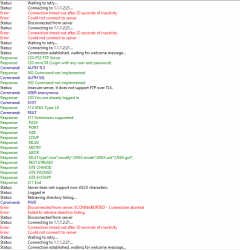
There was only one miraculous point where it nearly worked but failed at the end,
here are the filezilla logs (this is the only time this kind of worked):
Screenshot_2024-06-17_171417.png


Guys please help me im so confused i cannot find any answers to this even after doing a big research on this :apologetic: Thank you
 
NOTES TO ADD:
FTP via wifi works perfectly its just that its ridiculously slow
Connecting both the PS3 and PC to a router is not a option for me as they are located in a completely seperate room
 
There are many possible causes.
It could be a hardware issue:
- PS3 Ethernet port or card could be damaged
- PC Ethernet port or card could be damaged
- Cable could be wrong or damaged

It could be a software issue:
- FTP server not running, disabled or network port in use by another app
- PS3 Network disabled or not configured properly (e.g. wrong DNS, proxy enabled, DHCP enabled or IP address in already in use)
- FTP client could be not properly configured
- Proxy or antivirus could be blocking the inbound/outbound network ports

Try moving temporarily the router and the PC next to the PS3 and verify if the PS3 and PC connect through the router.

Also try these tutorials for direct connect PS3 to PC:
https://www.psx-place.com/threads/very-simple-way-to-direct-connect-ps3-to-pc.17052/
https://www.wikihow.com/Connect-a-PlayStation-3-to-a-Laptop
 
Hello aldostools!
I will answer some of the possible causes you gave me so we can hopefully narrow the issue down:

It could be a hardware issue:
- PS3 Ethernet port or card could be damaged
A: I don't think the Ethernet Port is damaged, i will connect my PS3 to the router for internet later to be sure.
- PC Ethernet port or card could be damaged
A: The PC Ethernet port works flawlessly as i could do the direct ethernet FTP with my CECHJ04 PS3 without any issues.
- Cable could be wrong or damaged
A: I have tried 3 different non-crossover Ethernet cables to no avail. I'm not sure with what you mean by "wrong" but i presume its to use a crossover cable. I got myself a crossover adapter and it does not work too

It could be a software issue:
- FTP server not running, disabled or network port in use by another app
A: I have tried WebmanMOD FTP in XMB, then Multiman and making sure WebmanMOD FTP is disabled in Setup and also Irisman. Made sure the server is running but no function.
- PS3 Network disabled or not configured properly (e.g. wrong DNS, proxy enabled, DHCP enabled or IP address in already in use)
A: Made sure IP adress is only different in the last digit to the PC, Tried bunch of DNS combinations, proxy is always set to off, I do not have a DHCP option in my PS3 when using custom settings. After applying settings i recieve an IP but no internet connection which from what i heard is normal.
- FTP client could be not properly configured
A: Not sure how i should configure it. Im using stock Filezilla and also tried WinSCP
- Proxy or antivirus could be blocking the inbound/outbound network ports
A: I have tried by turning off Firewall and Windows defender

I will try hooking both the PC and PS3 to the router, when the time comes i will give you an update :D

Also another thing if it can help:
I saw this thread here in PSX place (Help) can't connect to ps3 via ethernet cable. | PSX-Place and the Author seemed to use a network bridge and setting the IP to automatic in his ethernet port settings. I redid the steps and it seemed to let me connect to FTP but i was always met with a error after connecting or when listing PS3 directory. I only did this once and i sadly forgot how to recall the steps again

(The attached screenshot is the FileZilla logs of a attempt to make it work that way)
 

Attachments

  • Screenshot 2024-06-17 171417.png
    Screenshot 2024-06-17 171417.png
    53.3 KB · Views: 39
You have to check IP address being used.

Depending the network Class you use the range of Private IP address is different.
  • Class A networks use a default subnet mask of 255.0. 0.0 and have 0-127 as their first octet. ...
  • Class B networks use a default subnet mask of 255.255. 0.0 and have 128-191 as their first octet. ...
  • Class C networks use a default subnet mask of 255.255. 255.0 and have 192-223 as their first octet.
upload_2024-7-16_16-20-8.png


Example:
ips-jpg.20804
 
If you have connected psš to pc or thru router there is no chance the ip adres is what you have posted (10.1.1.2:21). the ip adres should look like this for example 192.168.243.32

Yes, the PS3 will make its own local IP adress when I configure it on automatic using ethernet. But every FTP server shows a blank IP address and the network is unreachable when starting FTP on PC

You have to check IP address being used.

Depending the network Class you use the range of Private IP address is different.
  • Class A networks use a default subnet mask of 255.0. 0.0 and have 0-127 as their first octet. ...
  • Class B networks use a default subnet mask of 255.255. 0.0 and have 128-191 as their first octet. ...
  • Class C networks use a default subnet mask of 255.255. 255.0 and have 192-223 as their first octet.
View attachment 43629

Example:
ips-jpg.20804

My Network uses the Class C since it starts with "192." Other than that do you want me to use the settings from the example? If yes I have already tried that before doing the post.

Today I will hopefully try it by using a router in between
 
Last edited by a moderator:
Yes, the PS3 will make its own local IP adress when I configure it on automatic using ethernet. But every FTP server shows a blank IP address and the network is unreachable when starting FTP on PC


My Network uses the Class C since it starts with "192." Other than that do you want me to use the settings from the example? If yes I have already tried that before doing the post.

Today I will hopefully try it by using a router in between

The ip adress what you need to enter in fillezila or whatever client what are you using. You need to check on ps3 console!!! No ftp client will find the ps3 autoaticaly!!
 
The ip adress what you need to enter in fillezila or whatever client what are you using. You need to check on ps3 console!!! No ftp client will find the ps3 autoaticaly!!

Yes I knew that from the beginning, I don't think you understood me well on what I said
 

Similar threads

Back
Top