Hi! I'm relatively new to the PS2 scene and need some help getting my ISO back working on a PS2 Fat.
I'm unsure what I did wrong, but it's driving me insane.
I'm using a 4TB SSD exFAT 512B with the latest grim doomer OPL and a MemCardPro 2 for FCMB.
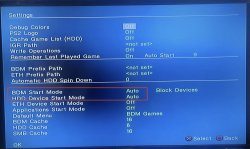
I managed to get everything working and enabled the correct HDD settings like BDM Start Mode Auto (HDD ON), but for some inexplicable reason, OPL does not see any of my games (ISO) except maybe one time out of ten.
I decided to try with another smaller HDD, but it seems I've had no luck.
The HDD are seen; the games won't always appear. IF they appear, I can boot them. Formatted many times and used the correct CD/DVD folders.
I'm using 3 adapter:
• A random one no brand
• An official modded bitfunx
• Kaico one
What could the problem be? I don't think is the PS2 itself because the original HDD the console came with (PlayStation 2 BB Pack) works fine with the OG adapter.
Any ideas? I really don't know what else to do.
I'm unsure what I did wrong, but it's driving me insane.
I'm using a 4TB SSD exFAT 512B with the latest grim doomer OPL and a MemCardPro 2 for FCMB.
I managed to get everything working and enabled the correct HDD settings like BDM Start Mode Auto (HDD ON), but for some inexplicable reason, OPL does not see any of my games (ISO) except maybe one time out of ten.
I decided to try with another smaller HDD, but it seems I've had no luck.
The HDD are seen; the games won't always appear. IF they appear, I can boot them. Formatted many times and used the correct CD/DVD folders.
I'm using 3 adapter:
• A random one no brand
• An official modded bitfunx
• Kaico one
What could the problem be? I don't think is the PS2 itself because the original HDD the console came with (PlayStation 2 BB Pack) works fine with the OG adapter.
Any ideas? I really don't know what else to do.