RIP-Felix
Senior Member
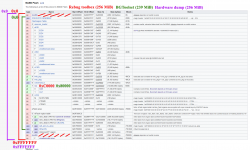
Another thing is that all flashers/patchers (BGToolset (browser), HFW Flash Writer (browser), HEN Flash Patcher (GameOS app)) should never touch any other regions except for the two ROS banks. Ideally, as long as there are not any bugs in the code, a "brick" in this case should mean only corrupted ROS/CoreOS. Meaning it can be fixed by replacing only that part (2x 7 MiB).
If anyone is interested in writing instructions for a brick recovery in the form of a PDF, it would be great to include them together with a flash backup output from BGToolset / HEN FP.
Here's what I just tried and the results from it. The scenario is pretend By the way. Ididn't actually brick my console. It's a simulation. Perhaps someone can give me insights as to what I did wrong. Check my reasoning...
- I follow the guides to get a BGToolSet backup from my NAND console. Checked it pyPS3checker and the dump is good. Then I jailbreak and oops, I get a Russian RSOD. I've bricked my console cuz I wasn't patient and didn't listen to @STLcardsWS warning! Now what?
- So I disassemble to the MB. Mark top (side A) NAND0, Bottom (Side B) NAND1 and remove them. Hot air...yay!
- Use a HW flasher like teensy or Flashcat USB to read their contents and make good dumps of NAND0.bin and NAND1.bin. 2 dumps of each NAND module so I can compare them and be sure they are identical, indicating a good dump. So 4 reads total. This is important because they are already corrupt I don't want more corruption!
- Use FlowRebuilder's Unscramble option to interleave NAND0.bin and NAND1.bin into a single unified 256MB Full NAND Dump.
- Open the Unified 256MB Full NAND Dump in HxD.
- Select block (CTRL + E).
- Start-offset = 0000000
- End-Offset = 003FFFF
- Copy it (CTRL + C)
- This is bootldr Top
- Select block (CTRL + E).
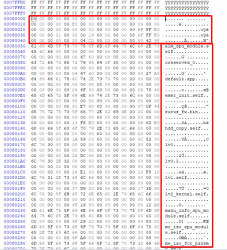
- Open 239MB Software Dump (BGtoolSet backup) in HxD and place your cursor at the begining. Then insert Bootldr TOP (CTRL + V). Can confirm it's correct if FF's end at offset 00040000.
Go back to Unified 256MB Full NAND Dump
Now I need to add the Unrefrenced area. I need to fill the rest of the file with FF's (Empty data) so it ends at offset FFFFFFF. I did that by going to...
The resulting file is 256MB and was recognized by PS3DumpChecker. It said the dump failed on 7 of 114 checks and is BAD.
The RebugToolBox Full Dump from the same working console (after jailbreak) failed 2 of 117 checks.
When comparing the 2 flash dumps they begin to diverge at Offset 0D702000 (/dev_flash2 (FAT16) XRegistry). ANd the last place they diverge is at Offset 0F02A3A0. So we missed a step I think.
- Select block (CTRL + E).
- Start-offset = F000000
- End-Offset = F03FFFF
- Copy it (CTRL + C)
- This is bootldr Bottom
Now I need to add the Unrefrenced area. I need to fill the rest of the file with FF's (Empty data) so it ends at offset FFFFFFF. I did that by going to...
- EDIT --> Insert Bytes.
- Bytecount = 100000
- Fill pattern = F
- That added enough offsets filled with FF to go past offset FFFFFFF.
- I Double clicked "Offset(h)" in the lower left hand corner to manually go to offset FFFFFFF. I selected everything after that and deleted it.
The resulting file is 256MB and was recognized by PS3DumpChecker. It said the dump failed on 7 of 114 checks and is BAD.
- bootldr0 (bottom) FAILED! Offset: 0xF000000
- bootldr1 (bottom) FAILED! Offset: 0xF000010
- bootldr Rev key (Bottom) FAILED! Offset: 0xF000004
- bootldr Statistics (Bottom) Statistics check Failed! 0xFF doesn't match expected percentage: lower then 5% Actual value: 100.00% FAILED! Offset checked: 0xF000000 Length checked: 0x100030 Everything should be less then 5.00%
- ROS0 Hash Result: FAILED!
- ROS1 Hash Result: FAILED!
- Datamatch for: bootldr size Result: Failed!
- Datamatch for: per console nonce Result: Failed!
- Datamatch for: bootldr Result: Failed!
The RebugToolBox Full Dump from the same working console (after jailbreak) failed 2 of 117 checks.
- ROS0 MD5 Hash
- ROS1 MD5 Hash
When comparing the 2 flash dumps they begin to diverge at Offset 0D702000 (/dev_flash2 (FAT16) XRegistry). ANd the last place they diverge is at Offset 0F02A3A0. So we missed a step I think.
Go back to 239MB Software Dump (BGToolSet Backup)
That's the same as my original 256MB NAND dump RebugToolBox made. And when compared they are identical. So this method worked.
This assumes that there is nowhere else that the jailbreak process can corrupt!
- Select block (CTRL + E).
- Start-offset = 00C0000
- End-Offset = 0EBFFFF
- Copy it (CTRL + C)
- This copies ROS0 and ROS1
- Select block (CTRL + E).
- Start-offset = 00C0000
- End-Offset = 0EBFFFF
- Delete it (DEL)
- The cursor should leave off where it was deleted (Offset 00C000)
- Paste ROS0 and ROS1 in (CTRL + V)
That's the same as my original 256MB NAND dump RebugToolBox made. And when compared they are identical. So this method worked.
This assumes that there is nowhere else that the jailbreak process can corrupt!
Last edited: