


HAN Toolbox v0.5
New Features:
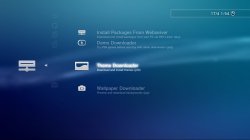
External Content Downloaders
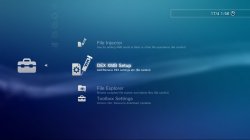
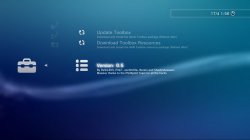
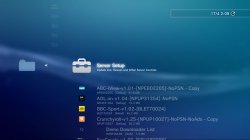
For the downloaders, There is an initial setup to be done, this involves going to Toolbox Settings and Downloading a resource pkg, its quite simple, download the pkg then reboot. If you don't want to use the content downloaders then you don't need to do this step.
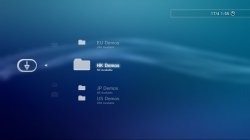
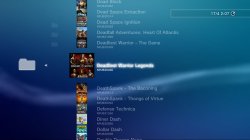
@ShaolinAssassin Has done some amazing work adding the other regions demos to Demo Downloader, This is really excellent because it was not something I planned to get back to for a long time if ever tbh.
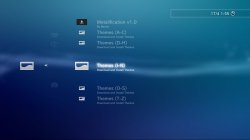
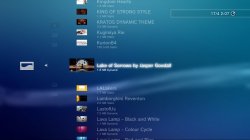
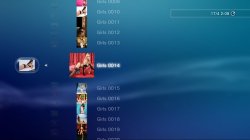
@pink1 Helped me rewrite the original XMBPD theme downloader from scratch and in a much better way, now all themes have icons which is something I wanted to do for a long time, theme type and size are displayed on the XMB too, and we also increased the available theme count to over 1001.
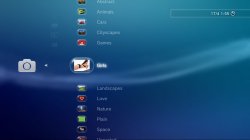
Wallpaper downloader: When downloading a wallpaper, when the image loads up in the browser, press triangle, go to File>Save Image>System Storage, then you can go to the photo category to set it as a wallpaper.
Note: If you browse thousands of items in one session you will get missing icons, a reboot solves it.
Debug Settings Toggler
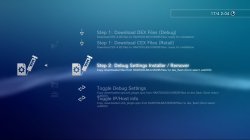
Options to download CEX and DEX settings files to HDD, and then options to inject which ever files you have downloaded, if you don't already know how to use Debug Settings DO NOT use this item.
Auto Switching to DEX Xploit links
If you use the new Debug settings Xploit from Team PS3 Xploit, and you want to have your Xploit links in the Toolbox auto switch to DEX http links when on DEX XMB, then inject this category_game_tool2.xml = DOWNLOAD , if you don't understand what is meant by this, don't use this feature.
Use at your own risk. This Mod/App was not made by Team PS3Xploit, so if you have issues with it please don't annoy them. This is an XMB mod made independently but it does use lots of Team PS3Xploits work.
New Features:
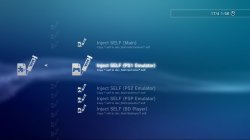
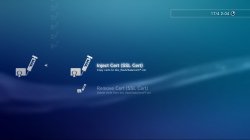
- Self injector added
- Cert remover added
- Demo Downloader updated with demos from all regions
- Theme Downloader added
- Wallpaper Downloader added
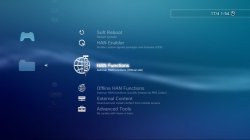
- Menus rearranged
- Debug Settings Toggler added
- DEX Xploit links added (Auto switching, see below)
- New icons
External Content Downloaders
For the downloaders, There is an initial setup to be done, this involves going to Toolbox Settings and Downloading a resource pkg, its quite simple, download the pkg then reboot. If you don't want to use the content downloaders then you don't need to do this step.
@ShaolinAssassin Has done some amazing work adding the other regions demos to Demo Downloader, This is really excellent because it was not something I planned to get back to for a long time if ever tbh.
@pink1 Helped me rewrite the original XMBPD theme downloader from scratch and in a much better way, now all themes have icons which is something I wanted to do for a long time, theme type and size are displayed on the XMB too, and we also increased the available theme count to over 1001.
Wallpaper downloader: When downloading a wallpaper, when the image loads up in the browser, press triangle, go to File>Save Image>System Storage, then you can go to the photo category to set it as a wallpaper.
Note: If you browse thousands of items in one session you will get missing icons, a reboot solves it.
Debug Settings Toggler
Options to download CEX and DEX settings files to HDD, and then options to inject which ever files you have downloaded, if you don't already know how to use Debug Settings DO NOT use this item.
Auto Switching to DEX Xploit links
If you use the new Debug settings Xploit from Team PS3 Xploit, and you want to have your Xploit links in the Toolbox auto switch to DEX http links when on DEX XMB, then inject this category_game_tool2.xml = DOWNLOAD , if you don't understand what is meant by this, don't use this feature.
Use at your own risk. This Mod/App was not made by Team PS3Xploit, so if you have issues with it please don't annoy them. This is an XMB mod made independently but it does use lots of Team PS3Xploits work.
Here is the latest update to the HAN Toolbox - v0.3
Thanks to Team PS3Xploit we have got lots more features at our disposal and we also added some of our own to the toolbox this time around.
New features in this version
- Soft Reboot added
- Hard Reboot added
- Shutdown Added
- File Explorer Added (browse and delete files)
- New auto running links for all Xploit options (no buttons to push)
- Moved all Xploits except "HAN Enabler" into sub categories
- Submenu added for DEX Firmware Xploits (NOT for Normal HAN users)
- Original manual start Xploits still available under legacy menu
- Built in Toolbox Updater (Update from the XMB in future)
Features in v0.2
- HAN Installer
- HAN Enabler
- License Dumper
- License Injector
- Debug Package Enabler
- Support Forum
- Install Packages From Webserver (PKG Linker Required)
Important Note:
It doesn't matter which order you do this in, but you should run HAN Installer again with freshly downloaded han support files to add support for Toolbox v0.3 either before or after installing the pkg, after installing the pkg you can go to Game Data Utility and delete the v0.2 data. If you don't do these things, v0.3 will not show, and you will still have 0.2 showing. Its ok if you have v0.2 and v0.3 showing at the same time, just delete v0.2 Game Data and reboot to clear it.We are now removing the "beta/poc/wip" tags for v0.3 of the Toolbox. Still lots of work to do before a v1.0 release though.
Auto Running Xploits
Now the main HAN Enabler button will link up to the official page for the Auto running version of the Xploit, So its a quicker process. The original versions of the Xploits with webpages are still accessible through a subcategory along with Auto running versions of all. Also added is a File Explorer feature feature that allows the PS3 file system to be browsed to check if files exist, and you can also delete files of folder by pressing the triangle button and selecting Unlink/Unlink Folder, Use the delete function carefully and don't delete important files or else you might need to reinstall FW or format HDD.Future Toolbox Updates
Also you will no longer need to update HAN Toolbox via pkg anymore after installing this update, when the next updates comes out you will be update it fron the XMB just like a game.See the new setting item inside the HAN Toolbox.HAN Toolbox v0.3 Screenshots


Package Linker
Since the last release we have also released PKG Linker v1.0 For Windows that serves as an all in one package server, Its going to become even more important over the next while, So make sure to check that out too HERE.More updates to come soon from @pink1(Dev) and @DeViL303(Dev) and @Berion(Icons), we have not forgotten about Demo Downloader either.
 Special thanks to @esc0rtd3w from Team PS3Xploit for his extra help with everything. Thanks to all the staff and devs at PSX-Place too.
DOWNLOAD HERE
Don't forget, if you ran HAN Installer before 19 March 2018, you need to redownload the han support files and run HAN installer again to add support for this
Don't forget, if you ran HAN Installer before 19 March 2018, you need to redownload the han support files and run HAN installer again to add support for this
HAN Toolbox by Pink1 and DeViL303
Still in Beta stage, use at your own risk!
Note: This package is signed with the Xplit v3.0 resigner, so it wil not install on CFW, although the Toolbox is compatible with Rebug.
Links added so far:
Any suggestions welcome.
Thanks to Team PS3 Xploit for the hacks, Thanks to Berion for all icons
HAN Toolbox v0.1 is out now:
HAN Toolbox v0.2 out now too:
Usage:
Read more about this resource...
Still in Beta stage, use at your own risk!
Note: This package is signed with the Xplit v3.0 resigner, so it wil not install on CFW, although the Toolbox is compatible with Rebug.
Links added so far:
- ★ HAN Installer
- ★ HAN Enabler
- ★ License Dumper
- ★ License Injector
- ★ Debug Package Enabler
- ★ Support Forum
- ★ Install Packages From Webserver (See note in red below)
Any suggestions welcome.
Thanks to Team PS3 Xploit for the hacks, Thanks to Berion for all icons
HAN Toolbox v0.1 is out now:
HAN Toolbox v0.2 out now too:
Usage:
- Install package
- Enjoy
Read more about this resource...
Last edited:


