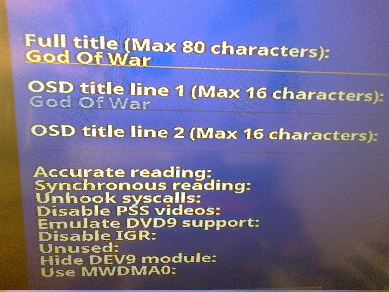
Here is how it looks when I want to install game (everything is fine):
Thanks. So I probably made a mistake while updating the soft keyboard.
With some luck, I can also find the reason why this part is also sometimes unstable.
Well at least "we know" that maybe now they are working on some kind of a fix.
She never actually wrote that they were going to do anything about it, but I do hope they will.
It's not even about just the PS2 itself, but the function does not even work with some of the Realtek adaptors (in Windows).
Just a question. Would the lwip-timer-backport and the things related to the previous ARP-'Kickout'-Fix be of any use here (to this project)?
No. HDLGameInstaller uses the modules from the PS2SDK.
The PS2SDK now uses lwIP v2.0.0, which does not have those problems that the in-game lwIP stack has. That old in-game stack was from SMS, which was probably based on an early version of lwIP from 2004 (Estimated to be v0.7.x).
Are you having issues with HDLGameInstaller? Network functionality has been improved drastically over the past few versions, and I am not sure if you have tried the new version yet.
If you are referring to how it seems like network activity seems to spike at regular intervals, that is probably caused by the DMA channel being shared with the HDD unit.
Regarding Flow-Control: I had a similar issue, when I was using a new OS (Win10 Pro x64) on an older Mainboard and the basic Chipset-Drivers caused it.
It was on one of either of these 3 main-boards: ASUS M3N78-EM (pretty sure, it was that one), or ASUS M2N32 SLI Deluxe, or AsRock N68-S UCC...
What kind of OS where you using?
In my case I manually had to look up the Chipset and also scanned it via CPU-Z, GPU-Z, etc.
Then I downloaded the driver; installed it (via setup); rebooted; had to manually install some drivers via device-manager (but could often let it automatically find the driver in that folder, where the package [from Nvidia?] was unpacked to); rebooted and had no network-related problems anymore.
We're using the latest drivers from Realtek. The Realtek adaptor does not advertise support for flow control, but it is perhaps a driver issue; at the BIOS, in Linux or if the Microsoft driver is used, flow control is advertised.
I found that using the Microsoft-provided driver allows for decent network speeds and there are no frame drops.
As for Linux, I don't know if flow control actually works there, even though its r8168 driver advertises support for it; there seems to be no code that enables it and ethtool reports that the interface does not support flow control.
When I try to change the setting with ethtool, it reports that the driver does not support flow control.
Flow control is likely no longer really necessary for Fast Ethernet devices to communicate properly.
My Lenovo Z460 was from 2010 and its RTL8102E also shares this problem. But I never had issues with getting 12MB/s file transfers across the local network - likely meaning that our computers and network equipment are fast enough to sustain 100Mbit Full-Duplex, even without flow control.
It does not seem to affect all Realtek devices, as we also have Realtek devices that do not have such issues - despite using the same driver.
For example,
@jolek is using RTL81111B, which is a Gigabit NIC that has this issue. On the other hand, my desktop PC (RTL8168B) and newer laptop (RTL8168GU) do not have this problem...
On AssemblerGames, another user had something similar... but it was with an Intel NIC. He tried using another PC that had a Qualcomm NIC, and the problem did not occur there.
So perhaps not all manufacturers have implemented flow control. But yet, it's likely not a problem for general use in 2018...