Help with the tutorial for running ps2 ISOs/BIN

Kei_22

Forum Noob
Hi everyone!!. I need some help,I seem to be stuck, I'm sure it's something I'm missing,kind of slow with this sort of things.lol.

I'm stuck at step 10 where it says to go to Multiman/Managunz,etc and copy your ISO.BIN. to the specified directory. But i came across two things.

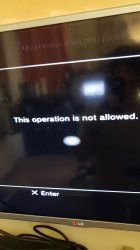
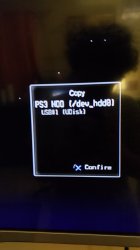
It won't let me copy it.
Where and how do i get to this directory?.

Images included. I'm using Multiman.

Again I'm sure i must be doing something wrong,send help,I have fallen and I can't get up
20200331_175942.jpg 20200331_175952.jpg
 
that copy is for ripping disc to hdd or external usb hdd. it wont do what you want to do.

are you on cfw or hen?

on cfw put iso file in ps2iso folder. on hen you need to convert to .iso.bin.enc in ps2iso folder.

you mention step 10, which guide are you following?
 
Hi!! I'm on hen. Ps has HFW 4.85.1 installed. I'm using this guide:

https://www.psx-place.com/threads/tutorial-ps3hen-the-great-ps3-hen-all-in-one-guide.24369

I already followed all the steps up until 10,have my ISO.BIN.ENC in my usb drive.

Do i need to copy the file in the os itself f om the xmb or from multiman,etc or add it to the PS3ISO folder in the usb drive?

(i already have the PS3ISO folder created in the usb from a previous tutorial but it's emoty,the ISO.BIN.ENC us in the root directly.​
 
Hi!! I'm on hen. Ps has HFW 4.85.1 installed. I'm using this guide:

https://www.psx-place.com/threads/tutorial-ps3hen-the-great-ps3-hen-all-in-one-guide.24369

I already followed all the steps up until 10,have my ISO.BIN.ENC in my usb drive.

Do i need to copy the file in the os itself f om the xmb or from multiman,etc or add it to the PS3ISO folder in the usb drive?

(i already have the PS3ISO folder created in the usb from a previous tutorial but it's emoty,the ISO.BIN.ENC us in the root directly.​
Copy the *.ISO.BIN.ENC file from your USB drive to dev_hdd0/PS2ISO using a homebrew file manager such as the one built in to multiMAN. PS2 backups can only be played from the internal HDD - that goes for CFW as well as HEN.
 
I don't have the console on right now,but where's the file manager on Multiman?.

I'll check later after I'm done working and let you guys know if it all went well!

thanks in advance!
 
I don't have the console on right now,but where's the file manager on Multiman?.

I'll check later after I'm done working and let you guys know if it all went well!

thanks in advance!
Under the first column of the 'XMB' - multiMAN/mmCM - select 'File Manager / mmOS'
Press :but x: to select a file (or multiple), :but cir: for options, and :but square: switches between the open file explorer windows. The rest should be self-explanatory :)
 
got in. but... where's my USB? lol i checked the multi man mmCM and PS3 folders,how is ot supposed to be called?

it's formated to FAT32. 20200331_211212.jpg
 
I did everything but Managunz nor Multiman are detecting the ISO.BIN.ENC file. plop.

I added webman but i noticed the fan on the console kicked in right after i restarted after installing it. It doesn't sound ridiculously loud but you know it's running just like when a laptop's fan kicks in to cool it down.

I'm thinking of using irisman instead.

But I don't know why the ISo is not showing. ugh
 
I did everything but Managunz nor Multiman are detecting the ISO.BIN.ENC file. plop.

I added webman but i noticed the fan on the console kicked in right after i restarted after installing it. It doesn't sound ridiculously loud but you know it's running just like when a laptop's fan kicks in to cool it down.

I'm thinking of using irisman instead.

But I don't know why the ISo is not showing. ugh
put the file under ps2iso folder not ps3iso!
 
Updating. Finally managed to mount the game and launch with ps2 placeholder.

I have to mount the game every time I'm going to play right?

thanks for all the help guys!!
 

Similar threads

Back
Top