PS3 Help with webman and memory card utility

I've been having some issues as of late with my console freezing whenever I try to access the memory card utility it all started because my console (on the latest rebug) started telling me there's no memory card inserted I have saved before and there are saves on the system. Whenever I try to access the saves through the XMB the icons never load and closing out of the memory card ultlity it just gives me a frozen screen. I must admit a few times it has froze so I did Unplug the power cord from the back of the system and I think this is the issue. Anyway I fix this?
image0.jpg
 
You should never just yank the power cable out of the back of your PS3. You probably made the problem you had worse and caused more problems as you can corrupt the data on your PS3 and the HDD.

Press and hold the power button till the PS3 shuts down. it will eventually shut down if you keep it pressed.

Reboot your PS3 into safe mode and restore the file system. If that fails so solve the problem try reinstalling the firmware.
If that fails rebuild the database and then reinstall the firmware.

When using webMAN did you have 'Cobra' enabled?
 
I am not sure what your issue is as there are so many variables.

However, i have been experiencing regular freezing on my machine also, i am guessing you have already ruled out it overheating?

My systems sits at 50'c when playing as i have the fans set running at 42%.

What i think is my issue (still not sure) is that when i check the system stats with webman it tells me there is only 2,000kb of free memory when i am on XMB, i think my machine is running out of available memory and freezing.

When i check the same stats in MultiMan, it tells me the system has 60,000kb of free memory.

I am guessing it takes less memory to run MultiMan than it does to run the native XMB, that's why I see the discrepancy, perhaps this could be your issues also? That when playing games it drags the available memory down, i have checked when in the middle of playing Minecraft and the system memory goes as low as 1,400kb sometimes, i think it hits the floor occasionally and freezes the system

To be honest, it is really piss*ng me off at this stage, I can be guaranteed at least one freeze per night.

The advice above is sound, press and hold the power button and the machine will beep signalling it will shut down, mine sometimes takes another 10 seconds or more after that beep to actually turn itself off but it will do it.
 
What i think is my issue (still not sure) is that when i check the system stats with webman it tells me there is only 2,000kb of free memory when i am on XMB, i think my machine is running out of available memory and freezing.

When i check the same stats in MultiMan, it tells me the system has 60,000kb of free memory.

You can will find different amounts in these. Each uses a different allocation of memory set aside for various tasks.

WebMAN is showing you the available 'SystemOS' memory available, basically the memory (RAM) set aside to operate the system, XMB, firmware, boot files, plugins etc, as webMAN is written into the XML of the XMB and uses sprx's loaded into the firmware flash memory to operate. If you have a low amount here you might want to check your 'boot.txt & prx.txt' to see how many plugins you have running in the background.

MultiMAN on the other hand shows you the memory available that is set aside for the 'GameOS' as it uses this to operate. Basically the memory for running your games and apps stored on your HDD. Also for using you mods and things for games.

If you're system memory runs low your console will shut down and reboot into 'Safe Mode' and you will get a message say 'System cannot run correctly'.

If your memory for running games runs low or out it will crash the game and/or Console. And sometimes it will give a similar message 'Game cannot run correctly' and exit to XMB or reboot the console. Normally if your running high demand games with high demand mods. Usually I have found it will just crash.

My systems sits at 50'c when playing as i have the fans set running at 42%.

That is a bit high of a fan speed to keep it that low, 25% normally keeps mine below 60°C running high demand games such as Call of Duty. maybe you have a cooling issue? Have you tried replacing the Thermal Paste and cleaning out the Heat Sink and Air Flow ports of dust?

Minecraft isn't exactly a high demand game when it comes to taxing the RAM so I can't see that crash your console unless of course you're modding the hell out of it. So inturn wouldn't put to much of a stress on the CPU & RSX and send the temps high.

Have you also tried reinstalling your Firmware to see if that resolves your crashing issue?

Also frequently crashes can be as a result of a HDD about to fail, high fragmentation of the HDD especially if the HDD is used alot and/or is old.

 
I think the last part of your post may be my issues so, HDD needing to be upgraded, according to my 'Boot.txt' i am only running the below,

/dev_hdd0/webftp_server.sprx

Think i need to complete a full back up of HDD and replace with new one.

Thanks for the reply.
 
I think the last part of your post may be my issues so, HDD needing to be upgraded, according to my 'Boot.txt' i am only running the below,

/dev_hdd0/webftp_server.sprx

Think i need to complete a full back up of HDD and replace with new one.

Thanks for the reply.
Before taking the hdd out of the PS3 do the "restore filesystem" from recovery menu, this is like a defragmentation

If you are still having problems with the hdd connect it to PC (by SATA) and use a tool named MHDD to perform a "surface scan" of the hdd plates
It takes lot of time to complete, but is not destructive (the data is not overriten or lost), and is nice because is going to tell you how many "vague" sectors it has (or damaged) and the "latency" of all sectors
If you have lot of vague sectors... yeah, the hdd is becoming old and is better to replace it because there is no way to fix that vague sectors
Sometimes a low level format can "wake up" vague sectos, but is not usual, and could be misleading (the sector looks fine, but after some writes becomes "vague" again)
 
Before taking the hdd out of the PS3 do the "restore filesystem" from recovery menu, this is like a defragmentation

If you are still having problems with the hdd connect it to PC (by SATA) and use a tool named MHDD to perform a "surface scan" of the hdd plates
It takes lot of time to complete, but is not destructive (the data is not overriten or lost), and is nice because is going to tell you how many "vague" sectors it has (or damaged) and the "latency" of all sectors
If you have lot of vague sectors... yeah, the hdd is becoming old and is better to replace it because there is no way to fix that vague sectors
Sometimes a low level format can "wake up" vague sectos, but is not usual, and could be misleading (the sector looks fine, but after some writes becomes "vague" again)

Thanks for the advice,

Don't want to derail the original posters thread so I hope these suggestions for my problems also give helpful possibilities for the original poster.

Can you tell me how do I scan the PS3 HDD, I understand that taking it out of the PS3 will cause it to prompt for it to be formatted when I put it back in?

Do I scan it in the PS3 and connect the PS3 to PC somehow?

Also, if the original posters issue is a memory problem, I had a thought which is more a question for developers and mods,

· On a PC we can utilise a usb flash drive to provide more temporary RAM, can the same be somehow done on PS3 with a piece of software being written to do so?
 
Yes, the same sugestion applyes to the OP, he unplugged power cord some times (and additionally probably he had some crashes or freezes in games too, as lot of us have eventually)
All this creates problems in the filesystem, like in linux if you turn off the computer before "unmounting" the hdd partitions

In Ps3 the only solution is to enter in recovery menu and run the "restore filesystem", this procedure should complete in less than 5 minutes btw (longer than that and it means you had some problem and the PS3 is trying to fix it), and you should not lose any file (unless the PS3 finds something that was really corrupt and irrecoverable, in this case the PS3 will delete this file only)

The main menu of MHDD looks like this:
02l6F4g.png

To use it in a safe way is better to disconnect all other devices of the motherboard, so you will see only 1 hdd in that screen
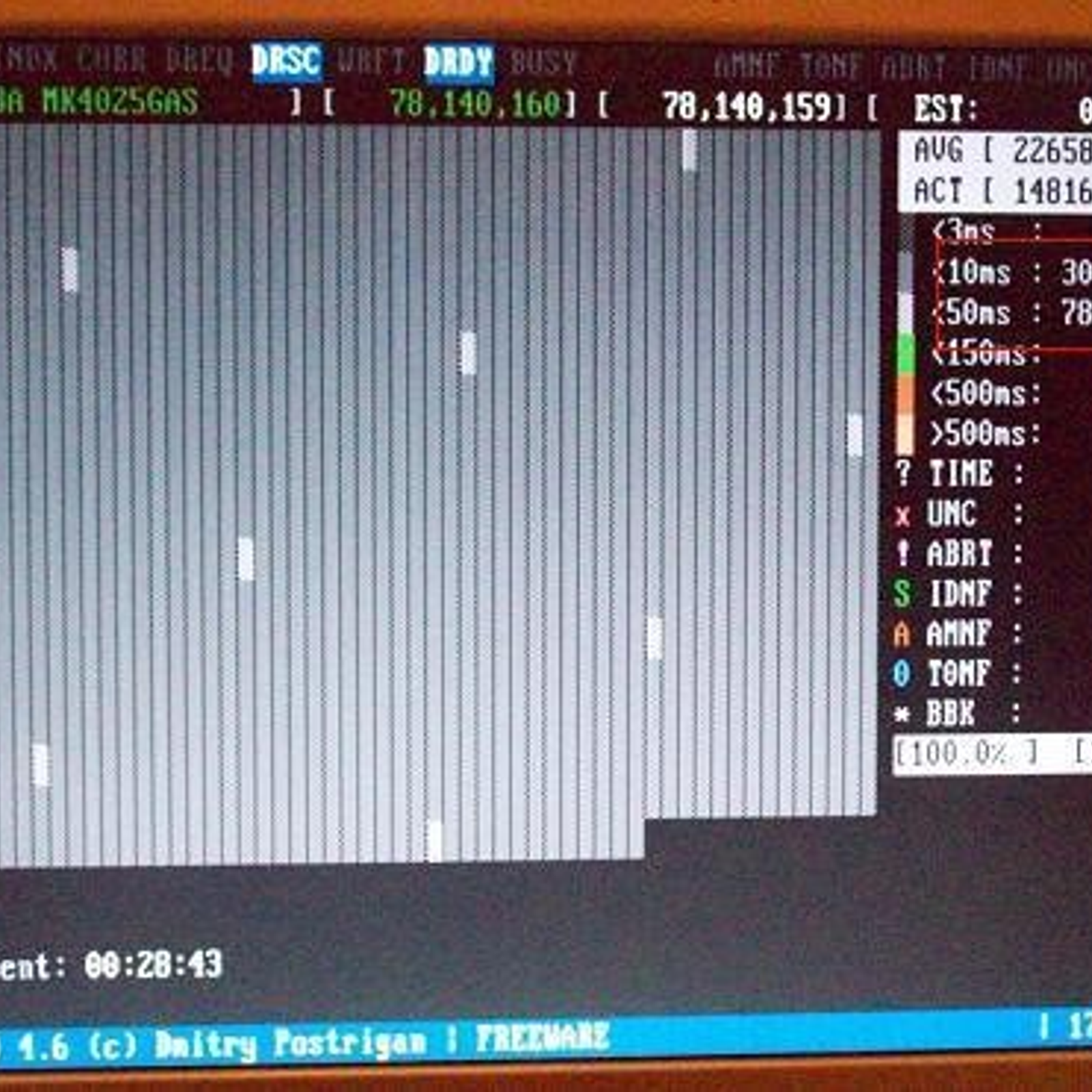
After selecting the hdd you will see another screen with options, one of them is named "surface scan" and looks like this:
51924b83-972f-e011-a433-0200d897d049_2_full.jpg

Is like a checkered pattern that moves... every square represents a sector, and by looking at the color of it you know the "latency" of that sector (the time spent in reading the info in it), at the right of the screen you have the counters
In this example... note at the right that hdd has 785 sectors with a latency smaller than 50 miliseconds. Thats normal btw, even a new hdd usually have a few of them too

This "surface scan" doesnt writes anthing to the hdd btw... so if you do it right when you connect it back to the PS3 it should boot normally
 
Sorry i went too fast, forget about MHDD by now
The first thing you need to do is to enter in this menu and use option 3 (restore filesystem)
ps3-safe-mode-2.jpg

To enter in the menu you need to (from standby)

1) press and hold power button (dont release it)
The PS3 does a "beep" sound.... then it does a "double beep" sound... then the PS3 turns off

2) press and hold power button (dont release it)
The PS3 does a "beep" sound.... then it does a "double beep" sound... RELEASE POWER BOTTON HERE !!!

-----------------------
Is needed to repeat that... at the seond "loop" (and inmediatlly after the "double beep" sound) release the button
You will see a screen advising to connect the dualshock3 by USB
 
Thats great help, i would typically have used Gparted to scan a drive but if this can allow me to take the drive out and reinsert without formatting all the better.

I will make a back up anyway, just to be cautious.

However, i have generic controllers and they, for some reason, wont allow you to enter the recovery menu.
 
Thats great help, i would typically have used Gparted to scan a drive but if this can allow me to take the drive out and reinsert without formatting all the better.

I will make a back up anyway, just to be cautious.

However, i have generic controllers and they, for some reason, wont allow you to enter the recovery menu.
MHDD needs to be booted as "liveCD" or "liveUSB" btw... in his web you can download the images
To prepare the PC is better to disconnect all other hdd's (just incase to prevent mistakes by choosing other hdd), also because you dont want to boot windows with the PS3 hdd connected (again just incase). The first time you boot windows with a PS3 hdd connected is going to show you an advise like... "a new hdd has been found, do you want to initialize it ?". If it happens choose NO

So... with the PC turned off (and only the ps3 hdd connected to the PC motherboard)... enter in the PC bios to enable booting from CD, USB etc...
Then boot from live media... and you should see the main menu of MHDD with the PS3 hdd

There is a tutorial about MHDD here in the forum written by kozarovv that explains better what to do inside MHDD btw
 
MHDD needs to be booted as "liveCD" or "liveUSB" btw... in his web you can download the images
To prepare the PC is better to disconnect all other hdd's (just incase to prevent mistakes by choosing other hdd), also because you dont want to boot windows with the PS3 hdd connected (again just incase). The first time you boot windows with a PS3 hdd connected is going to show you an advise like... "a new hdd has been found, do you want to initialize it ?". If it happens choose NO

So... with the PC turned off (and only the ps3 hdd connected to the PC motherboard)... enter in the PC bios to enable booting from CD, USB etc...
Then boot from live media... and you should see the main menu of MHDD with the PS3 hdd

There is a tutorial about MHDD here in the forum written by kozarovv that explains better what to do inside MHDD btw

Thanks for your replies.

I use LiLi to create my live USB's, wont have any difficulty using MHDD.

I have the ISO already downloaded, its very very small, only 449kb's!
 
Hi, I signed only to reply, because some other people may have this issue in the future, even though the topic is old. Some people were advising to do a data rebuild in safe mode. It didn't work for me. The only thing that worked is inside setting or Irisman, Webman you set aditional setting when it come the memory. In my Irisman it set default to some other memory than memory card. Once is set it to memory card it worked like a charm. You have to set it to each game. This setting is not global. Hope it helps.

Regards
Thatorious
 
Back
Top