PS3 How does the PS3 interpret filenames ending with a dot?

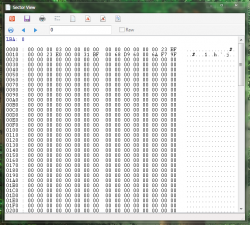
Where it's written "0A.;1" (full caps, it's the file identifers)
They are listed twice because they are big files, overs 1024MB. They are 'splitted' inside the iso.

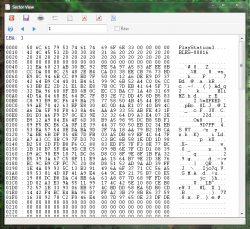
The "real name", with lower and higher case is written in u16. With a hex viewer you can search text in "unicode UTF 16", this one contains the dot.


Now that you talk about it, I didn't notice the part where the filename doesn't have the dot (or should I write period ?). I think it's in an extension area (made by sony?), I don't think it's standard, maybe I'm wrong, I'm just guessing. I think this area is a meta data, It's probably not used at all. Something for sure, this part isn't created by any software I know... but I don't know a lot ^^'
Oh, I didn't know file names were written in UTF 16 (in fact, I didn't know UTF-16 was incompatible with UTF-8). You're right, there is a dot there (I edited my post, the ones ending in dots were the "1#" files). But I don't know why when I mount it in Linux (Debian, XFCE) there isn't a dot there. Maybe it uses the second section of the ISO, which would probably mean that it is part of a standard? Or does it just remove the dots for some reason when mounting (it shouldn't, ext4 should and the OS should support files ending with dots). I don't know.

The Minecraft ISO file tutorialDiff does indeed have a dot when listed in UTF-16. Like NBA 2K16 though, it also has the filenames written in UTF-8, and the file name there does not have the dot. I don't know, maybe the PS3 uses the second section in UTF-8 by default to list files in ISOs (and if not found uses the one in UTF-16?).
 
I'll try later to mount a header on the ps3 to see how it read these files.

How do you mount the iso on linux ? maybe the software remove the dot ?
 
I'm using the mount command in Linux with the loop device to mount the ISO/bin: https://linux.die.net/man/8/mount. I was reading the man pages, and I think there are some options for ISO 9660 which I'll try out (does that apply to PS3 games?). Here's the exact command:

sudo mount <path_to_iso> <path_to_mounting_directory> -o loop

Edit: It seems that mounting it is indeed removing the dots at the end by default. I tried adding a dot to the UTF-8 filename of tutorialDiff, and it still mounts the file as simply "tutorialDiff". So it's probably not using that extra section in the header. As for the PS3, I don't know how it handles mounting. Maybe it's the same as Linux and removes the dot at the end by default when mounting a disc?
 
Last edited:
I doubt mount removing dots. Probably file manager do. Try list files from mnt point in terminal and see if filenames are full or partial.
 
I mounted a random ISO onto the PS3 made with makeps3iso with a file's name changed to have a dot at the end, and in wMM file-manager it shows that there is no dot at the end of this filename. Thus, the PS3, it seems, behaves like a Linux machine using the default mount, and removes the dot at the end of files (at least, when shown in a file manager, not sure what happens when a game requests a file). Or, it would be better to say, that the PS3 does treat files ending with a dot the same as files that do not in ISO format, and defaults to showing no dot/period (at least, there is no difference between them, a dot will get added while creating an ISO regardless of there being one before because of the ISO 9660 standard). I guess this can create problems with JB Folder dumps since sometimes there can be a dot at the end of file (depending on which app you use to dump?), which the a game won't expect and thus fail (contributing to higher success rate of mounting ISOs instead of JB folders). This could also create problems when verifying ISOs games with IRDs using ManaGunZ since it would expect files to end with dots, when some don't.
 
Last edited:
Ok, the second section in UTF-8 must be part of a standard or something. I initially tried changing a character to a dot in the UTF-16 section of the minecrat header (I wanted to see if naming the file "tutorialDif.." would show a dot in Linux). Though, when I mounted it, the name was still "tutorialDiff" (with the extra f intact). I then tried changing the "f" in the UTF-8 section to a dot, and lo and behold there is a dot at the end of the file when mounted on Linux. I guess it is necessary to either test mounting an original disc to the PS3, or an original header (I do not know how). I'm guessing the PS3 is also reading the UTF-8 section, and defaulting to the UTF-16 if not found (or, makeps3iso also creates the UTF-8 section in its output ISO).

Edit: By the way, last time I tried to add a dot to the name in the UTF-8 section I did so by adding a new character instead of replacing one (like the f). I think it didn't work because this section works like the PARAM.SFO, and the length of the file name is defined somewhere.
 
Last edited:
  • Like
Reactions: Zar
One last thing. I checked an ISO generated by makeps3iso using a hex editor (I wanted to avoid looking at the source code :P) and indeed those ISOs do not have that weird UTF-8 small/big caps section. Only the file identifiers (in caps) and the real name (in UTF-16). Thankfully, it seems the PS3 doesn't expect the extra UTF-8 section and can mount ISOs generated by makeps3iso normally (probably in order to support Blu-Ray films? or maybe only some games have it?). Perhaps that last section acts as an override or something for the real file names. I don't know the purpose of its existence, though. I wonder if all games have this last section?
 
  • I mounted the header of minecraft on my PS3 and then I went inside dev_bdvd. The result is "the dot disapeared"
  • I made a "test" function to see if I can access to the file with and without the dot, here is the result :
Path : /dev_bdvd/PS3_GAME/USRDIR/Common/res/TitleUpdate/tutorialDiff
Size : 15D34
Path : /dev_bdvd/PS3_GAME/USRDIR/Common/res/TitleUpdate/tutorialDiff.
/dev_bdvd/PS3_GAME/USRDIR/Common/res/TitleUpdate/tutorialDiff. doesn't exist
Size : 0
  • I checked with ghidra what path is used inside the EBOOT (I checked with the eboot of escape boot island). The dot is not mentionned.
  • I built the ISO of escape boot island with the IRD+ps3 iso rebuilder, ps3 iso rebuilder define the path with the dot but it is able to detect the file and check the md5, how ? it's probably because it's a windows software, and windows sanitize the path, it removes the dot. To be sure I did some test :
dir "G:\GAMES\Escape Dead Island [BLES02026]\PS3_GAME\USRDIR\0cab870c0ee6339e."
dir "G:\GAMES\Escape Dead Island [BLES02026]\PS3_GAME\USRDIR\0cab870c0ee6339e..."
it always detects the file which doesn't have the dot and it gives me the filename without the dot with its size​
  • I checked how ManaGunZ was able to calculate the md5 with the dot. It's not calculating the md5 from /dev_bdvd but from the freshly dumped iso (I made it like that to be faster probably) that's why it's able to get the file offset and hashes
In conclusion, the correct path is probably without the dot.


Something that is probably going to be buggy is the md5 check from managunz with JB backup. It's probably not going to found the files defined in the header with a dot. Edit : it's fixed, now.
 
Last edited:
@Zar, I think I found a possible bug in makeps3iso. if you create an ISO containing a file with a name having no dot at the end, and then check the real name of the file in the UTF-16 section in the header of this ISO, you'll see that the name does not contain a dot there as well. The file name is simply listed as (using tutorialDiff as an example): "tutorialDiff;"

This doesn't follow ISO 9960 specification from the document you posted earlier. The file name must have a dot between the name and semicolon even if it doesn't have an extension. I'm not sure if this can cause any bugs when the PS3 is reading files from the ISO (probably not, maybe in certain cases the file may be identified as a directory?), but it may create a problem with IRD verification in ManaGunZ. The ird lists the name of the file as having a dot, while the ISO may be read as having none if name retrieval is done by grabbing the entire name until a semi-colon is found. I guess it would be best to patch makeps3iso to create the ISO filenames properly in this case (I guess this is more important if you're using Windows and are unable to easily add a dot manually to the name of your file), and to patch ManaGunZ to properly verify ISOs made with older versions of makeps3iso.

By the way Zar, speaking of makeps3iso, I submitted an updated readme to your fork of makeps3iso (along with a few other changes) which you may be interested in
 
Last edited:
Last edited:
Here's a summary of the thread (in case anyone comes across it in the future), with some new info added:

1. I believe PS3 games are in a so called "UDF Bridge" (UDF/ISO, Hybrid, etc) format, which means that the header contains both the ISO-9660 and UDF file systems.

2. Specifications for the ISO-9660 format sometimes requires file names without an extension to still have a period at the end (the format of filenames in ISO 9960 is "[file_name].[ext];"). However, since the period is not always required in specifications, sometimes files with no extension are listed without a period in a disc header. It seems all PS3 games followed the same standard since they were built with the same tool, and do include a period for file names with no extension.

3. The PS3 defaults to the UDF file system, which does not enforce the use of a period for files without an extension (Linux also seems default to UDF when using the mount command, not sure about Windows).

4. Typically, extraction and dumping tools default to reading the ISO-9660 file system section of the header, and read the filenames from there. Thus, files with no extension may or may not be written with a period at the end (depending on whether the author made an exception for this sort of files). However, due to Windows not allowing files to end with a period, and due to FAT-32 usually not allowing file names to end with a dot, the period is still removed automatically (by the tool itself, or by the OS).

5. ISOs built with makeps3iso are in full ISO-9660 format, and thus do not contain the UDF file system section that PS3 games have.

6. makeps3iso does not enforce the use of a period for file names with no extension in its header (using the ISO-9660 file system), so a file ending with a period will be written differently (and may be considered different) than a file with the same name with with no period at the end.

7. It seems that the PS3 by default interprets file names ending with a period in the ISO-9660 file system section as files with no period at the end. One can see this when accessing (with a hex editor) the header of Minecraft for PS3: The tutorialDiff file ends with a period in the ISO-9660 section (per standard), and does not have one in the UDF file system section.

8. It also seems that the PS3 does not care if a file with no extension in the ISO-9660 section of the header ends with no period (probably done to support all Blu-Ray films and DVDs properly). This means that ISO creation tools could have files with no extension written with or without a period (in the ISO-9660 file system), and it wouldn't matter.

9. The EBOOT.BIN of PS3 games seems to expect file names with no extension to end without a period (as tested by Zar).

10. Conclusion:

The "real name" of files with no extension in PS3 games do not contain a period at the end due to the hybrid "UDF Bridge" format. File names with no extension from the ISO-9660 section of the header seem to default to being read by the PS3 as having no period, so having a file ending with a period in the UDF section of the header would probably create a conflict (since, at least on Linux using mount, filenames ending with a period in UDF are read as ending with a period. Not sure about the PS3).

So, running JB folders off of FAT-32 devices of games with files with no extension shouldn't cause any problems, since no period at the end is expected by the PS3, good news for Windows users having files ending with a period automatically renamed. However, FAT-32 device owners using an OS other than Windows should beware of their JB folder dumps having files with no extensions with a period at the end, since the PS3 may or may not recognize it as being different than a file which doesn't end with a dot (depending on how the PS3 handles FAT-32) (whether an OS is able to write file names to FAT-32 ending with a period seems inconsistent; a lot of the time in Linux file names written to FAT-32 get their period at the end removed).

The only possible problem I see is if if one builds an ISO game having a file without an extension using makeps3iso. The game should run fine, since the period at the end of file names in ISO-9660 file systems isn't expected by the PS3. However, ird verification may fail since IRD files list file names using the ISO-9660 file system, and include the final period of files with no extension. So, when a file with no extension is read from a makeps3iso ISO, the program verifying the game may not recognize it as being the same file listed as ending with a period, and warn that one file is missing while there is an extra one in the ISO.

Edit: Added a few alternative names for UDF-Bridge since it seems it is not an official name.

 
Last edited:
Thing which You calling a "disc header" is file system table and in most cases, contains the same data but differently described (like i.e first revision of ISO9660 using 8+3 file name standard which quite limited symbols allowed to use in opposite to UDF which have a lot less such limitations).

Ad1. There is no such thing like "UDF Bridge".

Ad5. Are You sure? I didn't check myself but ISO9660 have file size limitation to 2GiB so I doubt it is used alone by makeps3iso. However, I didn't check it so I could be wrong. If I am, then such images breaks the standard or even be broken is some specific cases.

Ad6. Also I could be wrong but as I remember when I looking at Mirror's Edge, his original PS3 BD-ROM using hybrid disc: with ISO9660 and UDF filesystems (so also two tables, each for both), like i.e PS2 DVD-ROM.
 
Thing which You calling a "disc header" is file system table and in most cases, contains the same data but differently described (like i.e first revision of ISO9660 using 8+3 file name standard which quite limited symbols allowed to use in opposite to UDF which have a lot less such limitations).

Ad1. There is no such thing like "UDF Bridge".

Ad5. Are You sure? I didn't check myself but ISO9660 have file size limitation to 2GiB so I doubt it is used alone by makeps3iso. However, I didn't check it so I could be wrong. If I am, then such images breaks the standard or even be broken is some specific cases.

Ad6. Also I could be wrong but as I remember when I looking at Mirror's Edge, his original PS3 BD-ROM using hybrid disc: with ISO9660 and UDF filesystems (so also two tables, each for both), like i.e PS2 DVD-ROM.
1. It's the closest thing online I found to a hybrid ISO-9660/UDF disc, though it did seem to be an unofficial name since only a few pages mention it. Guess it is just better to call it hybrid, or maybe all UDF discs look like this (to be honest, I haven't looked into the format too much. I tried to, but seems technical documentation is very hard to come by without shelling out a few hundred bucks).

5. I am 100% sure makeps3iso uses only ISO-9660. I think Zar explained in one of his comments that files which are too big are split (written twice) in the file system table for discs. If you want to check, you could just open a small ISO with a hex editor made by makeps3iso and look for the name of files in both UTF-16 and UTF-8. You'll only find UTF-16 ones. (minecraft is a good one to test since it is a very small, if not the smallest, PS3 disc game, when it comes to size).

6. Not sure what you mean, but from what I've seen most (all I've looked at) PS3 discs have a UDF (utf-8) and a ISO-9660 (with revisions) file system tables.

Edit: It seems that this hybrid UDF/ISO format goes by a lot of names: https://www.videohelp.com/glossary?U. Guess the name doesn't really matter; what's more important is the hybrid nature of these discs.
 
Last edited:
Actually I was wrong about UDF-Bridge, but this terminology occurs only in Sony docs. Hybrid discs, which means discs with few file system tables are common. In example ISO9660+Joliet, ISO9660+UDF, ISO9660+RR, RR+HFS, ISO9660+UDF+XDFS etc.

You can make encrypted dump from original disc (not whole disc is encrypted, only some sector range data on it but tables are ok) and open it in IsoBuster. It allows You to view file system tables separately, so You can i.e make file list for each and compare. If You don't have ODD with BD, You can do it via multiMAN from Video category and after DDA option is turned on (@Zar works on it I think, but i don't know if he implement it in ManaGunz or not).
 
Last edited:
From what I understood ps3 iso are : ISO9660+Joliet+UDF(Bridge?)
@AlexRhine the joliet is a the part where filenames are written in UTF16

In makeps3iso, the whole UDF part is missing. (if someone want to add it the spec are available here : http://www.osta.org/specs/)

Also, it seems like the filenames are redefined inside the UDF in UTF8. The ps3 use the names defined by the UDF tables. And in the UDF tables the dot is removed eeven if the ps3 support the last character as a dot.
 
Last edited:
Also, it seems like the filenames are redefined inside the UDF in UTF8. The ps3 use the names defined by the UDF tables. And in the UDF tables the dot is removed eeven if the ps3 support the last character as a dot.
I was wrong about the UTF-8 filenames being part of the UDF file system. Apparently, filenames in UDF are written in "OSTA CS0 characters" which is a mixture of compressed 8 bit (ISO-8559-1) and UTF-16: https://en.wikipedia.org/wiki/Universal_Disk_Format#Character_set. The UTF-8 filenames we saw are probably from the third extension of the ISO-9660 format (Rocky-Ridge), as you can see here: https://wiki.osdev.org/ISO_9660#Rock_Ridge_and_Joliet.

So, makeps3iso only uses "vanilla" ISO-9660 (with the whole 8+3 filename thing) with Joliet extension. Original PS3 discs probably use ISO-9660 with extensions (Rocky-Ridge) + Joliet Extension + UDF; the whole package, I guess you could say.
 
One more thing. Extensions/modifications of the ISO-9660 format are typically referred to as levels, with 1 being the original and 3 being the newest official one.

According to the man page of genisoimage, file names with no dot/period are only supported on "ISO 9660 Level 4", which is only a theoretical unofficial standard supported by the program. I'm not sure if the Joliet extension ever added "official support" for file names with no dot/period.

Multi-extent files (bigger than 4gb) are only supported in "ISO-9660 Level 3" and higher (it was a bit misleading for me to say makeps3iso created discs in full ISO-9660; that sounds like the discs were created with the original standard).

So, you could say that makeps3iso uses ISO-9660 Level 3 with Joliet extension, bordering on unofficial Level 4 since file names with no extension don't get an additional dot/period added to them. It is unlikely, but possible, that these ISO files may be mounted incorrectly on some firmware due to the missing dot/period (though, it seems that the PS3 supports them properly).

Original discs most likely use "ISO 9660 Level 3" with extensions for filenames and UDF added to the mix.

In summary, if someone wanted ISOs generated by makeps3iso to reassemble original discs more closely, they would need to fix ISOs to "ISO 9660 Level 3", add the Rocky-Ridge extension, add a UDF file system, and allow files to be ordered inside the disc in a certain manner, with the PS3_DISC.SFB, PARAM.SFO, and other files being written first (in lba terms), and PS3UPDAT.PUP (and possibly the trophy files) last. A lot of those features could be extracted from genisoimage, though keep in mind UDF support is still in alpha.

(FYI, this ordering is only in LBA/Sector terms. The filenames seem to be written in a normal alphabetized manner in the header; it's probably ASCII ordering).

Though, to be honest, if someone wanted all these features on an ISO, it would be much easier to just build a decrypted ISO using an IRD. Not really worth it to add UDF support. The only useful features that could be added to makeps3iso IMO would be fixed Level 3 (so mounting is guaranteed to work) and file ordering to make mounting and reading a bit faster.
 
Last edited:
One more thing. Extensions/modifications of the ISO-9660 format are typically referred to as levels, with 1 being the original and 3 being the newest official one.
Where did You read about that? I.e ImgBurn shows me 1, 2 and... X.

According to the man page of genisoimage, file names with no dot/period are only supported on "ISO 9660 Level 4", which is only a theoretical unofficial standard supported by the program. I'm not sure if the Joliet extension ever added "official support" for file names with no dot/period.
ImgBurn can build image with files without extension, no matter what level of ISO9660 or Joliet was chosen.

Original discs most likely use "ISO 9660 Level 3" with extensions for filenames and UDF added to the mix.

In summary, if someone wanted ISOs generated by makeps3iso to reassemble original discs more closely, they would need to fix ISOs to "ISO 9660 Level 3", add the Rocky-Ridge extension, add a UDF file system, and allow files to be ordered inside the disc in a certain manner, with the PS3_DISC.SFB, PARAM.SFO, and other files being written first (in lba terms), and PS3UPDAT.PUP (and possibly the trophy files) last. A lot of those features could be extracted from genisoimage, though keep in mind UDF support is still in alpha.
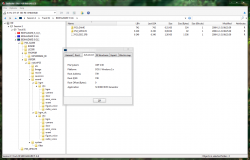
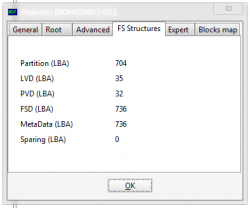
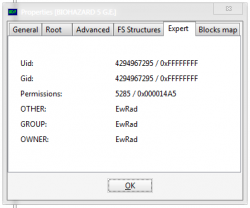
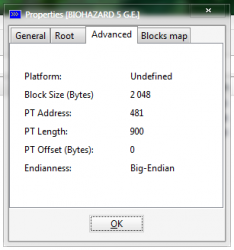
According to IsoBuster, original games are build with ISO9660 + Joliet + UDF v2.50. Unfortunately, it doesn't shows what kind of ISO9660 and Joliet.

isobuster_ps3bdrom_1.png isobuster_ps3bdrom_2.png isobuster_ps3bdrom_3.png isobuster_ps3bdrom_4.png isobuster_ps3bdrom_5.png isobuster_ps3bdrom_6.png isobuster_ps3bdrom_7.png
 
Back
Top