How to go online with ps3-update list.txt on CFW?

Jin799

Member
Hi all,
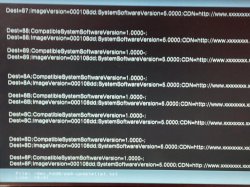
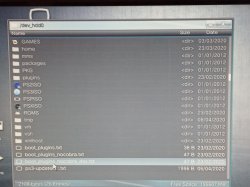
I have rebug 4.85 and would like to go online using the ps3-updatelist.txt and have out the file in the root of the dev_hdd0 but when I try to sign in, it's still asking me for an update to 4.86. Why is that and what am I doing wrong ?
I have managed to disable sen enabler so am trying to avoid using it. IMG_20200406_131214.jpg IMG_20200406_131549.jpg
 
Hi all,
I have rebug 4.85 and would like to go online using the ps3-updatelist.txt and have out the file in the root of the dev_hdd0 but when I try to sign in, it's still asking me for an update to 4.86. Why is that and what am I doing wrong ?

I'm not 100% sure, but I guess you have to spoof it to 4.86
 
Do I have to activate webman mod or something like that?
I thought webman mod is always running in the back ground.

Any suggestions?
 
Do I have to activate webman mod or something like that?
I thought webman mod is always running in the back ground.

Any suggestions?

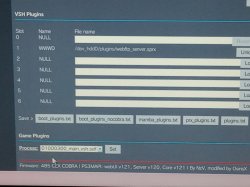
yes, you need to have webman Mod running for this spoof trick to work.
(wMM acts like a proxy, feeding the fake .txt file to the PS3)
 
if you are on rebug lite 4.85 you should update to rebug 4.86. there is no reason not to.

if you were on rebug rex 4.84 i would not recommend update as there is not a rex rebug past 4.84
 
i never could get this to work but i only tried once. it seems so simple but maybe something is different sometimes? maybe it needs full webman and some people have the lighter versions?
 
yes, you need to have webman Mod running for this spoof trick to work.
(wMM acts like a proxy, feeding the fake .txt file to the PS3)
Yes how do I have it running? I thought it was running as soon as you switched on the ps3?

I know for sure that I have the full version of wMM running, and I will eventually update to rebug 4.86 but was trying this method for a friend who will not be able to update as he's not tech abled.
 
by full version i mean when you first install webman you are actually installing the installer. when you run the new webman icon (not the menu were it lists games and settings) if you hold L1 untill ps3 turns off to reboot it will install full. if dont know to hold L1 sometimes it detects that you need a less functional webman and installs that.

you can tell for sure by going to webmans temperature page. it fill say FULL NTFS if you have full at the bottom of the page.

but i dont know if this makes a difference here...i just know i didnt get it to work.
 
by full version i mean when you first install webman you are actually installing the installer. when you run the new webman icon (not the menu were it lists games and settings) if you hold L1 untill ps3 turns off to reboot it will install full. if dont know to hold L1 sometimes it detects that you need a less functional webman and installs that.

you can tell for sure by going to webmans temperature page. it fill say FULL NTFS if you have full at the bottom of the page.

but i dont know if this makes a difference here...i just know i didnt get it to work.
Yes I have that, thanks for info on how to check it but I'm still having problems. IMG_20200406_145802.jpg
 
Do I have to load any options in PS3MAPI in the webman app cos I see a lot of options but the ps3-updatelist.txt is not loaded or showing

IMG_20200406_151705.jpg
 
BHAM!!!
It's worked seems that it needed that update for it to work. Thanks buddy you have been a great help.
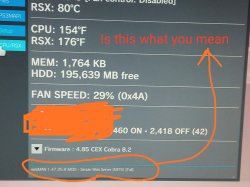
cool..in case you didnt see my last post--that first pic shows your rsx temp is 80...thats too high...you should consider turning on fan control...take it off syscon and put on auto. it may get loud if you do it now so wait till ps3 is cool and you turn it on again. if the fan is too loud or you dont like it going up and down, then put it on manual. start at 40% and see where the temp goes.
 
cool..in case you didnt see my last post--that first pic shows your rsx temp is 80...thats too high...you should consider turning on fan control...take it off syscon and put on auto. it may get loud if you do it now so wait till ps3 is cool and you turn it on again. if the fan is too loud or you dont like it going up and down, then put it on manual. start at 40% and see where the temp goes.
Yes thanks, I'll do that but I did turn it off cos it was loud in the first place.
I think I'll go for the manual option, it's where its says 35% so I should change that to 40%?
 
Yes thanks, I'll do that but I did turn it off cos it was loud in the first place.
I think I'll go for the manual option, it's where its says 35% so I should change that to 40%?
yeah that should keep it from getting way too hot but also not be way too loud.
 
Back
Top