

Berion
Developer
HOW TO HACK PLAYSTATION 2 IN 2025? [ROADMAP]
We are now early 2025 and there are still enthusiasts in the world ready not only to play on such an ancient console, but also to find new ways to explore it, write and improve homebrew programs. If you're a new user, you've probably already managed to dig through a ton of articles and tutorials (usually heavily outdated because they're at least a decade old), while you feel confused from the onslaught of all this knowledge.
That's okay! I've prepared this roadmap especially for you. It won't guide you step by step because it's not a detailed tutorial, but it will indicate what your options are and which path you should take, according to the PS2 model and accessories you have. These are, as of today, all known public ways, categorized and sorted alphabetically.

A. Optical Disc
Without a soldered-in modchip or exploit, no PS2 will allow any program (and therefore copies of games) to run from discs other than the original, pressed ones. The only recordable media that MechaCon/Dragon (the drive controller) will accept are DVD-Video and Audio CD.
You must also keep in mind that not all disc formats are supported by all console optical drives. Avoid dual-layer media, especially +/-RW, which for some reason are the most debiting on the PS2's lasers. Many drives, do not read DVD+R/M at all. Safe, therefore, are only DVD-R.
Boot Disc
Pressed discs, i.e. CD-ROMs or DVD-ROMs with cloned "security sectors" (so they must necessarily be original and from the same region as the console; copies on CD-Rs or DVD-/+Rs won't work), which allow, for example, cheating in games, putting saves to a memory card, running programs from a flash drive. The most popular are Action Replay, Code Breaker, GameShark and Swap Magic. As an attack vector, the most useful among this bunch is Swap Magic 3.6 or 3.7, since it runs *.elf from USB. In second place are Action Replay MAX and Code Breaker 9 or 10, which allow you to import a save from USB to PS2MC, while their *.cbs and *.max containers store timestamps (so you can prepare Fortuna or Open Tuna in them).
Free DVD Boot
FDVDB is an exploit of the DVD-Video player. It will work only with its specific versions (which can be checked in the Browser) and only with the English language set.
Swap Trick
Disc swap: the original game for its crafted copy, in which the executable file responsible for the online mode (PS2 has only 32MiB RAM, so often game developers separated a separate *.elf for single player mode and a separate one for online) could be swapped with, for example, a file manager. This method requires blocking the sensors of opening the flap (on "slim") or pulling out the disc tray forcibly (on "fat") because pressing the eject button interrupts the reading, and the idea is that the console does not know that the user has done a transplant. Without blocking sensors and no mistreatment of the disc tray: only with the console taken apart.
Yabasic
Exploit of Basic, or more specifically the Yabasic, added with the console demo disc. This is an interesting vector of attack, because at least a quarter of PS2 owners have such an original disc with demos and a Basic language interpreter. So far, the idea has not gone beyond the proof of concept stage (that is, it works, but is not ready for use by the average console user). Not all versions of Yabasic are susceptible, and the demos included with this program were only in PAL and NTSC-J regions.
B. Internal Memory Card
I used the term "internal memory card", not only because of the capacity (8MiB) and the same MCFS file system as on the PS2 card, but also to not differentiate internal mass storage category.
Currently, the lack of any exploits using "xfrom0:/" (found in all DESR models and potentially possible in the Network Adapter implementation on SCPH-5**** models).
It is possible that "Free DVR Boot" will be released in the near future, as the method for signing the executable file is now known.
C. External Memory Card or Emulator (PS2MC/MMCE)
In the list, I do not mention PSX environment exploits, namely currently: Free PSX Boot, TonyHax and TonyHax International, because they can't be used to hack the PS2 environment, or at least no one has figured out yet, a way to escape ps1 mode (theoretically it's not even possible). They also all use only PSXMC (which is a memory card for PlayStation/PlayStation One, not PlayStation 2).
MMCE (Multipurpose MemoryCard Emulator) is - as the name suggests - a memory card emulator, which, among other things, allows you to select the card image (PSXMC/PS2MC) that will pretend to be a real memory card. So everything in this section that applies to a real card also applies to MMCE devices (SD2PSX, SD2PSx Gen2, SD2PSx Gen2, PSxMemCard Gen2, MemCard PRO2).
If you have a PS3 Memory Card Adaptor (must be original), then you can also prepare everything from the PC, using a dedicated program (PS3MCA Tool) and, of course, drivers for this device (Windows/Linux).
Fortuna / OpenTuna
Fortuna is an exploit of the save icon parser by Browser. It requires the user to preview the save and return to the main menu, which will automatically launch the program buried in the alleged icon. Unfortunately, the hack will not work if the save does not have the most recent timestamp. Fortuna supports all "slim" models, but an open-source fork has been created, namely OpenTuna, which covers more consoles. SCPH-9**** users with fw v2.30, or those whose cards do not support Magic Gate, and who would like to have FMCB, can run it with FunTuna. I recommend the all-in-one installer: Free McTuna.
Free McBoot
FMCB adds a customizable menu in the Browser, from where you can run programs written to a memory card or flash drive. And in addition copies of games to DVD from PS2 (copies from PSX and PS2 on CD are not supported) if ESR is added (but alternatively you can use Free DVD Boot or MechaPwn, see the paragraphs on these hacks for details). Versions 1.9** do not work properly with many modchips (in that case, use 1.8b or one of the older ones than 1.966).
PlayStation 2 Basic Bootloader
PS2BBL is a simple bootloader that runs one of the programs assigned to the selected joypad button (e.g. wLE ISR, OPL/uOPL, FMCB, OSDM etc.). It does not have a graphical interface. It can be installed using, for example, KELFBinder.
ProtoPwn
ProtoPwn is an exploit that uses MBROWS, present only in models with the so-called proto kernel. It does not use the OSD Update mechanism, so a Magic Gate card is not necessary.
PS2 Independence
Exploit that takes advantage of a bug in parsing the configuration file ("title.db") of the PS1DRV. As with Swap Trick, you have to tinker with the disc tray/flap sensors plus you additionally have to use an original PSX game. You prepare an index on your computer with the games you own and write them to the memory card using any method.
D. Internal Mass Storage (HDD/SSD on PATA/SATA)
All "exploits" written to the hard drive, use the same mechanism for updating firmware from the hard drive (OSD Update) - that is, the same one used to run official software (like HDD OSD, Linux e.g. PSBBN).
Free HDBoot
FHDB adds a customizable menu in the Browser, from where you can run programs written to a internal disk or flash drive. And in addition copies of games to DVD from PS2 (copies from PSX and PS2 on CD are not supported) if ESR is added (but alternatively you can use Free DVD Boot or MechaPwn, see the paragraphs on these hacks for details). Does not work properly with many modchips.
MBR Boot
It differs from the others in that a loader (which initializes the hardware and starts the patcher or whatever) is not written to "hdd0:/__mbr", but just an ordinary signed program. The most common use is to write a disk image (e.g. using HDD Raw Copy Tool with uLE kHn (file "__mbr.raw") just to format the disk and run from USB e.g. FMCB/FHDB Installer.
PlayStation 2 Basic Bootloader
PS2BBL is a simple bootloader that runs one of the programs assigned to the selected joypad button (e.g. wLE ISR, OPL/uOPL, FHDB, HOSDM etc.). It does not have a graphical interface. It can be installed using, for example, KELFBinder.
PSBBN Definitive English Patch
PlayStation Broadband Navigator is an official Linux distribution that never left Japan and, for a long time, remained unknown to a wider audience due to language barriers and draconian requirements (NTSC-J model with original HDD). The PSBBN Definitive English Patch project is not only the first correct translation into English, but also a complete pre-configured environment. It includes many deleted PSBB channels, HDD OSD, homebrew programs, etc., all on APA-Jail (for more information on APAJ, please refer to the readme file in PS2HDH). Furthermore, PSBBN DEP does not require an NTSC-J console or an original HDD.
SoftDev2
SoftDev2 is a simple bootloader that runs one of several predefined programs. It does not have a graphical interface.
E. External Mass Storage (USB/i.Link/MX4SIO)
Currently, the lack of any exploits using "mass:/".
F. Network (LAN/WAN)
Tony Hawk's Pro Strcpy
Admittedly, this is an exploit of the Tony Hawk's Pro Skater 4 (SLUS-20504) save, but it can be loaded from within an emulated and pre-patched game on a PC, with the same albeit original PS2 game connecting to it.
G. Miscellaneous
That is, hacks that are difficult to assign to any of the above categories.
MechaPwn
MechaPwn is an optical drive exploit, though unfortunately only with the Dragon controller (MechaCon is not supported). It patches NVM (that is, the contents of the EEPROM where the console settings are stored, but also patches the drive's fw).
It cannot by itself serve you as an attack vector (because you need something in order to install MechaPwn at all, which cannot also be done on a computer with an NVM image). On the other hand, after the installation, it will be one of way to hack the PS2, including different one (because you will be able to run from the disc the file manager, with which you can run e.g. FMCB Installer from USB.
Modchip
A special chip soldered to the console, fooling the PS2 optical drive so that the program being run is on a CD/DVD-ROM, while it is really on a CD/DVD-R (greatly simplified, of course). The best modchips were Crystal Chip, DMS, Ghost and Matrix Infinity. None of these are currently in production. The most popular modchips were and are their cheap clones like Modbo and Ripper.

Health Track
The following are, in my opinion, currently the best methods for hacking the PS2.
Scenario I: With an internal hard drive.
The SCPH-3**** and 5**** models require a Network Adaptor; the SCPH-70*** soldered an IDE to the motherboard, and the SCPH-75*** soldered a modchip with an IDE. DESR models, on the other hand, without an HDD will not boot.
What is the difference between internal and external you can read at this link.
Additional Informations
MMCE vs MX4SIO
The king of attack vectors is and will forever remain a memory card emulator (any MMCE such as SD2PSX, PSxMemCard Gen2, MemCard PRO2). It will work on literally any PS2 model (SCPH/DESR/KDL/DTL-H/COH) and any firmware, because each one allows you to use a VMC (virtual memory card) put onto a microSD card, which is seen by the PS2 like a real card or dongle, including Magic Gate authentication support. So you can use a dedicated exploit (FMCB/PS2BBL or Fortuna or OpenTuna packaged with FunTuna or Free McTuna).
The best firmware for SD2PSX and its family is sd2psXtd.
MX4SIO, its clones (such as MC2SIO) as well as the SDXC card soldered to the console motherboard or card PCB - are not emulators! Although they use the same port as MMCE and real memory cards, they are closer to a flash drive, only that they are connected to SIO2, not USB.
SCPH-9K & FMCB/PS2BBL
Many people think that these models can not automatically at console startup, run FMCB or PS2BBL. This is true only for the 9K series with firmware 2.30. Early copies that left the factory had version 2.20.
How to check the firmware version? Certainly not in the Browser (PS2 menu), as the version is not displayed anywhere there. Theoretically, if you see the date code 8B on the sticker next to the model, then and only then the PS2 has 2.20 (it varies with 8C, and all 8Ds have 2.30). But this is not reliable, because motherboards may have been swapped...

The only 100% reliable test is to launch up the disc with Free DVD Boot, which will automatically run wLE. In this program, go to "MISC", then to "Debug Info" and if at "ROMVER" you see 0230* - it means you are unlucky, if 0220* - congratulations.
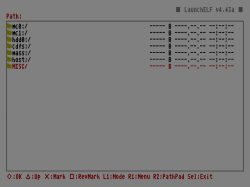
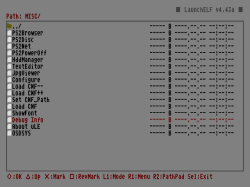
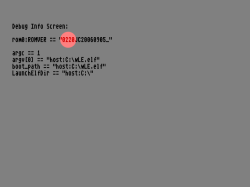
Is it possible to update the firmware? No. The main part of the on-board firmware on all PS2s (BOOTROM) is loaded on the ROM chip, which means it is read-only. Versions 2.30 and 2.40 do not allow you to load updates from a memory card (and that's why FMCB/PS2BBL can't automatically boot on these fw).
How to live with fw 2.30 and 2.40? The solution is OpenTuna, packaged with FunTuna or Free McTuna. Admittedly, it won't be an automatic launch, but it's better than nothing, right?
Disk Images
Never write someone else's hard drive images with APA (the same goes for APA-Jail). Due to the nature of the APA format, it is tailored to the size of the media on which it was created. Writing such an image to a disk of a different size, at first glance, does not have any negative consequences, but in practice, the creation of new partitions or defragmentation of APA leads to their damage (this can manifest itself in the disappearance of partitions from the list in uLE, corrupted PFS or game images on new partitions, unnaturally long parsing time of the APA chain etc.).
An exception to this rule is MBR Boot, but only because it is used to boot, for example, wLE kHn, after which the disk must be formatted (and thus the content from the image, overwritten).
We are now early 2025 and there are still enthusiasts in the world ready not only to play on such an ancient console, but also to find new ways to explore it, write and improve homebrew programs. If you're a new user, you've probably already managed to dig through a ton of articles and tutorials (usually heavily outdated because they're at least a decade old), while you feel confused from the onslaught of all this knowledge.
That's okay! I've prepared this roadmap especially for you. It won't guide you step by step because it's not a detailed tutorial, but it will indicate what your options are and which path you should take, according to the PS2 model and accessories you have. These are, as of today, all known public ways, categorized and sorted alphabetically.
A. Optical Disc
Without a soldered-in modchip or exploit, no PS2 will allow any program (and therefore copies of games) to run from discs other than the original, pressed ones. The only recordable media that MechaCon/Dragon (the drive controller) will accept are DVD-Video and Audio CD.
You must also keep in mind that not all disc formats are supported by all console optical drives. Avoid dual-layer media, especially +/-RW, which for some reason are the most debiting on the PS2's lasers. Many drives, do not read DVD+R/M at all. Safe, therefore, are only DVD-R.
- supported by all models: PS2CD-ROM, PS2DVD-ROM SL/DL, CD-ROM, DVD-ROM SL/DL, CD-R, CD-RW, DVD-R SL and DVD-RW
- can be read by some drives: DVD+M (DVD M-Disc), DVD+R SL/DL, DVD-R DL, DVD+RW
- unsupported: DVD-RAM
- CDDA (Audio CD) can be recorded/pressed on CD-R or CD-ROM. DVD-Video can be recorded/pressed onto DVD-/+R/ROM. These are merely marketing terms for the type of disc, not the names of the physical formats.
- The DVDs used can be either 8cm or standard 12cm (this is why there are two different gouges on the disc tray).
- All DVD+Rs can claim to be DVD-ROMs as long as the user has changed the so-called bitsetting before recording the disc in the settings of the recording program. I don't know if this in any way affects the detectability of the disc on drives that don't support DVD+R (probably not).
- Everything you read above applies to SCPH and KDL models. Perhaps also the DESR.
Boot Disc
Pressed discs, i.e. CD-ROMs or DVD-ROMs with cloned "security sectors" (so they must necessarily be original and from the same region as the console; copies on CD-Rs or DVD-/+Rs won't work), which allow, for example, cheating in games, putting saves to a memory card, running programs from a flash drive. The most popular are Action Replay, Code Breaker, GameShark and Swap Magic. As an attack vector, the most useful among this bunch is Swap Magic 3.6 or 3.7, since it runs *.elf from USB. In second place are Action Replay MAX and Code Breaker 9 or 10, which allow you to import a save from USB to PS2MC, while their *.cbs and *.max containers store timestamps (so you can prepare Fortuna or Open Tuna in them).
| It works on: | all SCPH, DESR and KDL models |
| It works from: | PS2CD-ROM or PS2DVD-ROM |
| Recommendation: | no, because there are simpler methods and it is difficult to buy these programs today at reasonable prices |
| Permanent: | no |
Free DVD Boot
FDVDB is an exploit of the DVD-Video player. It will work only with its specific versions (which can be checked in the Browser) and only with the English language set.
| It works on: | all SCPH and KDL models with DVD-Player (can be updated) in versions 3.10 and 3.11 |
| It works from: | DVD-R, DVD+R or DVD+M |
| Recommendation: | yes |
| Permanent: | no |
Swap Trick
Disc swap: the original game for its crafted copy, in which the executable file responsible for the online mode (PS2 has only 32MiB RAM, so often game developers separated a separate *.elf for single player mode and a separate one for online) could be swapped with, for example, a file manager. This method requires blocking the sensors of opening the flap (on "slim") or pulling out the disc tray forcibly (on "fat") because pressing the eject button interrupts the reading, and the idea is that the console does not know that the user has done a transplant. Without blocking sensors and no mistreatment of the disc tray: only with the console taken apart.
| It works on: | all SCPH models |
| It works from: | PS2CD-ROM or PS2DVD-ROM with CD-R, DVD-R, DVD+R or DVD+M |
| Recommendation: | no, because it is annoying (on Fat/Slim) and destroys the disc tray ejection mechanism (on Fat) |
| Permanent: | no, sensors blockades can be removed |
Yabasic
Exploit of Basic, or more specifically the Yabasic, added with the console demo disc. This is an interesting vector of attack, because at least a quarter of PS2 owners have such an original disc with demos and a Basic language interpreter. So far, the idea has not gone beyond the proof of concept stage (that is, it works, but is not ready for use by the average console user). Not all versions of Yabasic are susceptible, and the demos included with this program were only in PAL and NTSC-J regions.
| It works on: | all SCPH models but PAL and NTSC-J only |
| It works from: | PS2CD-ROM |
| Recommendation: | no, unless you are a masochist or have a penchant for writing epistles |
| Permanent: | no |
B. Internal Memory Card
I used the term "internal memory card", not only because of the capacity (8MiB) and the same MCFS file system as on the PS2 card, but also to not differentiate internal mass storage category.
Currently, the lack of any exploits using "xfrom0:/" (found in all DESR models and potentially possible in the Network Adapter implementation on SCPH-5**** models).
It is possible that "Free DVR Boot" will be released in the near future, as the method for signing the executable file is now known.
C. External Memory Card or Emulator (PS2MC/MMCE)
In the list, I do not mention PSX environment exploits, namely currently: Free PSX Boot, TonyHax and TonyHax International, because they can't be used to hack the PS2 environment, or at least no one has figured out yet, a way to escape ps1 mode (theoretically it's not even possible). They also all use only PSXMC (which is a memory card for PlayStation/PlayStation One, not PlayStation 2).
MMCE (Multipurpose MemoryCard Emulator) is - as the name suggests - a memory card emulator, which, among other things, allows you to select the card image (PSXMC/PS2MC) that will pretend to be a real memory card. So everything in this section that applies to a real card also applies to MMCE devices (SD2PSX, SD2PSx Gen2, SD2PSx Gen2, PSxMemCard Gen2, MemCard PRO2).
If you have a PS3 Memory Card Adaptor (must be original), then you can also prepare everything from the PC, using a dedicated program (PS3MCA Tool) and, of course, drivers for this device (Windows/Linux).
Fortuna / OpenTuna
Fortuna is an exploit of the save icon parser by Browser. It requires the user to preview the save and return to the main menu, which will automatically launch the program buried in the alleged icon. Unfortunately, the hack will not work if the save does not have the most recent timestamp. Fortuna supports all "slim" models, but an open-source fork has been created, namely OpenTuna, which covers more consoles. SCPH-9**** users with fw v2.30, or those whose cards do not support Magic Gate, and who would like to have FMCB, can run it with FunTuna. I recommend the all-in-one installer: Free McTuna.
| It works on: | SCPH-3****/5****/7****/9**** |
| It works from: | PS2MC |
| Recommendation: | yes, if you have fw v2.30 or newer |
| Permanent: | no |
Free McBoot
FMCB adds a customizable menu in the Browser, from where you can run programs written to a memory card or flash drive. And in addition copies of games to DVD from PS2 (copies from PSX and PS2 on CD are not supported) if ESR is added (but alternatively you can use Free DVD Boot or MechaPwn, see the paragraphs on these hacks for details). Versions 1.9** do not work properly with many modchips (in that case, use 1.8b or one of the older ones than 1.966).
| It works on: | all SCPH models (also 9**** but only with fw v2.20), DESR and DTL-H |
| It works from: | PS2MC in any slot with Magic Gate support |
| Recommendation: | yes |
| Permanent: | no |
PlayStation 2 Basic Bootloader
PS2BBL is a simple bootloader that runs one of the programs assigned to the selected joypad button (e.g. wLE ISR, OPL/uOPL, FMCB, OSDM etc.). It does not have a graphical interface. It can be installed using, for example, KELFBinder.
| It works on: | all SCPH models (also 9**** but only with fw v2.20), DESR and DTL-H |
| It works from: | PS2MC in any slot with Magic Gate support |
| Recommendation: | yes |
| Permanent: | no |
ProtoPwn
ProtoPwn is an exploit that uses MBROWS, present only in models with the so-called proto kernel. It does not use the OSD Update mechanism, so a Magic Gate card is not necessary.
| It works on: | SCPH-10000, SCPH-15000, DTL-H10000, DTL-H10100, DTL-H10000S |
| It works from: | PS2MC in any slot |
| Recommendation: | yes |
| Permanent: | no |
PS2 Independence
Exploit that takes advantage of a bug in parsing the configuration file ("title.db") of the PS1DRV. As with Swap Trick, you have to tinker with the disc tray/flap sensors plus you additionally have to use an original PSX game. You prepare an index on your computer with the games you own and write them to the memory card using any method.
| It works on: | SCPH-1**** and SCPH-3**** |
| It works from: | PSXCD-ROM with CD-R with PS2MC |
| Recommendation: | no, because there are simpler methods |
| Permanent: | no |
D. Internal Mass Storage (HDD/SSD on PATA/SATA)
All "exploits" written to the hard drive, use the same mechanism for updating firmware from the hard drive (OSD Update) - that is, the same one used to run official software (like HDD OSD, Linux e.g. PSBBN).
Free HDBoot
FHDB adds a customizable menu in the Browser, from where you can run programs written to a internal disk or flash drive. And in addition copies of games to DVD from PS2 (copies from PSX and PS2 on CD are not supported) if ESR is added (but alternatively you can use Free DVD Boot or MechaPwn, see the paragraphs on these hacks for details). Does not work properly with many modchips.
| It works on: | SCPH-1****/3****/5**** (and 70*** if you solder IDE to the motherboard in them) |
| It works from: | (internal) HDD/SSD |
| Recommendation: | yes |
| Permanent: | no |
MBR Boot
It differs from the others in that a loader (which initializes the hardware and starts the patcher or whatever) is not written to "hdd0:/__mbr", but just an ordinary signed program. The most common use is to write a disk image (e.g. using HDD Raw Copy Tool with uLE kHn (file "__mbr.raw") just to format the disk and run from USB e.g. FMCB/FHDB Installer.
| It works on: | SCPH-1****/3****/5**** (and 70*** if you solder IDE to the motherboard in them) |
| It works from: | (internal) HDD/SSD |
| Recommendation: | yes |
| Permanent: | no |
PlayStation 2 Basic Bootloader
PS2BBL is a simple bootloader that runs one of the programs assigned to the selected joypad button (e.g. wLE ISR, OPL/uOPL, FHDB, HOSDM etc.). It does not have a graphical interface. It can be installed using, for example, KELFBinder.
| It works on: | SCPH-1****/3****/5**** (and 70*** if you solder IDE to the motherboard in them) |
| It works from: | (internal) HDD/SSD |
| Recommendation: | yes |
| Permanent: | no |
PSBBN Definitive English Patch
PlayStation Broadband Navigator is an official Linux distribution that never left Japan and, for a long time, remained unknown to a wider audience due to language barriers and draconian requirements (NTSC-J model with original HDD). The PSBBN Definitive English Patch project is not only the first correct translation into English, but also a complete pre-configured environment. It includes many deleted PSBB channels, HDD OSD, homebrew programs, etc., all on APA-Jail (for more information on APAJ, please refer to the readme file in PS2HDH). Furthermore, PSBBN DEP does not require an NTSC-J console or an original HDD.
| It works on: | SCPH-1****/3****/5**** (and 70*** if you solder IDE to the motherboard in them) |
| It works from: | (internal) HDD/SSD |
| Recommendation: | yes |
| Permanent: | no |
SoftDev2
SoftDev2 is a simple bootloader that runs one of several predefined programs. It does not have a graphical interface.
| It works on: | SCPH-1****/3****/5**** (and 70*** if you solder IDE to the motherboard in them) |
| It works from: | (internal) HDD/SSD |
| Recommendation: | no, obsolete since PS2BBL |
| Permanent: | no |
E. External Mass Storage (USB/i.Link/MX4SIO)
Currently, the lack of any exploits using "mass:/".
F. Network (LAN/WAN)
Tony Hawk's Pro Strcpy
Admittedly, this is an exploit of the Tony Hawk's Pro Skater 4 (SLUS-20504) save, but it can be loaded from within an emulated and pre-patched game on a PC, with the same albeit original PS2 game connecting to it.
| It works on: | all SCPH models |
| It works from: | PS2DVD-ROM + PC host |
| Recommendation: | no, because there are simpler methods |
| Permanent: | no |
G. Miscellaneous
That is, hacks that are difficult to assign to any of the above categories.
MechaPwn
MechaPwn is an optical drive exploit, though unfortunately only with the Dragon controller (MechaCon is not supported). It patches NVM (that is, the contents of the EEPROM where the console settings are stored, but also patches the drive's fw).
It cannot by itself serve you as an attack vector (because you need something in order to install MechaPwn at all, which cannot also be done on a computer with an NVM image). On the other hand, after the installation, it will be one of way to hack the PS2, including different one (because you will be able to run from the disc the file manager, with which you can run e.g. FMCB Installer from USB.
| It works on: | all DESR and SCPH-5****/7****/9**** models |
| It works from: | ODD |
| Recommendation: | yes, if you are not going to solder the modchip |
| Permanent: | yes, if you don't make or lose a copy of NVM from before installing MechaPwn |
Modchip
A special chip soldered to the console, fooling the PS2 optical drive so that the program being run is on a CD/DVD-ROM, while it is really on a CD/DVD-R (greatly simplified, of course). The best modchips were Crystal Chip, DMS, Ghost and Matrix Infinity. None of these are currently in production. The most popular modchips were and are their cheap clones like Modbo and Ripper.
| It works on: | All SCPH and DESR models, but different modchips can only be soldered to specific motherboards (there are no universal modchips) |
| It works from: | MOBO |
| Recommendation: | yes, if you want to play original games or their backups from any region without patching disc images (PS2) and emulation (PSX); no, because many of the firmware modchips conflict with FMCB/FHDB v1.9** and MechaPwn |
| Permanent: | yes, until you desolder it |
Health Track
The following are, in my opinion, currently the best methods for hacking the PS2.
Scenario I: With an internal hard drive.
The SCPH-3**** and 5**** models require a Network Adaptor; the SCPH-70*** soldered an IDE to the motherboard, and the SCPH-75*** soldered a modchip with an IDE. DESR models, on the other hand, without an HDD will not boot.
What is the difference between internal and external you can read at this link.
- For SCPH-1****/3****/5**** models:
Free HDBoot (installed straight to disk using PS2HDH). Some factories released consoles with the HDD boot flag disabled by default. In that case, the user must run the FMCB/FHDB Installer or KELFBinder and install FHDB or PS2BBL - at least once (since during this operation, the said flag will also be changed). - For SCPH-70***/75*** models with soldered IDE:
As above, but in addition you need Free McBoot with modules for HDD support. - For all DESR models:
Memory card with Free McBoot or PlayStation 2 Basic Bootloader.
- For all SCPH (9**** with fw v2.20):
Memory Card with Free McBoot or PlayStation 2 Basic Bootloader. - For SCPH-9**** models (but with fw v2.30) and KDL:
Also Memory Card but with FunTuna.
- Additionally, on SCPH-5****/7****/9**** and DESR models, it is possible to install MechaPwn.
- Additionally, on SCPH-1****/3****/5****, it is possible to update hacked DVD-Player, which adds Free DVD Boot support.
Additional Informations
MMCE vs MX4SIO
The king of attack vectors is and will forever remain a memory card emulator (any MMCE such as SD2PSX, PSxMemCard Gen2, MemCard PRO2). It will work on literally any PS2 model (SCPH/DESR/KDL/DTL-H/COH) and any firmware, because each one allows you to use a VMC (virtual memory card) put onto a microSD card, which is seen by the PS2 like a real card or dongle, including Magic Gate authentication support. So you can use a dedicated exploit (FMCB/PS2BBL or Fortuna or OpenTuna packaged with FunTuna or Free McTuna).
The best firmware for SD2PSX and its family is sd2psXtd.
MX4SIO, its clones (such as MC2SIO) as well as the SDXC card soldered to the console motherboard or card PCB - are not emulators! Although they use the same port as MMCE and real memory cards, they are closer to a flash drive, only that they are connected to SIO2, not USB.
SCPH-9K & FMCB/PS2BBL
Many people think that these models can not automatically at console startup, run FMCB or PS2BBL. This is true only for the 9K series with firmware 2.30. Early copies that left the factory had version 2.20.
How to check the firmware version? Certainly not in the Browser (PS2 menu), as the version is not displayed anywhere there. Theoretically, if you see the date code 8B on the sticker next to the model, then and only then the PS2 has 2.20 (it varies with 8C, and all 8Ds have 2.30). But this is not reliable, because motherboards may have been swapped...
The only 100% reliable test is to launch up the disc with Free DVD Boot, which will automatically run wLE. In this program, go to "MISC", then to "Debug Info" and if at "ROMVER" you see 0230* - it means you are unlucky, if 0220* - congratulations.
Is it possible to update the firmware? No. The main part of the on-board firmware on all PS2s (BOOTROM) is loaded on the ROM chip, which means it is read-only. Versions 2.30 and 2.40 do not allow you to load updates from a memory card (and that's why FMCB/PS2BBL can't automatically boot on these fw).
How to live with fw 2.30 and 2.40? The solution is OpenTuna, packaged with FunTuna or Free McTuna. Admittedly, it won't be an automatic launch, but it's better than nothing, right?
Disk Images
Never write someone else's hard drive images with APA (the same goes for APA-Jail). Due to the nature of the APA format, it is tailored to the size of the media on which it was created. Writing such an image to a disk of a different size, at first glance, does not have any negative consequences, but in practice, the creation of new partitions or defragmentation of APA leads to their damage (this can manifest itself in the disappearance of partitions from the list in uLE, corrupted PFS or game images on new partitions, unnaturally long parsing time of the APA chain etc.).
An exception to this rule is MBR Boot, but only because it is used to boot, for example, wLE kHn, after which the disk must be formatted (and thus the content from the image, overwritten).
Last edited:


 Exactly the same user data from -ROM media of CDDA or DVDV can be put on burnable discs in exactly the same LBA keeping exactly the same disc logic. And if we would want be hyper precise, then we should split e.g DVD-Video discs for enormous amount of formats as there are many physical differences between many discs technologies in even one DVD-ROM format case - which doesn't really have sense. Then why I'm using "PS2DVD-ROM" term instead of "DVD-ROM" for original PS2 discs while technically user data is exactly the same on both? There are some additional data beyond reach PC ODDs and different materials used which making them different but it is still totally ok to identify them as "DVD-ROM". Yet, this is console hacking site, so I don't feel bad marking them by that, to point those little differences.
