
You are using an out of date browser. It may not display this or other websites correctly.
You should upgrade or use an alternative browser.
You should upgrade or use an alternative browser.
PS2 How to play PS1 games on OPL?
- Thread starter Random Guy
- Start date
Random Guy
Member
Doesn't really make a big difference, does it?
I guess not, if one doesn't have stuttering issues or other ones.
Pros:
USB: just plug on Ps2 and play; you can browse the device from Wlaunchelf (so to test different modes, cheats, etc... directly from Ps2).
SMB: no need to defragment, no limits on device size.
Cons:
USB: you need to defrag, there's a limit on device size (2TB max).
SMB: you need one more device to where you have the shared folder (a PC or, best thing, a mini-router with USB port)
In short, using a mini-router you'd have to wait 20/25 seconds for it to be configured every time you power-on the Ps2, while using Ps2 USB it would be immediate.
But... using USB perhaps you'll lose patience sometimes waiting for it to defrag, while on SMB you won't have to worry about it at all.
This is all the difference you'll notice between the 2 ways.
I think the best is to use a USB HDD appositely for POPS, as big as you need for all the games you're interested to play on it.
Install the games and never delete them, so to avoid fragmentation (you could get some fragmentation anyway unless you install all games at once, since even saving on VMCs can cause fragmentation...).
Using an internal HDD (Fat Ps2) the games will boot noticeably faster. Once the games start, gameplay is the same as other devices.
USB: just plug on Ps2 and play; you can browse the device from Wlaunchelf (so to test different modes, cheats, etc... directly from Ps2).
SMB: no need to defragment, no limits on device size.
Cons:
USB: you need to defrag, there's a limit on device size (2TB max).
SMB: you need one more device to where you have the shared folder (a PC or, best thing, a mini-router with USB port)
In short, using a mini-router you'd have to wait 20/25 seconds for it to be configured every time you power-on the Ps2, while using Ps2 USB it would be immediate.
But... using USB perhaps you'll lose patience sometimes waiting for it to defrag, while on SMB you won't have to worry about it at all.
This is all the difference you'll notice between the 2 ways.
I think the best is to use a USB HDD appositely for POPS, as big as you need for all the games you're interested to play on it.
Install the games and never delete them, so to avoid fragmentation (you could get some fragmentation anyway unless you install all games at once, since even saving on VMCs can cause fragmentation...).
Using an internal HDD (Fat Ps2) the games will boot noticeably faster. Once the games start, gameplay is the same as other devices.
Random Guy
Member
Pros:
USB: just plug on Ps2 and play; you can browse the device from Wlaunchelf (so to test different modes, cheats, etc... directly from Ps2).
SMB: no need to defragment, no limits on device size.
Cons:
USB: you need to defrag, there's a limit on device size (2TB max).
SMB: you need one more device to where you have the shared folder (a PC or, best thing, a mini-router with USB port)
In short, using a mini-router you'd have to wait 20/25 seconds for it to be configured every time you power-on the Ps2, while using Ps2 USB it would be immediate.
But... using USB perhaps you'll lose patience sometimes waiting for it to defrag, while on SMB you won't have to worry about it at all.
This is all the difference you'll notice between the 2 ways.
I think the best is to use a USB HDD appositely for POPS, as big as you need for all the games you're interested to play on it.
Install the games and never delete them, so to avoid fragmentation (you could get some fragmentation anyway unless you install all games at once, since even saving on VMCs can cause fragmentation...).
Using an internal HDD (Fat Ps2) the games will boot noticeably faster. Once the games start, gameplay is the same as other devices.
I tried that nano router method with an external HDD attached and I had even more stuttering when playing PS2 games via SMB than if using the PC, not to mention some FMVs of the same game didn't have audio (as well as if using the PC).
Last edited:
Fragmentation is of no concern with POPStarter...SMB: no need to defragment, no limits on device size.
I tried that nano router method with an external HDD attached and I had even more stuttering when playing PS2 games via SMB than if using the PC, not to mention some FMVs of the same game didn't have audio (as well as if using the PC).
I thought we were talking about POPS/Ps1 games.
Anyway you probably had some hardware/software/configuration problems. Also on PC depending on configuration you can get different speed (and stuttering on FMV if it is too low).
I have this cheap one since years and never had any stutter on FMVs:
WP 20181223 00 22 20 Pro - YouTube
Fragmentation is of no concern with POPStarter...
I always knew that you have to defrag also Ps1 games from USB. I'll do some tests.
Btw I can say for example, playing the game Disney Tarzan, when saving, sometimes the gamesave was made fragmented and game couldn't load it (couldn't see the gamesave at all). Defragmenting it, the gamesave was visible again.
I'll check if putting games without defragging will work the same.
Last edited by a moderator:
Random Guy
Member
I thought we were talking about POPS/Ps1 games.
Anyway you probably had some hardware/software/configuration problems. Also on PC depending on configuration you can get different speed (and stuttering on FMV if it is too low).
I have this cheap one since years and never had any stutter on FMVs:
WP 20181223 00 22 20 Pro - YouTube
And I was, but since I had stuttering issues when playing PS2 games, I thought it was a good idea to ask if I'd also have them when playing PS1 games.
So, I likely had some hardware/software/configuration problem or after all even without one I could still get this issue?
I used TP-Link AC750.

Random Guy
Member
I thought we were talking about POPS/Ps1 games.
Anyway you probably had some hardware/software/configuration problems. Also on PC depending on configuration you can get different speed (and stuttering on FMV if it is too low).
I have this cheap one since years and never had any stutter on FMVs:
WP 20181223 00 22 20 Pro - YouTube
I always knew that you have to defrag also Ps1 games from USB. I'll do some tests.
Btw I can say for example, playing the game Disney Tarzan, when saving, sometimes the gamesave was made fragmented and game couldn't load it (couldn't see the gamesave at all). Defragmenting it, the gamesave was visible again.
I'll check if putting games without defragging will work the same.
Did they work?
Did they work?
Don't worry, I'll post the result as soon as I'll check it, I didn't had the time yet.
Anyone who can share the OPL version which shows the PS1 games option? \;
I'll follow Blaine's tutorial for the rest of the setup.
PS: Sorry, saw first response post, I'll try it.
Thanks
It works for me now, not all ROMS work just as good, but PAL vs NTSC did the trick for e.g. Tekken 3.
Also, I had to unplug my MX4SIO to have a higher chance of the USB being read by OPL Beta 1964. Had to restart the PS2 and retry opening OPL often, frozen screen a lot. Not sure if this is OPL, PS2 version, or the PS1 installed games causing this.
Not all artworks are picked up from the Arte folder by the installer as not all are included for several versions, but renaming manually isn't rocket science. Just read the number of the game in OPL under the artwork location. Then look it up after plugging back into the PC to rename, and copy/paste, the artwork to the Art folder.
Did they work?
I tried a couple games on a 500GB USB HDD. Only one got installed fragmented (Urban Chaos) and it seems to work flawlessly.
To be precise it seemed that the intro stuttered a little more than usual in the end but it could be just a sensation.
The game was just in 3 fragments. I don't know if on a heavilly fragmented HDD everything would play fine. I guess it also depends on the device seeking speed.
A good test would be to fragment the HDD the most possible (installing/uninstalling games with different sizes) and then try one of those games that skips FMVs when they aren't read at the correct timing (like "Paperino: operazione papero" or "Koudelka").
@TnA thank you for the tip. From now on I won't defrag anymore POPS games on USB, also on pendrive. I'll report back if there will be some issues.
Random Guy
Member
I tried a couple games on a 500GB USB HDD. Only one got installed fragmented (Urban Chaos) and it seems to work flawlessly.
To be precise it seemed that the intro stuttered a little more than usual in the end but it could be just a sensation.
The game was just in 3 fragments. I don't know if on a heavilly fragmented HDD everything would play fine. I guess it also depends on the device seeking speed.
A good test would be to fragment the HDD the most possible (installing/uninstalling games with different sizes) and then try one of those games that skips FMVs when they aren't read at the correct timing (like "Paperino: operazione papero" or "Koudelka").
@TnA thank you for the tip. From now on I won't defrag anymore POPS games on USB, also on pendrive. I'll report back if there will be some issues.
How can the user know if the games are fragmented and how did you know that game was in 3 fragments? And isn't 3 fragments a lot? When I think of fragmented games, I think of the USB devices where they're stored and in Windows the user can defragment them so it turns out the games themselves can be fragmented as well.
I didn't know there were games which skipped FMVs. Can the speed be adjusted by a OPL setting to fix them? I didn't know those games were more likely to stutter if fragmented than the others.
When you mention installing and uninstalling games from the external HDD, do you mean simply deleting them? I didn't know that could fragment the USB devices and that if the games had different sizes, it would likely fragment them more.
Last edited:
How can the user know if the games are fragmented and how did you know that game was in 3 fragments? And isn't 3 fragments a lot? When I think of fragmented games, I think of the USB devices where they're store and in Windows the user can defragment them so it turns out the games themselves can be fragmented as well.
I didn't know there were games which skipped FMVs. Can the speed be adjusted by a OPL setting to fix them? I didn't know those games were more likely to stutter if fragmented than the others.
When you mention installing and uninstalling games from the external HDD, do you mean simply deleting them? I didn't know that could fragment the USB devices and that if the games had different sizes, it would likely fragment them more.
1. In auslogics disk defrag you can see on which blocks the files are scattered:
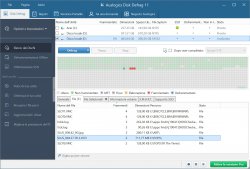
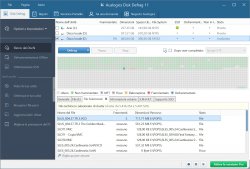
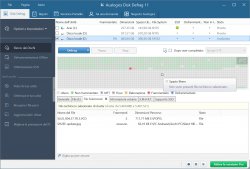
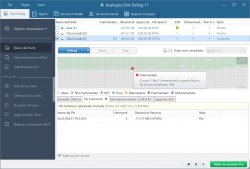
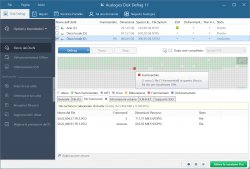
This is an example with Tomb Raider 2.
It is not that much fragmented, it is a 711MB file, it could be scattered in hundred of pieces on a very fragmented HDD.
2. OPL doesn't matter, Ps1 games run on POPS that's a different app (you can just launch it from OPL). And yes there are games that skips FMVs if the reading isn't perfect, I'm talking about original games played on real HW.
For example, I didn't know that "Paperino: operazione papero" had an intro FMV until I played it on a PsOne (that have much better lens that SCPH-9002 models).
On POPStarter this issue cannot happen, since it is a direct reading, much better than optical. However I was wondering if a game heavilly scattered (so that also FMVs would be heavilly fragmented) could cause problems from USB. That's the reason I mentioned this possible test.
3. Yes installing/copying, is the same.
Perhaps you should look online for a explanation on what fragmentation is. Are always the files on a device that got fragmented, not the device itself (unless you hit it with a hammer
 ). When I say a USB device heavilly fragmented I mean that it is full of fragmented files.
Random Guy
Member
1. In auslogics disk defrag you can see on which blocks the files are scattered:
View attachment 40419 View attachment 40420 View attachment 40421 View attachment 40422 View attachment 40423
This is an example with Tomb Raider 2.
It is not that much fragmented, it is a 711MB file, it could be scattered in hundred of pieces on a very fragmented HDD.
2. OPL doesn't matter, Ps1 games run on POPS that's a different app (you can just launch it from OPL). And yes there are games that skips FMVs if the reading isn't perfect, I'm talking about original games played on real HW.
For example, I didn't know that "Paperino: operazione papero" had an intro FMV until I played it on a PsOne (that have much better lens that SCPH-9002 models).
On POPStarter this issue cannot happen, since it is a direct reading, much better than optical. However I was wondering if a game heavilly scattered (so that also FMVs would be heavilly fragmented) could cause problems from USB. That's the reason I mentioned this possible test.
3. Yes installing/copying, is the same.
Perhaps you should look online for a explanation on what fragmentation is. Are always the files on a device that got fragmented, not the device itself (unless you hit it with a hammer
Is it possible to check USB games fragmentation on OPL?
Is it possible to check USB games fragmentation on OPL?
For Ps2 games, yes. Look in the settings it is one of the first.
Random Guy
Member
For Ps2 games, yes. Look in the settings it is one of the first.
It doesn't show up, at least in the latest Beta version.

L2000
Member
I think it was removed out of later versions of OPL , so it might not be visible to him .For Ps2 games, yes. Look in the settings it is one of the first.
solid state media generally doesn't not need to ever be "defragmented" due to the nature the data is accessed . I'm not going to reply to any further follow ups as I feel this looks like one of those endless threads by @Windows10User , where one question is followed by another mostly unrelated already answered question , PS1 games will not give the stuttering issues you are worried about due to the read rate being ample over usb 1.1 , your router seems to be at fault for either bottlenecking or throttling the data transfer for PS2 games , if you are by the means get a phat PS2 and an internal HDD ( mechanical or SSD) or just go with a PS3 , I do apologise for my brevity .It doesn't show up, at least in the latest Beta version.
That is INCORRECT for how OPL accesses files in-game!solid state media generally doesn't not need to ever be "defragmented" due to the nature the data is accessed .
This does not matter much on new Betas which support up to 64 fragments, but it DOES matter on old builds!
Similar threads
-
PS2 Transferring ISOs from PC to PS2 hardrive without removing the latter from the console?
- Started by latinking
- Replies: 1
-
PS2 After Update to latest OPL some Art are shown, some are not
- Started by Tackskull
- Replies: 13
-
-