
You are using an out of date browser. It may not display this or other websites correctly.
You should upgrade or use an alternative browser.
You should upgrade or use an alternative browser.
PS2 How to use USBUtil
- Thread starter Md Hesam
- Start date


jolek
Senior Member
There is really fancy button called Post New Thread:

Try to use it instead of posting wherever it suits you.
The same button can be also found in help & support:

BTW game, there are tons of games especially on PS2...
Also, what does USBUtil shows in Status?
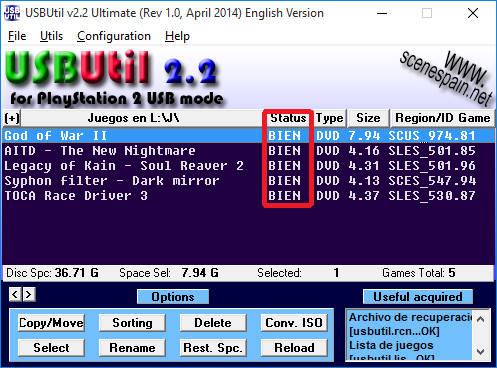
Short guide is in this topic (Quick guide how to install your game tab):
https://www.psx-place.com/resources/usbutil-by-iseko.679/.
Try to use it instead of posting wherever it suits you.
The same button can be also found in help & support:
BTW game, there are tons of games especially on PS2...
Also, what does USBUtil shows in Status?
Short guide is in this topic (Quick guide how to install your game tab):
https://www.psx-place.com/resources/usbutil-by-iseko.679/.
Last edited:

jolek
Senior Member
USBUtil can be also used for DVD5 games.
FAT32 file system do not support single file larger than 4 GB.
E.g. Legacy of Kain: Soul Reaver 2 is DVD5 (almost 4,6 GB) game and its image (ISO) will not "fit" into FAT32 file system.
USBUtil is "slicing" it into max 1 GB "pieces" so they can all fit into that file system.
If file system supports larger than 4 GB per file, there is no advantage for "slicing" ISO.
So USBUtil can be used for all games (I haven't tried CD games so far),
but for comfort, games can be also copied into CD\DVD folder if file system support it.
FAT32 file system do not support single file larger than 4 GB.
E.g. Legacy of Kain: Soul Reaver 2 is DVD5 (almost 4,6 GB) game and its image (ISO) will not "fit" into FAT32 file system.
USBUtil is "slicing" it into max 1 GB "pieces" so they can all fit into that file system.
If file system supports larger than 4 GB per file, there is no advantage for "slicing" ISO.
So USBUtil can be used for all games (I haven't tried CD games so far),
but for comfort, games can be also copied into CD\DVD folder if file system support it.
Last edited:
You can also use USBUtil to shrink DVD5 games to save disk space and, in one case i found, to speed up loading:
http://www.ps2-home.com/forum/viewtopic.php?t=1511&start=20#p8037
http://www.ps2-home.com/forum/viewtopic.php?t=1511&start=20#p8037
jolek
Senior Member
Did you also tried to unpack ISO?
I mean extract all files from ISO.
Make once again ISO from extracted files.
Some ISO's after unpacking can take even 50% less space after unpacking.
E.g. Heroes of the Pacific (SLES_534.41) ISO takes ~4,6 GB.
Files of that game after unpacking ISO should take ~2,5 GB.
Now for test you can make an ISO from these unpacked files.
New ISO should take only ~2,5 GB, not ~4,6 GB as it was originally.
I don't remember if it was called fake LBA or something else,
but not all games will support this method.
I mean extract all files from ISO.
Make once again ISO from extracted files.
Some ISO's after unpacking can take even 50% less space after unpacking.
E.g. Heroes of the Pacific (SLES_534.41) ISO takes ~4,6 GB.
Files of that game after unpacking ISO should take ~2,5 GB.
Now for test you can make an ISO from these unpacked files.
New ISO should take only ~2,5 GB, not ~4,6 GB as it was originally.
I don't remember if it was called fake LBA or something else,
but not all games will support this method.
I just used USBUtil's RIP iso function.Did you also tried to unpack ISO?
I mean extract all files from ISO.
Make once again ISO from extracted files.
Some ISO's after unpacking can take even 50% less space after unpacking.
E.g. Heroes of the Pacific (SLES_534.41) ISO takes ~4,6 GB.
Files of that game after unpacking ISO should take ~2,5 GB.
Now for test you can make an ISO from these unpacked files.
New ISO should take only ~2,5 GB, not ~4,6 GB as it was originally.
I don't remember if it was called fake LBA or something else,
but not all games will support this method.
You're right, quite a few games have large blank dummy files, which I believe are there to shift game data to the outside of the DVD so it can be read quicker. This is no longer useful when using the ISO on a hard drive, so it just wastes space.
As I mentioned in the linked post, I also tried using another tool to rebuild the LBA, and this produced the same results as using USBUtil.
- Try the newest Beta!
- Why don't you just use the ISO?
- Games on USB need to be perfectly defragmented as well as VMCs (if you use them)
- Please don't expect us to guide you through everything... There are a lot of tutorials available.
Just use an ISO (since it seems to be smaller than 4GB) and OPL-Manager...
Last edited by a moderator:
jolek
Senior Member
As TnA suggest you can search for "OPL Beta" via google.
Also you can visit PS2 Resources:
https://www.psx-place.com/resources/categories/playstation-2-ps2.7/.
[Open PS2 Loader] Official Beta releases:
https://www.psx-place.com/resources/open-ps2-loader-official-beta-releases.720/.
Automated daily build system for OPL, wLe & FCEUmm-PS2:
https://www.psx-place.com/resources/automated-daily-build-system-for-opl-wle-fceumm-ps2.702/.
BTW X-Men Legends (SLUS_206.56) according to redump,
should fit into USB (FAT32) device without a problem:
http://redump.org/disc/2184/.
Also you can visit PS2 Resources:
https://www.psx-place.com/resources/categories/playstation-2-ps2.7/.
[Open PS2 Loader] Official Beta releases:
https://www.psx-place.com/resources/open-ps2-loader-official-beta-releases.720/.
Automated daily build system for OPL, wLe & FCEUmm-PS2:
https://www.psx-place.com/resources/automated-daily-build-system-for-opl-wle-fceumm-ps2.702/.
BTW X-Men Legends (SLUS_206.56) according to redump,
should fit into USB (FAT32) device without a problem:
http://redump.org/disc/2184/.
jolek
Senior Member
If ISO will not work, the same thing will be with ul.
Check md5sum of (ISO) X-Men Legends (SLUS_206.56).
It should be: 20c4a952a6c28a60c9a012c629866929.
Here is tutorial how to check md5sum:
https://www.psx-place.com/threads/how-to-check-game-md5-checksum.19277/.
Check md5sum of (ISO) X-Men Legends (SLUS_206.56).
It should be: 20c4a952a6c28a60c9a012c629866929.
Here is tutorial how to check md5sum:
https://www.psx-place.com/threads/how-to-check-game-md5-checksum.19277/.
jolek
Senior Member
Why you want to use tutorial for game that takes less than 4 GB?
There is no need to use USBUtil.
Check md5sum of ISO, if it is different, make another rip from disc with different tool (e.g. IMGBurn).
Simple copy game ISO to DVD folder do not need tutorial, if it does... than someone else should help you...
There is no need to use USBUtil.
Check md5sum of ISO, if it is different, make another rip from disc with different tool (e.g. IMGBurn).
Simple copy game ISO to DVD folder do not need tutorial, if it does... than someone else should help you...
Don't use USB-Util but OPL-Manager!!!
In OPL Manager you need to set the OPL-path... Just select your USB... It creates the necessary folders... Put the iso into the new DVD-Folder... Start OPL Manager again...
Let it do it's job.
Make sure the file is defragmented!
Secure-unplug the USB-Device, plug it into the PS2, start OPL again, try the game...
In OPL Manager you need to set the OPL-path... Just select your USB... It creates the necessary folders... Put the iso into the new DVD-Folder... Start OPL Manager again...
Let it do it's job.
Make sure the file is defragmented!
Secure-unplug the USB-Device, plug it into the PS2, start OPL again, try the game...
Last edited:
Similar threads
-
PS2 Transferring ISOs from PC to PS2 hardrive without removing the latter from the console?
- Started by latinking
- Replies: 1
-
-
-
PS2 Transformers Call of the Future FMV stutter in hdd
- Started by KarPops
- Replies: 2