
You are using an out of date browser. It may not display this or other websites correctly.
You should upgrade or use an alternative browser.
You should upgrade or use an alternative browser.
Charles_n_town
Senior Member
Mymc can access PS2 memory cards iirc. Not sure how well it'll work in your situation, but it may be worth a try.
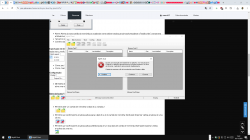
error open image:
Consulte o final desta mensagem para obter detalhes sobre como chamar a
depuração just-in-time (JIT) em vez desta caixa de diálogo.
Quando a depuração JIT está habilitada, qualquer exceção sem tratamento
será enviada ao depurador JIT registrado no computador,
em vez de ser tratada nesta caixa de diálogo.
Consulte o final desta mensagem para obter detalhes sobre como chamar a
depuração just-in-time (JIT) em vez desta caixa de diálogo.
Quando a depuração JIT está habilitada, qualquer exceção sem tratamento
será enviada ao depurador JIT registrado no computador,
em vez de ser tratada nesta caixa de diálogo.
Attachments

bucanero
Developer
if you want a low-level tool to browse and replace files on a ps2 memcard image, you can try:
https://github.com/bucanero/ps2vmc-tool
there's a windows binary on the release section, but it's a command line tool.
https://github.com/bucanero/ps2vmc-tool
there's a windows binary on the release section, but it's a command line tool.

Berion
Developer
I told you twice already that mymc expecting cards with ECC. And point to a program which will add/remove ECC. Plus explained why the reason you want edit card image is totally pointless. You asking over and over the same questions across different threads, naming them all: doubts. I starting to have doubts in humanity. 
Berion
Developer
In one of the threads you started, I linked to AIO Project and point to application for adding or removing ECC from card images.
You cannot write back image with ECC... MCA not supporting ECC, that's why you didn't get ECC dump in the first place. It is needed for mymc and its forks which supporting card images only with ECC.
You can try also Bucanero's tool.
You cannot write back image with ECC... MCA not supporting ECC, that's why you didn't get ECC dump in the first place. It is needed for mymc and its forks which supporting card images only with ECC.
You can try also Bucanero's tool.
Charles_n_town
Senior Member
ps2vmc tool won't open in my pc open e close cmd, I can't access the app, I use Windows 10 and I also don't know how to delete files from the image and add new files to a specific folder in the image
it's a cmdline tool apparently. I don't know how user-friendly it is as I've never used it, but that's why it's opening and closing.
Berion
Developer
https://en.wikipedia.org/wiki/Command-line_interfaceps2vmc tool won't open in my pc open e close cmd, I can't access the app,
It is not GUI application. You need to run CMD or PowerShell and invoke it there. So in assumption you downloaded this:
https://github.com/bucanero/ps2vmc-tool/releases/download/v1.1.2/psvmctools-85c34aa4-Win64.zip
You need unpack it and i.e in PowerShell run "ps2vmc-tool.exe" with proper arguments, depend what you want achieve.
https://github.com/bucanero/ps2vmc-tool/blob/main/README.mdI use Windows 10 and I also don't know how to delete files from the image and add new files to a specific folder in the image
Usage:
./ps2vmc-tool <VMC filepath> <command> [<arguments>]
Available commands:
--mc-info, -i
--mc-free, -f
--mc-image, -img <output filepath>
--ecc-image, -ecc <output filepath>
--mc-format
--list, -ls <mc path>
--extract-file, -x <mc filepath> <output filepath>
--inject-file, -in <input filepath> <mc filepath>
--make-directory, -mkdir <mc path>
--remove-directory, -rmdir <mc path>
--remove, -rm <mc filepath>
--file-crosslink, -cl <real mc filepath> <dummy mc filepath>
--psv-import, -pi <PSV filepath>
--psu-import, -pu <PSU filepath>
--psu-export, -px <mc path> <output filepath>
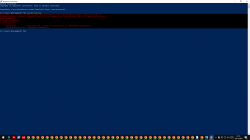
Charles_n_town
Senior Member
I can't really read the error, but I can vaguely see the command (have very bad eyes), but you need to start an exe with ./ . put ./ right before the exe
edit: like this:

edit: like this:
Last edited:
bucanero
Developer
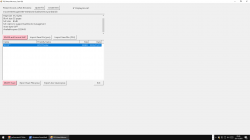
actually it seems that another developer made a windows GUI for my ps2vmc-tool:
https://github.com/MegaBitmap/PS2-VMC-GUI
I can't say how it works as I never tested (I don't even use windows) but it seems they made a GUI using powershell that uses my ps2vmc tool as backend.
If someone tests, please report results, so I can add some reference or link from my GitHub to this GUI for users that need a UI
https://github.com/MegaBitmap/PS2-VMC-GUI
powershell "irm https://raw.githubusercontent.com/MegaBitmap/PS2-VMC-GUI/master/PS2-VMC-GUI.ps1 | iex"
- Run this command or create a shortcut and paste this command as the target.
For offline use, download this repository as a ZIP file.
Extract the ZIP to a folder and then run PS2-VMC-GUI-Offline.ps1 with PowerShell.
I can't say how it works as I never tested (I don't even use windows) but it seems they made a GUI using powershell that uses my ps2vmc tool as backend.
If someone tests, please report results, so I can add some reference or link from my GitHub to this GUI for users that need a UI
Charles_n_town
Senior Member
I didn't test it beyond seeing if it loaded. I'm sure it works okay, but that might be something "cloud" needs to try:actually it seems that another developer made a windows GUI for my ps2vmc-tool:
https://github.com/MegaBitmap/PS2-VMC-GUI
I can't say how it works as I never tested (I don't even use windows) but it seems they made a GUI using powershell that uses my ps2vmc tool as backend.
If someone tests, please report results, so I can add some reference or link from my GitHub to this GUI for users that need a UI
i tested MegaBitmap/PS2-VMC-GUI open close
Charles_n_town
Senior Member
you have to open it with a cmdline probably. download it, then in powershell: ./PS2-VMC-GUI.ps1
Charles_n_town
Senior Member
I wouldn't know. Iirc, you can access the folder with launch.elf on the PS2 itself. an app that can on PC, I dunno.