I've lost control of my fan speed

The problems I'm facing right now have first started when, one day, I lowered the fan control settings on WebMAN-MOD, from 35% manual speed to 33%. What happened instead of the expected was that the fan started going faster.

Since then, my PS3 starts really loudly and fast, taking a long time using the console for it to start lowering it's speed and noise.
  • The problem really shows up however when I change the manual speed to anthing lower or higher. When saving the configuration, the fan goes very quiet and slow making a very unusual sound. But when rebooting the console, the fan just go as faster and loudly as everybody's first time using the WebMAN.
  • Using SYSCON makes the fan go very slow and quiet, but sometimes though I'm not sure it's even moving.
  • For some reason the fan just doesn't change it's speed, it just stays at a fixed and unknown speed.

It has been a while since this problem started, but since the day I moved to a much more quieter place, I could finally grasp the magnitude of the problem and how annoying it is!

Right now, I don't really know what to do. Sometimes I think I should stop playing and wait until I buy the right tools to open the PS3 and clean the fan and apply thermal paste. Or just remove everything from the console, and make a fresh install of HEN.

Before writing this thread, I have set the fan speed to SYSCON, so that I can feel safe when applying fixes.

// Edits:

I have a PS3 Super Slim
 
Last edited:
The problems I'm facing right now have first started when, one day, I lowered the fan control settings on WebMAN-MOD, from 35% manual speed to 33%. What happened instead of the expected was that the fan started going faster.

Since then, my PS3 starts really loudly and fast, taking a long time using the console for it to start lowering it's speed and noise.
  • The problem really shows up however when I change the manual speed to anthing lower or higher. When saving the configuration, the fan goes very quiet and slow making a very unusual sound. But when rebooting the console, the fan just go as faster and loudly as everybody's first time using the WebMAN.
  • Using SYSCON makes the fan go very slow and quiet, but sometimes though I'm not sure it's even moving.
  • For some reason the fan just doesn't change it's speed, it just stays at a fixed and unknown speed.

It has been a while since this problem started, but since the day I moved to a much more quieter place, I could finally grasp the magnitude of the problem and how annoying it is!

Right now, I don't really know what to do. Sometimes I think I should stop playing and wait until I buy the right tools to open the PS3 and clean the fan and apply thermal paste. Or just remove everything from the console, and make a fresh install of HEN.

Before writing this thread, I have set the fan speed to SYSCON, so that I can feel safe when applying fixes.

This is a common theme on a few of the fat models when using webman fan mod with standard auto setting. I have a L and a K model that tend to operate this way if using that mode. You can try playing with your minimum temps to find a happy medium and you might be able to get it to chill out. Could try using auto #2 as an alternative. It works pretty well especially on older fat boys that tend to run a little hot out the gate. Definitely swap out your thermal paste when you have the time and tools to do so. That will help a lot as well.
 
This is a common theme on a few of the fat models when using webman fan mod with standard auto setting. I have a L and a K model that tend to operate this way if using that mode. You can try playing with your minimum temps to find a happy medium and you might be able to get it to chill out. Could try using auto #2 as an alternative. It works pretty well especially on older fat boys that tend to run a little hot out the gate. Definitely swap out your thermal paste when you have the time and tools to do so. That will help a lot as well.

Thank you for the reply, I didn't know about this information!

Researching about the issue makes me think that there isn't much I can do except change thermal paste as you said, and do some other things like cleaning the fans.

I'll have to try the auto #2 config webMAN the next time I boot my console though I'm a little afraid of doing it and making things worse. I'll give it a shot.

By the way, I have a PS3 Super Slim. Making this behavior even more weird (or not).
 
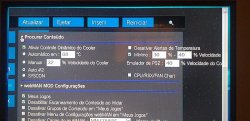
Can you show a screenshot of your webman fan settings. I've never seen that behavior on any of my super slims.
 
Can you show a screenshot of your webman fan settings. I've never seen that behavior on any of my super slims.

Here it is. It's in brazilian portuguese but I think it's possible to identify what is the configuration. Anyway don't mind the green artifacts, my hdmi has seen better days.

By the way, I changed the configuration from manual 32% to Auto #2 (thanks to Checkity_CheckYoSelf). The problem is still there, sometimes it's possible to hear the fans going crazy on a moment and calming down on another but now It's less anoying than before, and playing for a long time makes things more normal like before.
 

Attachments

  • picture.jpeg
    picture.jpeg
    170.6 KB · Views: 128
Here it is. It's in brazilian portuguese but I think it's possible to identify what is the configuration. Anyway don't mind the green artifacts, my hdmi has seen better days.

By the way, I changed the configuration from manual 32% to Auto #2 (thanks to Checkity_CheckYoSelf). The problem is still there, sometimes it's possible to hear the fans going crazy on a moment and calming down on another but now It's less anoying than before, and playing for a long time makes things more normal like before.
Yea once you get some good new paste in there, you can try to go back to standard auto and set a temp you're comfortable with and see how it acts. The paste in these things is usually 15 years old and flaky dry by now, both on top the IHS and below, so at the very least change the paste on the top when you can and it should help a lot. I'd recommend arctic silver mx4 or even kryonaut if you want to spend the little extra on it. Clean the fan and the heatsink too while you're in there. It's a little nervewracking your first disassembly, but I can do these in my sleep now that i've taken apart so many different models. Can't hurt to take pics of where the screws are on your first disassembly in case you forget when re-assembling. Good luck. Hope that helps!
 
Back
Top