PS3 Just trying to clone my ps3 HDD to an SSD...

AVaughn

Forum Noob
Hey everyone,

I just found about about the whole community (and project work) regarding ps3 jailbreaking, etc.

I have a few questions which I hope someone can answer, and if not, maybe point me somewhere I can go to find the answers?

All i'm trying to do is futureproof my ps3, that entails 1) buying up all the dlcs for my favourite games from the psn store, and 2) cloning to an SSD.

I have tried pretty much all of the cloning software I can think, to try and clone the HDD inside a ps3, I have tried casper, AOMEI, and clonezilla, none seem to be able to understand what's on the 320Gb HDD, comes up as unallocated. (If anyone has a method that works, please tell me, I dont care if I have to put a 480Gb in there and have 160Gb unallocated).

All i know is that, with the HEN, you can do some combination at the network settings, and get access to debug options, where there is an option to clone ps3's hdd to another one plugged in via USB.

If I get the hen software on my ps3, am I fucked, just like, immediately and automatically? I plan to go onto the psn store to buy more things (before it's all shut down in a few months), and I also plan to play games online until psn and online services eventually cease. Am i going to get my account suspended just for having HEN but using literally none of it's features (apart from cloning my HDD)? Because I also use my account on ps4, have tons of stuff linked up to it.

Any suggestions and tips would be far appreciated. if the playstation can just tell that you have the HEN software on your device, and will get you banned even if you don't use it, what if I were to remove the NIC from the ps3 right after initialising the HEN? Then the ps3 would be a forever offline device, but I would keep all my dlcs and not get acc banned? This is gonna come across as really badly written, apologies to everyone.
 
You cannot clone* because PS3 using custom partition table and encrypting almost whole HDD. Such question already appeared several times, use search function. ;p

*well, You can using tools offering sector by sector copy (i.e Clonezilla if use dd), but You will not gain more space than on source device, the rest will be invisible because is not written to partition table and there is no tools on PS3 side which update it.


BTW: https://www.psx-place.com/threads/ultimate-userdata-backup-guide.29037/
 
The rest of the space being unallocated works just fine for me. The original 320Gb is plenty of space, just want my ps3 to be running on a new and faster drive.

Thanks for the "sector by sector" idea, I have found this, which looks like it will do the same thing. https://hddguru.com/software/HDD-Raw-Copy-Tool/

I appreciate the work you guys are doing with HEN, but at the same time I am happy that I can achieve what I am trying to do, without having to install that on the ps3.

Thanks a lot for the reply. Yes, not searching the forum was a rookie mistake, I assumed I was special and had a unique question, lol. Sorry
 
Last edited:
I have tried pretty much all of the cloning software I can think, to try and clone the HDD inside a ps3, I have tried casper, AOMEI, and clonezilla, none seem to be able to understand what's on the 320Gb HDD, comes up as unallocated. (If anyone has a method that works, please tell me, I dont care if I have to put a 480Gb in there and have 160Gb unallocated).
Yeah you just need to do a low level clone of it, and like Berion says you will not gain any extra space, the cloned drive will be exactly like the original in every way, including useable size and free space.

A better idea would be to get everything you want from the store, then jailbreak it and back the stuff up via FTP or a file manager, this way you will not have unused space on your SSD and you will have easy access to the individual files if you need it.
 
Last edited:
Yes, You can use HDD Raw Copy Tool as this is very simple application and doing the job fine.

Yet still this is a little pointless. Why would You not just copy Your data to PC and copy it back after format format of a new drive? Can be a little annoying and time consuming but this is not something which You doing often, and You gaining full space on new device.
 
"Copy your data to PC", such as what? What can i copy to pc? I would like to copy, trophies, DLC content, save data, everything. I have two profiles, one which is signed into PSN, and another that used to be, but due to some error is permanently locked out, the one which is locked out has very many trophies, and platinum ones as well, I am pretty sure I cannot copy that data to another PS3 or to a USB unless I can sign into psn on all accounts, right?

It doesn't seem pointless to me, I still have lots of space on the ps3, all I am looking to do is switch from a ~12 year old HDD to a brand new SSD, which should increase performance significantly.
 
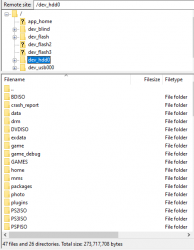
With HEN or CFW, you can just connect via FTP, then you copy anything you want. It gives you full access to the filesystem. This way you can backup/restore only specific files if you want to. It gives you more control over your backup as its not inside an encrypted hdd image.

upload_2021-3-23_22-14-30.png

If you want to do a full backup and restore to a new drive, you should dump all of dev_hdd0 and all of dev_flash2, then set up your new drive in the console, format it, reinstall firmware, then copy the whole lot back over to the console. Then all you need to do is rebuild the database and it will be exactly as it was before.

The advantage here is that you will get all of the space on your new hdd/ssd, and also you could restore it to a different console if required, although that requires a little more work as some files are console specific.
 
"Copy your data to PC", such as what? What can i copy to pc?
You can copy everything and restore everything. I have paste a link to the tutorial in second post in this thread...

(...) unless I can sign into psn on all accounts, right?
On hacked PS3 You don't need Sony for anything any more. That's one of the reasons why all peoples should hack theirs PS3.

It doesn't seem pointless to me, I still have lots of space on the ps3, all I am looking to do is switch from a ~12 year old HDD to a brand new SSD, which should increase performance significantly.
Sure thing, whatever fits You best. I just showing that there is better solution. ;]
 
To DeViL303:

Ah, yes. That would be the alternative to what I am trying to achieve, although much more complicated! Also, are you really saying that I would be able to use all of the unallocated space on the drive? (For example, ps3 HDD is 320Gb, new SSD is 480Gb).

Im not sure that I will be proceeding with this, just because it is more work, but I appreciate the reply. I have, I think 3 questions:

1) what does "dump" in this context mean? Get rid of, or keep? Sorry, english is my first language but technical terms i'm not great with
2) How would I "reinstall firmware", are you talking about ps3's OS here?
Also, I don't know what "rebuild the database" means, but im sure I can find out through searching the forum, I think i've seen that term used before.
3) Would the end result of this entail having the HEN / CFW software on the ps3? The reason I am leaning towards my lame method of 1:1 clone and unallocated space is, because I don't have to install anything, or at least, the end result just leaves me with the "normal", "unmodded" ps3.

Btw, I checked out your youtube channel, very cool stuff!

To Berion:

I guess i am just worried that installing this may somehow jeopardise my account, because like I said, I plan to be using PSN up until the services cease. I have seen people on the forum saying "my account has been permanently banned as sony detected a compromised device", and the reply to them is "You should have known the risks", well, I am just trying to understand the risks!
 
Also, are you really saying that I would be able to use all of the unallocated space on the drive? (For example, ps3 HDD is 320Gb, new SSD is 480Gb).
Yes, you would exploit the console. Back up your stuff via FTP. Then you could put in the new drive and format it. So it will give you the full space.

Then you can copy all your data back onto the system. Then you could remove all traces off the app you use for FTP, and install official firmware again. In theory you will be back to the way it is now, but with a bigger drive installed.

1) what does "dump" in this context mean? Get rid of, or keep? Sorry, english is my first language but technical terms i'm not great with
Dump here just means "copy the data off the device", not dump like rubbish. :) a bit confusing alright.

2) How would I "reinstall firmware", are you talking about ps3's OS here?
You would just put the firmware update file on a USB drive and install it like normal. When you put in a new HDD, most PS3 consoles need you to reinstall the firmware, as some of it is stored on the HDD that you removed.

Also, I don't know what "rebuild the database" means, but im sure I can find out through searching the forum, I think i've seen that term used before.
This is just an option you click in safe mode. Nothing really special about it. You can do it on official firmware too. It basically just scans the hard drive, and adds whatever it finds to the XMB, media and games etc.
3) Would the end result of this entail having the HEN / CFW software on the ps3? The reason I am leaning towards my lame method of 1:1 clone and unallocated space is, because I don't have to install anything, or at least, the end result just leaves me with the "normal", "unmodded" ps3.
That is true, you would have to install HEN or CFW to do this, but you could revert it to official after its complete. There is a slight risk to this more complicated method really, as you have to make sure you tidy up all traces of HEN/CFW before you go back to official firmware.

The advantage is that you get all your files in unencrypted form, and could restore them to another console if required.

Btw, I checked out your youtube channel, very cool stuff!
Cheers :)
i am just worried that installing this may somehow jeopardise my account, because like I said, I plan to be using PSN up until the services cease. I have seen people on the forum saying "my account has been permanently banned as sony detected a compromised device", and the reply to them is "You should have known the risks", well, I am just trying to understand the risks!
You are right to be cautious, and copying the whole HDD image to the new SSD is easier and safer when it comes to that.
 
Using SEN having HAN, HEN or CFW is always ban risking (no matter what kind of usage, but highest possible is playing online with cheats, that's is like suicide (without spoofs)). So if You are currently have installed (?) HEN and login to SEN i.e to buy games in PSS, You are risking of ban account and ban for ALL consoles (all PSP, PSV, PSTV, PS3, PS4, PS5) glued to this account at once.

If You have clean console (OFW, never hacked by any way), and want change HDD for the same console, then You can use System Backup option which will pack all data from HDD (except trophies), and put into encrypted containers on USB (some can be read on different console, some only on this specific one on which was created due to IDPS involved in encryption). This can be restored on fresh PS3 or like in Your case after HDD change. But... licenses will not be restored, so You will need to connect to SEN for all users accounts with SEN accounts. The same with trophies retrieving.

I still strongly recommending to just copy all data to PC via FTP or file manager to USB. But if You want loose everything one day, it is Your choice. ;)
 
Last edited:
Using SEN having HAN, HEN or CFW is always ban risking (no matter what kind of usage, but highest possible is playing online with cheats, that's is like suicide (without spoofs)). So if You are currently have installed (?) HEN and login to SEN i.e to buy games in PSS, You are risking of ban account and ban for ALL consoles (all PSP, PSV, PSTV, PS3, PS4, PS5) glued to this account.

exactly. it happened to me, because I was naive enough to think it wouldn't. it affected my ps3, psv, pstv, and ps4. I've since created a separate account for each and a new ps3. I have the emails tied to the accounts on my pc and my phone to monitor them, because you'll receive an email if you ever get banned. all is good. I managed to save all of my saves on all systems, but I lost all trophies. that's actually why I'm buying a super slim, which I don't plan to hack. this will be my own console to play legitimately with on any future console (intend to buy a ps5 eventually). be very careful. the ps3 is probably the console most likely to get you banned, since you can't sign in on the ps4 if using exploits and sony doesn't seem to care about the psv/pstv.
 
Strangely they don't care at all on PSV/PSTV. At least yet. And this also doesn't mean that don't have already flagged such activities.

as its not inside an encrypted hdd image.
If You have in mind System Backup, then it is not disk image but container/archive/vfs/whatever You name it, but not image. ^^
 
Berion, you wrote this:

"You want loose everything one day, it is Your choice. ;)". You recommend I get HEN on my device, and use FTP to pull everything I can off the console? Can I turn off the automatic "sign into PSN" which happens when you pick a user account, then do it? If i never connect to any network service, can I get banned? It seems my best strategy is to do this:

Step 1) Buy everything that I want/need
Step 2) Sign out of PSN on all user accounts, ensure it doesn't automatically try to connect by itself after reboot
Step 3) Install exploit, HEN or something (which is the best?)
Step 4) Back things up using FTP, etc
Step 5) Never go on PSN or PSS ever again (this is OK if services will cease later this year anyway)

I have just read this, do either of you have any opinions or comments about it? You both seem very knowledgeable, I dont want to start a new thread. https://twitter.com/DoesItPlay1/status/1374034203826909196

Basically when the "cmos" battery dies, system prompts a required time server sync. If this happens after playstation 3 time server is taken offline, it will be impossible to perform server sync. People say this means that any digitally purchased games installed on the hard disk will be unplayable. What can we do about this??
 
We don't know if Sony close PSS and/or entire network for PS3 or not. One day for sure but I doubt that they will do this without official announcement.

I don't remember how settings looks like on PS3, but on PS4 there is just checkbox for network on/off. If there isn't on PS3 (something tells me there is not), then You have three ways: abandon network settings, blacklisting Sony servers on router side or blacklisting PS3 on router side by MAC address.

- - -
  1. Hack console. If You have PS3 with old boot loader, then install CFW, if You have new boot loader, then maximum HEN can be used. Use bgtoolset from ps3xploit official site.
  2. Make NAND/NOR full dump. If one day console die from bad blocks or logic damages of flash, this can save Your console from trash destiny.
  3. Read EID Root Key (CFW only feature). This open door to read HDD outside PS3 (i.e if You get perm brick or YLOD/RSOD beyond repair and didn't backup saves etc. this allows You to copy any data from it on Windows or Linux).
  4. Read IDPS + PSID + NP Account ID (for all accounts). Those keys allows You to sign/resign/decrypt/encrypt saves, trophies and system backup archives. Console IDs can be displayed i.e by multiMAN, NPAIDs are written in "dev_flash2/etc/xRegistry.sys".
  5. Export all licenses from all accounts to RAP (unsigned) so they no longer be tied to this specific PS3. I.e by Apollo.
  6. And of course copy everything else which You want I covered in Ultimate User Backup guide
- - -
Yes, dead RTC breaks NPDRM (licensing and in addition trophies time stamps + some events in some games). Currently there is no way to avoid that other way than replace battery but should be easy to redirect traffic to custom server (if there isn't some dirty tricks in the process but simple date and time retrieving).
 
Last edited:
View attachment 32334

If you want to do a full backup and restore to a new drive, you should dump all of dev_hdd0 and all of dev_flash2, then set up your new drive in the console, format it, reinstall firmware, then copy the whole lot back over to the console. Then all you need to do is rebuild the database and it will be exactly as it was before.

For full backup and restore to a new hard drive successfully when copying back using ftp (Filezilla) the folders dev_hdd0 and all of dev_flash2 can I just copy the two folders over, (dev_hdd0 and dev_flash2 on new hard drive) the repeated files in the transfer do I skip or replace with the new files?

There is no risk of brick the console in this process?

To rebuild the database can I use one of these applications ( Advanced Power Options v1.11 (CFW & HEN), CFW Power Options v1.07) in rebug 4.86 lite to enter safe mode and rebuild the database or do I have to do manual process by holding power button?
 
Last edited:
They are not folders but partitions, to be precise mounting points.

Replace if You know what are You doing. I strongly recommending to read my tutorial about data backup.

No brick risk. Copied xRegistry.sys on different console results in BSOD but only for first boot. Reboot and be fine. But this file is mandatory if You don't want resign every save and trophy of every user.

You can.
 
Yes, dead RTC breaks NPDRM (licensing and in addition trophies time stamps + some events in some games). Currently there is no way to avoid that other way than replace battery but should be easy to redirect traffic to custom server (if there isn't some dirty tricks in the process but simple date and time retrieving).
Can't you just use the EID root key to decrypt the pkg and reinstall it without DRM?
 
HDD is encrypted by ATA Key (all models) and VFLASH Key (NOR models), both generated from ERK and seeds. This have nothing to do with PKG format. Besides that, it is not possible to make DRM free content on PS3, everything using DRM, even free content. ;)

RTC is crucial part of SSL, TRP and NPDRM mechanisms.
 
They are not folders but partitions, to be precise mounting points.

Replace if You know what are You doing. I strongly recommending to read my tutorial about data backup.

No brick risk. Copied xRegistry.sys on different console results in BSOD but only for first boot. Reboot and be fine. But this file is mandatory if You don't want resign every save and trophy of every user.

You can.
To mount the partitions accurately and copy files to the PC can I then just use my PS3 with CFW or do I have to do the copy and write back (partitions dev_hdd0 and dev_flash2) using PC with linux installed following your tutorial mounting-the-ps3-internal-memory-on-linux-2022-04-16.pdf?
 

Similar threads

Back
Top