ManaGunZ

PS3 ManaGunZ - PS3 Backup Manager by Zar v1.41

Im going to reply you here to dont interfere with the other thread about CDDA that is really interesting :encouragement:
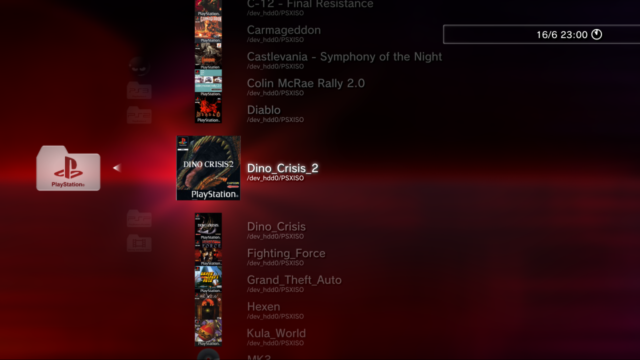
@sandungas I'm simple man, all I "want" is to have covers like in webMAN MOD:
webman2.png


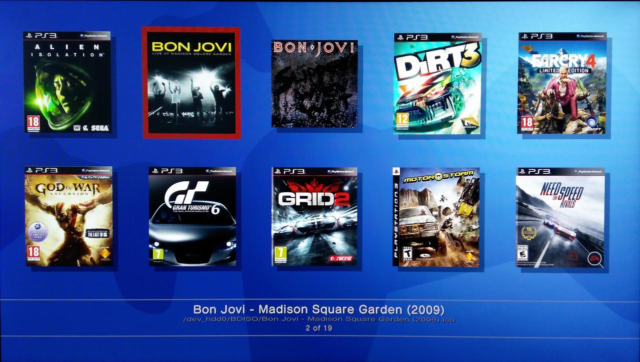
When I enable "display cover" I have:
Mana-Gun-Z-v1-38-2a.png

So thanks for the tip.
I really appreciate your help with covers.
image.gif
Not sure if that was a question, a thought, or a suggestion, but you gave me an idea

As i was mentioning in the other thread, managunz uses a max of 3 images for every game in all interfaces: ICON0, COVER, CASE
Except in FLOW3D where are used ICON0, COVER, but the CASE is a polygonal object in real 3D

All the interfaces are designed using the ICON0 as a "fallback", because originally the PS3 backup managers only supported PS3 game format and all the PS3 games have ICON0
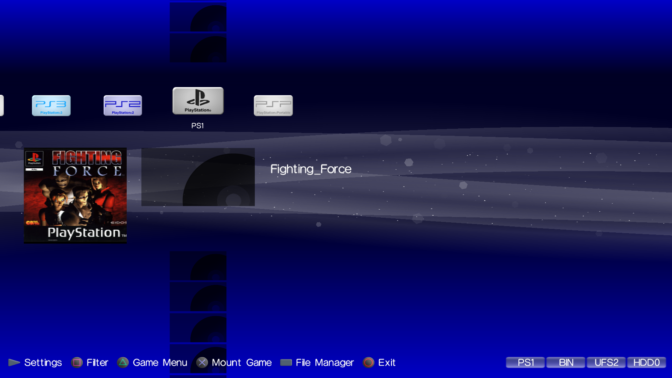
Later... and following that same design rule it was needed to add another "fallback" for the missing ICON0 of PS1 and PS2 games (are the black icons aligned vertically in your screenshot)

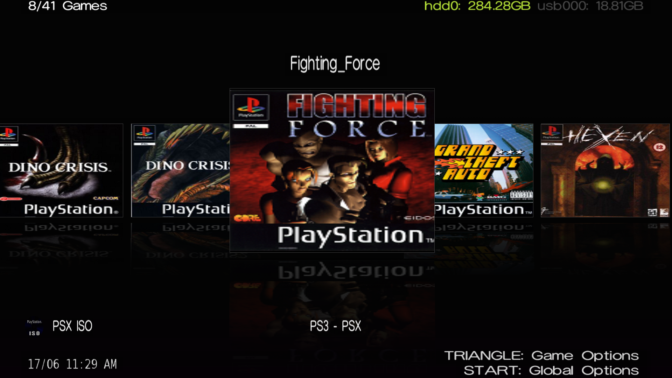
In some interfaces (FLOW2D, FLOW3D and GRID) the ICON0 is not diplayed incase managunz finds a COVER for the game mostly because there is no room for it (it would look bad)
In LIST interface as far i remember there is a setting to hide ICON0

But XMB interface is designed as a clone of the official XMB, and the game/app icons that appears in the official main [XMB]>[GAME] columns are really a ICON0 rectangle
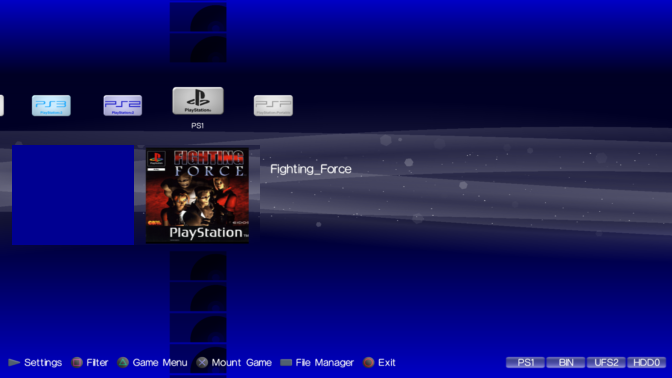
When zar was building the XMB interface i was helping him and we was experimenting with the COVER and CASE images, we was thinking where to locate them, and the area at left-bottom corner did look perfect because the official XMB never uses it (so we was able add a bit of creativity without breaking the original design :D )
But i dont think we never considered to display the COVER (or COVER+CASE that is pretty much the same size, but few pixels bigger) in the official position of the ICON0 because this implyes to "hide" the ICON0 or relocate it, and in my oppinion thats a bad idea to be honest
The ICON0 of PS3 and PSP games looks good, and we was thinking in all this as general rules that should be applyed to all game types (PS1, PS2, PS3, PSP)
Im talking mostly at the actual look of managunz XMB interface where the game icons are displayed at "top level" of the XMB hierarchy, we are trying to mimick how it looks the [XMB]>[GAME] column and the result is nice imo, we spend a lot of time in the details of how it looks :D (check the theme named "replica zero" btw, we used it as the guinea pig while working in XMB interface)

But what you are suggesting/thinking, about displaying the games in the same style like webman, located under a subcategory... looks like a good idea
Im not talking about modifying the actual look of XMB interface... but maybe can be made by adding a setting specific for XMB interface to "relocate" the main icons vertically, so you need to enter in everyone of them to display the vertical list of game icons. It could be something like this:
Code:
[MGZ settings]>[UI settings]>[XMB]>[Main icons orientation] = Horizontal (default) / Vertical

I think is the easyest way to do it, and dont modify the way how the ICON,COVER,CASE works... with this i mean...
-ICON0 (or his fallback) preserves his position, even if there is a COVER/CASE for the game. The reason is because it will look more official, also we dont want to "hide" the ICON0 of PS3 and PSP games, usually is a nice image
-COVER and CASE are displayed at the same position at bottom-left corner... because is the area less invasive with the official design

Is not going to look exactly like webman, because in webman you need to choose either the ICON0 or the COVER, and managunz can display up to 3 images for every game
But well... i guess this can be solved with other setting:
Code:
[MGZ settings]>[UI settings]>[XMB]>[ICON0 persistency] = Never hide (default) / Hidden by COVER
 
Last edited:
Also IRISMAN support this scheme:
IRISMAN-v4-86-3-a.png


So it could unify how covers are displayed.

Unified:
  • IRISMAN:
    IRISMAN-v4-86-3-a.png


  • webMAN MOD:
    webman2.png


  • ManaGunZ:
    Mana-Gun-Z-v1-38-2b.png


  • sMAN:
    slaunch-preview.png
 
Last edited:
I'll add the possibility to display the cover (if there isn't icon0) on xmb ui.
In LIST ui can be made something similar too... hide the monochrome "fallback" ICON0 if COVER exists (and thats all for LIST ui, is not needed to move the actual positions of the images)
And make both as default

What is going to happen for most users at the first days using managunz is something like this
1) Open managunz for first time, lets say the user have backups for all game types (PS3/PS2/PS1/PSP)
2) In XMB/LIST ui's PS3/PSP games displays the real ICON0... and PS2/PS1 the monochrome "fallback" ICON0
3) Then the user adds some COVER images for all games
4) In XMB and LIST ui's PS3/PSP games displays the real ICON0 and COVER... and PS2/PS1 displays only COVER

I was thinking that making this behaviour default was going to be a bummer because maybe the user is not going to realize that is posible to create a custom ICON0 for PS2/PS1... but the fact is the option to "create ICON0" is going to appear in the game settings, we are not hiding the option so is still posible to do it
Also, in both XMB and LIST the user is going to realize by comparing the amount of images used in PS3/PSP with PS2/PS1 that the ICON0 of PS2/PS1 is "missing" (so eventually they will realize there is an option in the game settings to create it)

All and all... yeah, i think is a good idea, XMB and LIST are going to look a bit better because we are reducing the posibilities for the monochrome "fallback" ICON0 to be displayed
 
Last edited:
@jolek, the actual managunz have that UI styles and can display the games in a very similar way, try to play around with managunz settings, there are a lot related with the interface visual look
The mode used in irisman is named FLOW, i think it was apple who introduced it years ago with the ipod, since that time is used in lot of media players, backup managers, etc...
At some point zar added a variant of FLOW using game CASE in 3D... since that point i call them FLOW2D (the plane one like iris that is pretty much finished, looks good), and FLOW3D (this was a bit experimental, there is still room for improvement in it)

The mode used by sMAN is named GRID, in it you can select the number of rows/columns

And the mode used by webman can be made modifying the actual XMB ui a bit, i think is not going to be much practical because is going to be needed to enter every folder/category with an action (click X), and because the "main icons" with the folder/categories needs to be located vertically (and this doesnt looks like the official XMB, but is ok, i guess there is no other option to achieve it, so is a valid solution to achieve the goal), but visually it could look exactly like the screenshot you posted of webman, or better because we can add the cover+case at bottom-left corner, and ICON0 with an official look (and without the distortion that happens in webman), in the same way is made in the actual XMB ui on managunz
 
Last edited:
I think the actual look of XMB ui is better, but anyway... i made a sketchup to conclude my brainstormings about this, i think this is the best/only way to achieve a visual look like webman
Btw, im not trying to clone webman, what i want is to clone how the official XMB looks inside subfolders (is like a second level deepth in the hierarchy)

Im only showing the "top level", because this is the part i was trying to explain (but not sure if my explainations was good enought to allow you to see the idea), the only non-official detail is the main icons needs to be located vertically, but the way how they moves and what you need to do with the cursor and buttons is the same than in official
cymx5Hh.png

Basically, when you enter this new managunz XMB ui mode you only see that 5 icons (ops, i just realized i missed PSP, anyway), you can move them up and down but the cursor (with the focus of interest) is always located at the center
Then you need to click in one of them.... and appears the vertical lists with the games
webman2.png


Right now i dont remember the details of the visual effects that happens in the transition, i guess the main icons are downscaled and moved, and is added a blur effect that covers the whole background/wallpaper, also we need an "arrow left" icon, and change the button mapping for cross and circle (and the info about them in the taskbar):
At top level: cross = select, circle = exit
At bottom level: cross = mount game, circle = back

The way how the ICON0, COVER, CASE are displayed could be exactly the same than the actual XMB ui (with the feature you are going to add to hide the default monochrome "fallback" ICON0 if COVER exists)

Also, the other difference with the actual XMB ui is that is needed to display the TITLE of all the games in the vertical list
 
Last edited:
Sorry for taking so many time in doing the default 3D covers @Zar im taking it easy because i been busy with other things, is not a critical feature, and i guess you are working in other managunz features more important

The other day i started working in it... i stepped back to this post when i calculated the sizes for the 2D front covers/cases... and i realized about a mistake
https://www.psx-place.com/threads/managunz-ps3-backup-manager-by-zar.1198/page-27#post-79862
Im going to quote myself with the mistake in bold
Cover dimensions - real (in milimeters)
PS1 - 120 x 120
PS2 - 129 x 183
PS3 - 130 x 149
PSP - 98 x 168

I noticed the size of the PS3 cover image used as an standard in PS3 backup managers (the 260x300 in pixels) is the double of the real size (the 130x149 in milimeters), this is great actually, whoever that had this idea i approve it completlly because its simplicity and other reasons, and this gave me the scale factor to calculate the other covers... in short is just needed to multiply everything by x2 :)

Cover dimensions - icon (in pixels)
PS1 - 240 x 240
PS2 - 260 x 370
PS3 - 260 x 300
PSP - 200 x 340

As you can see i have rounded some numbers again, is ok because visually is not notable, and is going to help with the next calculations for the case images

Case dimensions - icon + case (in pixels)
PS1 - 275 x 250
PS2 - 270 x 390
PS3 - 270 x 340
PSP - 210 x 360

The problem is the PS2 COVER & CASE... when i made the roundings i considered the PS3 cover had 183 mm height (and when i multiplyed by 2 to convert milimeters to pixels i rounded it up to 370 pixels, thats wrong). And as a consequence the PS2 CASE was also bigger... but now i realized is way better to round the PS2 COVER height to 360 pixels.
I know the COVER images are scaled on runtime to fit with the hardcoded sizes... but the CASE images are adjusted in a different way (based in the "hole" reserved for the COVER)

What im going to suggest is to change the size of the PS2 CASE image... i think this requires an small code change, right ?... are you fine with it ?
Take a look at this image i made for reference and comparison purposes... i remember i send some reference images to you time ago, but never at this qualilty and with all the info written on top of them

At 100% zoom (real size)
zbuXMWY.png


At 200% zoom (double the size)
1XWBt6A.jpg


I will send you new versions of this 2D CASE images soon (with the PS2 CASE using the new size, and the others with some details updated)... im just playing a bit with them

For the default 3D COVERS i want to do something similar with the disc images... but before that i need to calculate the FULL sizes (more about this later)
 
Last edited:
This is a quote when we was talking about how to divide the whole width in milimeters for a PS3 game cover (composed by back, side, front)... the same thing that was printed on a paper in the original game
I measure 129*2 + 14 = 272 for the full cover
That calculations are good imo, but i think we can round them at that point, if it was only one of them where we could round them (to multiplyers of 10 milimeters, or in other words... to centimeters) then maybe it would not be worthy, but i realized we can do it with all them, the way i see it now is it would be very convenient to do it this way (from left to right, and only widths)

PS1 = 5 + 140 + 5
PS2 = 130 + 14 + 130
PS3 = 130 + 14 + 130
PSP = 100 + 14 + 100

There is an important diffrence in between how the PS1 cover adjusts to his case and all the others (PS2, PS3, PSP)
In PS2, PS3, PSP the cover sheet (the paper) is located "outside" the solid plastic case so at the time we try to represent it we just need to "stick" the texture on top of it, fits perfect
But in PS1 case the cover sheet is "inside" the solid plastic case... this creates some disalignments of a couple of milimeters or up to 4 at the side (because the walls of the polygonal case objects used in FLOW3D doesnt have a "thickness")
Also the real cover sheets made of paper doesnt adjusts exactly to the inner case limits... there is always an small gap in most of the borders of the paper where there is "nothing", and we dont really want to represent that "void" areas :/

Also, another weird thing is at the time sony was publishing games for the original PlayStation it looks the case formats was not completly standarized, later for PS2, PS3, PSP they was a lot more strict, but in the PS1 games there are many different game cases... and some of them was a bit ugly imo i dont want to clone that ones that looks so primitive... incase of doubts i prefer to clone that generic "jewell cases" for audio CD's (this was my original intention when i made the PS1 case image btw)

So please @Zar tell me wich values you used to divide the width for the back PS1 cover, is a bit tricky and im doubtful about what to do, what i suggested is fine ?: PS1 = 5 + 140 + 5
The other alternative i see is: PS1 = 10 + 130 + 10

In total is 150 mm width (real world meassure)... if we want to round them to multiplyers of 5 mm then the first suggestion fits.... and if we want to round to multiplyers of 10 mm then the second suggestion fits better (this would allow us to round all the values to 10mm... except the "sides" sections)

In short... the full list could be everything rounded to multiplyers of 5 mm (except the "sides" sections without rounding)
PS1 FRONT COVER width = 120
PS2 FRONT COVER width = 130
PS3 FRONT COVER width = 130
PSP FRONT COVER width = 100
PS1 BACK COVER width = 5 + 140 + 5
PS2 FULL COVER width = 130 + 14 + 130
PS3 FULL COVER width = 130 + 14 + 130
PSP FULL COVER width = 100 + 14 + 100

Or... everything rounded to 1 centimeter (except the "side" sections rounded to multiplyers of 5 mm)
PS1 FRONT COVER width = 120
PS2 FRONT COVER width = 130
PS3 FRONT COVER width = 130
PSP FRONT COVER width = 100
PS1 BACK COVER width = 10 + 130 + 10
PS2 FULL COVER width = 130 + 15 + 130
PS3 FULL COVER width = 130 + 15 + 130
PSP FULL COVER width = 100 + 15 + 100
 
Last edited:
PS1 gamecase is a mess... :
https://gaming.ebaumsworld.com/arti...sic-playstation-1-game-case-designs/85608231/

I took for reference this format:
https://s3.amazonaws.com/ebaumsworld.prod/uploads1515000756471-91Kffuu.jpg

Because, all my PS1 gamecase have this format.

The cover front size is 126x126, the sides is 15x126 and the back 140x126 . The gamecase size are 140x130x15

Dude don't bother too much with this, i'm not working on it at all right now.

I broke my car, bike, motorbike and phone in just few days. Now, I'll focus on fixing them. It will take me weeks especially for the motorbike which is severely damaged...
 
Last edited:
Auch, sorry to read that, i hope you are well and you find a way to fix them in the less annoying way posible :/
I was talking about this latelly because i said to you "consider it done" about the default FLOW3D covers, but the fact is i been a bit lazy latelly, from now on i will take a look at this from time to time (without reporting here) just to continue improving that reference images i made, i need some time to check the values you just posted, nothing to mention about them by now, but i will keep it in mind while thinking about all this (i updated my previous post when you was writing your previous one btw, please take another read at it when you are in a better mood for creativity)

What i realized this last days while doing this calculations is that is very convenient to do all the roundings at the time we meassure the real size in milimeters.... and from that point we can generate everything just by using scale factors
In the same way you did the other day when you posted a code sample, but using the real sizes in milimeters as global variables instead of local... and generating all the other derivated sizes by scale factors, that would be a bit epic imo because is a bit failproof to preserve his dimmensions everywhere globally :D

As far i remember based in our previous talks... in FLOW3D you are using a scale factor of around 3.5 (but not exactly it had some decimals), and that scale factor is something i calculated that is a consequence of how the sizes are calculated in the actual code... instead of being the cause of how all the other sizes are generated
I was wondering if it would be better to replace that scale factor by an integer number, either by 3 (this would reduce the load of the memory buffer, for performance, but it would hit the image quality), or by 4 (this would increase the image quality, but hits performance)
Anyway... the point is by using scale factors based in the size in milimeters from real world (after that initial rounding to multiplyers of 10mm or 5mm) all the generated values are going to be very straightforward.. for anyone that reads the code, or that looks at the default images, or for the users when someone asks "whats the best size to use for my covers", etc... the most we simplify it the most popular is going to be and easyer to remember

Dunno, i dont have a clear idea of what is best to do, so is not worthy to discuss it now, you know i like image design so i dont really want to distort the dimmensions... but that roundings are really convenient to simplify things... is one of this times when i see both sides of the ballance and is needed to find the intermediate point in between performance and visual look
 
Last edited:
Can someone post the sizes of case and covers from his original PS1 games in milimeters ?
For the BACK cover, please meassure the width with the whole "paper" unfolded, and indicate the widths of the sections at the sides
Dont make any rounding btw, we need to know the real sizes more accuratelly posible from the most popular case and cover formats

The goal is to have a better overview to decide how to do the roundings, what zar meassured is not far away than the generic "jewell case" image i made in 2D in pthotoshop, the bigger difference in that "front view" representation is the cover is 5 milimeters bigger in X and Y (to update my image in 2D i would need to add 10 pixels all around the disc, in between the disc and the plastic "walls")... but the total front width is the same than the generic "jewell case" (both can be rounded to 14cm)
 
Last edited:
I think I rounded to the millimeter already
I guessed it later while checking it, i dont have any case like that though so im not sure
If someone posts that sizes accuratelly (from that case style, or others) it could help me a lot

From the different PS1 case styles this one you did choose is the one i like most, it looks a bit more modern and elegant than the others
The biggest difference with the standard "jewell case" seems to be the size of the cover, the width of the black plastic band at the left, and the thickness of the case

I guess im going to update the PS1 2D case image to match with that style, i know in FLOW3D the polygonal case object is using that style... so i think is better to have the 2D case images following the same style than the 3D cases
There is no need for it to be honest, because the 2D images and 3D images have a very different treatment... but i think is better if they matches to standarize all calculations
 
It would be enought by telling this sizes in mm without roundings:

Front cover: width*height
Back cover: (side+back+side)*height
Plastic case: width*height*thickness

In the 2D image im representing the papers inside the plastic case (and we are considering the plastic "walls" of the case are around 2 mm), so there is around 2 mm of difference in between the paper limits and the external dimmensions of the plastic case
For the adjustment with the polygonal case of FLOW3D is needed to adjust that 2 mm of the walls in a different way because the papers are going to be outside, but i havent thought in this adjustment yet
I guess the areas more sensitive to distorsions are going to be the sides, so i will focus my attention in them
 
I think i found a bug in ManaGunZ v1.38, and is important because it freezes the PS3 (is needed to force a shutdown by keeping pressed ON button for 10+ seconds, and at the next boot the PS3 does a filesystem check)

To replicate it is needed to follow this steps:
1) Uninstall any other previous ManaGunZ version <--- this is very important to trigger the bug
2) Install ManaGunZ v1.38
3) Press X button (to mount) a PS3 ISO game <--- dont do any other thing (especially, dont open the game settings)
4) PS3 freezes

After that... if you reboot the PS3 and you repeat that same steps the game is mounted normally and everything works fine
So we could say the bug im reporting is a "first boot bug" only (it doesnt happens in second and further boots)... this is why i mentioned to uninstall previous ManaGunZ versions when trying to replicate this bug

Im wondering if is related with the fact that ManaGunZ creates/updates a specific setting file for every game, where are stored the game individual settings you can select for that specific game (by pressing triangle button on top of the game icon)
To trigger this bug dont open the game settings because at this point ManaGunZ is going to create the settings file and it seems the presence of the settings file prevents the freeze
In other words... it seems what is causing the freeze is the absence of that setting file

Dunno... im focusing my attention on that settings file because i know there was some ManaGunZ functions updated in the last versions related with it (and maybe some safety checks went broken ?)
Anyway... i hope this gives you some hint about what is happening @Zar
 
I think i found a bug in ManaGunZ v1.38, and is important because it freezes the PS3 (is needed to force a shutdown by keeping pressed ON button for 10+ seconds, and at the next boot the PS3 does a filesystem check)

To replicate it is needed to follow this steps:
1) Uninstall any other previous ManaGunZ version <--- this is very important to trigger the bug
2) Install ManaGunZ v1.38
3) Press X button (to mount) a PS3 ISO game <--- dont do any other thing (especially, dont open the game settings)
4) PS3 freezes

After that... if you reboot the PS3 and you repeat that same steps the game is mounted normally and everything works fine
So we could say the bug im reporting is a "first boot bug" only (it doesnt happens in second and further boots)... this is why i mentioned to uninstall previous ManaGunZ versions when trying to replicate this bug

Im wondering if is related with the fact that ManaGunZ creates/updates a specific setting file for every game, where are stored the game individual settings you can select for that specific game (by pressing triangle button on top of the game icon)
To trigger this bug dont open the game settings because at this point ManaGunZ is going to create the settings file and it seems the presence of the settings file prevents the freeze
In other words... it seems what is causing the freeze is the absence of that setting file

Dunno... im focusing my attention on that settings file because i know there was some ManaGunZ functions updated in the last versions related with it (and maybe some safety checks went broken ?)
Anyway... i hope this gives you some hint about what is happening @Zar

I have personally never experienced this, and I do a clean install of ManaGunZ every update.
 
I think i found a bug in ManaGunZ v1.38, and is important because it freezes the PS3 (is needed to force a shutdown by keeping pressed ON button for 10+ seconds, and at the next boot the PS3 does a filesystem check)

To replicate it is needed to follow this steps:
1) Uninstall any other previous ManaGunZ version <--- this is very important to trigger the bug
2) Install ManaGunZ v1.38
3) Press X button (to mount) a PS3 ISO game <--- dont do any other thing (especially, dont open the game settings)
4) PS3 freezes

After that... if you reboot the PS3 and you repeat that same steps the game is mounted normally and everything works fine
So we could say the bug im reporting is a "first boot bug" only (it doesnt happens in second and further boots)... this is why i mentioned to uninstall previous ManaGunZ versions when trying to replicate this bug

Im wondering if is related with the fact that ManaGunZ creates/updates a specific setting file for every game, where are stored the game individual settings you can select for that specific game (by pressing triangle button on top of the game icon)
To trigger this bug dont open the game settings because at this point ManaGunZ is going to create the settings file and it seems the presence of the settings file prevents the freeze
In other words... it seems what is causing the freeze is the absence of that setting file

Dunno... im focusing my attention on that settings file because i know there was some ManaGunZ functions updated in the last versions related with it (and maybe some safety checks went broken ?)
Anyway... i hope this gives you some hint about what is happening @Zar

What is your config ? 4.86 rebug ?
 
Back
Top