sandungas
Developer
Im going to reply you here to dont interfere with the other thread about CDDA that is really interesting 
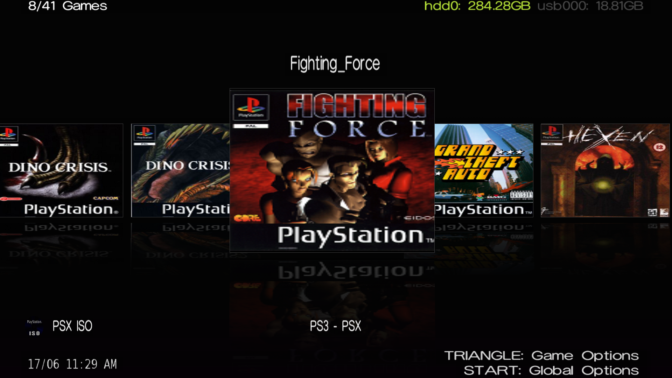
As i was mentioning in the other thread, managunz uses a max of 3 images for every game in all interfaces: ICON0, COVER, CASE
Except in FLOW3D where are used ICON0, COVER, but the CASE is a polygonal object in real 3D
All the interfaces are designed using the ICON0 as a "fallback", because originally the PS3 backup managers only supported PS3 game format and all the PS3 games have ICON0
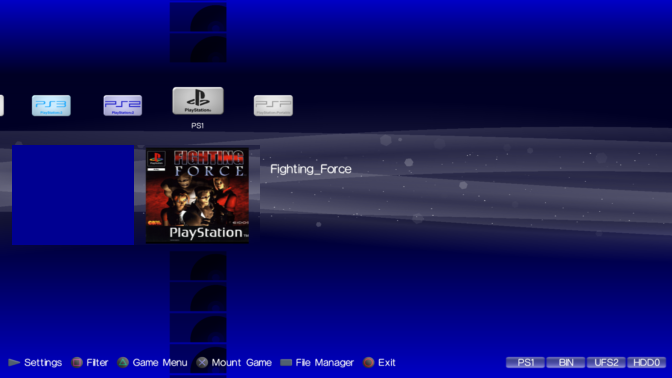
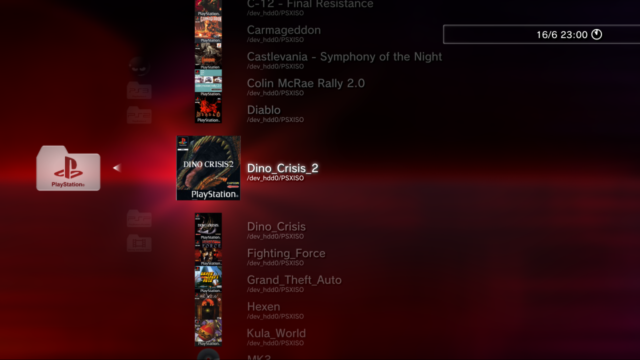
Later... and following that same design rule it was needed to add another "fallback" for the missing ICON0 of PS1 and PS2 games (are the black icons aligned vertically in your screenshot)
In some interfaces (FLOW2D, FLOW3D and GRID) the ICON0 is not diplayed incase managunz finds a COVER for the game mostly because there is no room for it (it would look bad)
In LIST interface as far i remember there is a setting to hide ICON0
But XMB interface is designed as a clone of the official XMB, and the game/app icons that appears in the official main [XMB]>[GAME] columns are really a ICON0 rectangle
When zar was building the XMB interface i was helping him and we was experimenting with the COVER and CASE images, we was thinking where to locate them, and the area at left-bottom corner did look perfect because the official XMB never uses it (so we was able add a bit of creativity without breaking the original design )
)
But i dont think we never considered to display the COVER (or COVER+CASE that is pretty much the same size, but few pixels bigger) in the official position of the ICON0 because this implyes to "hide" the ICON0 or relocate it, and in my oppinion thats a bad idea to be honest
The ICON0 of PS3 and PSP games looks good, and we was thinking in all this as general rules that should be applyed to all game types (PS1, PS2, PS3, PSP)
Im talking mostly at the actual look of managunz XMB interface where the game icons are displayed at "top level" of the XMB hierarchy, we are trying to mimick how it looks the [XMB]>[GAME] column and the result is nice imo, we spend a lot of time in the details of how it looks (check the theme named "replica zero" btw, we used it as the guinea pig while working in XMB interface)
But what you are suggesting/thinking, about displaying the games in the same style like webman, located under a subcategory... looks like a good idea
Im not talking about modifying the actual look of XMB interface... but maybe can be made by adding a setting specific for XMB interface to "relocate" the main icons vertically, so you need to enter in everyone of them to display the vertical list of game icons. It could be something like this:
I think is the easyest way to do it, and dont modify the way how the ICON,COVER,CASE works... with this i mean...
-ICON0 (or his fallback) preserves his position, even if there is a COVER/CASE for the game. The reason is because it will look more official, also we dont want to "hide" the ICON0 of PS3 and PSP games, usually is a nice image
-COVER and CASE are displayed at the same position at bottom-left corner... because is the area less invasive with the official design
Is not going to look exactly like webman, because in webman you need to choose either the ICON0 or the COVER, and managunz can display up to 3 images for every game
But well... i guess this can be solved with other setting:
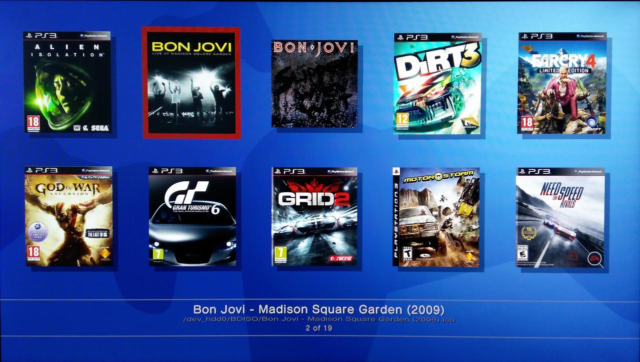
Not sure if that was a question, a thought, or a suggestion, but you gave me an idea@sandungas I'm simple man, all I "want" is to have covers like in webMAN MOD:
When I enable "display cover" I have:
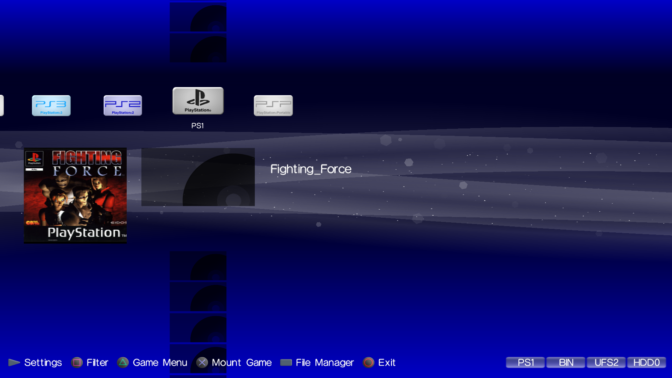
So thanks for the tip.
I really appreciate your help with covers.
As i was mentioning in the other thread, managunz uses a max of 3 images for every game in all interfaces: ICON0, COVER, CASE
Except in FLOW3D where are used ICON0, COVER, but the CASE is a polygonal object in real 3D
All the interfaces are designed using the ICON0 as a "fallback", because originally the PS3 backup managers only supported PS3 game format and all the PS3 games have ICON0
Later... and following that same design rule it was needed to add another "fallback" for the missing ICON0 of PS1 and PS2 games (are the black icons aligned vertically in your screenshot)
In some interfaces (FLOW2D, FLOW3D and GRID) the ICON0 is not diplayed incase managunz finds a COVER for the game mostly because there is no room for it (it would look bad)
In LIST interface as far i remember there is a setting to hide ICON0
But XMB interface is designed as a clone of the official XMB, and the game/app icons that appears in the official main [XMB]>[GAME] columns are really a ICON0 rectangle
When zar was building the XMB interface i was helping him and we was experimenting with the COVER and CASE images, we was thinking where to locate them, and the area at left-bottom corner did look perfect because the official XMB never uses it (so we was able add a bit of creativity without breaking the original design
)But i dont think we never considered to display the COVER (or COVER+CASE that is pretty much the same size, but few pixels bigger) in the official position of the ICON0 because this implyes to "hide" the ICON0 or relocate it, and in my oppinion thats a bad idea to be honest
The ICON0 of PS3 and PSP games looks good, and we was thinking in all this as general rules that should be applyed to all game types (PS1, PS2, PS3, PSP)
Im talking mostly at the actual look of managunz XMB interface where the game icons are displayed at "top level" of the XMB hierarchy, we are trying to mimick how it looks the [XMB]>[GAME] column and the result is nice imo, we spend a lot of time in the details of how it looks
(check the theme named "replica zero" btw, we used it as the guinea pig while working in XMB interface)But what you are suggesting/thinking, about displaying the games in the same style like webman, located under a subcategory... looks like a good idea
Im not talking about modifying the actual look of XMB interface... but maybe can be made by adding a setting specific for XMB interface to "relocate" the main icons vertically, so you need to enter in everyone of them to display the vertical list of game icons. It could be something like this:
Code:
[MGZ settings]>[UI settings]>[XMB]>[Main icons orientation] = Horizontal (default) / VerticalI think is the easyest way to do it, and dont modify the way how the ICON,COVER,CASE works... with this i mean...
-ICON0 (or his fallback) preserves his position, even if there is a COVER/CASE for the game. The reason is because it will look more official, also we dont want to "hide" the ICON0 of PS3 and PSP games, usually is a nice image
-COVER and CASE are displayed at the same position at bottom-left corner... because is the area less invasive with the official design
Is not going to look exactly like webman, because in webman you need to choose either the ICON0 or the COVER, and managunz can display up to 3 images for every game
But well... i guess this can be solved with other setting:
Code:
[MGZ settings]>[UI settings]>[XMB]>[ICON0 persistency] = Never hide (default) / Hidden by COVER
Last edited: